| Author |
Message |
Nashou66

Joined: 12 Jan 2007
Posts: 16171
Location: West Seneca NY
|
| Posted: Sat Feb 04, 2012 8:42 pm Post subject: |
|
|
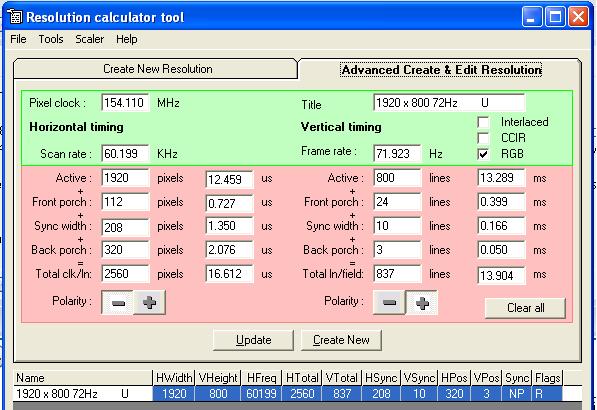
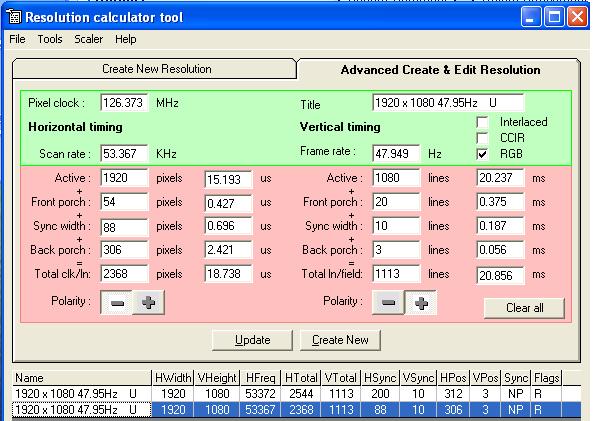
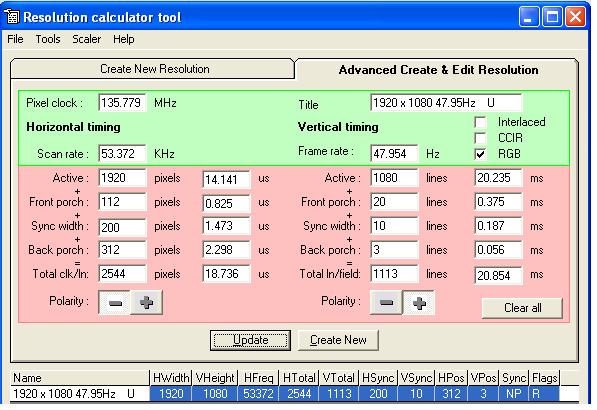
Here is what I got form the resolution editor. Try them as well , don't save. If they work use the save command, if they dont shut off the
HDQ to go to last saved data( yours above, I hope you saved it!  ) )
Now notice the Horizontal Sync width is 200 and at 1.473 us. that has to be grater than 1us let me put your numbers in and compare.
Your sync width is too low. But give it a try anyhow, you might not get the squiggles.
Athanasios
| Description: |
|
| Filesize: |
65.89 KB |
| Viewed: |
11584 Time(s) |
|
| Description: |
|
| Filesize: |
60.88 KB |
| Viewed: |
11584 Time(s) |
|
_________________
Don't blame your underwear for your crooked ass~ unknown Greek philosopher
"Republicans believe every day is the Fourth of July, but the Democrats believe every day is April 15." --- President Reagan
One Smart Dog!!!
Marquee High Performance Bellows now shipping!!
Marquee Modifications and Performance Enhancement
Marquee C-element and Bellow removal
|
|
| Back to top |
|
 |
jbmeyer13

Joined: 03 Dec 2010
Posts: 1135
|
| Posted: Sat Feb 04, 2012 11:23 pm Post subject: |
|
|
You didn't enter the same numbers I had for vertical which has an effect on the bandwith number. Enter these in the editor and see what comes back:
Active 1080
Vsync 8
Vfrn 7
Back 26
Total 1134
What do you mean when you say wiggles?
I'm going to try your numbers but I don't think they will work; that pixel calc from the editor looks too low..
|
|
| Back to top |
|
|
Phoenixed
Joined: 13 Oct 2011
Posts: 514
Location: The mitten
|
| Posted: Sun Feb 05, 2012 12:22 am Post subject: Wiggles |
|
|
The HDM some times gets a little warm when displaying 1080p content and it begins to oscillate. At least that's my understanding of what Nash means.
_________________
Planar PD-8150/Runco LS-5
|
|
| Back to top |
|
|
jbmeyer13
Joined: 03 Dec 2010
Posts: 1135
|
| Posted: Sun Feb 05, 2012 1:04 am Post subject: |
|
|
Nash-
I entered your numbers but had to max the H-Size to 100 on the Marquee and then a little further with the HDQ size control. I'm having a hard time getting the geometery right, the vertical seems squished and out of proportion. When measuring my grid it seems like the S and C linearity are spot on but I'll have to play with it more. I'm going to post pictures at some point later.
My setting in the Marquee (using my porch seetings) ended up being 77H/15V after perfecting the geometery.
_________________
Projector: Modded 9501LC ULtra- MP VIM, Vold VNB, ETECH LVPS, Silver VIM Cables, HD10F's & a V1 case!
|
|
| Back to top |
|
|
jbmeyer13
Joined: 03 Dec 2010
Posts: 1135
|
| Posted: Sun Feb 05, 2012 2:19 am Post subject: |
|
|
These are the timings I'm trying for 1920 x 800 (2.35AR)
0 VTOT 837
1 ACT 800
2 VSYN 10
3 VFRN 24
4 HTOT 2560
5 HACT 1920
6 HYSN 250
7 HFRN 160
8 72 HZ
What does your res editor say Nash?
|
|
| Back to top |
|
|
jbmeyer13
Joined: 03 Dec 2010
Posts: 1135
|
| Posted: Sun Feb 05, 2012 4:19 am Post subject: |
|
|
Here's the problem; when I increase the HTOT to numbers above 2400 it creates too great a distance between the edge of the active image and the edge of the raster. I have to set the H size in the Marquee to 90+ but then the edge of the raster extends 5-6" on each side past the edge of the screen. Previously, I have always tried to keep the active image close to the edge of the raster. If I increanse the HTOT to 2500 it's way out of whack.
I know you say your H size is always in the 90's but each PJ is different.
The first 2 photos shows my converged image (and grid) at my settings (less than 2400 HTOT)


These two photos are at HTOT > 2400. On the color bars notice how far the test pattern spills over the screen.


|
|
| Back to top |
|
|
dvh99

Joined: 25 Dec 2009
Posts: 2158
Location: nederland
|
| Posted: Sun Feb 05, 2012 4:39 am Post subject: |
|
|
if you want 720p 1080i and 1080p to fit a certain width then you wont get there if with 1080p your width setting is e.g. 95.
i think 1080i is for the lower scanrates when adjusting coils on the hdm and 720p and up for the higher scanrate coils, check tim`s website for more info and use a plastic tool.
no need to go over 2400 pixels.
hsync 250 seems an awful lot and is wasted bandwidth, horizontal frontporch doesn`t need to be 160 either, reduce this to 128(sync width) and 64(hor frontporch) or so or just the numbers i gave you, should work just fine.
i always use multiples of 8pixels btw as all resolutions are divideable by 8.
_________________
1 answer always poses multiple questions.
marquee 9500ultra HD10L moome hdmi1.3 v3+ some mods.
|
|
| Back to top |
|
|
Nashou66
Joined: 12 Jan 2007
Posts: 16171
Location: West Seneca NY
|
| Posted: Sun Feb 05, 2012 4:43 am Post subject: |
|
|
| jbmeyer13 wrote: | Here's the problem; when I increase the HTOT to numbers above 2400 it creates too great a distance between the edge of the active image and the edge of the raster. I have to set the H size in the Marquee to 90+ but then the edge of the raster extends 5-6" on each side past the edge of the screen. Previously, I have always tried to keep the active image close to the edge of the raster. If I increanse the HTOT to 2500 it's way out of whack.
I know you say your H size is always in the 90's but each PJ is different.
|
That is why there is ringing, you want to increase the distance by making the raster larger hence the 2500 HTOT.
Those last two pics look fine, now just use the Marquee's size to bring in the sides and top bottom. One is the internal pattern,
that will always be different than the Source pattern. So do not worry about the internal patterns. When i had my single PJ set up the internal patters went off the tube face edge so i made sure to decrease size if for some reason i needed to look at internal patterns. Use the DVE grids for convergence,geometry etc. your doing it all the correct way.I think by going back to the internal patterns you think something is wrong when its all correct.
So keep at it . For 800p I kept the numbers the same I think as in 1080p just made VTOT to 800 and changed the Frequency to 72hz or tripling the actual incoming 24hz what ever it actually is. If those numbers you have look good then keep them and tweak it here and there.
Looks like your slowly figuring it out, good work. The best way to learn is to fail once in a while. Took me many hours to get it how I wanted.
Athanasios
_________________
Don't blame your underwear for your crooked ass~ unknown Greek philosopher
"Republicans believe every day is the Fourth of July, but the Democrats believe every day is April 15." --- President Reagan
One Smart Dog!!!
Marquee High Performance Bellows now shipping!!
Marquee Modifications and Performance Enhancement
Marquee C-element and Bellow removal
|
|
| Back to top |
|
|
Nashou66
Joined: 12 Jan 2007
Posts: 16171
Location: West Seneca NY
|
| Posted: Sun Feb 05, 2012 4:50 am Post subject: |
|
|
denis I disagree about going over 2500. hes doing well so far. It what I was using and the bandwidth is fine.
Width coils are not the issue here. Just the need to use the Lumagen's internal or the BD players patterns and not the marquee's.
I just checked my blends and those internals go over the edges as well for my timings . I had ringing as well, making the raster super large compared to the active image is whats needed to reduce it or eliminate it.
Athanasios
_________________
Don't blame your underwear for your crooked ass~ unknown Greek philosopher
"Republicans believe every day is the Fourth of July, but the Democrats believe every day is April 15." --- President Reagan
One Smart Dog!!!
Marquee High Performance Bellows now shipping!!
Marquee Modifications and Performance Enhancement
Marquee C-element and Bellow removal
|
|
| Back to top |
|
|
Nashou66
Joined: 12 Jan 2007
Posts: 16171
Location: West Seneca NY
|
|
| Back to top |
|
|
Nashou66
Joined: 12 Jan 2007
Posts: 16171
Location: West Seneca NY
|
| Posted: Sun Feb 05, 2012 5:02 am Post subject: |
|
|
Also i just realized, are you saying on the tube face the image is way to small if you use the marquee's size to get it to fit the screen?
if yes then your PJ is not located in the right spot. you'll have to move it close to get the image to get smaller. in the last two pic by moving the PJ closer you get it right.
Going to bed now, work in the early am.
Athanasios
_________________
Don't blame your underwear for your crooked ass~ unknown Greek philosopher
"Republicans believe every day is the Fourth of July, but the Democrats believe every day is April 15." --- President Reagan
One Smart Dog!!!
Marquee High Performance Bellows now shipping!!
Marquee Modifications and Performance Enhancement
Marquee C-element and Bellow removal
|
|
| Back to top |
|
|
dvh99
Joined: 25 Dec 2009
Posts: 2158
Location: nederland
|
| Posted: Sun Feb 05, 2012 5:05 am Post subject: |
|
|
am i missing something here?
the active image is always proportional to the raster, only difference is the porches which aren`t active.
higher scarates mean wider sweep from the hdm, if he can just get the screen filled with the active imaged maximized on the tubeface and his setting is near 100% for h-size he won`t be able to fit the screen with a 720p signal.
i am absolutely certain he can use much less porches and still have no ringing.
i entered the same numbers i have at my friends marquee and he has zero ringing either.
_________________
1 answer always poses multiple questions.
marquee 9500ultra HD10L moome hdmi1.3 v3+ some mods.
|
|
| Back to top |
|
|
Nashou66
Joined: 12 Jan 2007
Posts: 16171
Location: West Seneca NY
|
| Posted: Sun Feb 05, 2012 5:09 am Post subject: |
|
|
Raster is the total image Dennis, active and porches and syncs. So if you make those really large the Electron beam has time to settle
down before it gets into the active image. So you can have the raster go off the edge of the tube face as long as your not scanning it with the beam. So keeping G2's so the raster is 0% white or Black you are safe. Its What i have been doing for years and a trick Pro calibrators use to eliminate ringing.
Not all HDM's are created equal, some ring more than others. Also the Deflection coils play a factor. I think Scott said less capacitance = less ringing. Or something like that.
Nashou
_________________
Don't blame your underwear for your crooked ass~ unknown Greek philosopher
"Republicans believe every day is the Fourth of July, but the Democrats believe every day is April 15." --- President Reagan
One Smart Dog!!!
Marquee High Performance Bellows now shipping!!
Marquee Modifications and Performance Enhancement
Marquee C-element and Bellow removal
|
|
| Back to top |
|
|
Nashou66
Joined: 12 Jan 2007
Posts: 16171
Location: West Seneca NY
|
|
| Back to top |
|
|
jbmeyer13
Joined: 03 Dec 2010
Posts: 1135
|
| Posted: Sun Feb 05, 2012 5:33 am Post subject: |
|
|
To be clear the ringing WAS NOT eliminated by porch seetings or HTOT, HSYN, etc. The drop from 60 to 48 is what fixed that problem. There are no settings I could use at 60 that would eliminate the ringing, hence the need to drop to 48. At 800p/72 I have no ringing either.
The test patterns (unlike the active image) show the total dimensions of your raster. The active image is always smaller than the raster but if it's too much smaller that is not so good. When I increase the HTOT beyond 2400 the width of the raster increases greater proportionally than does the active image. I have to increase the Marquee's H size to 90+ and I'm not really changing the amount of the tube face that the active image occupies, just making the raster larger. I guess the best way to explain this is that regardless of whether I use 2350 or 2550 the active image will end up being the same. At 2350 the active image is closer to the edge of the raster and the H size settings are smaller (77 is what I have at 2350) where as at 2550 there is a greater distance between the edge of the active image and the edge of the raster (95 is what I have at 2450).
I think the method Athan is describing is a way to not see the ringing because by making the raster larger but having the active image not as close to the edge, the ringing won't be viewable on screen. The question becomes do I keep my settings (less than 2400 HTOT) at 48 hz or do I attempt to go back to 60 Hz and use Athan's method and have an H size of 95+.
Based on what Dennis is saying I'd be inclined to stay below 2400 but WTF do I know. I'm winging this without having a res editor anyway. After 13 hours of messing with this thing I'm going to sleep....
_________________
Projector: Modded 9501LC ULtra- MP VIM, Vold VNB, ETECH LVPS, Silver VIM Cables, HD10F's & a V1 case!
|
|
| Back to top |
|
|
Nashou66
Joined: 12 Jan 2007
Posts: 16171
Location: West Seneca NY
|
| Posted: Sun Feb 05, 2012 1:33 pm Post subject: |
|
|
I had an AHA!!!! moment at 4 am, woke me right up. In the lumagen it only shows the Front Porch which is the right side of the image. Its the back porch you need to increase, and to do that you have to reduce the front while the back will be increased by the lumagen to bring the ATOT,HSYNC,and HFRT and the not shown Back Porch to equal the HTOT. So you we do not increase the front porch with the 2500 and greater HTOT we reduce it!!! Look at the diagram below for a visual explanation.

I haven't done that in so long I forgot that is what I was actually doing. In the tV-Ones I had a spot to increase Back porch and that is where i did it and then lowered front to keep the total pixels equal. So try reducing the Front Porch settings using the larger HTOT Numbers. Also when reducing the front porch the image will move to the right the amount of pixels you remove. Using the Horizontal Phase in the Marquee will bring it back to the left. That should allow you to reduce Ringing at 1080p@ 60. But I still prefer 1080p@48 for movies. you might be able to use the 1080p@60 fro upscaling 1080i@60.
Now back to cooking.
Athanasios
_________________
Don't blame your underwear for your crooked ass~ unknown Greek philosopher
"Republicans believe every day is the Fourth of July, but the Democrats believe every day is April 15." --- President Reagan
One Smart Dog!!!
Marquee High Performance Bellows now shipping!!
Marquee Modifications and Performance Enhancement
Marquee C-element and Bellow removal
|
|
| Back to top |
|
|
dvh99
Joined: 25 Dec 2009
Posts: 2158
Location: nederland
|
| Posted: Sun Feb 05, 2012 5:17 pm Post subject: |
|
|
what you are showing is seen from the back of the tube.
that is what i told him, either lower the front porch to increase the backporch or increase the htot to increase the backporch.
1080p simply won`t work because of the 165mhz limit, this has nothing to do with 60 or 48hz.
_________________
1 answer always poses multiple questions.
marquee 9500ultra HD10L moome hdmi1.3 v3+ some mods.
|
|
| Back to top |
|
|
Phoenixed
Joined: 13 Oct 2011
Posts: 514
Location: The mitten
|
| Posted: Sun Feb 05, 2012 6:52 pm Post subject: |
|
|
Now if he was using a dvi to hdmi adapter plug, is he still limited to that 165mhz limit?
_________________
Planar PD-8150/Runco LS-5
|
|
| Back to top |
|
|
dvh99
Joined: 25 Dec 2009
Posts: 2158
Location: nederland
|
| Posted: Sun Feb 05, 2012 7:06 pm Post subject: |
|
|
yes, it is the single link hdmi that limits the dvi, dual link hdmi isn`t used (yet)in home theatres or consumer grade devices.
_________________
1 answer always poses multiple questions.
marquee 9500ultra HD10L moome hdmi1.3 v3+ some mods.
|
|
| Back to top |
|
|
Nashou66
Joined: 12 Jan 2007
Posts: 16171
Location: West Seneca NY
|
|
| Back to top |
|
|
|
|