| Author |
Message |
jbmeyer13

Joined: 03 Dec 2010
Posts: 1135
|
| Posted: Thu Feb 02, 2012 12:57 am Post subject: Porch setting on Vision HDQ |
|
|
Just plugged a new Lumagen Vision HDQ into my rig and I'm trying to adjust the timing to eliminate the damn HDM ringing. I'm starting with 1080P/60 and I'm wondering what values to use for the porch settings. Currently I'm at the following factory defaults:
VSYN 5
VFRN 4
HSYN 88
HFRN 44
Suggestions?
|
|
| Back to top |
|
 |
Nashou66

Joined: 12 Jan 2007
Posts: 16171
Location: West Seneca NY
|
| Posted: Thu Feb 02, 2012 2:06 am Post subject: |
|
|
If i didn't have unresopinsible employee's I'd have had my HDQ hooked up to my spare Marquee!!! Stuck at work.
First is to increase your Total V timings , what is it at now? 2200? I think I went to 2500, what this does though is
push the raster really close to the edge of the tube face, maybe a bit off. Its ok as long as you dont light up the raster with high G2's.
What this accomplishes is it gives the beam time to settle down before it get to the active image portion of the video signal.
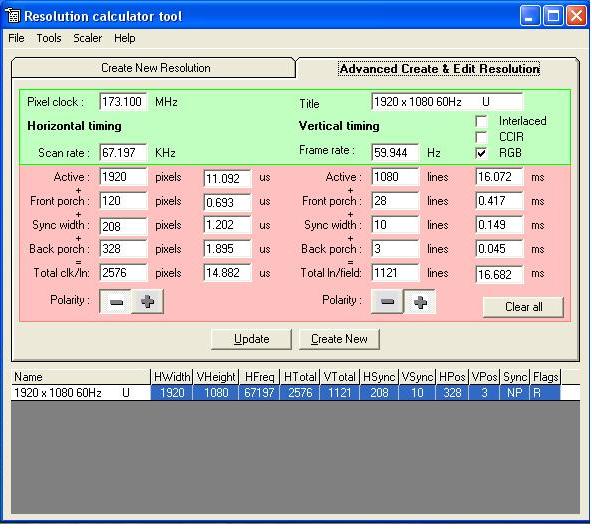
this program from TV one will help you set up the porch settings
http://tvone.CRMdesk.com/image.aspx?mode=file&id=385
Also when using this program look at the syncs they dont like less than 1us timing.
Athanasios
_________________
Don't blame your underwear for your crooked ass~ unknown Greek philosopher
"Republicans believe every day is the Fourth of July, but the Democrats believe every day is April 15." --- President Reagan
One Smart Dog!!!
Marquee High Performance Bellows now shipping!!
Marquee Modifications and Performance Enhancement
Marquee C-element and Bellow removal
|
|
| Back to top |
|
|
Nashou66
Joined: 12 Jan 2007
Posts: 16171
Location: West Seneca NY
|
|
| Back to top |
|
|
jbmeyer13
Joined: 03 Dec 2010
Posts: 1135
|
| Posted: Thu Feb 02, 2012 3:33 am Post subject: |
|
|
Nash-
I tried to download the program but was unable to install it; something about a missing file..
On the Vision HDQ menu the options are for
0 VTOT
1 VRES
2 VSYN
3 VFRN
4 HTOT
5 HRES
6 HSYN
7 HFRN
8 VRATE
I assume that HSYN = Sync Width and HFRN = Front Porch? If so, there is no Back Porch control to adjust and I don't see anything about us or ms. I guess if I adjust the VTOT and HTOT it backs it's way into the proper back porch calculations???
|
|
| Back to top |
|
|
dvh99

Joined: 25 Dec 2009
Posts: 2158
Location: nederland
|
| Posted: Thu Feb 02, 2012 3:52 am Post subject: |
|
|
yes.
i would reduce backporch to 288 and front porch to 96 to decrease total bandwidth some.
vertical sync width could give problems with the settings nash provided, use 16/24 for vsync width 24/32 for backporch and 16 for vert frontporch.
_________________
1 answer always poses multiple questions.
marquee 9500ultra HD10L moome hdmi1.3 v3+ some mods.
|
|
| Back to top |
|
|
jbmeyer13
Joined: 03 Dec 2010
Posts: 1135
|
| Posted: Thu Feb 02, 2012 4:07 am Post subject: |
|
|
dvh99-
I'm not following you. The Vision HDQ does not allow the user to set back porch; it calculates based on the fields I displayed above. I can't enter 288 or 96, nor can I see what the back porch is..
Can you populate my chart with what you think the settings should be and I'll give it a try?
0 VTOT
1 VRES 1080
2 VSYN
3 VFRN 16
4 HTOT
5 HRES 1920
6 HSYN
7 HFRN
I entered the following and it was an absolute disaster; image looked like an unconverged 4:3
0 VTOT 1121
1 VRES 1080
2 VSYN 10
3 VFRN 28
4 HTOT 2576
5 HRES 1920
6 HSYN 208
7 HFRN 120
|
|
| Back to top |
|
|
Nashou66
Joined: 12 Jan 2007
Posts: 16171
Location: West Seneca NY
|
| Posted: Thu Feb 02, 2012 4:39 am Post subject: |
|
|
I just put those settings up so JB could get an idea of what the numbers would do in the program , and to show him what the sync timings would be in micro seconds(μς).
JB start with what the Lumagen gives you for 1080p@60 output. the input should be set to 1090p@24 or @60 depending on what your player is set to. Then add VTOT . What is the VTOT default of the lumagen?
List the numbers the Lumie puts for 1080p@ 60.
Athanasios
_________________
Don't blame your underwear for your crooked ass~ unknown Greek philosopher
"Republicans believe every day is the Fourth of July, but the Democrats believe every day is April 15." --- President Reagan
One Smart Dog!!!
Marquee High Performance Bellows now shipping!!
Marquee Modifications and Performance Enhancement
Marquee C-element and Bellow removal
|
|
| Back to top |
|
|
dvh99
Joined: 25 Dec 2009
Posts: 2158
Location: nederland
|
| Posted: Thu Feb 02, 2012 4:45 am Post subject: |
|
|
it does, hor total is used to set backporch.
so hor sync width is e.g. 120 and hor frontporch is e.g. 96, if you want 288 hor backporch your horizontal total would be 1920+288+120+96=2424
look at your vert timings, your total is less the the vert resolution plus front and sync width, this could explain the strange picture you are having.
edit: my vertical timings are
vertical total 1176
vert front 16
vert sync width 32
which leaves me with 48 vert backporch.
_________________
1 answer always poses multiple questions.
marquee 9500ultra HD10L moome hdmi1.3 v3+ some mods.
Last edited by dvh99 on Thu Feb 02, 2012 4:54 am; edited 1 time in total
|
|
| Back to top |
|
|
jbmeyer13
Joined: 03 Dec 2010
Posts: 1135
|
| Posted: Thu Feb 02, 2012 4:49 am Post subject: |
|
|
The BD player output is set at 1080/24 and the Lumagen factory settings for 1080p/60 are:
0 VTOT 1125
1 VRES 1080
2 VSYN 5
3 VFRN 4
4 HTOT 2200
5 HRES 1920
6 HSYN 88
7 HFRN 44
_________________
Projector: Modded 9501LC ULtra- MP VIM, Vold VNB, ETECH LVPS, Silver VIM Cables, HD10F's & a V1 case!
|
|
| Back to top |
|
|
Nashou66
Joined: 12 Jan 2007
Posts: 16171
Location: West Seneca NY
|
| Posted: Thu Feb 02, 2012 4:56 am Post subject: |
|
|
Ok leave it all as is and make HTOT to 2300 and see how it looks, then you can change the HFRN up a bit. your goal it to match
HRES+HSYN+HFRN+( back porch calculated)=HTOT using HTOT as the "goal" if it still has ringing you can try two things.
1) add more HFRN and reduce HSYN, but this is where you needed the TV one program to see what those numbers do to
the us values, they shoukld always be over 1 us.
2) if one gets us to low add more HTOT and re adjust till you get it right.
Also you might have to recenter your image either via the Marquee's phase or the lumagen position function
Nashou
_________________
Don't blame your underwear for your crooked ass~ unknown Greek philosopher
"Republicans believe every day is the Fourth of July, but the Democrats believe every day is April 15." --- President Reagan
One Smart Dog!!!
Marquee High Performance Bellows now shipping!!
Marquee Modifications and Performance Enhancement
Marquee C-element and Bellow removal
Last edited by Nashou66 on Thu Feb 02, 2012 5:05 am; edited 1 time in total
|
|
| Back to top |
|
|
dvh99
Joined: 25 Dec 2009
Posts: 2158
Location: nederland
|
| Posted: Thu Feb 02, 2012 5:03 am Post subject: |
|
|
enter these numbers and see what happens, these are the exact same settings that i use.
0 VTOT 1176
1 VRES 1080
2 VSYN 32
3 VFRN 16
4 HTOT 2368
5 HRES 1920
6 HSYN 104
7 HFRN 56
_________________
1 answer always poses multiple questions.
marquee 9500ultra HD10L moome hdmi1.3 v3+ some mods.
|
|
| Back to top |
|
|
Nashou66
Joined: 12 Jan 2007
Posts: 16171
Location: West Seneca NY
|
|
| Back to top |
|
|
jbmeyer13
Joined: 03 Dec 2010
Posts: 1135
|
| Posted: Thu Feb 02, 2012 6:25 am Post subject: |
|
|
The numbers Dennis provided don't work, not only do they no eliminate banding but the screen goes static (looks like when scan lock is not happening, vsync out of range error).
Once this happens I had to restore to factory defaults. The weird part is each time I'm getting different settings for the HSYN and HFRN; which seem to default to what I had previously..
The max I could get was this:
0 VTOT 1176
1 VRES 1080
2 VSYN 32
3 VFRN 16
4 HTOT 2272
5 HRES 1920
6 HSYN 104
7 HFRN 56
If HTOT went to 2273 I would get the static/wavy/flicker image. I'm going to sleep; too much of this for one night...first Nash's program won't load on my computer, now this 
|
|
| Back to top |
|
|
dvh99
Joined: 25 Dec 2009
Posts: 2158
Location: nederland
|
| Posted: Thu Feb 02, 2012 2:46 pm Post subject: |
|
|
quelle output are you using?
if dvi doesn`t work try rgbhv.
_________________
1 answer always poses multiple questions.
marquee 9500ultra HD10L moome hdmi1.3 v3+ some mods.
|
|
| Back to top |
|
|
jbmeyer13
Joined: 03 Dec 2010
Posts: 1135
|
| Posted: Thu Feb 02, 2012 3:03 pm Post subject: |
|
|
The RGBHV is the analog output, that won't work with Blu-Ray. Only option is what I'm doing; DVI out of Lumagen with an DVI/HDMI adapter into the Moome card.
_________________
Projector: Modded 9501LC ULtra- MP VIM, Vold VNB, ETECH LVPS, Silver VIM Cables, HD10F's & a V1 case!
|
|
| Back to top |
|
|
dvh99
Joined: 25 Dec 2009
Posts: 2158
Location: nederland
|
| Posted: Thu Feb 02, 2012 3:11 pm Post subject: |
|
|
problem you are having is that you are limited by the 165mhz bandwidth of single link dvi.
1080p with the porch settings needed for crt go over that by a small margin.
you could output 48hz instead of 60 and see what happens, almost certain 48hz will work.
_________________
1 answer always poses multiple questions.
marquee 9500ultra HD10L moome hdmi1.3 v3+ some mods.
|
|
| Back to top |
|
|
jbmeyer13
Joined: 03 Dec 2010
Posts: 1135
|
| Posted: Thu Feb 02, 2012 3:24 pm Post subject: |
|
|
Hey Dennis,
I'll try 48hz tonight. I used this bandwith calculator: http://myhometheater.homestead.com/bandwidthcalculator.html and it looks like 1920 x 1080p/48 hz would put me at 149.3. Technically I could max the refresh at 53 but 48 is better since even multiple of 24.
At the end of the day I'm most concerned about 2.35/2.40 material since the majority of film content is shot in scope these days. If I run 1910 x 800/72 hz I'll hit the max of 165mhz on the button.
Just really hope the ringing goes away...
_________________
Projector: Modded 9501LC ULtra- MP VIM, Vold VNB, ETECH LVPS, Silver VIM Cables, HD10F's & a V1 case!
|
|
| Back to top |
|
|
Nashou66
Joined: 12 Jan 2007
Posts: 16171
Location: West Seneca NY
|
| Posted: Thu Feb 02, 2012 3:49 pm Post subject: |
|
|
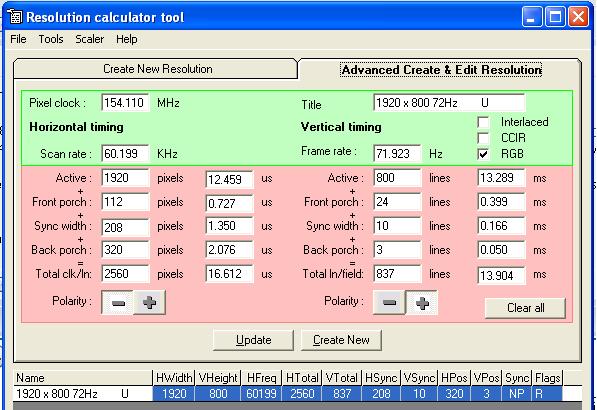
Here is a quick set up for 800p@72 from the res editor. I can't remember if I used this or not. One thing JB, is with the lumagen it had a glitch that if you had the Onscreen menu up while video was on at high bandwidths the image would judder. just close the Onscreen menu
and the imgage should move smoothly. if you dont hit save and you power off and back on it goes to last saved memory.
Dennis you dont have a HDQ do you?
Now the image here will be too tall, so you have to go into the shrink function to get the proper
aspect.
| Description: |
|
| Filesize: |
62.76 KB |
| Viewed: |
14993 Time(s) |
|
_________________
Don't blame your underwear for your crooked ass~ unknown Greek philosopher
"Republicans believe every day is the Fourth of July, but the Democrats believe every day is April 15." --- President Reagan
One Smart Dog!!!
Marquee High Performance Bellows now shipping!!
Marquee Modifications and Performance Enhancement
Marquee C-element and Bellow removal
|
|
| Back to top |
|
|
dvh99
Joined: 25 Dec 2009
Posts: 2158
Location: nederland
|
| Posted: Thu Feb 02, 2012 4:02 pm Post subject: |
|
|
nope, i use a htpc and have no hdcp issues or other crap to worry about cms would be nice however.
_________________
1 answer always poses multiple questions.
marquee 9500ultra HD10L moome hdmi1.3 v3+ some mods.
|
|
| Back to top |
|
|
jbmeyer13
Joined: 03 Dec 2010
Posts: 1135
|
| Posted: Thu Feb 02, 2012 4:06 pm Post subject: |
|
|
Athan-
For the 1920x1080/48 should I still use the following settings Dennis suggested?
0 VTOT 1176
1 VRES 1080
2 VSYN 32
3 VFRN 16
4 HTOT 2368
5 HRES 1920
6 HSYN 104
7 HFRN 56
If not can you send me a res editor screen shot that gets me 1920 x 1080 at <or= 165mhz
I saw the judder last night, the menu flickers every few seconds. I need to have the menu up to initially to set parameters but from what you are saying once I save and close the menu the judder should disappear.
_________________
Projector: Modded 9501LC ULtra- MP VIM, Vold VNB, ETECH LVPS, Silver VIM Cables, HD10F's & a V1 case!
|
|
| Back to top |
|
|
|
|