| Author |
Message |
mp20748
Joined: 12 Sep 2006
Posts: 5689
Location: Maryland
TV/Projector: 9500LC Ultra / Super 02 and 03 VIM
|
| Posted: Mon Apr 29, 2013 1:38 pm Post subject: |
|
|
| jbmeyer13 wrote: | | This line is driving me crazy. Could the firmware volume on the CLM be causing this issue? |
No. That lines is an elevated pedestal. It is the black reference point from the internal generator input stage also getting into the final video stage along with the input signal coming from the BNC's or Moome port. And with it having a higher pedestal than the main input, what's on that second input shows up in the final video signal.
I now have a stock VIM, and a solution for this, so I'll post the fix sometime this week.
Interesting that you guys are having this problem. I've been trying to point it out for years and have been told that it's not a problem. I also can't understand how a projector with this problem can be properly calibrated.
|
|
| Back to top |
|
 |
stridsvognen
Guest
|
| Posted: Mon Apr 29, 2013 2:04 pm Post subject: |
|
|
|
I think its possible, but dificoult to calibrate it to measure perfect, but it just dont look perfect to me.. Needs to much signal correction. and a non moddet Card can be calibrated almost to perfection without messing with the signal.
|
|
| Back to top |
|
|
jbmeyer13

Joined: 03 Dec 2010
Posts: 1135
|
| Posted: Mon Apr 29, 2013 6:56 pm Post subject: |
|
|
| Quote: | | I now have a stock VIM, and a solution for this, so I'll post the fix sometime this week. |
I'm holding you to that Mike as I have been patiently awaiting this fix 
| Quote: | | Interesting that you guys are having this problem. I've been trying to point it out for years and have been told that it's not a problem. I also can't understand how a projector with this problem can be properly calibrated. |
The problem has been known but not the definitive fix. Some people apparently don't have this issue. Perhaps CIR could chime in and tell us what % of Marquees he has calibrated have this issue.
_________________
Projector: Modded 9501LC ULtra- MP VIM, Vold VNB, ETECH LVPS, Silver VIM Cables, HD10F's & a V1 case!
|
|
| Back to top |
|
|
mp20748
Joined: 12 Sep 2006
Posts: 5689
Location: Maryland
TV/Projector: 9500LC Ultra / Super 02 and 03 VIM
|
| Posted: Mon Apr 29, 2013 7:29 pm Post subject: |
|
|
| jbmeyer13 wrote: | | Quote: | | I now have a stock VIM, and a solution for this, so I'll post the fix sometime this week. |
I'm holding you to that Mike as I have been patiently awaiting this fix
| Quote: | | Interesting that you guys are having this problem. I've been trying to point it out for years and have been told that it's not a problem. I also can't understand how a projector with this problem can be properly calibrated. |
The problem has been known but not the definitive fix. Some people apparently don't have this issue. Perhaps CIR could chime in and tell us what % of Marquees he has calibrated have this issue. |
You guys got me solving problems on stock VIM's. There's no fun in that..
I've already solved the problem. The fix will involve a pot to adjust the pedestal to the point where the line just disappears. I chose to do it that way rather than trying to find a fixed cure for the problem, because a more precise second pedestal would make for the absolute best low end performance.
You'll laso need to remove three resistors from the CLM.
I'll post pictures of all of this later, along with the pot adjustment procedure.
|
|
| Back to top |
|
|
dvh99

Joined: 25 Dec 2009
Posts: 2158
Location: nederland
|
| Posted: Tue Apr 30, 2013 12:40 am Post subject: |
|
|
the line disappeared with me after removing u106 from the chain.
_________________
1 answer always poses multiple questions.
marquee 9500ultra HD10L moome hdmi1.3 v3+ some mods.
|
|
| Back to top |
|
|
mp20748
Joined: 12 Sep 2006
Posts: 5689
Location: Maryland
TV/Projector: 9500LC Ultra / Super 02 and 03 VIM
|
| Posted: Tue Apr 30, 2013 12:51 am Post subject: |
|
|
| dvh99 wrote: | | the line disappeared with me after removing u106 from the chain. |
Yeah, that's one way to solve the problem. But its not an easy solution to the problem, or even a sensible one.
|
|
| Back to top |
|
|
dvh99
Joined: 25 Dec 2009
Posts: 2158
Location: nederland
|
| Posted: Tue Apr 30, 2013 4:40 pm Post subject: |
|
|
been working fine for months and it was a 10 minute job so why wouldn`t it be sensible?
_________________
1 answer always poses multiple questions.
marquee 9500ultra HD10L moome hdmi1.3 v3+ some mods.
|
|
| Back to top |
|
|
stridsvognen
Guest
|
| Posted: Tue Apr 30, 2013 4:53 pm Post subject: |
|
|
| dvh99 wrote: | | been working fine for months and it was a 10 minute job so why wouldn`t it be sensible? |
Im at the moment fighting with my new ULTRA, and i can for sure say that a 9500LC is not just a 9500LC.
They can behave very different, with mods to.. Maybe your controle board dont mind, but others might.
I remember some bright borders on mine when removing it, i think it was from the pic border to the border of the raster.
And my chip was socket mounted, so it was not possible just to lift a pin.
Im sure Mike will corect me if im wrong, but i dont think you can just Count on that a mod will Work positive on all Marquee models.
And 2nd there is also a lot of difference in who think what.. Some wont notice or care for some details, and others will notice and care about any Little detail. We are all different, so if Mike have to come up with a mod, im sure he like to be sure that it will Work on all, or most of the models. And please the most picky person out there.
|
|
| Back to top |
|
|
Nashou66

Joined: 12 Jan 2007
Posts: 16171
Location: West Seneca NY
|
| Posted: Tue Apr 30, 2013 5:09 pm Post subject: |
|
|
I just tried a variation of the line fix. I was told it was part of the X hatch pattern that of the internal video.
So I thought why turn off all the menu's with removing U106 and just turn Off the X hatch pattern!!
So I found the trace on the bottom of the CLM cut it and put a switch on that line. It is pin 19 from U108.
That goes into U106. Well it did shut off the X hatch patterns including the DOT pattern but the line remained.
So I don't think its the X hatch pattern causing this from the CLM.
I also tried to just shut the power to CL415 on the 02 Vim, it is the RGB quad op amp for the INT Vid. Same thing, Line remained.
So it got me thinking maybe its something with the power supply etc. I aded a 100uf cap to the positive side of the CL415 op amp and the line got brighter!! Strange.
So next thing I'll try is to just shut of either of the two Chips in the X hatch Generator. it might not be the Specific X hatch pattern but the other related signals associated with it.
nashou
_________________
Don't blame your underwear for your crooked ass~ unknown Greek philosopher
"Republicans believe every day is the Fourth of July, but the Democrats believe every day is April 15." --- President Reagan
One Smart Dog!!!
Marquee High Performance Bellows now shipping!!
Marquee Modifications and Performance Enhancement
Marquee C-element and Bellow removal
|
|
| Back to top |
|
|
Nashou66
Joined: 12 Jan 2007
Posts: 16171
Location: West Seneca NY
|
| Posted: Wed May 01, 2013 12:16 am Post subject: |
|
|
Ok so I read back over the entire thread or most of the pertinent parts.
Here is my understanding of the problem in summary.
The Issue with the Resistor mod is that it raises the Black level of the internal video which is always there even when the external video is selected. In having the internal video on and the resistor mod in place the black pedestal level of the int vid is elevated and over rides the black pedestal of the ext vid causing the observed elevated level of the video on the screen.
So with no resistor mod the black pedestal of the internal video is black( 0 v ) or Blacker than Black ( -120mv ) according to the Service manual. This allows good black pedestal for the source Video however the faint line is there on some not all Vims.
So the question is Where does this line come from?
Some say its the vim others the CLM Or is it both depending on configuration and or build dates of the Vim and CLM.
My theory as to why some see the line others do not.
I have to agree with Mike that the line must come from a signal off the CLM. But which one for certain?
Why do some vims show the faint line and others do not that do not have the faint line TB applied?
My theory is that some of the parts on the said vims may work better than other vims. Id start with the DC restore chips, the DS5401's and the CL 415's and their associated decoupling caps etc. It might be possible that one or more of these components keep the line out of the final video and or they allow the elevated pedastal of the internal video to not be so overpowering, for example the MC 3404 DC restore chip brings the pedestal back down to where it should be at the Vim
which does not wash out the Internal video.
So which parts of my theory can be ruled out?
I refer back to this part of the service manual

That signal is where Mike said to remove the three resistors on the CLM, 205,206 and 208 I believe . Mike what happened when you removed these?
You posted to remove them and showed the picture but then did not make any comments afterwards and I think your post got lost and forgotten.
I think this might be the right direction but lets move back to where this wave form coms from, the DPB two signals and the VBLANK
signal. So what happened when you removed those three resistors?
Athansios
_________________
Don't blame your underwear for your crooked ass~ unknown Greek philosopher
"Republicans believe every day is the Fourth of July, but the Democrats believe every day is April 15." --- President Reagan
One Smart Dog!!!
Marquee High Performance Bellows now shipping!!
Marquee Modifications and Performance Enhancement
Marquee C-element and Bellow removal
|
|
| Back to top |
|
|
jbmeyer13
Joined: 03 Dec 2010
Posts: 1135
|
| Posted: Fri May 03, 2013 3:46 pm Post subject: |
|
|
Hey Mike,
Can you provide an update on this?
_________________
Projector: Modded 9501LC ULtra- MP VIM, Vold VNB, ETECH LVPS, Silver VIM Cables, HD10F's & a V1 case!
|
|
| Back to top |
|
|
mp20748
Joined: 12 Sep 2006
Posts: 5689
Location: Maryland
TV/Projector: 9500LC Ultra / Super 02 and 03 VIM
|
|
| Back to top |
|
|
jbmeyer13
Joined: 03 Dec 2010
Posts: 1135
|
| Posted: Fri May 03, 2013 8:44 pm Post subject: |
|
|
Does this remove the internal menu's and if so how are you currently switching them on/off? Barclay's idea would be nice if it can be implemented.
_________________
Projector: Modded 9501LC ULtra- MP VIM, Vold VNB, ETECH LVPS, Silver VIM Cables, HD10F's & a V1 case!
|
|
| Back to top |
|
|
mp20748
Joined: 12 Sep 2006
Posts: 5689
Location: Maryland
TV/Projector: 9500LC Ultra / Super 02 and 03 VIM
|
| Posted: Fri May 03, 2013 8:50 pm Post subject: |
|
|
| jbmeyer13 wrote: | | Does this remove the internal menu's and if so how are you currently switching them on/off? Barclay's idea would be nice if it can be implemented. |
The menus remain.
|
|
| Back to top |
|
|
barclay66

Joined: 27 Jun 2011
Posts: 1304
Location: Germany
TV/Projector: Marquee 9500 Ultra
|
| Posted: Tue May 07, 2013 9:46 am Post subject: VIM Mod |
|
|
Hi,
I made it!
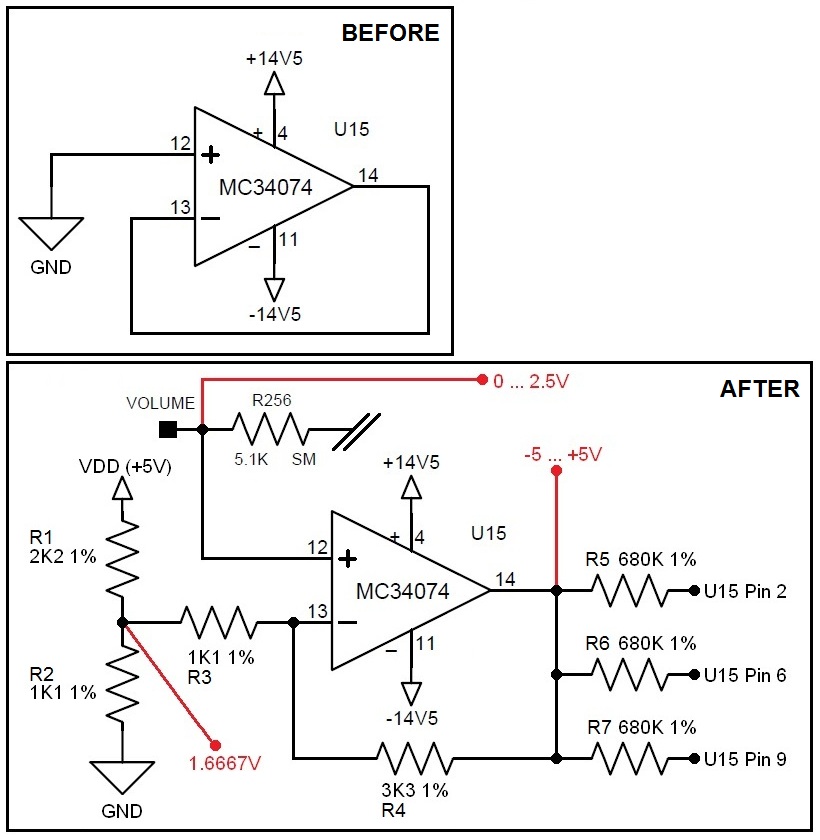
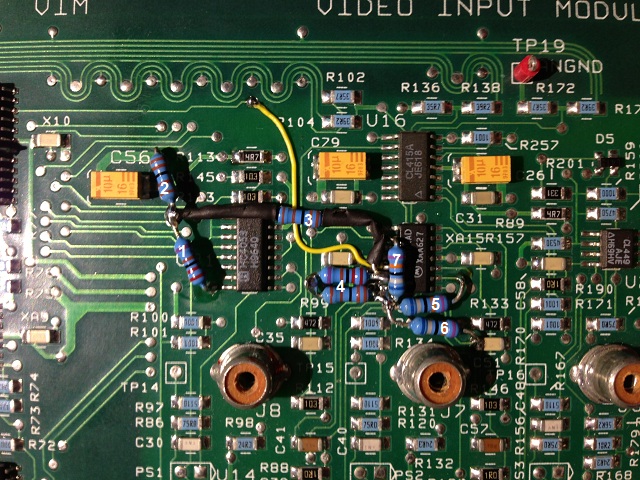
The mod only needs seven resistors and is controllable via the volume control on the remote (setting is saved per predefined channel in the channel list). Please see the attached schematic and the picture of my result. I know, it's not a beauty, but I was interested in its functionality first.
The mod takes advantage of the unused OP-Amp inside U15 and delivers its controllable voltages to U15 (what a coincidence!). As the D/A converter for the volume voltage (U10, delivers 0 ... 2.5V) is nearby, everything can be built around U15. Make sure to cut the traces at pins 12/13/14 first!
The OP-Amp is used as a voltage level shifter. R1/R2 determine the bias and R4 determines the gain. Using a OP-Amp calculator I determined that with a gain of 4 and the bias voltage of 1.6667V I could "convert" the input voltage of 0 ... 2.5V to the desired -5 ... +5V.
Of course the calculator assumes an ideal OP-Amp and the result was more like -3.9 ... +3.9V. Playing around carefully with the values of the above mentioned resistors should make the full swing possible (if necessary).
A look at the board picture reveals that I didn't have a 3K3 resistor at hand. Therefore You can see 2K2 and 1K1 in series.
Regards,
barclay66
| Description: |
|
| Filesize: |
114.72 KB |
| Viewed: |
10452 Time(s) |
|
| Description: |
|
| Filesize: |
193.58 KB |
| Viewed: |
10451 Time(s) |
|
|
|
| Back to top |
|
|
mp20748
Joined: 12 Sep 2006
Posts: 5689
Location: Maryland
TV/Projector: 9500LC Ultra / Super 02 and 03 VIM
|
| Posted: Tue May 07, 2013 10:55 am Post subject: |
|
|
GREAT JOB..
..and using that fourth OP amp in U15 was pure genius.
|
|
| Back to top |
|
|
Nashou66
Joined: 12 Jan 2007
Posts: 16171
Location: West Seneca NY
|
|
| Back to top |
|
|
stridsvognen
Guest
|
| Posted: Tue May 07, 2013 2:21 pm Post subject: |
|
|
|
That looks nice..
|
|
| Back to top |
|
|
barclay66
Joined: 27 Jun 2011
Posts: 1304
Location: Germany
TV/Projector: Marquee 9500 Ultra
|
| Posted: Tue May 07, 2013 2:51 pm Post subject: |
|
|
| Nashou66 wrote: | | The Yellow wire is the 2.5 volt volume reference I assume. |
Exactly. It's the output of the D/A converter.
| Nashou66 wrote: | | And the top of R5 is the VDD correct? |
Nope. VDD (+5V) is at the bottom of R1 (pin 16 of the HC4053). R5 is one of the three 680K resistors (see schematic).
Regards,
barclay66
|
|
| Back to top |
|
|
barclay66
Joined: 27 Jun 2011
Posts: 1304
Location: Germany
TV/Projector: Marquee 9500 Ultra
|
| Posted: Tue May 07, 2013 3:00 pm Post subject: |
|
|
| mp20748 wrote: | GREAT JOB..
..and using that fourth OP amp in U15 was pure genius. |
Thank You!
I knew I would be needing an OP-Amp for the voltage shift. So I first looked at the last page of the schematics where the unused components are and this was the best solution. I could have chosen for an unused OP-Amp of a CLC415, but hey, this isn't a design where we need bandwith 
Regards,
barclay66
|
|
| Back to top |
|
|
|
|





