| Author |
Message |
barclay66

Joined: 27 Jun 2011
Posts: 1304
Location: Germany
TV/Projector: Marquee 9500 Ultra
|
| Posted: Wed May 02, 2012 2:57 pm Post subject: |
|
|
| Nashou66 wrote: | | We just need to know how much voltage that INT/EXT is and find an appropriate switch. |
Hi,
INT/EXT will definately be a logic voltage (either 5V or 0V) as it origins from U4 which is a logic gate.
Still I don't think it's suitable as it will be toggled multiple times during each scan line. The appropiate switch would need to have extremely low switching time. At 64KHz scan rate, one scan line takes 15,63µs. So if there are 100 pixels of text to be displayed there would be 200 on/off transitions on a scan line. This would need a device with a switching time below 78ns.
Basically this is how it's been done with those SD5401 (switching time around 1ns). Therefore I was looking for a signal with some general meaning which would be active as long as graphics and/or text are to be displayed...
Regards,
barclay66
|
|
| Back to top |
|
 |
mp20748
Joined: 12 Sep 2006
Posts: 5689
Location: Maryland
TV/Projector: 9500LC Ultra / Super 02 and 03 VIM
|
| Posted: Thu May 03, 2012 11:57 am Post subject: |
|
|
| barclay66 wrote: | | Nashou66 wrote: | | We just need to know how much voltage that INT/EXT is and find an appropriate switch. |
Hi,
INT/EXT will definately be a logic voltage (either 5V or 0V) as it origins from U4 which is a logic gate.
Still I don't think it's suitable as it will be toggled multiple times during each scan line. The appropiate switch would need to have extremely low switching time. At 64KHz scan rate, one scan line takes 15,63µs. So if there are 100 pixels of text to be displayed there would be 200 on/off transitions on a scan line. This would need a device with a switching time below 78ns.
Basically this is how it's been done with those SD5401 (switching time around 1ns). Therefore I was looking for a signal with some general meaning which would be active as long as graphics and/or text are to be displayed...
Regards,
barclay66 |
Thanks for joining in..
when I deal with the SD5401's I leave the clamp switching alone, but only focus on the "SEL" or two sections in each that switch the input video. The timings for the switch is very touchy. So its not going to be easy to get around or find an easy replacement for the clamp circuit. The video input function is easier, but at the same time the INT-EXT / SEL control line also carries the OSD and the Blanking for the video chain. I'll get back to you later on a chip I use for this, that I have replaced the video switching section (my mini board mod) of the SD5401's, and it still allowed the OSD and Blanking to work flawless. Again, the clamp function of SD5401 was left alone.
I followed your previous post and looked at "TEXT" and "U94" and since U94 is a Flip Flop, its most likely THE control logic voltage for "U106" and I'm also thinking that B0, B1, B2, and TEXT are "U106" control logic lines that control the operation of U106. So a better or good workaround should be able to work directly from the 4 flip-flop outputs directly from "U94"
I have removed my test bed Marquee 8500LC from the cart/bench, so I'll not be able to check those four lines to confirm what I suspect they are. It'll also be awhile before I'll be able to get it back on the cart. So if someone else could check this out, It could provide a better idea on where to go from there.
|
|
| Back to top |
|
|
barclay66
Joined: 27 Jun 2011
Posts: 1304
Location: Germany
TV/Projector: Marquee 9500 Ultra
|
| Posted: Thu May 03, 2012 12:55 pm Post subject: |
|
|
| mp20748 wrote: | | I followed your previous post and looked at "TEXT" and "U94" and since U94 is a Flip Flop, its most likely THE control logic for "U106" and I'm also thinking that B0, B1, B2, and TEXT are "U106" control logic lines that control the operation of U106. So a better or good workaround should be able to work directly from the 4 flip-flop outputs directly from "U94". |
Exactly!!!
U94 acts like a data portal. Whenever U100 gets a command from the main CPU (U16) it will trigger U94. The main CPU delivers an 8-bit word at the portal entry using its upper 8-bit data lines and by toggling the "CLK" input this data word is presented at the output and stays until its replaced with new data.
Each of these 8-bits is used for controlling different parts of the character and video generator (e.g. background and foreground content).
What I still don't understand is the fact that U100 is controlling U94's "CLK" input. So U100 decides by itself when it wants to read new data from the main CPU? I don't think so.
It seems more likely to me that the signal labelled "CS-CHAR" is the global control line. It is used whenever the main CPU wants the character and video generator to do something. I will have to look into that as there are two possibilities:
- "CS-CHAR" is held active as long as there's something to be displayed (ideal situation - I'd use this signal for switching the outputs)
- "CS-CHAR" is only active during command transfer. It will only be triggered briefly when switching the character and video generator on and then again briefly when switching it off (not so good. In this case the preferred signal could be "TEXT")
Fascinating stuff!!!
Regards,
barclay66
|
|
| Back to top |
|
|
mp20748
Joined: 12 Sep 2006
Posts: 5689
Location: Maryland
TV/Projector: 9500LC Ultra / Super 02 and 03 VIM
|
| Posted: Thu May 03, 2012 11:36 pm Post subject: |
|
|
Mentioned earlier, the chip that I used to replace the Input Source switching sections of the SD5401.
http://www.ti.com/product/opa875
|
|
| Back to top |
|
|
ronaldus
Joined: 25 Dec 2010
Posts: 183
Location: france
|
| Posted: Fri May 04, 2012 7:01 pm Post subject: |
|
|
Hi again,
Why not use a retriggerable monostable multivibrator
something like this: http://processmodeling.org/theory/electronics/ref/74xxx/74123.PDF (
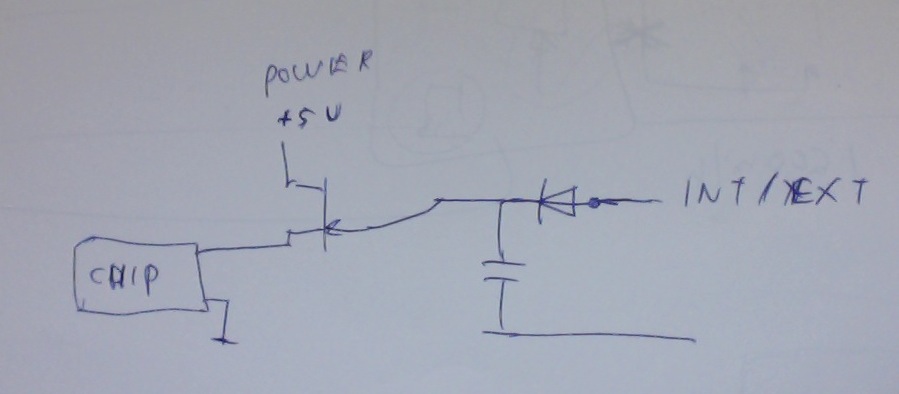
look at the graph on page 2 that's what i mean. You can then take the signal INT/EXT and turn it into a constant signal. It will stay in one state (high) for a certain time after the last pulse has been received and then goes to the other state (low) . This signal can then be used to switch the generator on or off.
What probably would work also (if the INT/EXT signal is strong enough) is to charge a capacitor through a diode that then is connected to a FET that switches the power on or off to the chip we want.
| Description: |
|
| Filesize: |
50.37 KB |
| Viewed: |
6881 Time(s) |
|
|
|
| Back to top |
|
|
ronaldus
Joined: 25 Dec 2010
Posts: 183
Location: france
|
| Posted: Fri May 04, 2012 7:48 pm Post subject: |
|
|
Hi I just saw that the INT/EXT signal is generated by the pixel processor so if you use it to switch it off then it will never turn back on. It could be useful for other signals though.
I saw that in the schematic there are some spare components on the board. so maybe they could be used?
Ron
|
|
| Back to top |
|
|
Nashou66

Joined: 12 Jan 2007
Posts: 16171
Location: West Seneca NY
|
| Posted: Fri May 04, 2012 8:02 pm Post subject: |
|
|
| ronaldus wrote: | Hi I just saw that the INT/EXT signal is generated by the pixel processor so if you use it to switch it off then it will never turn back on. It could be useful for other signals though.
I saw that in the schematic there are some spare components on the board. so maybe they could be used?
Ron |
It could be used to shut off the RGB video op amp used to send the internal video signals to the SD5401.
Athanasios
_________________
Don't blame your underwear for your crooked ass~ unknown Greek philosopher
"Republicans believe every day is the Fourth of July, but the Democrats believe every day is April 15." --- President Reagan
One Smart Dog!!!
Marquee High Performance Bellows now shipping!!
Marquee Modifications and Performance Enhancement
Marquee C-element and Bellow removal
|
|
| Back to top |
|
|
ronaldus
Joined: 25 Dec 2010
Posts: 183
Location: france
|
| Posted: Fri May 04, 2012 8:51 pm Post subject: |
|
|
Hi again,
i just got another idea.
On the VIM connect the IN1 and IN2 together.
take out the R105, R139, R180 otherwise we will have a double termination.
Use the signal I-REL to switch on/off the pixel generator the only problem is to get this signal on to the CLM (external wire from one front panel to the other?)
If you select input 2 you'll have no menus.
If you select input 1 you'll have menus.
We could also use the volume signal. volume min pixel processor on, volume above certain value pixel processor off
Would that be something?
Cheers,
Ron.
|
|
| Back to top |
|
|
Nashou66
Joined: 12 Jan 2007
Posts: 16171
Location: West Seneca NY
|
|
| Back to top |
|
|
mp20748
Joined: 12 Sep 2006
Posts: 5689
Location: Maryland
TV/Projector: 9500LC Ultra / Super 02 and 03 VIM
|
| Posted: Tue May 08, 2012 12:49 am Post subject: |
|
|
I looked into the various suggestions and even tried a few things myself over the weekend.
I now know and understand a little more on control and operation of the Internal Generator. I'm also now back to thinking it would be best to toggle (on/off) the B+ to U106.
Right now I'm trying to find a way using the remote how I'll be able to make this happen. The "VOLUME" key is one option, with the "MUTE" key being the option I would rather use.
I'll post back!
|
|
| Back to top |
|
|
mp20748
Joined: 12 Sep 2006
Posts: 5689
Location: Maryland
TV/Projector: 9500LC Ultra / Super 02 and 03 VIM
|
| Posted: Tue May 08, 2012 6:23 pm Post subject: |
|
|
OK, I found a way to switch the INT-EXT in and out of the circuit, and would like to use the 'MUTE" key on the remote to toggle that feature. Now if someone could help me out by showing me where they are muting the audio on the diagram using that key.
My goal is to switch the Internal Generators OSD out of the circuit (OFF), simply by pressing the "MUTE" key on the remote.
With this feature, you would be allowed to completely remove that LINE and the hash noise that's a constant in the image even when the OSD is not present/enabled.
|
|
| Back to top |
|
|
barclay66
Joined: 27 Jun 2011
Posts: 1304
Location: Germany
TV/Projector: Marquee 9500 Ultra
|
| Posted: Tue May 08, 2012 7:24 pm Post subject: |
|
|
Umm,
Seems to me that "MUTE" is not a switched signal but equal to Volume with level zero.
If You look at the audio section on the VIM You can see that there are only three control signals present: "AUD-SEL", "I-SEL" and "VOLUME".
Both selection lines control the 74HC4052 Multiplexer and switch one of the inputs onto the outputs (Pins 3 & 13). Both signals originate from U35 (PCF8574A, I2C to parallel port) which receives its commands from the CLM. "VOLUME" originates from U10 which too is a converter (serial commands to analog voltages).
So I believe that "MUTE" is just software and has the same effect like bringing the volume downt to zero quickly. Its just that the CLM stores the previous value and will restore it as soon as "MUTE" is pressed again.
You could confirm this by measuring the voltage on Pin 10 of U10.
In order to use "VOLUME" as a trigger You would require a zero voltage detector which can be built around a comparator easily. There are two unused comparators left on U3 (CA339).
Regards,
barclay66
|
|
| Back to top |
|
|
Nashou66
Joined: 12 Jan 2007
Posts: 16171
Location: West Seneca NY
|
| Posted: Tue May 08, 2012 7:32 pm Post subject: |
|
|
Come one guys!!!!!
Geeze the Mute button is not for the audio, I thought you were Marquee experts 
The Mute button is for muting the OSD when doing calibrating work so the the menus do not contaminate the
readings to the probe with stray light .
Most likely it is part of the Pixel generator of the logic chip that controls it.
Athanasios
_________________
Don't blame your underwear for your crooked ass~ unknown Greek philosopher
"Republicans believe every day is the Fourth of July, but the Democrats believe every day is April 15." --- President Reagan
One Smart Dog!!!
Marquee High Performance Bellows now shipping!!
Marquee Modifications and Performance Enhancement
Marquee C-element and Bellow removal
|
|
| Back to top |
|
|
mp20748
Joined: 12 Sep 2006
Posts: 5689
Location: Maryland
TV/Projector: 9500LC Ultra / Super 02 and 03 VIM
|
| Posted: Tue May 08, 2012 7:42 pm Post subject: |
|
|
| barclay66 wrote: |
So I believe that "MUTE" is just software and has the same effect like bringing the volume downt to zero quickly. Its just that the CLM stores the previous value and will restore it as soon as "MUTE" is pressed again.
You could confirm this by measuring the voltage on Pin 10 of U10.
Regards,
barclay66 |
I tried that, with no change with either "Volume" or "Mute" change.
I'm thinking it controls the MUTE on the decoder board only through "SCL/SDA" communication.
|
|
| Back to top |
|
|
Nashou66
Joined: 12 Jan 2007
Posts: 16171
Location: West Seneca NY
|
| Posted: Tue May 08, 2012 8:04 pm Post subject: |
|
|
| mp20748 wrote: | | barclay66 wrote: |
So I believe that "MUTE" is just software and has the same effect like bringing the volume downt to zero quickly. Its just that the CLM stores the previous value and will restore it as soon as "MUTE" is pressed again.
You could confirm this by measuring the voltage on Pin 10 of U10.
Regards,
barclay66 |
I tried that, with no change with either "Volume" or "Mute" change.
I'm thinking it controls the MUTE on the decoder board only through "SCL/SDA" communication. |
Ok did you guys miss my post?
Its not an Audio Mute.
| Nashou66 wrote: | Come one guys!!!!!
Geeze the Mute button is not for the audio, I thought you were Marquee experts
The Mute button is for muting the OSD when doing calibrating work so the the menus do not contaminate the
readings to the probe with stray light .
Most likely it is part of the Pixel generator of the logic chip that controls it.
Athanasios |
Athanasios
_________________
Don't blame your underwear for your crooked ass~ unknown Greek philosopher
"Republicans believe every day is the Fourth of July, but the Democrats believe every day is April 15." --- President Reagan
One Smart Dog!!!
Marquee High Performance Bellows now shipping!!
Marquee Modifications and Performance Enhancement
Marquee C-element and Bellow removal
|
|
| Back to top |
|
|
stridsvognen
Guest
|
| Posted: Tue May 08, 2012 8:09 pm Post subject: |
|
|
| Nashou66 wrote: | Come one guys!!!!!
Geeze the Mute button is not for the audio, I thought you were Marquee experts
The Mute button is for muting the OSD when doing calibrating work so the the menus do not contaminate the
readings to the probe with stray light .
Most likely it is part of the Pixel generator of the logic chip that controls it.
Athanasios |
Thanks a lot.. Didn't know that.. I really missed that one when calibrating..
|
|
| Back to top |
|
|
mp20748
Joined: 12 Sep 2006
Posts: 5689
Location: Maryland
TV/Projector: 9500LC Ultra / Super 02 and 03 VIM
|
| Posted: Tue May 08, 2012 8:10 pm Post subject: |
|
|
| Nashou66 wrote: |
Its not an Audio Mute.
|
Please read your manual....the mute feature has been used for the purpose you mentioned (makes the OSD disappear), but it was designed to Mute the Audio.
|
|
| Back to top |
|
|
stridsvognen
Guest
|
| Posted: Tue May 08, 2012 8:16 pm Post subject: |
|
|
[quote="mp20748"] | Nashou66 wrote: |
Its not an Audio Mute.
| Nashou66 wrote: | Come one guys!!!!!
Geeze the Mute button is not for the audio, I thought you were Marquee experts
The Mute button is for muting the OSD when doing calibrating work so the the menus do not contaminate the
readings to the probe with stray light .
Most likely it is part of the Pixel generator of the logic chip that controls it.
Athanasios |
Please read your manual....the mute feature has been used for the purpose you mentioned (makes the OSD disappear), but it was designed to Mute the Audio. |
Try enter white level settings.. Drive G2.. it works great.. press and your osd go away. press again it comes back..
So maybe it mutes osd in white level menu, and audio when you don't enter any UTIL menu.????
I'm not going to connect any audio to test..
|
|
| Back to top |
|
|
macgyver655
Joined: 22 Aug 2007
Posts: 8508
|
| Posted: Tue May 08, 2012 8:19 pm Post subject: |
|
|
|
What happens if you remove power from U104? Is your noise gone? I lost track of where this thread was at already....
|
|
| Back to top |
|
|
Nashou66
Joined: 12 Jan 2007
Posts: 16171
Location: West Seneca NY
|
|
| Back to top |
|
|
|
|




