|
As this forum is rarely used anymore, we've locked it. Feel free to browse and read. Questions? Please reach out to us directly. Cheers! |

|
 |
|
|
| Author |
Message |
stridsvognen
Guest
|
| Posted: Fri Apr 27, 2012 3:48 pm Post subject: |
|
|
| Nashou66 wrote: | Kurt try What Mike mentioned earlier, use an adjustable resistor in that range of the 2.2 meg or get say a 1.8 meg with a trim pot and dial in the best compromise, or just till the line disappears. Then see how black level is affected.
Athanasios |
well that wont be this week, only have 1,5m resistors, and some 20k alps adjustable resistor.
And wonder if it would be best to use 3 adjustable resistor, so each color can be adjusted.?
|
|
| Back to top |
|
 |
stridsvognen
Guest
|
| Posted: Fri Apr 27, 2012 3:56 pm Post subject: |
|
|
| Tim in Phoenix wrote: | Guys
What if you select "OSD OFF" in preferences; would the generator be shut off? To get the OSD for a moment one just hits Contrast Recall, and you get the slider when needed.
. |
Just tested, same line.
But for now,i'm very happy with the line..
looking Underworld Evolution and that one tells me that this is great.. i don't notice the line, and black is very good.
|
|
| Back to top |
|
|
draganm

Joined: 08 Mar 2006
Posts: 8990
Location: Colorado
|
| Posted: Fri Apr 27, 2012 4:15 pm Post subject: |
|
|
| Tim in Phoenix wrote: | Guys
What if you select "OSD OFF" in preferences; would the generator be shut off? To get the OSD for a moment one just hits Contrast Recall, and you get the slider when needed.. |
that would too easy and doesn't require Soldering 
Great suggestion, I hardly even remember seeing that. Is it in the Utility's menu under screen options?
|
|
| Back to top |
|
|
Tim in Phoenix

Joined: 21 Oct 2006
Posts: 4409
Location: Phoenix
|
| Posted: Fri Apr 27, 2012 4:53 pm Post subject: |
|
|
Hello
VIMs are cheap, try another VIM?
.
|
|
| Back to top |
|
|
stridsvognen
Guest
|
| Posted: Fri Apr 27, 2012 5:22 pm Post subject: |
|
|
| Tim in Phoenix wrote: | Hello
VIMs are cheap, try another VIM?
. |
Ill take that one..
Whats the price? 20$ plus shipping.? 
Then ill take 3 of the latest edition.
|
|
| Back to top |
|
|
mp20748
Joined: 12 Sep 2006
Posts: 5689
Location: Maryland
TV/Projector: 9500LC Ultra / Super 02 and 03 VIM
|
| Posted: Fri Apr 27, 2012 5:33 pm Post subject: |
|
|
| stridsvognen wrote: |
well that wont be this week, only have 1,5m resistors, and some 20k alps adjustable resistor.
And wonder if it would be best to use 3 adjustable resistor, so each color can be adjusted.? |
Use the three 1.5m resistors and also use one of the 20k adjustable pots. ground one end of the pot and put the other to the tie point (where the three resistors are tied together) which should be -14v - after removing the three resistors from the tie point, attach them to the center connector on the pot.
|
|
| Back to top |
|
|
mp20748
Joined: 12 Sep 2006
Posts: 5689
Location: Maryland
TV/Projector: 9500LC Ultra / Super 02 and 03 VIM
|
| Posted: Fri Apr 27, 2012 7:43 pm Post subject: |
|
|
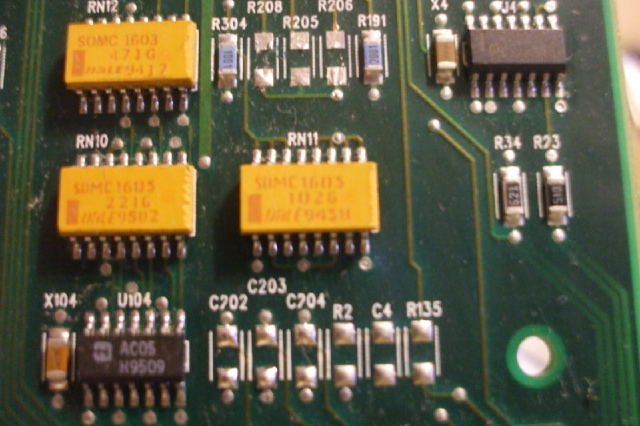
remove three resistors (R205, R206, R208) on the CLM.
| Description: |
|
| Filesize: |
49.34 KB |
| Viewed: |
9057 Time(s) |
|
|
|
| Back to top |
|
|
stridsvognen
Guest
|
| Posted: Fri Apr 27, 2012 7:56 pm Post subject: |
|
|
I tried the pot, and the 1,5m ohm resistors.
I think the 2,2M ohm will fit fine, i'm not able to go hight enought to see the lines again, and i put a 2 channel pot in series, measure 36k ohm
With the pot set to max. I have to lower my brightness 30, but the red and green gamma is 100% parallel now, they get all weird with just 1,5M ohm. its not only effecting dark level, it messed up the gamma in high level to.
|
|
| Back to top |
|
|
stridsvognen
Guest
|
| Posted: Fri Apr 27, 2012 8:39 pm Post subject: |
|
|
|
Here is my old and new grayscale, same G2 and Drive settings, with the standard mod 1,5m ohm and with the trim pot, at max, so around 1,85M ohm, the gamma is jumping around at 80% thats gone with extra 35K.
|
|
| Back to top |
|
|
Nashou66

Joined: 12 Jan 2007
Posts: 16171
Location: West Seneca NY
|
|
| Back to top |
|
|
stridsvognen
Guest
|
| Posted: Sat Apr 28, 2012 8:43 am Post subject: |
|
|
| Nashou66 wrote: | Kurt, are you defocusing blue at all? Also lower your Blue drive. Gamma is too low at thr 70-100% white range, suggesting your over driving blue a bit. A few clicks
Also maybe try for a gamma of 2.35, 2.2 is too low for CRT some even like 2.4 to 2.5.
Athanasios |
My idea was to get the Radiance XS at some time, and hoped it could accelerate the light output from 0 to 10% so black would get a little better.
As i see it CRT have a slip from lightening up the crt until getting some light on the screen.
What i do now is lowering the gamma in my VP50, but it can only lower all the color, not in points, was hoping that lumagen could do the same, just exept lowering 0-5%
The 70-100% blue is a choice between RGB or Gamma, i'm still trying to find the balance on that one.
This is gamma on my vp50 set to 1,1 on all colors, so my native gamma on the projector is much higher. And so its the VP50 setting pushing my overall hight end gamma down, but i traded it with close to 2,21 gamma in the dark end, wich is much more important to me.
If i put the gamma to 2,35, ill loose all details around 5% IRE. But i might prefer a higher gamma in the 50-100% end when i get the option.
|
|
| Back to top |
|
|
stridsvognen
Guest
|
| Posted: Sat Apr 28, 2012 7:56 pm Post subject: |
|
|
For now i decided to remove the mod, looks like the only thing it do is to cover up the line, like if you have a spot on your white wall, you don't paint the rest off the wall the color of the spot to hide it.
No matter what i did i could see it effecting the pq. I hope someone finds a solution to the fix the line where its created, until then i prefer that line over any resistors on that location on my ViM board.
I will keep the right to change my mind on a short notice..
|
|
| Back to top |
|
|
mp20748
Joined: 12 Sep 2006
Posts: 5689
Location: Maryland
TV/Projector: 9500LC Ultra / Super 02 and 03 VIM
|
| Posted: Mon Apr 30, 2012 2:30 pm Post subject: |
|
|
I got a chance to look at that line a little closer over the weekend. Here is what I found out:
It's best to not use the line mod at all. The mod as previously mentioned elevates the sources black level above the actual black reference point for best low end performance. So with the mod in place, the absolute best low end performance cannot be achieved.
The line in the image is generated from the Pixel Processor (U106) on the CLM. That chip is the main component for the OSD and Internal Generator. The line itself is generated into the video chain through the "INT/EXT" control line. That is the control that switches the SD5401 from Internal (test pattern) to External source (Moome/BNC's). On the SD5401 it is the "SEL" control pins.
Once the Internal generator is selected (INT-VID), R,G,B video is switched from the Pixel Processor into the video chain. Pressing "CONV" or "#" is two ways to enable the Internal Generator.
However, there is also OSD, that is not generated into the video chain through the same R,G,B Internal pattern. OSD is always active, while Internal Test patterns are switched into the video chain. With the OSD being always active in the video chain, any noise in the Pixel Processor would also be present in the video chain, and that is how the line gets into the image.
The line is not the only noise getting into the image from the Pixel Processor. The three R,G,B Internal patterns from the Pixel Processor also introduces some noise into the video chain. I used to suppress this noise on the generated R,G,B, using ferrite beads. That same noise appears in the image as fog or haze. It also diminishes the sharpness of the image, as what tridsvognen also found during our off-line chat.
The noise on the INT-EXT that produces the line cannot be solved using beads, because it appears as a generated line, not haze or fog.
So for best image or best low end performance, remove or do not install the Line Mod.
|
|
| Back to top |
|
|
stridsvognen
Guest
|
| Posted: Mon Apr 30, 2012 3:56 pm Post subject: |
|
|
With some help from Mike, i was trying to remove the 3 resistors, where the OSD enters in the VIM board, and removing those made the text of the OSD invisible, but the black background showed when pressing any settings.
The interesting there was to see what is black, its not possible to get perfect black, without some video input with quite big gamma correction.
I have very nice black, lowering the gamma from the VP50, but even at10% IRE with a gamma around 2.4, the black is not perfect.
Pressing any button making the black OSD background, will show the absolute black of the crt. Guess thats around 2,6 on the gamma curve, without correction
I hope to find some correction thats able to show black as the absolute black, and lower gamma so fast, that ill get around 2,3 around 5% IRE.
I later played with the OSD on off in the utility menu, and found that if you turn osd off it changes the green G2 settings a little, i could get my gamma curve straight again putting Green G2 2 click up.
It effected the high end of the gamma curve to, but it resulted my green and red being much better.
So my guess is that it removes some kind of noise to the video signal turning it off.
I also think that my 1080P 72hz performance improved without the mod, and osd off.
|
|
| Back to top |
|
|
Nashou66
Joined: 12 Jan 2007
Posts: 16171
Location: West Seneca NY
|
|
| Back to top |
|
|
stridsvognen
Guest
|
| Posted: Mon Apr 30, 2012 4:36 pm Post subject: |
|
|
| Nashou66 wrote: | Wait till you get the lumagen and you will have your perfect blacks at 0 IRE and the detail you want at 5% IRE.
The VP50 doesnt have the adjustment for gamma at points like the Lumagens do. Sell it and buy a Lumie, even the old HDP/HDQ will get you what you want.
Nashou |
Yeah.. The VP50 Pro is junk, i use it in my bedroom for upscaling LD to my old Fujitsu 720P plasma.
But ill wait buying the lumagen, till i'm sure i want to use the Vidikron. I have issues with my JVC X7, but it don't have banding ringing and noise in the picture,problems getting enough light and so on.
And when its calibrated, and the lamp healthy, and heated for 1-2 hours, its perfect in all ways, black contrast sharpness, you name it.
It will take serious lot of tweaking to get the Vidikron there, what i hope is that the CRT will be almost as good, and it can run optimal after 5-10 min of heatup.
|
|
| Back to top |
|
|
mp20748
Joined: 12 Sep 2006
Posts: 5689
Location: Maryland
TV/Projector: 9500LC Ultra / Super 02 and 03 VIM
|
| Posted: Tue May 01, 2012 11:46 am Post subject: |
|
|
| stridsvognen wrote: |
Yeah.. The VP50 Pro is junk, i use it in my bedroom for upscaling LD to my old Fujitsu 720P plasma |
That VP50 should do fine. It's not as good as an Lumagen, but no video processor could make an elevated video chain problem on these projectors go away. The Lumagen is very powerful, and will allow a lot more tweaking to the low end, that the VP50 won't. But neither will fix what's broken.
| Quote: | | But ill wait buying the lumagen, till i'm sure i want to use the Vidikron. I have issues with my JVC X7, but it don't have banding ringing and noise in the picture,problems getting enough light and so on. |
They all have shortcomings one way or the other. I'm not at all familiar with that particular JVC, but at the same time, I've yet to see any Digital render a truly natural image. But to each his own.
| Quote: | | And when its calibrated, and the lamp healthy, and heated for 1-2 hours, its perfect in all ways, black contrast sharpness, you name it. |
I've read a lot about lamp issues with this technology, and the sweep spot of both warm-up and lamp age. Besides my dislike of not seeing a truly natural image, these lamp, warm-up and bulb life issues would freak me out.
| Quote: | | It will take serious lot of tweaking to get the Vidikron there, what i hope is that the CRT will be almost as good, and it can run optimal after 5-10 min of heatup. |
One of the owners on AVS also owned a CRT. The same projector you have without the fancy name and case. He also said that non of the Digitals he had seen was capable of displaying a truly natural image. And that's why he used the CRT for when he watched the movies he really liked getting into. He said he used his Digital for sports and other non critical viewing. Not sure if he has finally replaced the CRT, but this was the case at least two years ago.
You seem to be a want to tweak and also get into the hobby of owning a CRT projector. And yes, it takes time and effort. But it can also be very rewarding, especially if you own one of the high end CRT projectors.
You also remind me of Craig. In that you've noticed a few things I have been saying for the longest, but has never really been an issues for most. Craig is without a doubt the best video calibrator out there, because he really knows and understands all the technical stuff related to getting the best image. he also finds and points out stuff, much like what you have been doing in this thread. And it's people like you and him that gets my Adrenalin going, and makes me pick up my soldering iron again. And since I've picked up the mod soldering iron again, I've also looked at the problem at hand further.
last night, I disable the Pixel Processor on my CLM. I did so by being able to turn that chip OFF and completely remove all OSD and Internal Generator. I will later install a switch on my CLM to toggle this in/out.
So with the switch, I'll be able to disable the LINE and the various other levels of noise that's normally always present in the image. On my setup, that's a substantial image improvement.
|
|
| Back to top |
|
|
stridsvognen
Guest
|
| Posted: Tue May 01, 2012 12:09 pm Post subject: |
|
|
Mike... Your the man.. i seriously think thats the way to do it.
Some thinking here, and observation. I think that what i see with my 1080P 72hz improvement, is related to better bandwidth, not like its higher, but noise occupying less bandwidth in the video chain, and must be important every where in the video chain.. player scaler cables.
Next, ill try play around with supply polarity, its not without importance to noise in the signal path, And keep all the video chain on the same supply phase.
My Moome card is stuck in custom, so i'm almost exploding here..
What keeps me going, is the many things to adjust on these CRT beasts.. its really challenging, and specially seeing how far it goes.
I know for sure that getting fixed my gamma, specially the blue drop, will improve more on PQ than anything else for now, and might be the thing to tip over the load in favor to CRT. But the Lumagen is not cheep, and this was just meant as fun, but suddenly it gets all serious... 
|
|
| Back to top |
|
|
Nashou66
Joined: 12 Jan 2007
Posts: 16171
Location: West Seneca NY
|
| Posted: Tue May 01, 2012 3:00 pm Post subject: |
|
|
| mp20748 wrote: | | stridsvognen wrote: |
Yeah.. The VP50 Pro is junk, i use it in my bedroom for upscaling LD to my old Fujitsu 720P plasma |
That VP50 should do fine. It's not as good as an Lumagen, but no video processor could make an elevated video chain problem on these projectors go away. The Lumagen is very powerful, and will allow a lot more tweaking to the low end, that the VP50 won't. But neither will fix what's broken.
|
Umm Not true. Lowering the luma at 0% on a lumagen will make it go to black even if you have Brightness set up to 60-70
on the Marquee. I have done this. The VP50 doe not have any controls to do any of this I do not believe. it has an over all Gamma control that elevates or lowers gamma over the entire range.
On My Lumagen i can take a 5% windo and make it black(0%) and raise the 0% window to make it about 5%. it is very powerful tool. Now it cant make Black happen on a Digital as it will always be some light output. But on CRT it is possible.
Athanasios
_________________
Don't blame your underwear for your crooked ass~ unknown Greek philosopher
"Republicans believe every day is the Fourth of July, but the Democrats believe every day is April 15." --- President Reagan
One Smart Dog!!!
Marquee High Performance Bellows now shipping!!
Marquee Modifications and Performance Enhancement
Marquee C-element and Bellow removal
|
|
| Back to top |
|
|
mp20748
Joined: 12 Sep 2006
Posts: 5689
Location: Maryland
TV/Projector: 9500LC Ultra / Super 02 and 03 VIM
|
| Posted: Tue May 01, 2012 4:42 pm Post subject: |
|
|
| Nashou66 wrote: | | mp20748 wrote: | | stridsvognen wrote: |
Yeah.. The VP50 Pro is junk, i use it in my bedroom for upscaling LD to my old Fujitsu 720P plasma |
That VP50 should do fine. It's not as good as an Lumagen, but no video processor could make an elevated video chain problem on these projectors go away. The Lumagen is very powerful, and will allow a lot more tweaking to the low end, that the VP50 won't. But neither will fix what's broken.
|
Umm Not true. Lowering the luma at 0% on a lumagen will make it go to black even if you have Brightness set up to 60-70
on the Marquee. I have done this. The VP50 doe not have any controls to do any of this I do not believe. it has an over all Gamma control that elevates or lowers gamma over the entire range.
On My Lumagen i can take a 5% windo and make it black(0%) and raise the 0% window to make it about 5%. it is very powerful tool. Now it cant make Black happen on a Digital as it will always be some light output. But on CRT it is possible.
Athanasios |
I think we're talking about two different things. You're speaking of calibration and what you can do with a processor. I'm speaking from what happens technically in the video chain. And from my perspective, if the capability does not exist in the technical, it can not PROPERLY exist in the calibration.
And yes, you can achieve black or near black, but if the signal is limited in the chain, you would also suffer limitations at the end of the chain and the black you may think is true black, may not be the best black that should be achieved. So seeing black, could also mean a limited overall video window. And that is what we also refer to as CRUSHED.
The pedestals and black reference points in a video chain are very critical for best overall image performance. And if any of them are not so accurate, then neither will the output be accurate or capable of proper reproduction of the source. And just because you're able to see black, and adjust gamma, it still does not mean you're seeing the entire IRE window.
Would a video processor be capable of correcting improper or inaccurate black reference - NO!
Could a video processor correct for CRUSHED, ELEVATED PEDESTAL or LIMITED video signal - NO!
If you still don't believe this, remove the three CLAMPING (black reference circuit) chips on the first stage of your VIM, and see how well you'll be able to correct on things using your Video Processor.
|
|
| Back to top |
|
|
|
|
|
|
|
You cannot post new topics in this forum
You cannot reply to topics in this forum
You cannot edit your posts in this forum
You cannot delete your posts in this forum
You cannot vote in polls in this forum
You cannot attach files in this forum
You can download files in this forum
|
Forum powered by phpBB © phpBB Group
|
|




