|
As this forum is rarely used anymore, we've locked it. Feel free to browse and read. Questions? Please reach out to us directly. Cheers! |

|
 |
|
|
| Author |
Message |
Jeremy112

Joined: 28 Sep 2006
Posts: 2649
Location: Fond du Lac, WI
|
| Posted: Mon Dec 26, 2011 4:34 pm Post subject: |
|
|
I've never had problems with the AKB line, the only time it ever became visible is if the "position" setting was messed up, but that never stayed an issue, once setup was complete.
Case is dead on about NECs having perfect convergence abilities. The point isn't necessary, but it will make the convergence perfect.
The BEST thing about these NECs, when you turn them on, they STAY converged, the only thing that needs warming up is the tubes for color. Takes my XG about 15 minutes to get to normal "100IRE" state.
If you can't get an NEC to line up perfect, its not the projectors fault 
_________________
When I'm asking for a Model number, that doesn't mean I'm asking for a nude photo with your number on it
|
|
| Back to top |
|
 |
draganm

Joined: 08 Mar 2006
Posts: 8990
Location: Colorado
|
| Posted: Mon Dec 26, 2011 6:20 pm Post subject: |
|
|
| gjaky wrote: | | and play also with red vertical linearity, adjust vertical (red) key-stone, and adjust the red upper-keystone, and a bit left-pincushion at the end. (hint: if you see small arrows in certain menus in the direction of the four edges there you can select which area do you want to adjust by pressing CTL+arrow) You can't blank out the AKB but you can switch it off, hit INFO and set AKB to OFF. |
OK, that's what I'm missing. I kept seeing upper key mentioned in the manual but couldn't get there. thanks. I'll turn AKB off
| CasetheCorvetteman wrote: | Turn that AKB crap off.
Use point and dont let anyone else tell you not to, cause in my experience NEC convergence when set up properly does not drift. Not even a little bit. It would drive me up the wall if it did cause i cant stand anything less than perfect convergence.
I cant see where anyone would have an issue with having SO MUCH control over the geometry as you do with these projectors, even if you had a wrinkle in a drop down screen you could still get the picture 100% spot on with these things. Sure, i can set up my Sony VPH 1001 analog convergence in under 5 minutes, but if its not perfect on the whole screen cause the screen isnt 100% perfectly flat, then im f***ed and there is nothing you can do to fix that. |
NEC is using the deflection circuitry and geometry controls to convergence R &B to green though which is not as simple as doing everything with a dedicated Convergence circuit. IF there is in fact no warm-up time to converge the set then that is an advantage and I wouldn't mind having that feature.
In reality though, by the time a typical blue ray boots, loads the movie, and plays all the preview crap it won't let you chapter-skip through, a marquee will converge so for me it's not an issue. Anyway, thanks for all the help everyone, I'll post some pics of my buddy's new NEC HT ASA I finish setting it up.
One last question, We still need a you-know-what banned electronic device that starts with an F and sounds like furry.  Order direct from Amazon UK or? Order direct from Amazon UK or?
|
|
| Back to top |
|
|
CasetheCorvetteman

Joined: 09 Nov 2008
Posts: 6326
Location: Australia
|
| Posted: Tue Dec 27, 2011 4:48 am Post subject: |
|
|
You really should be able to get this thing looking quite top notch. It DOES have a dedicated convergence circuit, it just happens to be far more flexable than most of the others
Im not sure where the best place to buy one is now, i think you have to program them yourself too... Not sure though...
|
|
| Back to top |
|
|
draganm
Joined: 08 Mar 2006
Posts: 8990
Location: Colorado
|
| Posted: Sat Dec 31, 2011 11:55 pm Post subject: |
|
|
|
set-up my mostly stock 8500, 180 DMB tubes and HD8 lenses back on the bench. Took a photo of the comparison shot between it and the 9PGX that was just up there recently. pics are from the same source, up-scaling DVD player -720P to VGA out/5BNC. No Moome or gamma boost. I think the MArquee looks a little better and you can see a higher contrast ratio as well as what I believe to be a higher RGB bandwidth. Disclaimer: I did not get the NEC nailed down like I know how to do on a MArquee and aspect ratio is off on the PGX (toot tall). This is just point and shoot, no tri-pod, First one is the NEC
|
|
| Back to top |
|
|
A Rogers
Joined: 14 Feb 2011
Posts: 133
Location: Toronto On
|
| Posted: Sun Jan 01, 2012 12:39 am Post subject: |
|
|
For the sake of comparison this is my NEC XG, with about 2min of warm up. I also own a PG6X and the image quality is comparable. Please ignor extra detail as this is a somewhat higher than DVD quality version of the film.

/e
RGB input via HTPC @ 1280x960 85hz on a Clarion m1300 4:3 screen approx 7' wide. photo taken with an inexpensive (cheap) Kodak M530. contrast 75 brightness 63
|
|
| Back to top |
|
|
draganm
Joined: 08 Mar 2006
Posts: 8990
Location: Colorado
|
| Posted: Thu Jan 19, 2012 5:50 pm Post subject: |
|
|
| A Rogers wrote: | For the sake of comparison this is my NEC XG, with about 2min of warm up. I also own a PG6X and the image quality is comparable. Please ignor extra detail as this is a somewhat higher than DVD quality version of the film.
RGB input via HTPC @ 1280x960 85hz on a Clarion m1300 4:3 screen approx 7' wide. photo taken with an inexpensive (cheap) Kodak M530. contrast 75 brightness 63 |
that's a really nice pic for sure, very crisp and the colors are excellent. I can see the Clarion screen quality too, My shots were on a cheap Da-lite matte white 1.0 . If I can get a pic like that dialed in at my buddy's place he will be thrilled.
Anyway, last night we finished hooking up the audio on my friends HT, sounds really frickin nice even though the acoustic panels/ corrections are not up yet. Da-lite high power screen is up and looks excellent.
We have a bracket coming from a forum member in Sanfran so the last thing left to do is hang the PJ. We'll be running 720P direct from the BD player to Mux HD, then 5BNC to PGX.
It looks like our throw will be right at 10 feet to the lenses from a 92 wide (horizontal width screen).
Opinions?
Does the NEC allow any kind of internal port adjustment like the marquee (long vs.r short retrace?)
|
|
| Back to top |
|
|
A Rogers
Joined: 14 Feb 2011
Posts: 133
Location: Toronto On
|
| Posted: Thu Jan 19, 2012 6:21 pm Post subject: |
|
|
| draganm wrote: | | A Rogers wrote: | For the sake of comparison this is my NEC XG, with about 2min of warm up. I also own a PG6X and the image quality is comparable. Please ignor extra detail as this is a somewhat higher than DVD quality version of the film.
RGB input via HTPC @ 1280x960 85hz on a Clarion m1300 4:3 screen approx 7' wide. photo taken with an inexpensive (cheap) Kodak M530. contrast 75 brightness 63 |
that's a really nice pic for sure, very crisp and the colors are excellent. I can see the Clarion screen quality too, My shots were on a cheap Da-lite matte white 1.0 . If I can get a pic like that dialed in at my buddy's place he will be thrilled.
Anyway, last night we finished hooking up the audio on my friends HT, sounds really frickin nice even though the acoustic panels/ corrections are not up yet. Da-lite high power screen is up and looks excellent.
We have a bracket coming from a forum member in Sanfran so the last thing left to do is hang the PJ. We'll be running 720P direct from the BD player to Mux HD, then 5BNC to PGX.
It looks like our throw will be right at 10 feet to the lenses from a 92 wide (horizontal width screen).
Opinions?
Does the NEC allow any kind of internal port adjustment like the marquee (long vs.r short retrace?) |
Thanks, I've spent dozens of hours learning the NEC and there are definitely a lot of little tricks and peculiarities in these sets (at least mine) that can be learned. As far as I am aware all of the signal options are on the third page of the source "info" menu. Careful setup of the Astig and focus can really bring a lot of sharpness. The edge/corner focus can be tricky as they effect each other quite a bit so can be tricky to get a balanced and sharp focus on both edges. For improved color/brightness/contras make sure to electronically de-focus the Blue it makes a BIG difference. love to see some shots of the finished install good luck and more importantly have fun!
|
|
| Back to top |
|
|
draganm
Joined: 08 Mar 2006
Posts: 8990
Location: Colorado
|
| Posted: Thu Feb 02, 2012 6:24 pm Post subject: |
|
|
So last night at 1AM we finally put the covers back on the 6PGX and called it good to go for the Super Bowl. My buddy is stoked, even with a 1080P Plasma TV upstairs he loves the CRT picture at 106" diagonal 16:9. This was F-in hard though, even after sorta-learning the 9PGX in my garage the full dial-in on PG was a challenge to say the least.
I have one question, the Focus to my eyes does not seem to be as tight as I expected. During the De-focus/Over-focus procedure for Stig/Flare I did not get clear Calamari rings or the "donut", dot inside halo for Flare. The Stig was just a blurry circle and in Flare it never really got past a slightly brighter area within another blurry circle.
It was hard to be certain but this seemed worse later in the night than it did earlier that evening. Of course so were our eye-balls. The optimal focus also came in almost at the end of the adjustment range towards the Flare end of things. So my question is
1) How obvious should the Stig and Flare pattern be? The Tinman set-up guide states "very obvious" ?
2)With the master focus electronic slider nulled at midpoint, should the optimal focus pot setting be more to the center of the adjustment range or is it normal for it to be skewed to one end
2) there are a couple of large caps on the Deflection board that are starting to swell and this board also has the Focus pots (even though it doesn't control focus). Is anyone familiar with the relationship between the deflection and Focus boards?
Machine is low 3200 hours, very clean tubes, and single owner (Runco) before we grabbed it. We're feeding it 720P from PS3, Moome MUX HD, and premium RGB cables to PJ
|
|
| Back to top |
|
|
CasetheCorvetteman
Joined: 09 Nov 2008
Posts: 6326
Location: Australia
|
| Posted: Fri Feb 03, 2012 7:09 am Post subject: |
|
|
Well its not obvious on my 9PG either. So i dont know. Where is this Tinman guide?
Replace those capacitors ASAP, youre risking damage to the set by using it with what are clearly failing parts. Can you get some pics of them? If they start to leak they will probably f*** the board or some of the surrounding components.
Why 720p and why not 1080i?
|
|
| Back to top |
|
|
gjaky

Joined: 05 Jun 2010
Posts: 2802
Location: Budapest, Hungary
|
| Posted: Fri Feb 03, 2012 8:30 am Post subject: |
|
|
I did a full setup last week, so I'm pretty in the adjustments now 
Doing the asting with the conventional way confused me too, so I simply left the machine focused and played to the sharpest focus at the edges, and it gave me better results than ever (I am using the PC controll software, if I'm correct with the remote controll it's automatically defocuses -or not?)
It hould be normal, hat the focus pots are not in the mid point.
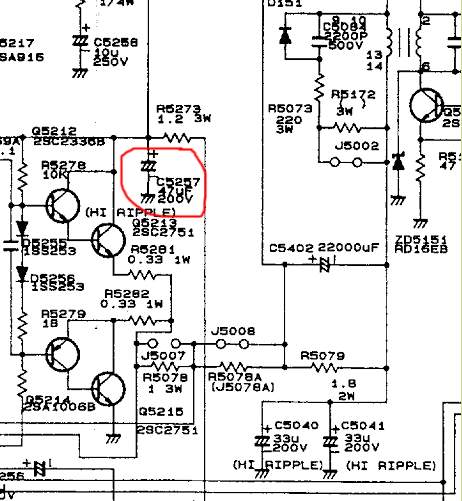
If the "LPHR" type caps are leaking please pay big attention to the substitute, because they are low ESR types, and you shoud replace the 200V47uF cap with a 200V 330-470uF low ESR, to avoid the so called "keystone buzzing" which happens sometimes with massive keystone usage.
There is no real relationship between the def board an F-drive board. They put those pots on the def board for the sake of easy setup, they are connected directly to the F-board through "FS" cable -I think.
_________________
projectors in the past : NEC 6-9PG xtra, Electrohome Marquee 6-7500, NEC XG 1351 LC ( with super modified Electrohome VNB neckboard !!!)
current: VDC Marquee 9500LC
The MOD: VNB-DB, VIM-DB
|
|
| Back to top |
|
|
draganm
Joined: 08 Mar 2006
Posts: 8990
Location: Colorado
|
| Posted: Fri Feb 03, 2012 5:17 pm Post subject: |
|
|
thanks for all the answers guys. this machine is still an Alien from space to me
| CasetheCorvetteman wrote: | | Well its not obvious on my 9PG either. So i dont know. Where is this Tinman guide? |
http://www.curtpalme.com/NECPG_MechSetup1.shtm
| CasetheCorvetteman wrote: | | Replace those capacitors ASAP, youre risking damage to the set by using it with what are clearly failing parts. Can you get some pics of them? If they start to leak they will probably f*** the board or some of the surrounding components. Why 720p and why not 1080i? |
don't worrry I'll get to the caps soon, they're not like about to explode, just no longer perfectly flat on top. On my marquee 8500 1080i makes big scan lines and the flickering is distracting. I might try 1080i on the PG Though but it will have to wait until after the super bowl, not messing with it before the game.
| gjaky wrote: | I did a full setup last week, so I'm pretty in the adjustments now
Doing the asting with the conventional way confused me too, so I simply left the machine focused and played to the sharpest focus at the edges, and it gave me better results than ever (I am using the PC controll software, if I'm correct with the remote controll it's automatically defocuses -or not?)
It hould be normal, hat the focus pots are not in the mid point.
If the "LPHR" type caps are leaking please pay big attention to the substitute, because they are low ESR types, and you shoud replace the 200V47uF cap with a 200V 330-470uF low ESR, to avoid the so called "keystone buzzing" which happens sometimes with massive keystone usage.
There is no real relationship between the def board an F-drive board. They put those pots on the def board for the sake of easy setup, they are connected directly to the F-board through "FS" cable -I think. |
thanks, edge focus is one thing I did not get to before my my eyes started seeing RGB dots everywhere. I'll take a look next time. We are also not using much keystone at all, matter of fact none of our settings were maxed out and most are pretty close ot center so I think the install was done very well
I always use low ESR caps, my favorites now is Panasonic FC and FM. I just looked on my 9PGX and the caps which are starting to go on my friends 6X are the 33uf 200Volt. On mine the factory put the wire loom clip right over the cap and left a big dent 
Why are these so HUGE? in the pic I have 39uf 200 volt on top for reference?
|
|
| Back to top |
|
|
draganm
Joined: 08 Mar 2006
Posts: 8990
Location: Colorado
|
|
| Back to top |
|
|
gjaky
Joined: 05 Jun 2010
Posts: 2802
Location: Budapest, Hungary
|
| Posted: Fri Feb 03, 2012 9:23 pm Post subject: |
|
|
High riple current cap is just an other name for low esr caps. In '95 the low esr caps were quite new to market probably that's why the bulky size.
_________________
projectors in the past : NEC 6-9PG xtra, Electrohome Marquee 6-7500, NEC XG 1351 LC ( with super modified Electrohome VNB neckboard !!!)
current: VDC Marquee 9500LC
The MOD: VNB-DB, VIM-DB
|
|
| Back to top |
|
|
CasetheCorvetteman
Joined: 09 Nov 2008
Posts: 6326
Location: Australia
|
| Posted: Sat Feb 04, 2012 6:20 am Post subject: |
|
|
|
That 47uF at the front of the DEF board should be a 470uF
|
|
| Back to top |
|
|
draganm
Joined: 08 Mar 2006
Posts: 8990
Location: Colorado
|
| Posted: Sat Feb 04, 2012 6:00 pm Post subject: |
|
|
| gjaky wrote: | | High riple current cap is just an other name for low esr caps. In '95 the low esr caps were quite new to market probably that's why the bulky size. |
Right, one thing I like about Digikey over mouser is you can sort a search by highest ripple current rating. The Panasonic I linked to above is almost half an amp rating which is probably a lot more than the original LHRA + double the voltage handling capacity as well.
That's one thing about cap technology and how far it's come. In order to get a cap to fit and older board with the same lead spacing (LS), you have to order a much large value cap to get the same physical size. That's one easy way to make an old CRT better than new ( in a small way )
| CasetheCorvetteman wrote: | | That 47uF at the front of the DEF board should be a 470uF |
THANKS  I remember that thread now. Man that was years ago but there was a thread about this very subject and the Schematic shows a 470uf I think while a 47 was installed= manufacturing error. I'm surprised I even remember that since I never used NEC's before. I remember that thread now. Man that was years ago but there was a thread about this very subject and the Schematic shows a 470uf I think while a 47 was installed= manufacturing error. I'm surprised I even remember that since I never used NEC's before.
Has anyone tried a slightly larger value on the pair of 33uf LPHR, like maybe 47?
I'm going to take pics of my buddy's test pattern images and see if anything improves after re-conditioning the H-board.
|
|
| Back to top |
|
|
gjaky
Joined: 05 Jun 2010
Posts: 2802
Location: Budapest, Hungary
|
| Posted: Sat Feb 04, 2012 6:56 pm Post subject: |
|
|
| Quote: | | I remember that thread now. Man that was years ago but there was a thread about this very subject and the Schematic shows a 470uf I think while a 47 was installed= manufacturing error. |
Hm? There is 47uF on schematics too, 470uf is just an upgrade.
| Description: |
|
| Filesize: |
48.13 KB |
| Viewed: |
7025 Time(s) |
|
_________________
projectors in the past : NEC 6-9PG xtra, Electrohome Marquee 6-7500, NEC XG 1351 LC ( with super modified Electrohome VNB neckboard !!!)
current: VDC Marquee 9500LC
The MOD: VNB-DB, VIM-DB
|
|
| Back to top |
|
|
draganm
Joined: 08 Mar 2006
Posts: 8990
Location: Colorado
|
| Posted: Sat Feb 04, 2012 7:50 pm Post subject: |
|
|
| gjaky wrote: | | Hm? There is 47uF on schematics too, 470uf is just an upgrade. |
Look, i'm not an NEC guy, I just go by what I've read here. Mark A_W worked at a place in Australia that serviced NEC's. According to him , Jan 2010.
| Mark_A_W wrote: | There is a cap that needs changing on the def board from 47uf to 470uf, it is the big one front middle. NEC screwed up, the parts list says 470uf in the service manual, but they fitted 47uf. It needs a high ripple cap.
A PG Xtra/Plus is the best air coupled projector. Full stop. Not as noisy nor prone to streaking/raster visibility as an XG, as sharp as any other AC model, and colour filtered out of the box.
Oh, and basically none of the boards will swap. |
So it looks like there's a factory Service or Tech. bulletin somewhere telling their service centers to use the larger value? Either way I don't really care, just trying to get the 2 here locally in tip-top shape
|
|
| Back to top |
|
|
CasetheCorvetteman
Joined: 09 Nov 2008
Posts: 6326
Location: Australia
|
| Posted: Sun Feb 05, 2012 2:30 am Post subject: |
|
|
No idea about the other 2, ive never read anything about changing values on others.
The schematic says 47uF, but the parts list says 470uF, and swapping it on the later PGs that have the 47uF will stop the buzz they sometimes get. Mine is a PG Plain and has a 10uF there, but it doesnt buzz either.
|
|
| Back to top |
|
|
draganm
Joined: 08 Mar 2006
Posts: 8990
Location: Colorado
|
| Posted: Sun Feb 05, 2012 6:59 pm Post subject: |
|
|
| CasetheCorvetteman wrote: | No idea about the other 2, ive never read anything about changing values on others.
The schematic says 47uF, but the parts list says 470uF, and swapping it on the later PGs that have the 47uF will stop the buzz they sometimes get. Mine is a PG Plain and has a 10uF there, but it doesnt buzz either. |
well like someone said earlier, the larger caps probably gives you more headroom in cases where the geometry is being pushed to an extreme. I didn't see anything that looked like buzzing, I did see some weird behavior in the Brightness menu with the contrast cranked up and brightness turned down on the dot pattern. A Weird flickering or loss of synch which disappeared as soon as you normalized everything. Probably more dried out caps on the video drive board
|
|
| Back to top |
|
|
CasetheCorvetteman
Joined: 09 Nov 2008
Posts: 6326
Location: Australia
|
| Posted: Mon Feb 06, 2012 4:53 am Post subject: |
|
|
|
Youre the first person ive ever chatted to that can "see" a buzzing sound.
|
|
| Back to top |
|
|
|
|
|
|
|
You cannot post new topics in this forum
You cannot reply to topics in this forum
You cannot edit your posts in this forum
You cannot delete your posts in this forum
You cannot vote in polls in this forum
You cannot attach files in this forum
You can download files in this forum
|
Forum powered by phpBB © phpBB Group
|
|




