|
As this forum is rarely used anymore, we've locked it. Feel free to browse and read. Questions? Please reach out to us directly. Cheers! |

|
 |
|
|
| Author |
Message |
Jeremy112

Joined: 28 Sep 2006
Posts: 2649
Location: Fond du Lac, WI
|
| Posted: Mon Feb 06, 2012 12:39 pm Post subject: |
|
|
Hmm, So that explains why my 9PG Plain always buzzed with the keystone setting being adjusted when I used the 9PG with the lenses at a 12 degree angle to the screen.
I'll have to check that in both my 9PG and my 9PG Xtra!! 
Also, as for the XG, the Quote from Mark AW is pretty accurate. I do note streaking visibility on my XG every now and then, when I do notice it, it is very very minimal, and probably related to timings.
On my NEC XG when I'm watching a movie or I hit a really bright scene like a 100IRE white scene, there is an extremely noticable buzzing in the power supply. It quiets down when brightness of the scene goes down, and goes up when brightness goes up in a scene etc... What would be causing this? Because that would make my XG a LOT more quiet half the time.
I remember someone here asking for XG Mods, and I commented that it wouldnt need any. However, if someone spent the time, the few things that should be modded on it are:
1: Fix the buzzing in PSU that occurs during high brightness scenes
2: An anti-banding mod for higher resolutions would be awesome
3: This may be out there, but Fan mods would certainly be nice to have as well. The main fan on the deflection board is ANNOYING AS HELL, and honestly even at cinema audio levels I can still hear the damn thing.
4: I dont know if I am the only one or not who has this issue, but I can visibly see the raster being projected from the blue tube on my XG onto the screen. A better way to put it is, if I mess with the blanking there appears to be what I would think is the raster wrapping behind itself, and when adjusting the blanking changes how this appears, but does not eliminate it. If there is a way to eliminate this issue I would PAY to have it done because it is the main quam I have with this machine.
Draganm, your 9PG Screenshot looks much better IMO than your Marquee shot, save for the sharpness at the edges and corners (but that is a PITA to work with on any NEC, more so if your still new to the set). I dont know if its the brightness or the colors, but something in the screenshot looks better than the marquee.
as for 720p vs 1080i... 1080i is fine and all, if scan lines dont bother you. I would guess this would be more visible on a larger screen, but even on my measly 82" screen I can see them on my XG at 1080i.
Dragan, if you are using a video processor or HTPC, the 9PG Plain (so the PG+ and the PGX as well) are capable of 1680x1050. No banding at this resolution on a 9PG, nor my XG. If its a 6PG/+/x I am not sure, I dont know what the difference is. if 1050p is too much for the set, there is always 1440x900.
Gotta love oddball resolutions! 
Other than that, I would say the XG is a top notch machine
_________________
When I'm asking for a Model number, that doesn't mean I'm asking for a nude photo with your number on it 
|
|
| Back to top |
|
 |
CasetheCorvetteman

Joined: 09 Nov 2008
Posts: 6326
Location: Australia
|
| Posted: Mon Feb 06, 2012 1:47 pm Post subject: |
|
|
Well my PG Plain doesnt buzz, and its still got the 10uF in there. I know AussieAl's 9PG Plain doesnt buzz either. Mine is pretty much level upside down near the ceiling, his is up the right way, apparently youll only have the keystone buzz when they are ceiling mounted, and im under the impression it is only the PLUS and XTRA that have the issue, not the 9 or 10 Plain. The Plains have the 10uF cap there, and the PLUS and XTRA have a 47uF, which is meant to be ( or certainly suits better with ) a 470uF.
It isnt something you can see on screen, it is merely a buzzing noise.
The projector in question here is not a Plain, its an XTRA, so the astig should be easy enough to get pretty good all over, once the magnetics are set right, the rest should be doable from the remote and it should be pretty damn sharp. Add that to the fact this thing has coarse and fine point convergence, there should be no reason it wont blow an 8 inch Marquee away when the setup is done good. In theory, if you wanted to have 100% perfect geometry, the point on green will easily allow you to achieve that, so you can have every single box on the whole screen exactly perfect if you want to take that much time.
|
|
| Back to top |
|
|
draganm

Joined: 08 Mar 2006
Posts: 8990
Location: Colorado
|
| Posted: Mon Feb 06, 2012 5:06 pm Post subject: |
|
|
| CasetheCorvetteman wrote: | | Youre the first person ive ever chatted to that can "see" a buzzing sound. |
ok, LOL  now that I've read Jeremy's post I can see you guys are talking about an actual audio NOISE . I was picturing in my head some kind of zig-zag line-distortion on the edges of the screen, DOH. now that I've read Jeremy's post I can see you guys are talking about an actual audio NOISE . I was picturing in my head some kind of zig-zag line-distortion on the edges of the screen, DOH.
| Jeremy112 wrote: | | Also, as for the XG, the Quote from Mark AW is pretty accurate. I do note streaking visibility on my XG every now and then, when I do notice it, it is very very minimal, and probably related to timings.. |
In the thread I quoted from earlier Mark also said he thought the PG+ and PGX were a much better package overall than the XG. I don't know, these two pgx's are the first NEC's Ive ever seen.
| Jeremy112 wrote: | | On my NEC XG when I'm watching a movie or I hit a really bright scene like a 100IRE white scene, there is an extremely noticable buzzing in the power supply. It quiets down when brightness of the scene goes down, and goes up when brightness goes up in a scene etc... What would be causing this? Because that would make my XG a LOT more quiet half the time. |
Buzzing noises come from transistors, the big ones that are usually clipped to an Aluminum heat-sink. IT's internal switching noise in the FET and will vary depending on frequency and amplitude. Not sure what can be done about it ?
| Jeremy112 wrote: | I remember someone here asking for XG Mods, and I commented that it wouldnt need any. However, if someone spent the time, the few things that should be modded on it are:
1: Fix the buzzing in PSU that occurs during high brightness scenes
2: An anti-banding mod for higher resolutions would be awesome
3: This may be out there, but Fan mods would certainly be nice to have as well. The main fan on the deflection board is ANNOYING AS HELL, and honestly even at cinema audio levels I can still hear the damn thing.
4: I dont know if I am the only one or not who has this issue, but I can visibly see the raster being projected from the blue tube on my XG onto the screen. A better way to put it is, if I mess with the blanking there appears to be what I would think is the raster wrapping behind itself, and when adjusting the blanking changes how this appears, but does not eliminate it. If there is a way to eliminate this issue I would PAY to have it done because it is the main quam I have with this machine. |
It would really take someone with an EE degree to go in there and upgrade the fet's like they did on the marquee HDM. It's not for the faint of heart and that person would need an XG chassis and at least 1 spare of every board or a complete second machine before even attempting this. There is now way in hell I would tackle this
| Jeremy112 wrote: | | Draganm, your 9PG Screenshot looks much better IMO than your Marquee shot, save for the sharpness at the edges and corners (but that is a PITA to work with on any NEC, more so if your still new to the set). I dont know if its the brightness or the colors, but something in the screenshot looks better than the marquee. |
yup, there's 2 things visible in those shots. First is the color filtering on Red, second is that the marquee default contrast setting is 50/100, NEC's contrast is 75 out of a 100 so it's brighter and the Red on the 9PGX was cranked up too high as well.
| CasetheCorvetteman wrote: | | The projector in question here is not a Plain, its an XTRA, so the astig should be easy enough to get pretty good all over, once the magnetics are set right, the rest should be doable from the remote and it should be pretty damn sharp. Add that to the fact this thing has coarse and fine point convergence, there should be no reason it wont blow an 8 inch Marquee away when the setup is done good.. |
I don't know about "blow away" but dam it looks good.My friends a PHD in chemical engineering so he was actually able to squeeze some more sharpness out of it using the factory manual after we called it quits last time at 1AM.
Finally last night I had a chance to see the 6PGX (late model Runco 950) showing the super bowl at 720P. It looked really amazing, even with 2 wall sconces lit in the back of the room. I could easily the color filtering, the colors were just popping, and the 2.8 gain High power fabric was really working in that room. With Black ceiling/screen wall and very dark brown carpet and side walls the image was BRIGHT. On the ceiling the machine looks fantastic with the Black Runco case and the fiber optic back-lit Runco badge on the back. Topped off with Piano Gloss Black Quad L series speakers the room was just very classy and high quality in ever respect.
Thanks to all you guys for the encouragement, this really turned out better than I even imagined. I'm afraid to even mess with it but we're picking up another 6PGX (runco 930), locally and I'll test the H-drive capacitor replacement on it first. I'll post some pics
|
|
| Back to top |
|
|
CasetheCorvetteman
Joined: 09 Nov 2008
Posts: 6326
Location: Australia
|
| Posted: Tue Feb 07, 2012 7:11 am Post subject: |
|
|
| draganm wrote: | | CasetheCorvetteman wrote: | | Youre the first person ive ever chatted to that can "see" a buzzing sound. |
ok, LOL now that I've read Jeremy's post I can see you guys are talking about an actual audio NOISE . I was picturing in my head some kind of zig-zag line-distortion on the edges of the screen, DOH.
|
Cheers mate I figured that much
|
|
| Back to top |
|
|
Jeremy112
Joined: 28 Sep 2006
Posts: 2649
Location: Fond du Lac, WI
|
| Posted: Tue Feb 07, 2012 5:29 pm Post subject: |
|
|
If there was visual noise on my CRT, I would not tolerate it  I would have to fix that. Luckily the audible noises from the XG can be silenced if I choose to build a hushbox. Im trying to decide when I have my XG if I want it to go behind the HT wall or in the HT. If I put it behind the wall I wont hear it at all, if I put it in the HT area Ill have this huge thing sitting on my ceiling I would have to fix that. Luckily the audible noises from the XG can be silenced if I choose to build a hushbox. Im trying to decide when I have my XG if I want it to go behind the HT wall or in the HT. If I put it behind the wall I wont hear it at all, if I put it in the HT area Ill have this huge thing sitting on my ceiling
Will probably put it behind the wall and cut a nicely shaped hole out for the lenses 
_________________
When I'm asking for a Model number, that doesn't mean I'm asking for a nude photo with your number on it
|
|
| Back to top |
|
|
draganm
Joined: 08 Mar 2006
Posts: 8990
Location: Colorado
|
| Posted: Tue Feb 07, 2012 5:53 pm Post subject: |
|
|
| Jeremy112 wrote: | | Will probably put it behind the wall and cut a nicely shaped hole out for the lenses |
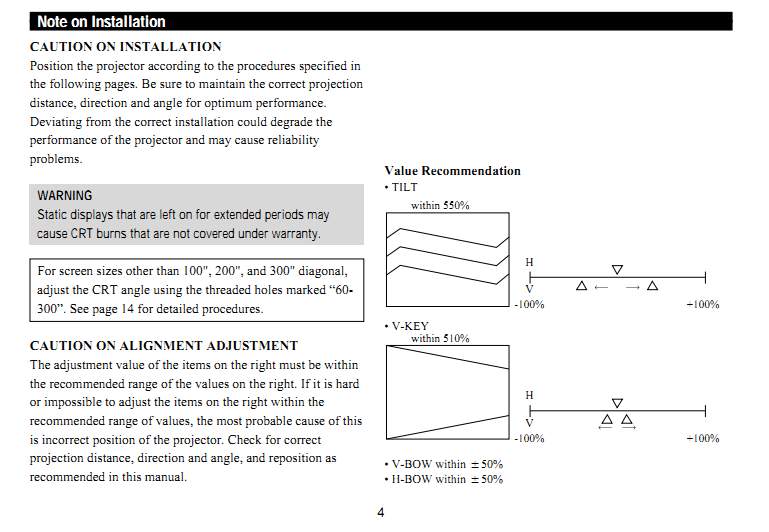
you can't just stick a CRT anywhere, you know there are proper throw distances right? Assuming it's at the correct distance now moving it back into another room will make the image much, much larger.
The other option is a rear projection onto a special screen but you need a lot of room behind the sreen
|
|
| Back to top |
|
|
CasetheCorvetteman
Joined: 09 Nov 2008
Posts: 6326
Location: Australia
|
| Posted: Wed Feb 08, 2012 6:45 am Post subject: |
|
|
|
On the contrary, you can put a CRT anywhere in most cases and correct it electronically if the set allows it, vast majority of digitals you need to line the center of the lens with the screen. Obviously youll wear the tubes unevenly, but you can do it
|
|
| Back to top |
|
|
gjaky

Joined: 05 Jun 2010
Posts: 2802
Location: Budapest, Hungary
|
| Posted: Wed Feb 08, 2012 7:03 am Post subject: |
|
|
Actually you CAN do it, but on what price?
| Description: |
|
| Filesize: |
52.76 KB |
| Viewed: |
3508 Time(s) |
|
_________________
projectors in the past : NEC 6-9PG xtra, Electrohome Marquee 6-7500, NEC XG 1351 LC ( with super modified Electrohome VNB neckboard !!!)
current: VDC Marquee 9500LC
The MOD: VNB-DB, VIM-DB
|
|
| Back to top |
|
|
AnalogRocks
Forum Moderator

Joined: 08 Mar 2006
Posts: 26706
Location: Toronto, Ontario, Canada
TV/Projector: Sony 1252Q, AMPRO 4000G
|
| Posted: Wed Feb 08, 2012 5:33 pm Post subject: |
|
|
That remind's me of the guy that tried putting his Ampro in the corner of the room and tried to project it onto the screen. Didn't work so well.
While you CAN off set a projector I find it's easier not to. Any time you max a setting to correct for the offset you are putting more stress on the electronics.
_________________
Tech support for nothing
CRT.
HD done right!
|
|
| Back to top |
|
|
draganm
Joined: 08 Mar 2006
Posts: 8990
Location: Colorado
|
| Posted: Wed Feb 08, 2012 5:54 pm Post subject: |
|
|
| gjaky wrote: | | Actually you CAN do it, but on what price? |
this price. Rather expensive IMO
| Quote: | Without trying to make fun of one of my customers, here’s what can happen when you install a CRT projector about 20% too far back from the recommended screen distance. You get insanely premature tube wear as shown below. The raster was not centered, the image is far too high on the tube face which can cause convergence instability over time, and the wear shown should happen towards the end of the tube life, not two years after the set was installed.
Remember to read the throw distance charts in the manuals, most of them are darn accurate! |

|
|
| Back to top |
|
|
CasetheCorvetteman
Joined: 09 Nov 2008
Posts: 6326
Location: Australia
|
| Posted: Thu Feb 09, 2012 6:03 am Post subject: |
|
|
|
That isnt from offset so much as it is from plain bad raster setup or bright part of the image way under size.
|
|
| Back to top |
|
|
Jeremy112
Joined: 28 Sep 2006
Posts: 2649
Location: Fond du Lac, WI
|
| Posted: Thu Feb 09, 2012 7:05 am Post subject: |
|
|
| draganm wrote: | | Jeremy112 wrote: | | Will probably put it behind the wall and cut a nicely shaped hole out for the lenses |
you can't just stick a CRT anywhere, you know there are proper throw distances right? Assuming it's at the correct distance now moving it back into another room will make the image much, much larger.
The other option is a rear projection onto a special screen but you need a lot of room behind the sreen |
I should note this isnt an actual room, I mean it is but it isn't. Its a wall I built to separate the utilities and landry off from the rest of the basement.
The projector is actually sitting where my in wall aquarium used to be. I didn't have the room to properly set it up before I took the aquarium out, hence why I used my VPL-VW50 for a while when the XGs green tube cracked. After I finally got a chance to get back to the HT I took the aquarium out and put the XG where it belonged. The Image is much better than it was before. That could be due to the new tubes or the proper distance, or most likely both.
I can see scan lines at 720p on it just barely from normal viewing distance, so I have to assume I have the projector setup pretty well.
_________________
When I'm asking for a Model number, that doesn't mean I'm asking for a nude photo with your number on it
|
|
| Back to top |
|
|
Jeremy112
Joined: 28 Sep 2006
Posts: 2649
Location: Fond du Lac, WI
|
| Posted: Thu Feb 09, 2012 7:08 am Post subject: |
|
|
Also I would like to mention that I have almost all of the settings on the XG to a near default state, I have spent many many many many hours on the mechanical adjustments of the projector, because I know how much easier the electronics will have it in the end.
I DO read what other people say on this forum, even if I dont reply to all of them
_________________
When I'm asking for a Model number, that doesn't mean I'm asking for a nude photo with your number on it
|
|
| Back to top |
|
|
AnalogRocks
Forum Moderator
Joined: 08 Mar 2006
Posts: 26706
Location: Toronto, Ontario, Canada
TV/Projector: Sony 1252Q, AMPRO 4000G
|
| Posted: Thu Feb 09, 2012 8:04 am Post subject: |
|
|
| Jeremy112 wrote: | Also I would like to mention that I have almost all of the settings on the XG to a near default state, I have spent many many many many hours on the mechanical adjustments of the projector, because I know how much easier the electronics will have it in the end.
I DO read what other people say on this forum, even if I dont reply to all of them |
If you don't reply you'll never catch up to me in posts
_________________
Tech support for nothing
CRT.
HD done right!
|
|
| Back to top |
|
|
|
|
|
|
|
You cannot post new topics in this forum
You cannot reply to topics in this forum
You cannot edit your posts in this forum
You cannot delete your posts in this forum
You cannot vote in polls in this forum
You cannot attach files in this forum
You can download files in this forum
|
Forum powered by phpBB © phpBB Group
|
|




