| Author |
Message |
kal
Forum Administrator

Joined: 06 Mar 2006
Posts: 18114
Location: Ottawa, Canada
TV/Projector: JVC DLA-NZ7
|
| Posted: Mon Nov 07, 2011 5:25 pm Post subject: Harry Potter and the Deathly Hallows, Part 2 [Blu-ray] |
|
|
Another reference disc!
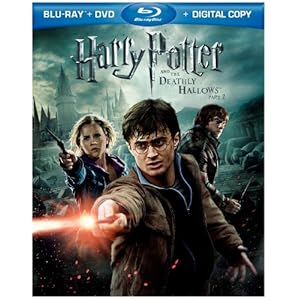
Harry Potter and the Deathly Hallows, Part 2 (Three-Disc Blu-ray/DVD Combo + UltraViolet Digital Copy) (2011)
(Click on picture to order, hover over for price)
| Quote: | The best movie of the franchise gets a proper send off with a demo-worthy visual display coupled with an audio presentation that will nearly blow you off your couch. There's nothing to dislike about the way this disc looks or sounds, the fact that it's a really good movie simply puts it over the edge. The Blu-ray exclusive special features are informative and worthwhile. The Maximum Movie Mode is a feature every fan will want to explore. When you add it all up, 'Harry Potter and the Deathly Hallows: Part 2' is a must own title. Even more so since Warner announced that it will be pulling all of the copies from store shelves by the end of this year. Get it while you can.
The Video: Sizing Up the Picture
Simply put the dark, brooding visuals of 'Deathly Hallows: Part 2' in 1080p will blow you away. For some reason, even though the two parts of the 'Deathly Hallows' were filmed at the same time, this part feels a tad more detailed. Slightly more ambitious in its look and scope. I may be grasping at straws there, but this is truly a breathtaking visual feast.
It's hard to not notice all the fine detail shining off the screen. Just take a look at the faces of Harry and Voldemort at the end. Dirtied and bloody, where each speck of mud and gunk is completely visible. The ultra-close-ups of them reveal the tiniest pores, hairs, and dirt flecks. As Hogwarts lay in ruins and the camera swoops down over a rubble-covered courtyard, even at mid-range you can see intricate patterns in the brick-lain courtyard floor. The tiniest age lines are extensively revealed on Olivander's face, even though he sits quite a distance from where the camera is placed. The special effects this time around take on a life of their own. The tiny, pulsating concentric rings of blue light that pulse forth from the students' wands in the darkness are easily visible. The shield that is created by the teachers at Hogwarts is something special. It has a total organic feel as it comes together. Spells and curses fly by with stunning ferocity, each of them clearly defined. As they smash into rocks and walls they send tiny chunks of rubble flying, all of which can be seen with clarity.
The movie is dark, full of unforgiving shadows. Although, these shadows never feature a bit of crushing. They're rich and deep, offering a wonderfully delineated picture that adds to the overall detail and look of the movie. Colors, while a bit rare, are actually extremely vibrant whenever presented. When Harry and Voldemort are locked in their own personal duel, the goopy, dripping magic between them shines with powerful reds and greens shooting off the screen.
Everything about this video presentation shines. In short 'Deathly Hallows: Part 2' is one of the finest demo discs you'll be picking up this year.
The Audio: Rating the Sound
The DTS-HD Master Audio 5.1 mix is just as demo-worthy as the video.
This thing is one bombastically charged ride. Directionality is top-notch. From the wiz-bang action as spells zoom by in and out of frame to the distant crackle of Death Eater spells exploding on the shield above Hogwarts. Even the quieter moments are cause for rejoicing. When Hermione, disguised as Bellatrix, enters Gringotts Harry and Griphook are supposed to be standing right beside her under Harry's invisibility cloak. Griphook whispers to Hermione that the other goblins know they're imposters. The surrounds pick up this bit of dialogue so well you'll think Griphook is standing right next to you.
LFE is a constant force. From crumbling Hogwarts walls, to the stomping of angry giants the sub-woofer rarely gets a break from the action. Panning effects are always smooth. Take the fire in the Room of Requirement. The low-end rumble of the fire led by a fearsome-sounding image of a dragon sweeps through the stacks of artifacts. The whoosh of the fire zooms from one end of the sound field to the other, enveloping you in its fury.
Surrounds are lively and active for the entire movie. The battle scenes offer a wide variety of ambient noise as wizards, witches and students battle Death Eaters, enormous spiders, and giants. Spells wiz by on every side. The fights are ferocious. You can hear people dying all around. It's simply a completely immersive listening environment.
You'll be just as happy with the audio here as you will be with the visuals. Everything about this disc screams demo quality. |
Kal
_________________

Support our site by using our affiliate links. We thank you!
My basement/HT/bar/brewery build 2.0
|
|
| Back to top |
|
 |
AnalogRocks
Forum Moderator

Joined: 08 Mar 2006
Posts: 26706
Location: Toronto, Ontario, Canada
TV/Projector: Sony 1252Q, AMPRO 4000G
|
| Posted: Mon Nov 07, 2011 8:19 pm Post subject: |
|
|
Looks like a good disk for gamma boost.
_________________
Tech support for nothing
CRT.
HD done right!
|
|
| Back to top |
|
|
kal
Forum Administrator
Joined: 06 Mar 2006
Posts: 18114
Location: Ottawa, Canada
TV/Projector: JVC DLA-NZ7
|
| Posted: Mon Nov 07, 2011 8:29 pm Post subject: |
|
|
Ha!
Part 1 was dark wasn't it? We watched it a week or so ago and while I appreciate the dark 'tone' of the movie, I kept thinking that the average picture level (APL) was simply too dark overall throughout the movie. I have a good gamma curve and CRT excels at low level detail, but I still think it should have been brighter at times.
Kal
_________________
Support our site by using our affiliate links. We thank you!
My basement/HT/bar/brewery build 2.0
|
|
| Back to top |
|
|
draganm

Joined: 08 Mar 2006
Posts: 8990
Location: Colorado
|
| Posted: Sun Nov 13, 2011 7:18 pm Post subject: |
|
|
We just watched the last harry potter Friday night and it was abolsutely amazing in our HT w/Marquee 8500. Some parts were too dark, like a few of the bank vault scenes, even with Moome card and gamma boost. Overall however the movie looked very good and was certainly the best Potter film ever. We actually watched it twice.
Saturday evening we walk into Costco and they had the usual assortment of LCD's and an LED TV and the choppy motion and mosquito noise was horrendous. My 8 year old with no prompting says, what's wrong with that picture, it looks fake . I laughed, even an 8 year old could see how sh*tty the digital image was. He was right of course, it didn't even look like the movie, looked like someone was filming on the movie set with a hand-held camera. It reminded me instantly of the out-takes and unedited stuff you get in the the bonus material. Unbelievable that a $3K TV could ruin a multi-million dollar movie that badly.
I just hugged my son and said, "your so lucky your dad knows what a good TV is supposed to look like. 
|
|
| Back to top |
|
|
dvh99

Joined: 25 Dec 2009
Posts: 2158
Location: nederland
|
| Posted: Tue Nov 15, 2011 10:18 am Post subject: |
|
|
ok, now i gotta go see those dark scenes.
will report back  . .
don`t know when cause i think assasins creed revelations came out today so it might take a while.
_________________
1 answer always poses multiple questions.
marquee 9500ultra HD10L moome hdmi1.3 v3+ some mods.
|
|
| Back to top |
|
|
WanMan

Joined: 19 Mar 2006
Posts: 10270
|
| Posted: Tue Nov 29, 2011 1:46 pm Post subject: |
|
|
I watched this one yesterday and enjoyed it. I think the only thing that could have made it batter would have been a CRT.
_________________
Trust no one. Absolutely no one. Advice of the board.
|
|
| Back to top |
|
|
MikeEby

Joined: 24 Jun 2007
Posts: 5237
Location: Osceola, Indiana
|
| Posted: Tue Nov 29, 2011 7:23 pm Post subject: |
|
|
| WanMan wrote: | | I watched this one yesterday and enjoyed it. I think the only thing that could have made it batter would have been a CRT. |
Interesting...I have it but haven't watched it yet...I didn't know if I should watch it in 3D on the DLP or on the CRT with great black levels.
Mike
_________________
Doing HD since the last century!
|
|
| Back to top |
|
|
Nashou66

Joined: 12 Jan 2007
Posts: 16171
Location: West Seneca NY
|
|
| Back to top |
|
|
mc86
Joined: 20 Sep 2008
Posts: 767
Location: pittsburgh, pa
TV/Projector: ECP 4500 (Vidikron box), ECP4500+, wanting 07MS/07MTS, evaluating pc soft-blend
|
| Posted: Wed Nov 30, 2011 12:14 am Post subject: |
|
|
Glad to know it wasn't just me -- This was the first movie we watched where I was pained by my setup and its limitations. BDP-83 to HDF3/GammaX feeding my ECP 4500 @1080i... about 1/2 way on the gamma X slider is what I live with, but this was sooo dark at times we couldn't see squat. That said, it looks plenty great-enough to enjoy the story, characters, and action.
All of us thinking this makes me wonder if they simply shot/made it too dark...or is that called "artistic"...?
I'll be interested in seeing Nashou's screen shots...not that I'm going to move up my PJ...though maybe someday when all of you have moved on I'll get a video processor. 
Matt
|
|
| Back to top |
|
|
WanMan
Joined: 19 Mar 2006
Posts: 10270
|
| Posted: Wed Nov 30, 2011 11:21 am Post subject: |
|
|
I do not mind the dark scenes in the movie. Seldom does one see, or be treated with, scenes that attempt to replicate natural lighting at night. I was rather pleased at how decently the RS20 did, but know all too well what I am experiencing is blissful ignorance.
_________________
Trust no one. Absolutely no one. Advice of the board.
|
|
| Back to top |
|
|
Nashou66
Joined: 12 Jan 2007
Posts: 16171
Location: West Seneca NY
|
| Posted: Thu Dec 01, 2011 2:25 am Post subject: |
|
|
Well here are a few, the camera(Point and click) was not able to capture all the detail I actually saw, well at least thats what I think from what i am seeing on my monitor which is not calibrated.
2.4

2.2

2.4

2.2


2.4

2.2

2.4

2.2

2.4

2.2

Now my PJ's are calibrated to 2.4 Gamma, Id probably gain som lower level detail if I went to 2.3 or 2.22.
The radiance has a gamma factor feature where I can raise or lower the overall gamma by .05 so I might go see how it looks and capture that but my battery died on my camera.
EDIT: I added pics where i used Lumagen's Gamma Factor Adjustment to lower Gamma from 2.4 to 2.2 by changing the default Gamma Factor from 1 to .9 there is a formula Gf=Desired Gamma/Actual Gamma so GF=2.2/2.4 .
Athanasios
_________________
Don't blame your underwear for your crooked ass~ unknown Greek philosopher
"Republicans believe every day is the Fourth of July, but the Democrats believe every day is April 15." --- President Reagan
One Smart Dog!!!
Marquee High Performance Bellows now shipping!!
Marquee Modifications and Performance Enhancement
Marquee C-element and Bellow removal
Last edited by Nashou66 on Thu Dec 01, 2011 4:09 am; edited 1 time in total
|
|
| Back to top |
|
|
Nashou66
Joined: 12 Jan 2007
Posts: 16171
Location: West Seneca NY
|
| Posted: Thu Dec 01, 2011 3:21 am Post subject: |
|
|
Just went to check the difference if I changed the Gamma factor in the lumagen from the default 1 to .85 which would effectively lower Gamma to 2.5. WOW, I need to go back and re calibrate the twins again or just leave the Gamma factor at .85.
Pics will follow to compare.
Edit: I'll add the gamma 2.2 pics in the original pic post .
Athanasios
_________________
Don't blame your underwear for your crooked ass~ unknown Greek philosopher
"Republicans believe every day is the Fourth of July, but the Democrats believe every day is April 15." --- President Reagan
One Smart Dog!!!
Marquee High Performance Bellows now shipping!!
Marquee Modifications and Performance Enhancement
Marquee C-element and Bellow removal
|
|
| Back to top |
|
|
|
|




