| Author |
Message |
JayAllan

Joined: 03 Jun 2007
Posts: 175
Location: Los Angeles
|
| Posted: Tue Aug 09, 2011 2:57 am Post subject: Problem with my DWIN 700 |
|
|
Hey guys,
I am not very technical but I am having a new problem with my projector.
The blue tube is starting to drift out of alignment on its own. Its happening all the time and it just started doing it this week. It will drift about a half inch on my 72 inch screen setup. If i adjust it it just drifts back.
Any ideas what causes this and how to fix it?
Thanks for any input!
Jay
|
|
| Back to top |
|
 |
Curt Palme
CRT Tech
Joined: 08 Mar 2006
Posts: 24396
Location: Langley, BC
TV/Projector: All of them!
|
| Posted: Tue Aug 09, 2011 3:07 am Post subject: |
|
|
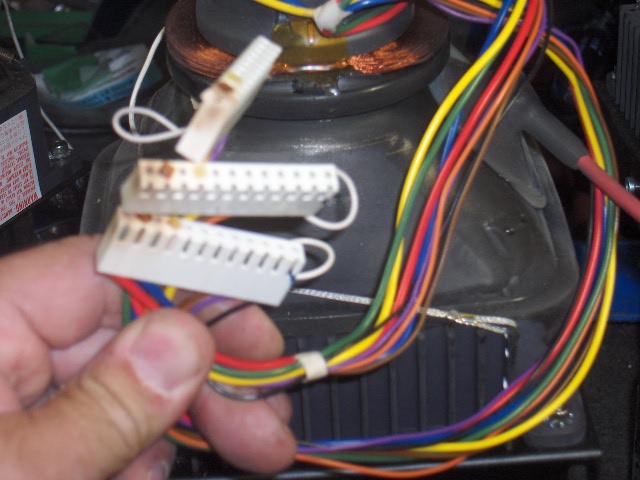
Yes, check this before using the set any more.:
Those are the white yoke connectors on the main motherboard. If ANY of them show browning or corrosion, DO NOT use the set any more. If the connections fail, you'll nuke the tubes. Gannon (member here) and I have both had that in the last 3 weeks.
Check the pins on the motherboard as well with a flashlight. I had one motherboard here start developing arcing right on the board. The pins were discolored from top to bottom. This almost always only happens on the red/blue wires on the yokes, as they use the most current.
| Description: |
|
| Filesize: |
93.7 KB |
| Viewed: |
7212 Time(s) |
|
|
|
| Back to top |
|
|
JayAllan
Joined: 03 Jun 2007
Posts: 175
Location: Los Angeles
|
| Posted: Tue Aug 09, 2011 3:11 am Post subject: |
|
|
Yikes! Ok Curt, thanks. I will pull the cover and have a look tonight. Hopefully I can get to them without pulling the PJ down 
|
|
| Back to top |
|
|
Curt Palme
CRT Tech
Joined: 08 Mar 2006
Posts: 24396
Location: Langley, BC
TV/Projector: All of them!
|
| Posted: Tue Aug 09, 2011 3:12 am Post subject: |
|
|
You can. Pull the connectors one at a time.
Oh,and no whining about the DWIN's size allowed, it's one of the smallest CRT's out there. 
|
|
| Back to top |
|
|
JayAllan
Joined: 03 Jun 2007
Posts: 175
Location: Los Angeles
|
| Posted: Tue Aug 09, 2011 3:20 am Post subject: |
|
|
|
Haha for sure. I have a few bigger PJs in storage! I love the DWIN for it's size and how quiet it is. Ok, its unplugged and I will report back later tonight
|
|
| Back to top |
|
|
Gannon

Joined: 08 Dec 2006
Posts: 164
Location: Detroit or the Interstates
|
| Posted: Fri Aug 12, 2011 9:04 am Post subject: |
|
|
Thanks for the link, Jay.
I think your work is more fun than ours.
Good luck, glad you caught this before it went bad...
_________________
gadfly and rogue philosopher
|
|
| Back to top |
|
|
JayAllan
Joined: 03 Jun 2007
Posts: 175
Location: Los Angeles
|
| Posted: Fri Aug 12, 2011 6:08 pm Post subject: |
|
|
Ha, Thanks Gannon. Yes I really do enjoy my job Been shooting for almost 20 years now. It never gets old or boring, and everyday is a new challenge. I only shoot for the highest end clients and we shoot many of the most beautiful women in the world.
I have not yet had a time to look inside the projector. Will do that today!
Jay
|
|
| Back to top |
|
|
Curt Palme
CRT Tech
Joined: 08 Mar 2006
Posts: 24396
Location: Langley, BC
TV/Projector: All of them!
|
| Posted: Fri Aug 12, 2011 6:28 pm Post subject: |
|
|
I'll let you look inside my projectors... can I look into your women?
Where is this link, I'd like to see your work, as I'm sure would others here..
|
|
| Back to top |
|
|
JayAllan
Joined: 03 Jun 2007
Posts: 175
Location: Los Angeles
|
| Posted: Fri Aug 12, 2011 6:35 pm Post subject: |
|
|
I think he was referring to the link in my profile.
It's NSFW so here is a tamer link to a book I am finishing on Fine Art Nudes: http://www.jayallanart.com
|
|
| Back to top |
|
|
Gannon
Joined: 08 Dec 2006
Posts: 164
Location: Detroit or the Interstates
|
| Posted: Fri Aug 12, 2011 6:36 pm Post subject: |
|
|
I must've found it in his profile, the name reminded me of one of my old LA clients...but as soon as I saw his portfolio, I realized I had the wrong guy.
For the right reasons...LOL!
Cheers
_________________
gadfly and rogue philosopher
|
|
| Back to top |
|
|
Gannon
Joined: 08 Dec 2006
Posts: 164
Location: Detroit or the Interstates
|
| Posted: Fri Aug 12, 2011 6:37 pm Post subject: |
|
|
Geez, a minute apart...
_________________
gadfly and rogue philosopher
|
|
| Back to top |
|
|
JayAllan
Joined: 03 Jun 2007
Posts: 175
Location: Los Angeles
|
| Posted: Sat Aug 13, 2011 4:58 am Post subject: |
|
|
Ok guys,
I took a look and there is no corrosion on the white yoke connectors or the pins. Any other ideas? 
Thanks,
Jay
|
|
| Back to top |
|
|
JayAllan
Joined: 03 Jun 2007
Posts: 175
Location: Los Angeles
|
| Posted: Sun Aug 14, 2011 6:38 pm Post subject: |
|
|
Any ideas? Is there a specific chip on the MB that controls the convergence?
I have a spare DWIN so I can swap out any of the boards. Just need to know which one!
|
|
| Back to top |
|
|
Gannon
Joined: 08 Dec 2006
Posts: 164
Location: Detroit or the Interstates
|
| Posted: Sun Aug 14, 2011 9:40 pm Post subject: |
|
|
Where you BE, Curt?
Jay,
You say there was no corrosion...the obvious burns are after a major failure...but the power connections on those molex's, the red wires, will oxodize before appearing dirty. They will merely be dingy, and it is best to clean and condition them anyways. It may STILL be the problem.
If you don't already have contact enhancer, something based on Cramolin or liquid Teflon, then I'm sure the wild guys down at Pacific Radio can set you up. I always love going in there...it is like a candy store for me. I'd use some gentle abrasive with the dab-on stuff...the spray is a waste on work like this...like a regular pencil eraser.
As a bonus, you can use the same stuff to treat all the connections in your hifi and video gear (especially turntable cartridges, headshells and interconnects)...and will most certainly derive some benefit. It will also help keep fresh the battery contacts on the video and camera gear you go on location with.
Let me know if this makes any difference, and sorry to have not answered until the weekend is finished.
Cheers,
John
Detroit
_________________
gadfly and rogue philosopher
Last edited by Gannon on Sun Aug 14, 2011 9:52 pm; edited 1 time in total
|
|
| Back to top |
|
|
Gannon
Joined: 08 Dec 2006
Posts: 164
Location: Detroit or the Interstates
|
| Posted: Sun Aug 14, 2011 9:47 pm Post subject: |
|
|
One quick question that just came to me...what is the value of the blue center convergence that you are using to center converge the image?!
If possible, keep it to the center-most value, which I think is 50 out of 100. Then use the manual shift, loosening those allen screws that hold down the blue and red guns...you'll notice the hole is open to allow the tube to move +/- about 5-degrees. The screws at the bottom must be loosened, too...and they can only be reached by a special long allen wrench...which Dwin used to provide with every projector. It is a 5/32, roughly a foot long...original is a Bondhus 13109, which Pacific Radio may be able to get for ya.
Get it CLOSE physically, to keep the electronic shift to an absolute minimum. That is always best practise with any CRT, do what you can to get it perfect physically, then trim it electronically.
If you can't find a source for the wrench, contact me privately, I've got a few spares.
Cheers,
John
_________________
gadfly and rogue philosopher
|
|
| Back to top |
|
|
JayAllan
Joined: 03 Jun 2007
Posts: 175
Location: Los Angeles
|
| Posted: Mon Aug 15, 2011 7:21 am Post subject: |
|
|
Gannon,
Thanks,
I do have some contact enhancer and i will dab some in there before I button it. up. I am actually all the way at 100 on the digital shift so perhaps it is time for me to redirect the green tube. I will look and see if I have a tool that will work. Thanks for the input!
Jay
|
|
| Back to top |
|
|
Curt Palme
CRT Tech
Joined: 08 Mar 2006
Posts: 24396
Location: Langley, BC
TV/Projector: All of them!
|
| Posted: Mon Aug 15, 2011 2:25 pm Post subject: |
|
|
If you need to shift the raster, the rings around the yoke have massive effect on the raster position. Use some silicone to reseal.
Otherwise I'd suspect problems on the motherboard. So far I have not had component drift on the motherboards, but some convergence drift issues have been cured by swapping the motherboard.
I've got about 10 donor 700s here for parts in good working shape, I can either test your board(s) (it could also be an issue in the CPU board)
Cheers!
|
|
| Back to top |
|
|
JayAllan
Joined: 03 Jun 2007
Posts: 175
Location: Los Angeles
|
| Posted: Tue Aug 23, 2011 2:44 am Post subject: |
|
|
|
Guys I cleaned the contacts and looked at the lens mounts. I need a longer wrench since I cant reach the top ones on the Blue tube. I think this will solve it though. Let you know soon...
|
|
| Back to top |
|
|
Gannon
Joined: 08 Dec 2006
Posts: 164
Location: Detroit or the Interstates
|
| Posted: Wed Aug 31, 2011 7:28 pm Post subject: |
|
|
Sorry about the 9-day wait on this, Jay.
Check your PMs.
Cheers
_________________
gadfly and rogue philosopher
|
|
| Back to top |
|
|
r.oppenhuizen
Joined: 22 Nov 2008
Posts: 21
|
| Posted: Sun Sep 11, 2011 12:42 pm Post subject: same problem on hdp-500 |
|
|
Guys,
I started to get this same problem on my dwin 500 , just checking if the same approach for fixing this issue applies also apllies to the 500?
|
|
| Back to top |
|
|
|
|





