|
As this forum is rarely used anymore, we've locked it. Feel free to browse and read. Questions? Please reach out to us directly. Cheers! |

|
 |
|
|
| Author |
Message |
stefuel

Joined: 07 Mar 2006
Posts: 3353
Location: Green Harbor MA USA
|
| Posted: Fri Jul 15, 2011 10:48 am Post subject: |
|
|
| macgyver655 wrote: | | rule76 wrote: | | Getting my ass kicked already by this thing. |
Whats the problem? They are actually real easy to set up once you understand the keys. There is also a help menu for setup that Chip always likes to recommend. Or read the manual, lol.  |
Help menu, manual, wazzz dat. I like to start by putting up the screen where ever it looks cool. Then find a spot on the ceiling that the projector fits on. Then go to the hardware store and get me some unistrut, nails and paper clips.
Then when everything is up and hanging by a thread, I'll post here asking for help 
The manual is FREE. Down load it and read it.
With very few exceptions, all these projectors were designed for industrial applications and NOT with HD in mind. You will find that it will be much easier the first couple of times through set up to use a older PC resolution. If you are using your PC as a signal source, set it to 1024X768 to start. As your setup skills increase, bump up the rez.
The "HELP" button is your friend if you can follow instructions 
_________________
Chip
A Barco is only a AmPro with training wheels
Card carrying member of the AVS chain gang.
|
|
| Back to top |
|
 |
incova
Joined: 27 Nov 2006
Posts: 789
Location: london
|
| Posted: Fri Jul 15, 2011 12:51 pm Post subject: hey |
|
|
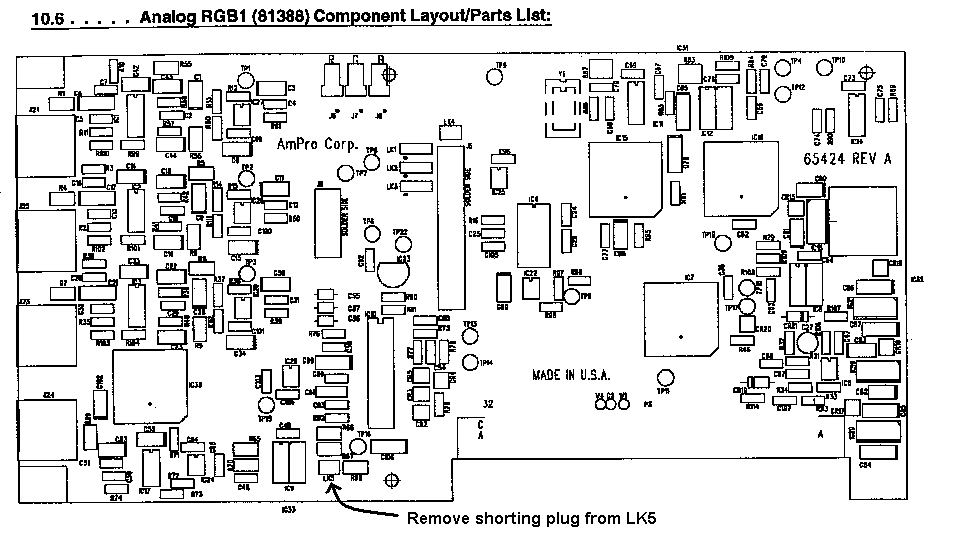
If I remember correctly Papalek says that Ampros need a stronger "hotter" signal, make sure your cable is good quality, as for the rolling I am sure Tse told me to remove a jumper but for the life of me I cannot remember it I will have a look, here you go, also check your battery you may set it up perfectly then find your battery needs replacing and there go your settings.
Scott stated:
“Many times vertical rolling can be fixed by removing the shorting plug from LK5 on the RGB bd. Attached is a .GIF showing the location of the plug. Hope this helps. If you pull the three video cables from the top of the bd make sure they are returned the same way they came off. There is a small dot designating one side.”
Good luck I am not the best person to be asking about all this but just trying to help out.
| Description: |
|
| Filesize: |
24.09 KB |
| Viewed: |
1264 Time(s) |
|
_________________
The more I learn
the less I know.
|
|
| Back to top |
|
|
|
|
|
|
|
You cannot post new topics in this forum
You cannot reply to topics in this forum
You cannot edit your posts in this forum
You cannot delete your posts in this forum
You cannot vote in polls in this forum
You cannot attach files in this forum
You can download files in this forum
|
Forum powered by phpBB © phpBB Group
|
|



