Return to the CurtPalme.com main site CurtPalme.com Home Theater Forum
A forum with a sense of fun and community for Home Theater enthusiasts!
Products for Sale ] [ FAQ: Hooking it all up ] [ CRT Primer/FAQ ] [ Best/Worst CRT Projectors List ] [ Setup Tips & Manuals ] [ Advanced Procedures ] [ Newsletter ]
 
Blu-ray disc release list and must-have titles. Buy the latest and best Blu-ray titles to show off in your home theater!

 As this forum is rarely used anymore, we've locked it. Feel free to browse and read. Questions? Please reach out to us directly. Cheers! 

which cable to use for spdif

 
This forum is locked: you cannot post, reply to, or edit topics.   This topic is locked: you cannot edit posts or make replies.    CurtPalme.com Forum Index -> Home Theater PCs
Author Message
lukem


Joined: 18 Feb 2009
Posts: 85


Posted: Thu Jun 23, 2011 3:32 pm    Post subject: which cable to use for spdif

Hi there.
i have just purchased an Asus xonar d2 for my htpc but was wondering which cable to use for the spdif port toslink or digital coax.

but unsre coz the ports look more like digital coax than toslink or digi optical.

if there is anybody with the same soundcard please let me know your findings.
regards
luke
Back to top
AFryia


Joined: 09 Mar 2006
Posts: 965
Location: S.E. Michigan VPH-G70Q

Posted: Sun Jul 03, 2011 3:14 am    Post subject:

what does the manual say?
_________________
My Volt Blog
Back to top
View user's photo album (33 photos)
Tom.W


Joined: 09 Mar 2006
Posts: 6635


Posted: Sun Jul 03, 2011 7:39 am    Post subject:

If its a RCA jack it's coax.
Back to top
AnalogRocks
Forum Moderator


Joined: 08 Mar 2006
Posts: 26706
Location: Toronto, Ontario, Canada

TV/Projector: Sony 1252Q, AMPRO 4000G

Posted: Sun Jul 03, 2011 7:43 am    Post subject:

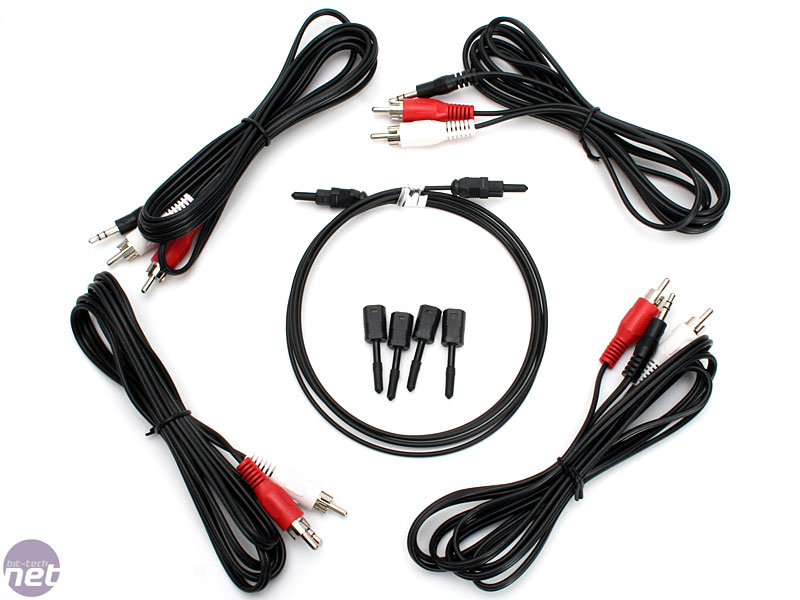
Looks like you can use either. Those are multi jacks, your card should have come with adaptors like the ones in the middle here:


_________________
Tech support for nothing

CRT.

HD done right!
Back to top
View user's photo album (27 photos)
Tom.W


Joined: 09 Mar 2006
Posts: 6635


Posted: Sun Jul 03, 2011 7:46 am    Post subject:

The specs...

http://www.asus.com/Multimedia/Audio_Cards/Xonar_D2PM/#specifications

It appears either will work if you have the proper adapters,
Back to top
AnalogRocks
Forum Moderator


Joined: 08 Mar 2006
Posts: 26706
Location: Toronto, Ontario, Canada

TV/Projector: Sony 1252Q, AMPRO 4000G

Posted: Sun Jul 03, 2011 7:52 am    Post subject:

Tom.W wrote:
The specs...

http://www.asus.com/Multimedia/Audio_Cards/Xonar_D2PM/#specifications

It appears either will work if you have the proper adapters,


Accessories

4 x 3.5mm-to-RCA adaptor cable (8ch)
2 x S/PDIF optical adaptors
1 x S/PDIF optical cable
1 x Additional MIDI card, cable, and external standard MIDI adaptor Y cable
Dolby Demo CD

_________________
Tech support for nothing

CRT.

HD done right!
Back to top
View user's photo album (27 photos)
AFryia


Joined: 09 Mar 2006
Posts: 965
Location: S.E. Michigan VPH-G70Q

Posted: Sun Jul 03, 2011 3:13 pm    Post subject:

Tom.W wrote:
If its a RCA jack it's coax.

Not necessarily.

For example a lot of Apple wireless stuff uses a RCA/Optical combo port.
Back to top
View user's photo album (33 photos)
lukem


Joined: 18 Feb 2009
Posts: 85


Posted: Tue Jul 05, 2011 9:36 am    Post subject:

just one other thing unsure about the optical, coz of the adapters.
i know for sure that the digi coax will work , but how does the optical work on there??
Back to top
This forum is locked: you cannot post, reply to, or edit topics.   This topic is locked: you cannot edit posts or make replies.    CurtPalme.com Forum Index -> Home Theater PCs All times are GMT
Page 1 of 1
You cannot post new topics in this forum
You cannot reply to topics in this forum
You cannot edit your posts in this forum
You cannot delete your posts in this forum
You cannot vote in polls in this forum
You cannot attach files in this forum
You can download files in this forum