| Author |
Message |
MikeEby

Joined: 24 Jun 2007
Posts: 5237
Location: Osceola, Indiana
|
| Posted: Fri Jan 28, 2011 1:50 am Post subject: Refurbished MacBook Pro? |
|
|
It's finally time to retire my 4 year old Lenova Notebook from work. This is my primary development machine for Windows however I would like to jump in to iDevice development so looking at running Boot Camp for the Windows .NET development and the Mac side for iDevice development.
Even though it is not my money buying the machine I would like to keep cost down. I can get a 15" MacBook Pro with the i7 processor a High Resolution Screen directly from Apple for about $300 less than a brand new unit same model and options. In the past I've had very good luck with refurbished electronics but I wonder if anyone had any experience with refurbished Apple products?
Also how does Boot Camp work....Can I load a "Retail" version of Windows 7 and be good to go?
Mike
_________________
Doing HD since the last century!
|
|
| Back to top |
|
 |
Nashou66

Joined: 12 Jan 2007
Posts: 16171
Location: West Seneca NY
|
| Posted: Fri Jan 28, 2011 3:46 am Post subject: Re: Refurbished MacBook Pro? |
|
|
| MikeEby wrote: | It's finally time to retire my 4 year old Lenova Notebook from work. This is my primary development machine for Windows however I would like to jump in to iDevice development so looking at running Boot Camp for the Windows .NET development and the Mac side for iDevice development.
Even though it is not my money buying the machine I would like to keep cost down. I can get a 15" MacBook Pro with the i7 processor a High Resolution Screen directly from Apple for about $300 less than a brand new unit same model and options. In the past I've had very good luck with refurbished electronics but I wonder if anyone had any experience with refurbished Apple products?
Also how does Boot Camp work....Can I load a "Retail" version of Windows 7 and be good to go?
Mike |
I think the refurb stuff is just as good as new.
Bootcamp works really well. You can also use Parallels but for connecting peripherals Boot Camp has been fool proof for me. Sometimes getting devises to be recognized in Parallels can be iffy.
Athanasios
_________________
Don't blame your underwear for your crooked ass~ unknown Greek philosopher
"Republicans believe every day is the Fourth of July, but the Democrats believe every day is April 15." --- President Reagan
One Smart Dog!!!
Marquee High Performance Bellows now shipping!!
Marquee Modifications and Performance Enhancement
Marquee C-element and Bellow removal
|
|
| Back to top |
|
|
ecrabb
Forum Moderator

Joined: 13 Mar 2006
Posts: 15909
Location: Utah
TV/Projector: JVC RS40, Epson 5010
|
| Posted: Fri Jan 28, 2011 4:17 am Post subject: |
|
|
Yeah, the refurbs from Apple pretty much are new. In fact, the only way you can tell a refurb is the packaging it comes in. Otherwise, it's all the same - same high-quality hardware, same warranty, same support, same everything - but 15-20% off new price. I haven't seen an Apple refurb yet that wasn't completely indistinguishable from a brand new machine.
Friends, family, and I have all purchased refurb products and been very happy. There was my wife's MacBook, a friend's 27" iMac, another two friends' 30" iMacs, and coincidentally, I just bought a Mac mini Server at the office about two weeks ago... I got the mini with Snow Leopard Server (which is $400 by itself) for $150 more than the base mini, along with dual 500GB drives and twice the RAM.
Yeah, with Boot Camp, you can throw in a retail Windows 7 disc and install just like you would with any other Windows machine. The only difference is Apple doesn't directly support you (i.e., you can't call and whine to Apple because, say, your printer won't work under Windows 7.)
It's all pretty simple, really... Especially since Snow Leopard... Run the Boot Camp Assistant... It makes sure you have all the necessary Windows hardware drivers before you start, has you partition the disc, reboots and installs Windows, then installs all the hardware drivers, and you're off to the races.
SC
|
|
| Back to top |
|
|
Zebu Fellenz
Joined: 21 Dec 2006
Posts: 2567
|
| Posted: Fri Jan 28, 2011 4:31 am Post subject: |
|
|
| ecrabb wrote: | another two friends' 30" iMacs,
SC |
The 30" iMac...
That's the one where they take a 30" ACD and duck tape a Mac Mini on the back, right? 
|
|
| Back to top |
|
|
ecrabb
Forum Moderator
Joined: 13 Mar 2006
Posts: 15909
Location: Utah
TV/Projector: JVC RS40, Epson 5010
|
| Posted: Fri Jan 28, 2011 5:37 am Post subject: |
|
|
Whoops. I meant 24 and 27, not 27 and 30.
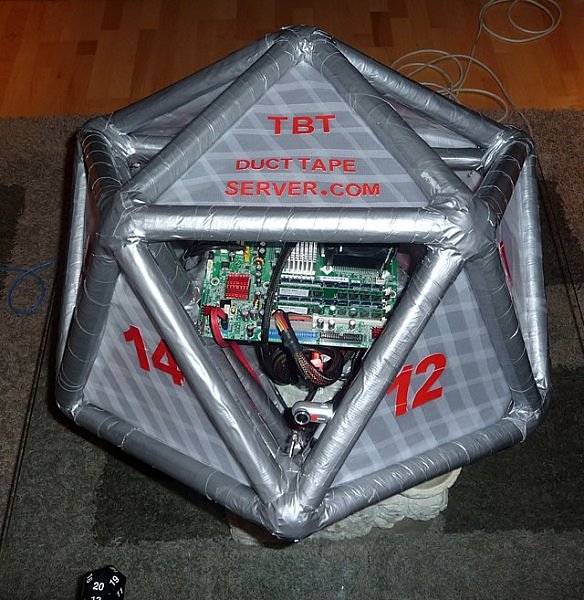
Oh, and it's Velcro on the mini, not duct tape. Duct tape is for PC's. 
SC
|
|
| Back to top |
|
|
AnalogRocks
Forum Moderator

Joined: 08 Mar 2006
Posts: 26706
Location: Toronto, Ontario, Canada
TV/Projector: Sony 1252Q, AMPRO 4000G
|
| Posted: Fri Jan 28, 2011 10:22 am Post subject: |
|
|
| ecrabb wrote: | Whoops. I meant 24 and 27, not 27 and 30.
Oh, and it's Velcro on the mini, not duct tape. Duct tape is for PC's.
SC |
| Description: |
|
| Filesize: |
90.65 KB |
| Viewed: |
5895 Time(s) |
|
_________________
Tech support for nothing
CRT.
HD done right!
|
|
| Back to top |
|
|
MikeEby
Joined: 24 Jun 2007
Posts: 5237
Location: Osceola, Indiana
|
| Posted: Thu Feb 10, 2011 2:29 pm Post subject: |
|
|
I'm thinking for the small cost difference between the 15" and the 17" I might go for the 17". I'll probably go the Apple store and see just how big the 17" is and if I can live with the extra size...Also glossy or anti-glare screen any preference here? The glossy looks really nice.
Mike
_________________
Doing HD since the last century!
|
|
| Back to top |
|
|
jask

Joined: 17 Mar 2006
Posts: 10187
Location: kamloops BC
|
| Posted: Tue Feb 15, 2011 3:52 am Post subject: |
|
|
| AnalogRocks wrote: | | ecrabb wrote: | Whoops. I meant 24 and 27, not 27 and 30.
Oh, and it's Velcro on the mini, not duct tape. Duct tape is for PC's.
SC |
|
Ron built a server too!!?
|
|
| Back to top |
|
|
|
|




