| Author |
Message |
mr_ro_co

Joined: 08 May 2006
Posts: 1643
Location: Santa Fe NM
|
| Posted: Sat Dec 18, 2010 10:27 pm Post subject: Is this a horizontal deflection or a convergence problem? |
|
|
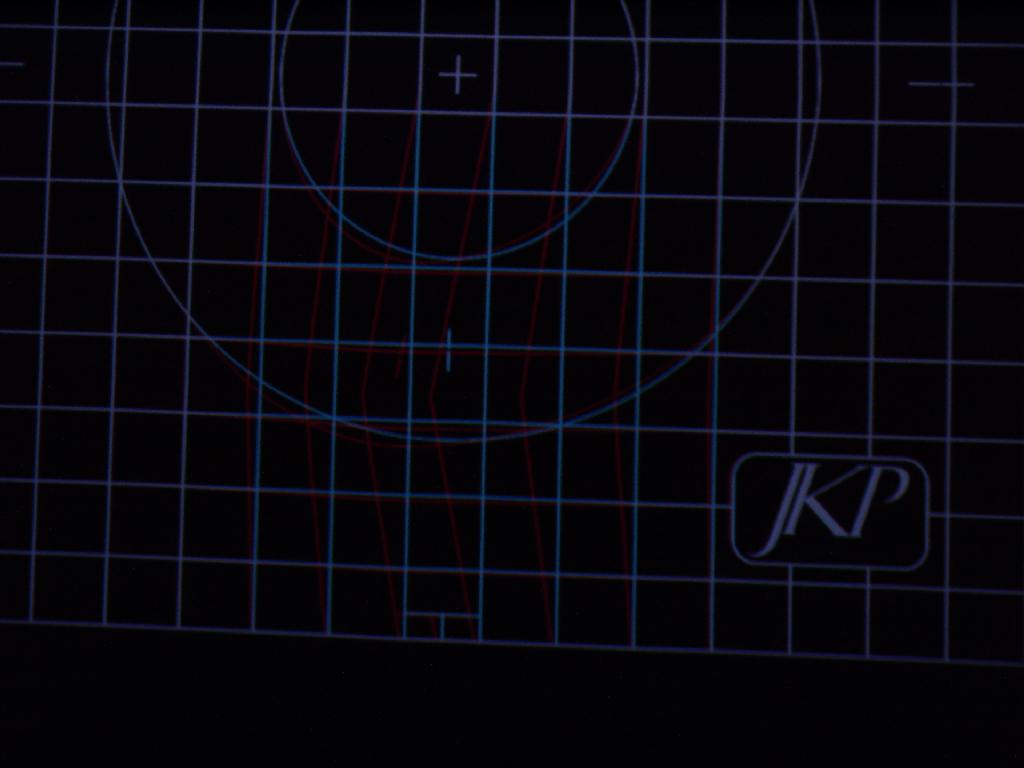
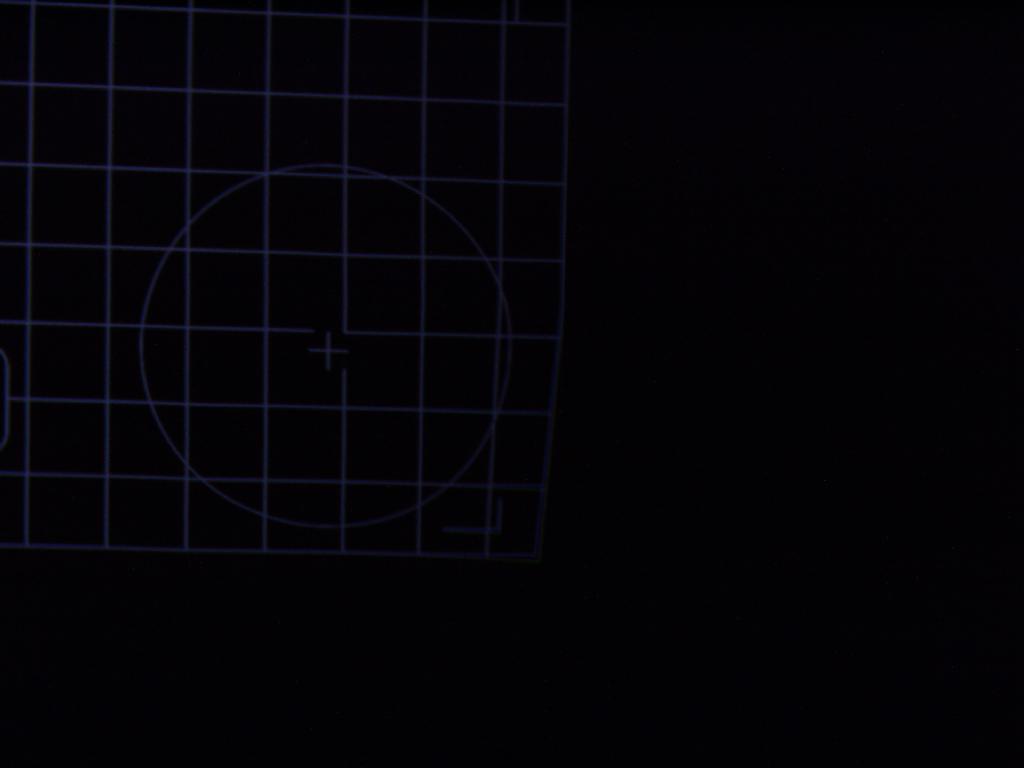
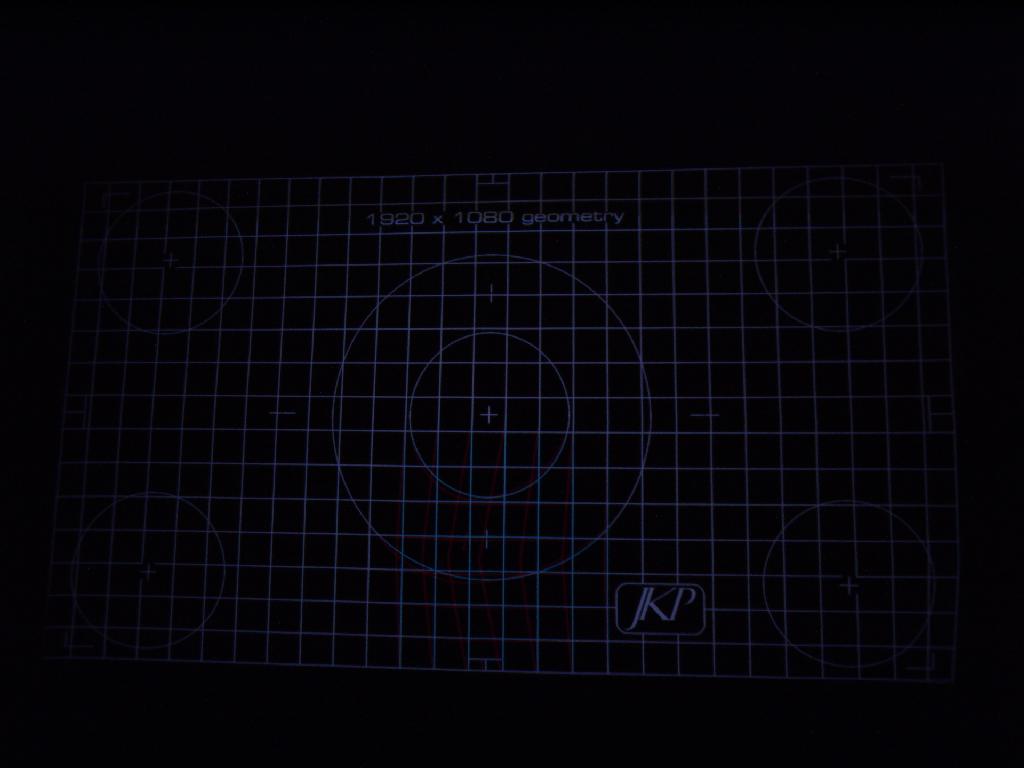
Fired up the set today and this is what I saw. Big glitch on the red in the center of the screen, but all 3 colors are together with a strange geometry deviation in the right bottom corner. I forced both issues back into shape with the convergence, but I'm guessing this is a patch for what's a more serious problem.
Any Marquee users seen this before?
TIA
Steve
| Description: |
|
| Filesize: |
43.77 KB |
| Viewed: |
6819 Time(s) |
|
| Description: |
|
| Filesize: |
23.15 KB |
| Viewed: |
6819 Time(s) |
|
| Description: |
| note big deviation in center bottom on the red, and all three doing something strange in bottom right corner. |
|
| Filesize: |
45.84 KB |
| Viewed: |
6819 Time(s) |
|
_________________
Not only is there no god, try finding a plumber on Sunday!
|
|
| Back to top |
|
 |
Tim in Phoenix

Joined: 21 Oct 2006
Posts: 4409
Location: Phoenix
|
| Posted: Sat Dec 18, 2010 10:43 pm Post subject: |
|
|
Hello
Try unplugging the red convergence yoke, see if that takes the bend out.
.
|
|
| Back to top |
|
|
Nashou66

Joined: 12 Jan 2007
Posts: 16171
Location: West Seneca NY
|
|
| Back to top |
|
|
dvh99

Joined: 25 Dec 2009
Posts: 2158
Location: nederland
|
| Posted: Sat Dec 18, 2010 11:08 pm Post subject: |
|
|
dpb, take it off clean the contacts and put back on, clean the contacts on the main clm too, use ethanol.
_________________
1 answer always poses multiple questions.
marquee 9500ultra HD10L moome hdmi1.3 v3+ some mods.
|
|
| Back to top |
|
|
mr_ro_co
Joined: 08 May 2006
Posts: 1643
Location: Santa Fe NM
|
| Posted: Sun Dec 19, 2010 2:01 am Post subject: |
|
|
Tim, I would try disconnecting the convergence yoke if I hadn't already made the mistake of dialing this out today via convergence! Dammit, I don't know how I can reverse those steps now. Any ideas?
Athanasios, I'm pretty sure I have the CLM board currently out of the set.
dvh99, what is the "dpb?"
Much thanks,
Steve
_________________
Not only is there no god, try finding a plumber on Sunday!
|
|
| Back to top |
|
|
dturco

Joined: 06 Feb 2009
Posts: 3778
Location: Eastern Shore Maryland
TV/Projector: Runco DLP VX-3000i Marquee 9500 parts doner
|
| Posted: Sun Dec 19, 2010 2:08 am Post subject: |
|
|
| mr_ro_co wrote: | Tim, I would try disconnecting the convergence yoke if I hadn't already made the mistake of dialing this out today via convergence! Dammit, I don't know how I can reverse those steps now. Any ideas?
Athanasios, I'm pretty sure I have the CLM board currently out of the set.
dvh99, what is the "dpb?"
Much thanks,
Steve |
Nah if the CLM was out your machine would not work. The DPB is on the CLM.
http://www.curtpalme.com/Marquee_Teardown5.shtm
Can you see that second little board with the screw in it? That's the DPB.
Just thought of this, you don't have you CMM in. {Contrast modulation Module} The machine will run without that.
_________________
Firefly rules. Can't stop the signal.
http://www.hulu.com/firefly
|
|
| Back to top |
|
|
mr_ro_co
Joined: 08 May 2006
Posts: 1643
Location: Santa Fe NM
|
| Posted: Sun Dec 19, 2010 2:16 am Post subject: |
|
|
| dturco wrote: | | mr_ro_co wrote: | Tim, I would try disconnecting the convergence yoke if I hadn't already made the mistake of dialing this out today via convergence! Dammit, I don't know how I can reverse those steps now. Any ideas?
Athanasios, I'm pretty sure I have the CLM board currently out of the set.
dvh99, what is the "dpb?"
Much thanks,
Steve |
Nah if the CLM was out your machine would not work. The DPB is on the CLM.
http://www.curtpalme.com/Marquee_Teardown5.shtm
Can you see that second little board with the screw in it? That's the DPB.
Just thought of this, you don't have you CMM in. {Contrast modulation Module} The machine will run without that. |
Ah, that's it, the CMM is the one that is out, thanks.
Thanks for the link to that DPB board!
Steve
_________________
Not only is there no god, try finding a plumber on Sunday!
|
|
| Back to top |
|
|
Nashou66
Joined: 12 Jan 2007
Posts: 16171
Location: West Seneca NY
|
| Posted: Sun Dec 19, 2010 2:20 am Post subject: |
|
|
| mr_ro_co wrote: | Tim, I would try disconnecting the convergence yoke if I hadn't already made the mistake of dialing this out today via convergence! Dammit, I don't know how I can reverse those steps now. Any ideas?
Athanasios, I'm pretty sure I have the CLM board currently out of the set.
dvh99, what is the "dpb?"
Much thanks,
Steve |
No way to reverse the steps. Only way is if you saved the settings to your PC vie the Marquee Loader program
from the RS 232 ports. I suggest to everyone to save their settings after each adjustment or set up just incase you do something like this. It could easily be just a corrupt memory. An Initialization might fix it but then you'll loose all settings.
You could save all settings to the Marquee loader program, initialize the set and then reload the settings, it might fix that issue. Even if it still looks off try to converge that area and it might work.
But first do as Tim said and pull the red's convergence cable from the Convergence Amp and fire it up, if the bend is gone then you may have a bad CVA ,if its still there try my idea and see if its s till there or can be adjusted out. If not then it is a bad CLM.
Athanasios
_________________
Don't blame your underwear for your crooked ass~ unknown Greek philosopher
"Republicans believe every day is the Fourth of July, but the Democrats believe every day is April 15." --- President Reagan
One Smart Dog!!!
Marquee High Performance Bellows now shipping!!
Marquee Modifications and Performance Enhancement
Marquee C-element and Bellow removal
|
|
| Back to top |
|
|
dturco
Joined: 06 Feb 2009
Posts: 3778
Location: Eastern Shore Maryland
TV/Projector: Runco DLP VX-3000i Marquee 9500 parts doner
|
| Posted: Sun Dec 19, 2010 2:25 am Post subject: |
|
|
I'm hesitent to say this but... you can go into the menu 9, 0910, and go to diagnostics where it gives an option to see the last 25? key presses. I think.
I don't know if you can undo anything from there, but maybe.
But even then you might hose everything and need a complete initialization anyway.
_________________
Firefly rules. Can't stop the signal.
http://www.hulu.com/firefly
|
|
| Back to top |
|
|
mr_ro_co
Joined: 08 May 2006
Posts: 1643
Location: Santa Fe NM
|
| Posted: Sun Dec 19, 2010 2:51 am Post subject: |
|
|
| Nashou66 wrote: | | mr_ro_co wrote: | Tim, I would try disconnecting the convergence yoke if I hadn't already made the mistake of dialing this out today via convergence! Dammit, I don't know how I can reverse those steps now. Any ideas?
Athanasios, I'm pretty sure I have the CLM board currently out of the set.
dvh99, what is the "dpb?"
Much thanks,
Steve |
No way to reverse the steps. Only way is if you saved the settings to your PC vie the Marquee Loader program
from the RS 232 ports. I suggest to everyone to save their settings after each adjustment or set up just incase you do something like this. It could easily be just a corrupt memory. An Initialization might fix it but then you'll loose all settings.
You could save all settings to the Marquee loader program, initialize the set and then reload the settings, it might fix that issue. Even if it still looks off try to converge that area and it might work.
But first do as Tim said and pull the red's convergence cable from the Convergence Amp and fire it up, if the bend is gone then you may have a bad CVA ,if its still there try my idea and see if its s till there or can be adjusted out. If not then it is a bad CLM.
Athanasios |
That is a very cool feature, the Marquee Loader program. I am very interested in that for troubleshooting benefit in particular.
If I understand you correctly, I can still disconnect the convergence cable and see if there is any bend in that region, but what about the bottom right corner, where the funny geometry distortion was, with all three colors converged?
Thanks!
Steve
_________________
Not only is there no god, try finding a plumber on Sunday!
|
|
| Back to top |
|
|
mr_ro_co
Joined: 08 May 2006
Posts: 1643
Location: Santa Fe NM
|
| Posted: Sun Dec 19, 2010 2:52 am Post subject: |
|
|
| dturco wrote: | I'm hesitent to say this but... you can go into the menu 9, 0910, and go to diagnostics where it gives an option to see the last 25? key presses. I think.
I don't know if you can undo anything from there, but maybe.
But even then you might hose everything and need a complete initialization anyway. |
Okay, I'll see what there is to see.
Steve
_________________
Not only is there no god, try finding a plumber on Sunday!
|
|
| Back to top |
|
|
Nashou66
Joined: 12 Jan 2007
Posts: 16171
Location: West Seneca NY
|
| Posted: Sun Dec 19, 2010 3:21 am Post subject: |
|
|
Hi Steve, I think an initialization might fix this problem, lets hope.
The marquee Program is located on VDC's web site.
here is a direct link:
http://vdcds.com/utilities/Marquee23.zip
It has the loader program separate and also a controller Program where you can save the settings from there as well.
I like to use this program when doing greyscale, the menus do not come up on the screen . So the G2 and drive menu boxes will not contaminate the readings. you can also do convergence and Zone contrast, all geometry etc. However i think some functions depend on the software version your PJ has, so you might have to play around to see what controls you have.
Athanasios
_________________
Don't blame your underwear for your crooked ass~ unknown Greek philosopher
"Republicans believe every day is the Fourth of July, but the Democrats believe every day is April 15." --- President Reagan
One Smart Dog!!!
Marquee High Performance Bellows now shipping!!
Marquee Modifications and Performance Enhancement
Marquee C-element and Bellow removal
|
|
| Back to top |
|
|
JustGreg

Joined: 07 Mar 2006
Posts: 3098
Location: Kenosha, WI
|
| Posted: Sun Dec 19, 2010 7:35 am Post subject: |
|
|
I had the same issue once on my 8500, the same tube too. After a thorough cleaning of chips, sockets, card edges, etc. it went away.
You'll need to do a full reinit to recreate the problem but saving your current setup and restoring it later after it's fixed will shorten the recovery (setup) time considerably.
_________________
Greg
"Is it ignorance or apathy? Hey, I don't know and I don't care!" --Jimmy Buffett
|
|
| Back to top |
|
|
mr_ro_co
Joined: 08 May 2006
Posts: 1643
Location: Santa Fe NM
|
| Posted: Sun Dec 19, 2010 3:18 pm Post subject: |
|
|
| Nashou66 wrote: | Hi Steve, I think an initialization might fix this problem, lets hope.
The marquee Program is located on VDC's web site.
here is a direct link:
http://vdcds.com/utilities/Marquee23.zip
It has the loader program separate and also a controller Program where you can save the settings from there as well.
I like to use this program when doing greyscale, the menus do not come up on the screen . So the G2 and drive menu boxes will not contaminate the readings. you can also do convergence and Zone contrast, all geometry etc. However i think some functions depend on the software version your PJ has, so you might have to play around to see what controls you have.
Athanasios |
Very cool. I downloaded it and will see if I can try it out today.
Thanks!
Steve
_________________
Not only is there no god, try finding a plumber on Sunday!
|
|
| Back to top |
|
|
mr_ro_co
Joined: 08 May 2006
Posts: 1643
Location: Santa Fe NM
|
| Posted: Sun Dec 19, 2010 3:23 pm Post subject: |
|
|
| JustGreg wrote: | I had the same issue once on my 8500, the same tube too. After a thorough cleaning of chips, sockets, card edges, etc. it went away.
You'll need to do a full reinit to recreate the problem but saving your current setup and restoring it later after it's fixed will shorten the recovery (setup) time considerably. |
I suspect something has worked its way loose and needs to be cleaned and reseated as you say. It's unfortunate, but my 1400 RPM front loader washer resided directly above where my projector is hung, and some days the projector really gets shaken good (don't worry, I've got a bomb proof mount). So it would make sense that something needs to be reseated.
I'm pretty excited about using loader program.
Thanks,
Steve
_________________
Not only is there no god, try finding a plumber on Sunday!
|
|
| Back to top |
|
|
dvh99
Joined: 25 Dec 2009
Posts: 2158
Location: nederland
|
| Posted: Sun Dec 19, 2010 3:46 pm Post subject: |
|
|
just clean those contacts its a 5 minute thing, why the delay?
_________________
1 answer always poses multiple questions.
marquee 9500ultra HD10L moome hdmi1.3 v3+ some mods.
|
|
| Back to top |
|
|
mr_ro_co
Joined: 08 May 2006
Posts: 1643
Location: Santa Fe NM
|
| Posted: Sun Dec 19, 2010 4:53 pm Post subject: |
|
|
| dvh99 wrote: | | just clean those contacts its a 5 minute thing, why the delay? |
I was just about to ask you, why can't I use isopropyl alcohol to clean the contacts? You said to use ethanol specifically. I don't have any on hand, I'd have to go to the paint store. Would denatured (5% methyl) ethanol be okay on PC board contacts? I used to use anhydrous isopropyl (made specifically for elecronics), but I don't have any of that either.
Thanks,
Steve
_________________
Not only is there no god, try finding a plumber on Sunday!
|
|
| Back to top |
|
|
dvh99
Joined: 25 Dec 2009
Posts: 2158
Location: nederland
|
| Posted: Sun Dec 19, 2010 5:05 pm Post subject: |
|
|
i am very sorry for the confusing, you can use ipa of course.
its just that the oxidation layer has to come off so use plenty of it and let it dry for 15 minutes before reinstalling.
hope that will solve the problem.
i had a similair problem on the top of my picture and it was solved simply by cleaning the contacts on the dpb and clm.
have you changed out those connectors btw, just curious?
|
|
| Back to top |
|
|
mr_ro_co
Joined: 08 May 2006
Posts: 1643
Location: Santa Fe NM
|
| Posted: Sun Dec 19, 2010 5:22 pm Post subject: |
|
|
| dvh99 wrote: | i am very sorry for the confusing, you can use ipa of course.
its just that the oxidation layer has to come off so use plenty of it and let it dry for 15 minutes before reinstalling.
hope that will solve the problem.
i had a similair problem on the top of my picture and it was solved simply by cleaning the contacts on the dpb and clm.
have you changed out those connectors btw, just curious? |
Okay, cool. I've got isopropyl on hand. Will clean those contacts and see what happens.
You are talking about the connectors on the VIM? Not yet - got the info saved, though, thanks for that. I'm waiting for a modified VIM to show up before I do that change on both my VIMs.
Steve
_________________
Not only is there no god, try finding a plumber on Sunday!
|
|
| Back to top |
|
|
dvh99
Joined: 25 Dec 2009
Posts: 2158
Location: nederland
|
| Posted: Sun Dec 19, 2010 5:29 pm Post subject: |
|
|
yes the vim and the vnb, or do you want to keep the mini rca on the vnb?
_________________
1 answer always poses multiple questions.
marquee 9500ultra HD10L moome hdmi1.3 v3+ some mods.
|
|
| Back to top |
|
|
|
|





