| Author |
Message |
DGP
Joined: 05 Nov 2008
Posts: 57
Location: Barcelona
|
| Posted: Mon Oct 11, 2010 10:20 am Post subject: Marquee 9500 Deflection processor issue |
|
|
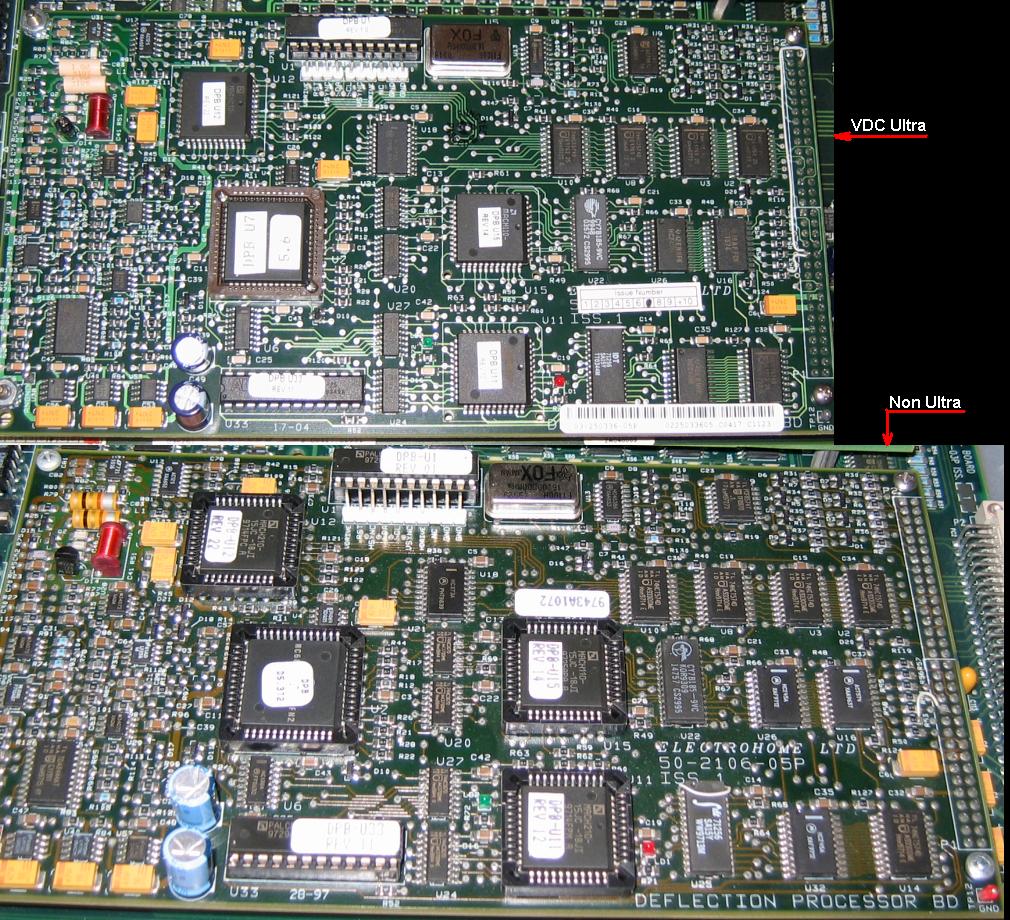
I have a VDC Marquee 9500 Ultra that started to have some deflection issues. If the projector is cold never fail. I already removed and cleaned the chips on the CLM and most of symptoms despaired. I’m pretty sure the problem is on the CLM and it should be a bad contact. This CLM version has most of the chips soldered, only 4 chips still use a socket (2 on the DPB and 2 on the CLB). I suspect that the U7 chip is the culprit.
I have a spare CLM, but is not an ultra type.
My question is: Can I plug the non ultra DPB in the ultra CLM?
From my point of view both DPB are identical and the chip versions are also identical except the U7 (Non ultra U7 Ver. D5.3T2, ultra U7 Ver. 5.6).
Beside the chips sockets both CLM are identical, the only difference I found is the U7 version.
| Description: |
|
| Filesize: |
272.41 KB |
| Viewed: |
6390 Time(s) |
|
|
|
| Back to top |
|
 |
Nashou66

Joined: 12 Jan 2007
Posts: 16171
Location: West Seneca NY
|
|
| Back to top |
|
|
DGP
Joined: 05 Nov 2008
Posts: 57
Location: Barcelona
|
| Posted: Mon Oct 11, 2010 11:34 am Post subject: |
|
|
| Nashou66 wrote: | you can do that to test if the CLM is bad or the DPB. but there are some fly wires you can add tot he non ultra to make it an ultra and then check the chip versions.
Athanasios |
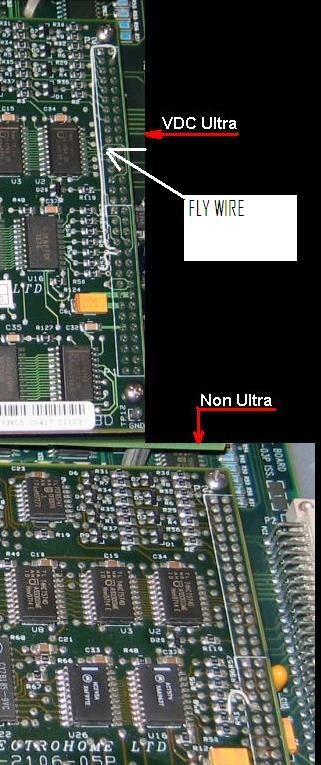
Athanasios it will be great if I can convert the non ultra CLM into an ultra version. Do you know the fly wires I should add?
|
|
| Back to top |
|
|
Nashou66
Joined: 12 Jan 2007
Posts: 16171
Location: West Seneca NY
|
| Posted: Mon Oct 11, 2010 11:42 am Post subject: |
|
|
its not the CLM its the DPB that has the added wires. Just look at your ultra DPB.
first try your ultra DPB to your other CLM. copy your setting from your old CLM with the marquee loader program or the Marquee Controller Program.
then swap the DPB to your other CLM.
then if it works after a couple hours check the chip versions and move them to the new board. if it still acts up i think you need to solder the connecting pins on the DPB. Or do the fly wire add on to the other DPB that is not an ultra board.
Athanasios
_________________
Don't blame your underwear for your crooked ass~ unknown Greek philosopher
"Republicans believe every day is the Fourth of July, but the Democrats believe every day is April 15." --- President Reagan
One Smart Dog!!!
Marquee High Performance Bellows now shipping!!
Marquee Modifications and Performance Enhancement
Marquee C-element and Bellow removal
|
|
| Back to top |
|
|
draganm

Joined: 08 Mar 2006
Posts: 8990
Location: Colorado
|
| Posted: Mon Oct 11, 2010 4:29 pm Post subject: |
|
|
| DGP wrote: | | Do you know the fly wires I should add? |
it's just 1 wire, this one
| Description: |
|
| Filesize: |
60.22 KB |
| Viewed: |
6333 Time(s) |
|
|
|
| Back to top |
|
|
DGP
Joined: 05 Nov 2008
Posts: 57
Location: Barcelona
|
| Posted: Fri Nov 05, 2010 2:56 pm Post subject: |
|
|
Thanks for the replays. I already added the fly wire on the DPB and replaced the complete CLM.
When I turn the projector on, it showed up a Warning message “Warning: Factory settings unusable”, but everything looks normal. Is this normal?
The original problem it is gone, but I can’t believe that also focus was better (specially on blue CRT) and also with the older CLM I can push contrast up to 86 without bloming (Frankeyokes installed). Using the original CLM the projector started to show up bloming with contrast at 65. All settings are indentical in both CLMs.
So I started to do all boards combinations within the old and new CLM (DPB, SWB and CLB) to know which one improves the focus and it is the CLB. No idea why.
Finally I decided to use the old CLM with the fly wire on the DPB, but some hours after the image get unfocused and bigger at once. It is possible to readjust focus and size again, but if I leave the projector turned off enough time to get could again looks like I should use the original focus and size values otherwise the image looks unfocused and smaller.
I used the original CLM but looks like is not the culprit. No error LED anywhere. Any idea? Could be realted with the warning message I saw using the modified CLM?
|
|
| Back to top |
|
|
dvh99

Joined: 25 Dec 2009
Posts: 2158
Location: nederland
|
| Posted: Fri Nov 05, 2010 3:15 pm Post subject: |
|
|
first what is a clb? or do you mean the clm
do you have a ultra focus board installed?
mike said that the frankenyokes arent ideal for the marquee. unless you rewind the coils to the specific magnetic induction of course.
mike also changed some values on the focus board but that was with using barco coils.
look carefully if you havent caused a short.
the focus waveform generator is on the clm perhaps the newer fwg sends a cleaner signal.
_________________
1 answer always poses multiple questions.
marquee 9500ultra HD10L moome hdmi1.3 v3+ some mods.
|
|
| Back to top |
|
|
DGP
Joined: 05 Nov 2008
Posts: 57
Location: Barcelona
|
| Posted: Fri Nov 05, 2010 3:40 pm Post subject: |
|
|
| dvh99 wrote: | first what is a clb? or do you mean the clm
do you have a ultra focus board installed?
mike said that the frankenyokes arent ideal for the marquee. unless you rewind the coils to the specific magnetic induction of course.
mike also changed some values on the focus board but that was with using barco coils.
look carefully if you havent caused a short.
the focus waveform generator is on the clm perhaps the newer fwg sends a cleaner signal. |
The CLM is composed by 3 boards CLB, SWB and the DPB. The CLB is the one that improves de focus.
I have an ultra focus installed, in fact is an ultra 9500 from VDC. I doubt that the frankenyokes are the reason because I installed them 2 years ago.
To me looks like a setting change somewhere in the projector (not in the CLM)
|
|
| Back to top |
|
|
Nashou66
Joined: 12 Jan 2007
Posts: 16171
Location: West Seneca NY
|
| Posted: Fri Nov 05, 2010 3:53 pm Post subject: |
|
|
Did you make sure you placed all the right chips together? I would make sure you take all the CLB chips that were on the ultra and place them on the non Ultra CLB and if you made the non ultra DPB into an ultra make sure you change those chips over as well.
from your pic it looks like the DPB on the ultra has a 5.6 U7 chip vs the 5.3 non ultra chip. that can make the unit show that error.
nashou
_________________
Don't blame your underwear for your crooked ass~ unknown Greek philosopher
"Republicans believe every day is the Fourth of July, but the Democrats believe every day is April 15." --- President Reagan
One Smart Dog!!!
Marquee High Performance Bellows now shipping!!
Marquee Modifications and Performance Enhancement
Marquee C-element and Bellow removal
|
|
| Back to top |
|
|
DGP
Joined: 05 Nov 2008
Posts: 57
Location: Barcelona
|
| Posted: Fri Nov 05, 2010 7:31 pm Post subject: |
|
|
No I didn't change any chip, I just added the fly wire on the DPB. There are 3 chips with different versions:
- U7
- U29
- U35
I can only move the U7 because the other 2 are soldered.
The warning show up every time I change the complete CLM, it doesn't matter if it is the ultra or not.
Diego
|
|
| Back to top |
|
|
Nashou66
Joined: 12 Jan 2007
Posts: 16171
Location: West Seneca NY
|
|
| Back to top |
|
|
DGP
Joined: 05 Nov 2008
Posts: 57
Location: Barcelona
|
| Posted: Fri Nov 05, 2010 7:44 pm Post subject: |
|
|
Yes the picture defocus and comes back and also there is a misalignment in the red CRT there is no way to fix it. I cleaned the removable chips and sockets and at the beginning I believed the defocus issue was fixed (the misalignment was still there) but after some days it comes back. I start to consider the option that there is a bad contact somewhere in the DPB.
When I replaced only the DPB the defocus and the red misalignment issues disappear. Just because I can't move all the chips from one CLM to the other, I tried the old CLM as it is but with the fly wire on the DPB and it works. Then I noticed the improvement in the focus and contrast.
Diego
|
|
| Back to top |
|
|
dvh99
Joined: 25 Dec 2009
Posts: 2158
Location: nederland
|
| Posted: Fri Nov 05, 2010 8:24 pm Post subject: |
|
|
bad contacts can do funny things, the picture can spin like crazy soldering the pins is a good idea.
_________________
1 answer always poses multiple questions.
marquee 9500ultra HD10L moome hdmi1.3 v3+ some mods.
|
|
| Back to top |
|
|
Nashou66
Joined: 12 Jan 2007
Posts: 16171
Location: West Seneca NY
|
|
| Back to top |
|
|
DGP
Joined: 05 Nov 2008
Posts: 57
Location: Barcelona
|
| Posted: Fri Nov 05, 2010 8:36 pm Post subject: |
|
|
Yes I have one from my 8500. I also think could be the HVPS, in fact I believe is a king of blooming not defocused. Once it started to fail if I reduce contrast the image the focus is normal but dim. The HVPS could also explain the picture size change.
Could it be possible that a wrong software version could damage the HVPS?
It’s fanny, the HVPS is the only module I never modified, completely untouched  !!! !!!
Diego
|
|
| Back to top |
|
|
DGP
Joined: 05 Nov 2008
Posts: 57
Location: Barcelona
|
| Posted: Sun Nov 14, 2010 6:32 pm Post subject: |
|
|
Finally I found and solved the DPB problem, it was a bad contact in the U7 socket. Unfortunately I still have problems with the HVPS, is bad (9500 Ultra build in 2004  ), but the way it behaves it is really strange. When I power on the projector it works perfectly until it get warmed (30/40 minutes) and then usually happens, just in one second, that the image get bigger on screen and defocus. It could be also possible that after some time it recovers the original focus and size. I replaced the HVPS with one spare I have from a 8500 and the problem disappear. ), but the way it behaves it is really strange. When I power on the projector it works perfectly until it get warmed (30/40 minutes) and then usually happens, just in one second, that the image get bigger on screen and defocus. It could be also possible that after some time it recovers the original focus and size. I replaced the HVPS with one spare I have from a 8500 and the problem disappear.
Is this the typical HVPS failure? I don’t hear any noise when this happen, somehow is linked to temperature.
CLM question:
Because I had problems with the DPB in my Ultra projector. I wanted to test if the issue disappear with the CLM from the 8500. Before I installed it in the Ultra projector I added the fly wire on the DPB to converted to an Ultra. I didn’t swap any chip, just as it was on my 8500.
When I turn the projector on, it showed up a Warning message “Warning: Factory settings unusable”, but everything looks normal.
It was clearly visible that the image was brighter and more sharp. Also I can push contrast up to 86 without blooming (with the original CLM only up to 65).
After this incredible improvement I swapped the Ultra SWB (stigmator wavefrom) board on the CLM, just in case this was the reason but nothing changed.
It looks like the CLM from my 8500 with the fly wire and the Ultra SWD, is changing the way the HVPS behaves. Could please somebody help me to understand this?.
Diego
|
|
| Back to top |
|
|
antorsae
Joined: 16 Jul 2006
Posts: 297
|
| Posted: Mon Nov 15, 2010 4:51 pm Post subject: |
|
|
Hi Diego,
When I swap CLMs I have to do a full calibration of the projector. I am not sure but I believe (please somebody who knows for sure... step in!) that the CLM generates some analog voltages used by the G2 and/or contrast lines... That's the only explanation I could find.
I had exactly the same issue you are experiencing with an HPVS. Heat-related... opened it, cleaned daughtherboard socket, etc... and nothing.. when it gets hot image changes size (and focus).
Rgs - Andres
|
|
| Back to top |
|
|
DGP
Joined: 05 Nov 2008
Posts: 57
Location: Barcelona
|
| Posted: Mon Nov 15, 2010 5:45 pm Post subject: |
|
|
Hi Andres,
When I swapped the CLMs I did a full calibration including G2, RGB focus and Stig adjustments. I always leave contrast and brightness at 50.
Diego
|
|
| Back to top |
|
|
|
|




