|
As this forum is rarely used anymore, we've locked it. Feel free to browse and read. Questions? Please reach out to us directly. Cheers! |
|
|
 |
|
|
| Author |
Message |
perisoft

Joined: 29 Aug 2007
Posts: 2920
Location: Ithaca, NY
|
| Posted: Wed Sep 15, 2010 2:29 am Post subject: Hey, it's a G70 XXXXX troubleshooting thread! |
|
|
Yeah, that's right.
So, I figured the thing up tonight and spent a couple of hours messing around. I got RGBHV input working fine, though the menu system is... obscure, to say the least. In some ways Sony's menus are great, and in some ways they're a massive WTF (popping all channels back on when you go to adjust a different item, for example, or letting you adjust a channel that's muted. Christ, I remember that one biting me in the ass with the 1271...).
Stig on green is very good; red focus needs to be pulled pretty hard electronically and R and B stig might want correcting in hardware. Not sure yet.
My input was a too-long VGA cable rather than a real RGBHV cable, so I think it was pretty bad. Lots of ghosting, etc. And I wasn't able to get powerstrip doing custom resolutions on my hacker computer I'm running this with in my office.
So, first official screenshot of the G70, on a 60" wide "screen" consisting of somewhat rumply big paper on the wall:
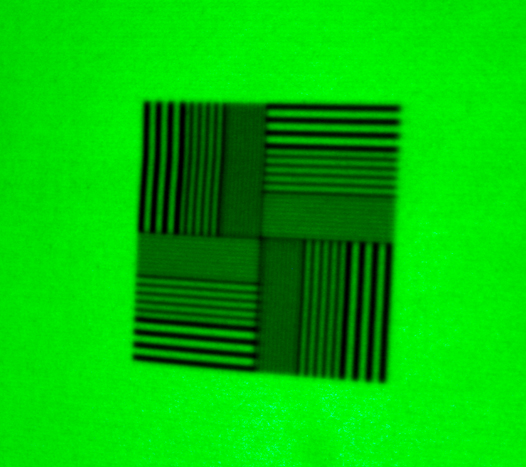
1080i60. Scanliney as all hell; never had a similar look with the Barco even when it was almost as sharp. But this is *already* sharper than I got the Barco.
Damn. This ought to be fun. 
Oh, and electronic stig? My god! I mean, I love my Barco, don't get me wrong, but this is a freaking Jeep-to-Land Rover kinda move here. Yikes!
_________________

Last edited by perisoft on Fri Sep 17, 2010 8:05 pm; edited 1 time in total
|
|
| Back to top |
|
 |
ecrabb
Forum Moderator

Joined: 13 Mar 2006
Posts: 15909
Location: Utah
TV/Projector: JVC RS40, Epson 5010
|
| Posted: Wed Sep 15, 2010 2:41 am Post subject: |
|
|
| perisoft wrote: | 1080i60. Scanliney as all hell; never had a similar look with the Barco even when it was almost as sharp. But this is *already* sharper than I got the Barco.
Damn. This ought to be fun.
Oh, and electronic stig? My god! I mean, I love my Barco, don't get me wrong, but this is a freaking Jeep-to-Land Rover kinda move here. Yikes! |
Told ya. 
SC
|
|
| Back to top |
|
|
perisoft
Joined: 29 Aug 2007
Posts: 2920
Location: Ithaca, NY
|
| Posted: Wed Sep 15, 2010 3:25 am Post subject: |
|
|
| ecrabb wrote: | | perisoft wrote: | 1080i60. Scanliney as all hell; never had a similar look with the Barco even when it was almost as sharp. But this is *already* sharper than I got the Barco.
Damn. This ought to be fun.
Oh, and electronic stig? My god! I mean, I love my Barco, don't get me wrong, but this is a freaking Jeep-to-Land Rover kinda move here. Yikes! |
Told ya.
|
Oh, and the scheimpflug? I figured, "What the hell, I'll see how hard it is to do this", and after about three screw turns and a corner focus adjustment, the blue optical was better at the corners than I've gotten my Barco all these long years. I mean... you could see what happened! Turn knob, top defocuses and bottom focuses! Christ, it was like someone else was doing the work for me...
It reminds me of the story about a guy who's walking down the street hitting himself in the head with a hammer. Someone stops him and says, "Why are you doing that?", and the guy says, "Because it feels so good when I stop." Three years of hammering, and this is feeling pretty good!
Also, I'm suspecting that optical's going to be better when I'm running on my real screen and don't have the thing squashed down to its absolute minimum screen size. Hells yeah.
_________________
|
|
| Back to top |
|
|
CIR Engineering

Joined: 25 Aug 2008
Posts: 4269
Location: Chicago USA & Berlin Germany
|
| Posted: Wed Sep 15, 2010 1:51 pm Post subject: Re: Hey, it's a G70 setup thread! |
|
|
| perisoft wrote: |
In some ways Sony's menus are great, and in some ways they're a massive WTF (popping all channels back on when you go to adjust a different item, for example, or letting you adjust a channel that's muted. Christ, I remember that one biting me in the ass with the 1271...)...
1080i60. Scanliney as all hell; never had a similar look with the Barco even when it was almost as sharp. But this is *already* sharper than I got the Barco.
Damn. This ought to be fun.
Oh, and electronic stig? My god! I mean, I love my Barco, don't get me wrong, but this is a freaking Jeep-to-Land Rover kinda move here. Yikes! |
Yeah, the absolute worst thing about Sony setup is the ability to adjust a color while it is muted. I wind up screwing this up often even though I own one and work on them all the time. It's always like, "man I am really running the linearity out so why isn't blue moving..." Then it's like $**t, I am accidentally adjusting red and now red is totally hosed
I love the Sony menu system though. Once you are in service mode it stays in service mode until you power down. And there is a direct command on the remote for every parameter so you only need the menu at all for the very initial settings like clamp and greyscale choice and the like.
If and when you adjust the flare magnets, try adjusting them with your highest frequency scan rate (1080p 60Hz) and then use the electronic to touch up the lower scan rates. Unless you really don't think you will use 1080p. But the G70 can resolve 1080p 60Hz pretty well if you optimize the phosphor usage. It won't fully resolve 1080p, but it does well enough.
Oh, and 1080i, the G70 will easily fully resolve 1080i so you should have perfect SMTPE 1:1 on all three colors at the center once you get it setup. If you do a good job and are also lucky you can often get perfectly resolved 1080i at all four corners as well.
And yeah, like I said the G70 is a dream to setup. Another advantage of electronic stig is that you can walk right up to the screen and actually see what you are doing clearly instead of being all the way back at the projector 
...I forget though, does the G70 have an electronic 6-pole at the center or not? I know the G90 has center 6-pole and also nine zones, but I forget if the G70 has any 6-pole at the moment.
craigr
_________________
JETI 1501-HiRes 2nm Spectroradiometer
JETI 1211 Spectroradiometer
Photo Research PR-650 Spectroradiometer
Klein K10-A Colorimeter
Murideo Fresco SIX-G HDMI 2.x Multimedia Generator
Murideo Fresco SIX-A HDMI 2.x Analyzer
Light Illusion ColourSpace XPT Color Calibration Software
Light Illusion LightSpace XPT Pro Version 10.x Color Calibration Software
OMARDRIS JVC Software Patch to use K10-A and Jeti with JVC OEM AutoCal Software!
Sencore CR7000 CRT Tube Analyzer / Rejuvenater
Authorized Dealer for Lumagen & just about everything worth buying
www.CIR-Engineering.com - craigr@cir-engineering.com
Phone: 865-405-6892
|
|
| Back to top |
|
|
CIR Engineering
Joined: 25 Aug 2008
Posts: 4269
Location: Chicago USA & Berlin Germany
|
| Posted: Wed Sep 15, 2010 1:58 pm Post subject: |
|
|
| perisoft wrote: |
Oh, and the scheimpflug? I figured, "What the hell, I'll see how hard it is to do this", and after about three screw turns and a corner focus adjustment, the blue optical was better at the corners than I've gotten my Barco all these long years. I mean... you could see what happened! Turn knob, top defocuses and bottom focuses! Christ, it was like someone else was doing the work for me... |
There is a lot to be said for a continuously adjustable scheimpflug with an infinite number of positions between max and min The G90 is the same, just turn the wrench and watch the screen.
When you do the scheimpflug on your final screen, defocus the tube you are adjusting slightly with the center optical focus to make everything slightly fuzzy. It makes it much easier to see when you have the same exact amount of fuzzy on opposite sides than when you try to compare which is sharper As you go along, tighten up the center focus and then defocus optically with the edge focus and repeat until the edge focus requires the same trim on the top, bottom, left, and right. You will get it supper tight.
I am spoiled and whenever I work on a projector that uses shims I am just like UGGGG now.
craigr
_________________
JETI 1501-HiRes 2nm Spectroradiometer
JETI 1211 Spectroradiometer
Photo Research PR-650 Spectroradiometer
Klein K10-A Colorimeter
Murideo Fresco SIX-G HDMI 2.x Multimedia Generator
Murideo Fresco SIX-A HDMI 2.x Analyzer
Light Illusion ColourSpace XPT Color Calibration Software
Light Illusion LightSpace XPT Pro Version 10.x Color Calibration Software
OMARDRIS JVC Software Patch to use K10-A and Jeti with JVC OEM AutoCal Software!
Sencore CR7000 CRT Tube Analyzer / Rejuvenater
Authorized Dealer for Lumagen & just about everything worth buying
www.CIR-Engineering.com - craigr@cir-engineering.com
Phone: 865-405-6892
|
|
| Back to top |
|
|
perisoft
Joined: 29 Aug 2007
Posts: 2920
Location: Ithaca, NY
|
| Posted: Thu Sep 16, 2010 12:51 am Post subject: |
|
|
So, I only had a few minutes today before my two-year-old took priority, but I did notice some odd behavior. First, the green seemed to be cutting in and out a bit; I tried some different output freqs and that seemed to alter things a bit. I can't rule out the source, though, since it's kind of a beater computer and it's been through the wars.
The second odd thing was that it seemed to suddenly drop contrast by 30%-40% or so; full output on each channel dropped by that much vs. the test patterns. Changing the contrast changed both; gain on each channel was already fairly high.
The only thing that used to do something similar on other display devices was switching whether they expected different voltages, but I don't see why that would have changed suddenly...
The third odd thing is that some modes resulted in a lack of sync; v-sync was fine but h-sync was all over the map. 1080i60 was whacky but 1080i59 worked fine...
These things combined with the history of input flakiness worry me - that said, it's never acted like it was going to fail to get ANY signal.
Ideas for things to check?
_________________
|
|
| Back to top |
|
|
AnalogRocks
Forum Moderator

Joined: 08 Mar 2006
Posts: 26706
Location: Toronto, Ontario, Canada
TV/Projector: Sony 1252Q, AMPRO 4000G
|
| Posted: Thu Sep 16, 2010 4:39 am Post subject: |
|
|
Which input card do you have?
_________________
Tech support for nothing
CRT.
HD done right!
|
|
| Back to top |
|
|
perisoft
Joined: 29 Aug 2007
Posts: 2920
Location: Ithaca, NY
|
| Posted: Thu Sep 16, 2010 10:15 am Post subject: |
|
|
Uh... It's rgbhv/component, or video or s-video. Are there different types of card that do rgbhv?
_________________
|
|
| Back to top |
|
|
CIR Engineering
Joined: 25 Aug 2008
Posts: 4269
Location: Chicago USA & Berlin Germany
|
| Posted: Thu Sep 16, 2010 2:20 pm Post subject: |
|
|
Well if your source could be flaky I would start by making sure it isn't (obviously).
I forget, is the G70 like the G90 in that you need to set the clamp in the service menu? On the G90 if you don't set the clamp to HC you will get weird behavior like that... but not on 1080i.
Is ABG on or off?
craigr
_________________
JETI 1501-HiRes 2nm Spectroradiometer
JETI 1211 Spectroradiometer
Photo Research PR-650 Spectroradiometer
Klein K10-A Colorimeter
Murideo Fresco SIX-G HDMI 2.x Multimedia Generator
Murideo Fresco SIX-A HDMI 2.x Analyzer
Light Illusion ColourSpace XPT Color Calibration Software
Light Illusion LightSpace XPT Pro Version 10.x Color Calibration Software
OMARDRIS JVC Software Patch to use K10-A and Jeti with JVC OEM AutoCal Software!
Sencore CR7000 CRT Tube Analyzer / Rejuvenater
Authorized Dealer for Lumagen & just about everything worth buying
www.CIR-Engineering.com - craigr@cir-engineering.com
Phone: 865-405-6892
|
|
| Back to top |
|
|
CIR Engineering
Joined: 25 Aug 2008
Posts: 4269
Location: Chicago USA & Berlin Germany
|
| Posted: Thu Sep 16, 2010 2:25 pm Post subject: |
|
|
| perisoft wrote: | | Uh... It's rgbhv/component, or video or s-video. Are there different types of card that do rgbhv? |
I think he meant do you have a Moome IFB or something along those lines.
What sources are you planning to use with the G70? Since you are on a budget, I would look for one of JohnHW's old DVI IFB cards or maybe get an HDF1. Both are DVI so only 8-bit color, but both do a good job with 1080p, especially John's Sony board.
I am installing a new Moome IFB in Doc's G90 in a couple months along with a Radiance processor. Doc has John's IFB in his projector now and I bet he would sell it to you for a fair price when we replace it with the Moome. I'll let him know, if you are interested in it?
craigr
_________________
JETI 1501-HiRes 2nm Spectroradiometer
JETI 1211 Spectroradiometer
Photo Research PR-650 Spectroradiometer
Klein K10-A Colorimeter
Murideo Fresco SIX-G HDMI 2.x Multimedia Generator
Murideo Fresco SIX-A HDMI 2.x Analyzer
Light Illusion ColourSpace XPT Color Calibration Software
Light Illusion LightSpace XPT Pro Version 10.x Color Calibration Software
OMARDRIS JVC Software Patch to use K10-A and Jeti with JVC OEM AutoCal Software!
Sencore CR7000 CRT Tube Analyzer / Rejuvenater
Authorized Dealer for Lumagen & just about everything worth buying
www.CIR-Engineering.com - craigr@cir-engineering.com
Phone: 865-405-6892
|
|
| Back to top |
|
|
perisoft
Joined: 29 Aug 2007
Posts: 2920
Location: Ithaca, NY
|
| Posted: Thu Sep 16, 2010 3:38 pm Post subject: |
|
|
| CIR Engineering wrote: | | perisoft wrote: | | Uh... It's rgbhv/component, or video or s-video. Are there different types of card that do rgbhv? |
I think he meant do you have a Moome IFB or something along those lines.
What sources are you planning to use with the G70? Since you are on a budget, I would look for one of JohnHW's old DVI IFB cards or maybe get an HDF1. Both are DVI so only 8-bit color, but both do a good job with 1080p, especially John's Sony board.
I am installing a new Moome IFB in Doc's G90 in a couple months along with a Radiance processor. Doc has John's IFB in his projector now and I bet he would sell it to you for a fair price when we replace it with the Moome. I'll let him know, if you are interested in it?
craigr |
The PJ came with an HD Fury 1, an RCT2200 (which I'm almost certainly going to sell as I have no component sources) and a Moome card. Originally the inputs on the PJ weren't working, but when the Moome card was pulled they started working; replacing the Moome card, however, didn't re-break the inputs - this is according to the previous owner. So it's odd.
I was planning on using RGBHV, due to the flexibility it gives me with scanrates; I'm not sure I can convince an HDFury or Moome to run, say, 1080i96, or 1080p48, and to alter porches etc. But I've never used them, so I don't know. It seems odd that a purely digital output like HDMI would be able to set porches, since it seems absurd to have a protocol meant to drive fixed pixel displays have that kind of feature. But absurd things have happened in the past...
I haven't messed with clamp. ABG is running; I tried turning it off the other night, and yeah, everything got dim - but it's on now.
I'll recheck that and check the source (obviously, as you say).
Thanks for the help!
_________________
|
|
| Back to top |
|
|
CIR Engineering
Joined: 25 Aug 2008
Posts: 4269
Location: Chicago USA & Berlin Germany
|
| Posted: Thu Sep 16, 2010 5:24 pm Post subject: |
|
|
Everything DVI/HDMI is easily customizable just like analog. The HDF1 and Moome won't have any problems running anything with a pixel clock below 148.5 MHz. So anything with a pixel clock below 1080p 60Hz will work with those DVI transcoders.
Post a photo of your Moome board and I can tell you which will be better, that or the HDF1. Most likley the HDF1 will be a better choice.
You could probably sell the Moome on eBay easy. I listed one for $98 a few months ago at a fixed price listing. It sold in less than three hours. I would do that and use the money to get one of John's DVI IFB cards as that will be the best option besides the newest Moome FULLHD card that costs around $350.
craigr
_________________
JETI 1501-HiRes 2nm Spectroradiometer
JETI 1211 Spectroradiometer
Photo Research PR-650 Spectroradiometer
Klein K10-A Colorimeter
Murideo Fresco SIX-G HDMI 2.x Multimedia Generator
Murideo Fresco SIX-A HDMI 2.x Analyzer
Light Illusion ColourSpace XPT Color Calibration Software
Light Illusion LightSpace XPT Pro Version 10.x Color Calibration Software
OMARDRIS JVC Software Patch to use K10-A and Jeti with JVC OEM AutoCal Software!
Sencore CR7000 CRT Tube Analyzer / Rejuvenater
Authorized Dealer for Lumagen & just about everything worth buying
www.CIR-Engineering.com - craigr@cir-engineering.com
Phone: 865-405-6892
|
|
| Back to top |
|
|
perisoft
Joined: 29 Aug 2007
Posts: 2920
Location: Ithaca, NY
|
| Posted: Thu Sep 16, 2010 7:12 pm Post subject: |
|
|
The moome is the older DVI one (1.3 on the board).
Well, it's not looking good for this thing. I tried the Moome, and it looks great - except there's only the red channel.
HD Fury and RGBHV suffer the same issues (well, HDF goes through RGB so...). Now there're more things going wonky; the levels aren't correct as before, and...
- It often takes the G70 a long time to lock to a signal. In one test it lost sync whenever the image got very bright.
- The input *and the menu* started losing green almost entirely, at random intervals. This suggests something beyond the input board, which would be Very Bad.
- There's a constant kind of very high frequency horizontal interference going on; the same regardless of signal and source.
All of this was tested with two different sources.
The Barco may not be ideal, but at least the thing has turned on and worked without a hitch every moment since I got it... given that I can't just spit out a couple hundred to have a board fixed whenever, if I can't find out *FOR SURE* exactly what's going on here, this'll probably get parted and dumped. 
_________________
|
|
| Back to top |
|
|
CIR Engineering
Joined: 25 Aug 2008
Posts: 4269
Location: Chicago USA & Berlin Germany
|
| Posted: Thu Sep 16, 2010 7:25 pm Post subject: |
|
|
That's sad, but don't give up so easy.
I am not enough of an expert on G70 repair to say what to try other than the basics of reseating broads and what not.
I can't remember so maybe one of the G70 owners can chime in, does the G70 have the clam setting in the service menu like the G90 does. If so, be sure to set it to HC and make sure that it is on RGBHV and not RGB, or RGB-HD, or RGB-SD, or any of the other options that Sony has in there. On the G90 the clamp must be set correctly or you will see behavior similar to what you are describing.
craigr
_________________
JETI 1501-HiRes 2nm Spectroradiometer
JETI 1211 Spectroradiometer
Photo Research PR-650 Spectroradiometer
Klein K10-A Colorimeter
Murideo Fresco SIX-G HDMI 2.x Multimedia Generator
Murideo Fresco SIX-A HDMI 2.x Analyzer
Light Illusion ColourSpace XPT Color Calibration Software
Light Illusion LightSpace XPT Pro Version 10.x Color Calibration Software
OMARDRIS JVC Software Patch to use K10-A and Jeti with JVC OEM AutoCal Software!
Sencore CR7000 CRT Tube Analyzer / Rejuvenater
Authorized Dealer for Lumagen & just about everything worth buying
www.CIR-Engineering.com - craigr@cir-engineering.com
Phone: 865-405-6892
|
|
| Back to top |
|
|
CIR Engineering
Joined: 25 Aug 2008
Posts: 4269
Location: Chicago USA & Berlin Germany
|
| Posted: Thu Sep 16, 2010 7:27 pm Post subject: |
|
|
Also, pull the Moome out and leave it out. I have heard of defective Moome boards causing input havoc on G's at least twice in the past. The previous owner had trouble with the Moome already so it's not a bad bet. Just take out the Moome and work with the stock BNC's for now with the HDF1.
Also, that Moome version is not nearly as good as the HDF1, so with the hardware you have you should use the HDF1 anyway.
craigr
_________________
JETI 1501-HiRes 2nm Spectroradiometer
JETI 1211 Spectroradiometer
Photo Research PR-650 Spectroradiometer
Klein K10-A Colorimeter
Murideo Fresco SIX-G HDMI 2.x Multimedia Generator
Murideo Fresco SIX-A HDMI 2.x Analyzer
Light Illusion ColourSpace XPT Color Calibration Software
Light Illusion LightSpace XPT Pro Version 10.x Color Calibration Software
OMARDRIS JVC Software Patch to use K10-A and Jeti with JVC OEM AutoCal Software!
Sencore CR7000 CRT Tube Analyzer / Rejuvenater
Authorized Dealer for Lumagen & just about everything worth buying
www.CIR-Engineering.com - craigr@cir-engineering.com
Phone: 865-405-6892
|
|
| Back to top |
|
|
perisoft
Joined: 29 Aug 2007
Posts: 2920
Location: Ithaca, NY
|
| Posted: Fri Sep 17, 2010 2:00 am Post subject: |
|
|
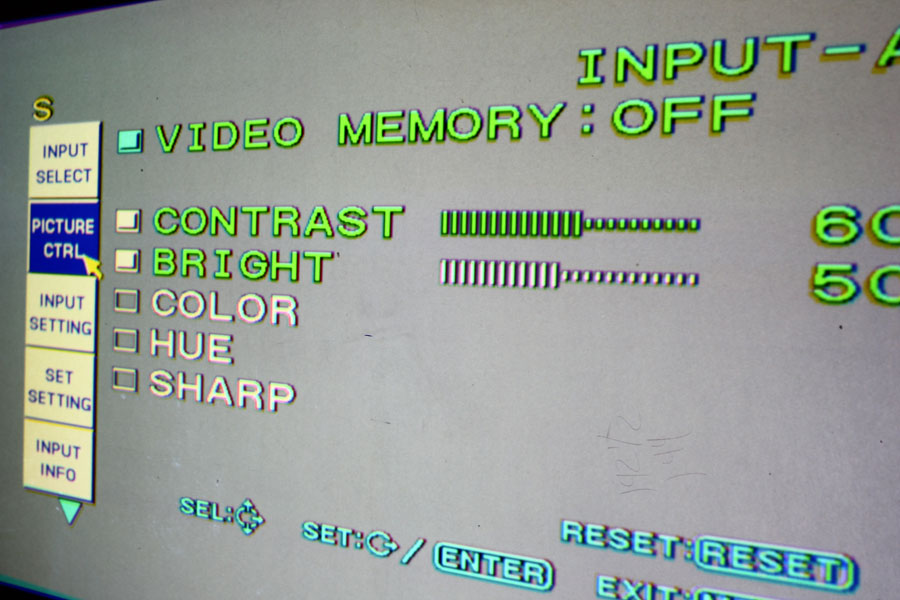
OK, so, here's a shot of the assumedly-bad levels thing. Background is full white output; obviously the menus are quite a bit brighter.
Is this by design so you can see what's going on, or is something messed up?
_________________
|
|
| Back to top |
|
|
CIR Engineering
Joined: 25 Aug 2008
Posts: 4269
Location: Chicago USA & Berlin Germany
|
| Posted: Fri Sep 17, 2010 2:15 am Post subject: |
|
|
| perisoft wrote: | | OK, so, here's a shot of the assumedly-bad levels thing. |
Hu, what are you talking about?
Where are the bias and gains set. Check them and post the numbers.
I don't think that the menus get dimmer if you turn down brightness, contrast, bias or gain on the G70. So your full white may not be max output of the tubes and menu.
It looks to me like the projector is work, no? Did you pull out the Moome?
craigr
_________________
JETI 1501-HiRes 2nm Spectroradiometer
JETI 1211 Spectroradiometer
Photo Research PR-650 Spectroradiometer
Klein K10-A Colorimeter
Murideo Fresco SIX-G HDMI 2.x Multimedia Generator
Murideo Fresco SIX-A HDMI 2.x Analyzer
Light Illusion ColourSpace XPT Color Calibration Software
Light Illusion LightSpace XPT Pro Version 10.x Color Calibration Software
OMARDRIS JVC Software Patch to use K10-A and Jeti with JVC OEM AutoCal Software!
Sencore CR7000 CRT Tube Analyzer / Rejuvenater
Authorized Dealer for Lumagen & just about everything worth buying
www.CIR-Engineering.com - craigr@cir-engineering.com
Phone: 865-405-6892
|
|
| Back to top |
|
|
ecrabb
Forum Moderator
Joined: 13 Mar 2006
Posts: 15909
Location: Utah
TV/Projector: JVC RS40, Epson 5010
|
| Posted: Fri Sep 17, 2010 2:17 am Post subject: |
|
|
I'll check mine, but I think that's right, Perisoft... IIRC, the menus are independent of brightness/contrast settings. It makes sense if you think about it... Like you pointed out, otherwise you could inadvertently make the menus impossible to see.
SC
|
|
| Back to top |
|
|
CIR Engineering
Joined: 25 Aug 2008
Posts: 4269
Location: Chicago USA & Berlin Germany
|
| Posted: Fri Sep 17, 2010 2:21 am Post subject: |
|
|
Do you have the install manual? You should look at pages 48 EN through pages 49 EN.
http://www.curtpalme.com/docs/SonyG70_Install.pdf
craigr
_________________
JETI 1501-HiRes 2nm Spectroradiometer
JETI 1211 Spectroradiometer
Photo Research PR-650 Spectroradiometer
Klein K10-A Colorimeter
Murideo Fresco SIX-G HDMI 2.x Multimedia Generator
Murideo Fresco SIX-A HDMI 2.x Analyzer
Light Illusion ColourSpace XPT Color Calibration Software
Light Illusion LightSpace XPT Pro Version 10.x Color Calibration Software
OMARDRIS JVC Software Patch to use K10-A and Jeti with JVC OEM AutoCal Software!
Sencore CR7000 CRT Tube Analyzer / Rejuvenater
Authorized Dealer for Lumagen & just about everything worth buying
www.CIR-Engineering.com - craigr@cir-engineering.com
Phone: 865-405-6892
Last edited by CIR Engineering on Fri Sep 17, 2010 2:25 am; edited 1 time in total
|
|
| Back to top |
|
|
perisoft
Joined: 29 Aug 2007
Posts: 2920
Location: Ithaca, NY
|
| Posted: Fri Sep 17, 2010 2:24 am Post subject: |
|
|
Contrast definitely affects menus.
I just tried going in and cranking gain/bias/contrast all the way up; if I do all of them then the outputs match the menus. Anything less and the menus are brighter; seems like the menus are brighter by some ratio until they start to saturate and the 'normal' output catches up.
So, it could be that a previous memory had much higher gain/bias, and it wasn't noticeable until I triggered another memory without such characteristics.
That still doesn't explain the slight jitteriness, or, more worryingly, the random times when green drops by 80% or so.
Right now I'm using direct VGA->RGBHV, but I've seen the same behavior with the HDF.
When the Moome was in there, the red was rock solid; no jitteriness at all. Looked great. Too bad it was only the red channel.
_________________
|
|
| Back to top |
|
|
|
|
|
|
|
You cannot post new topics in this forum
You cannot reply to topics in this forum
You cannot edit your posts in this forum
You cannot delete your posts in this forum
You cannot vote in polls in this forum
You cannot attach files in this forum
You can download files in this forum
|
Forum powered by phpBB © phpBB Group
|
|




