| Author |
Message |
perisoft

Joined: 29 Aug 2007
Posts: 2920
Location: Ithaca, NY
|
| Posted: Fri Sep 03, 2010 6:38 pm Post subject: Feature Creep |
|
|
OK, gentlemen...
A thread popped up the other day discussing MTF detection using MS Paint.
Those of you who know me (at all) will know that I can't leave well enough alone; my first thought was, "I can automate that". My second thought was, "I can use that to focus my projector if I hook up a web cam or other video device and can provide realtime feedback."
So, first, I fired up a web cam, pointed it at a test pattern, and focused away. Hot damn! Projecting a hugely blown-up picture of the web cam output allowed me to adjust optical focus far better than I'd been able to before; so-encouraged, I decided to try doing the same thing with astig.
I'd had a hell of a time getting astig anywhere near reasonable on my red tube; seeing a huge version on-screen made a massive difference. It's nowhere near perfect, but far, far better than before.
The next thing, I figured, was to be able to do this without eyeballing it. First, if you're adjusting focus and astig, the focus of the window you're watching to do the adjustment gets messed with. You could mitigate this by using a separate screen for the webcam, but that can be tricky; your only other option is to use a laptop and try to put it somewhere that you can see easily while your hand is stuck inside your projector.
Given that, the obvious task is to find a way to look at the pixel readings directly.
So, I fired up mah Visual Basic and had at it. I now have a nifty app that lets you set two pixel positions and (will soon) tell you the RGB values of each one, plus, probably, the ratio between the two. It'll read anything on the desktop; the trick is that if your webcam display uses an overlay my app can't get the pixel colors. I actually haven't tested mine yet.
But, the nice thing about this method is that it lets you use any optical device to do your work. If you wanted, you could use a DSLR with a macro lens, and write a script to auto-display new images; set your crosshairs anywhere on the desktop and fire away. Not as much realtime feedback as a webcam but potentially better quality.
Back to feature creep.
Originally I'd intended this to be just a personal thing, but since I can't leave well enough alone, I started making the thing slicker and slicker, so now I figure maybe other people might want to try it out too. I thought I'd ping the forum before I go doing file menus and installers and all of that crap, though.
Second, regarding feature creep, I'm looking at directly-integrating webcam support and adding in an astig helper - say, you'd pick a point and it would sample 8 points around it. You could use the result to see how round your pattern is.
One of the holy grails for me would be some way to help with optical corner focus; scheimpflug has always been a bastard for me. Only catch? You need four webcams, or a really OBSCENELY high-resolution DSLR! 
Any thoughts? Anything you guys think would be helpful? Am I just insane?
_________________

|
|
| Back to top |
|
 |
Nashou66

Joined: 12 Jan 2007
Posts: 16171
Location: West Seneca NY
|
| Posted: Fri Sep 03, 2010 7:06 pm Post subject: |
|
|
Sounds cool. And yes shiempflug is the worst, and moving the Camera for each corner would suck.
Id try it, I think my external iSight might even work on my Laptop while running windows since it runs the built in one.
How will it select which web cam to use? And would you be able to support the iSight? It think there is a driver set for windows out there somewhere.
PS, Were all Crazy Peri, were CRT'rs 
Athanasios
_________________
Don't blame your underwear for your crooked ass~ unknown Greek philosopher
"Republicans believe every day is the Fourth of July, but the Democrats believe every day is April 15." --- President Reagan
One Smart Dog!!!
Marquee High Performance Bellows now shipping!!
Marquee Modifications and Performance Enhancement
Marquee C-element and Bellow removal
|
|
| Back to top |
|
|
perisoft
Joined: 29 Aug 2007
Posts: 2920
Location: Ithaca, NY
|
| Posted: Fri Sep 03, 2010 7:29 pm Post subject: |
|
|
| Nashou66 wrote: | | Sounds cool. And yes shiempflug is the worst, and moving the Camera for each corner would suck. |
Yeah, it'd be pointless. You could go up and look yourself more easily, for obvious reasons.
| Quote: |
Id try it, I think my external iSight might even work on my Laptop while running windows since it runs the built in one.
How will it select which web cam to use? And would you be able to support the iSight? It think there is a driver set for windows out there somewhere. |
Well, there are two options... one is to have it just look at whatever pixel you select (this is what it does right now), so if you select a bit over your webcam display (and it doesn't use an overlay for the video) you'll get the color it's on. So, that's software-agnostic; it'll show what color is under that point where it's a photo, a webcam, or a flash animation in a web browser.
The other is to use the WDM API to grab the webcam framebuffer directly; that would solve the problem of overlays. But it would also limit your access to webcams that obey the WDM convention and show up to windows like a mouse or joystick or whatever (roughly).
This could have benefits though; you could do frame-averaging to get rid of the horrifying flicker that you get when webcams try to look at CRT screens, and denoise/improve effective bit depth. And other stuff that gets into image processing, but that's substantially more involved. We're talking, version 4 more involved.
iSight appears to be an edge-case; it looks like it wouldn't be visible like a regular web cam. But if you could find some other app that would show its output, you could use that with method 1 (with above caveats, of course).
| Quote: |
PS, Were all Crazy Peri, were CRT'rs |
There is that, but the thing is, you've got the basic level of crazy necessary to have a CRT at all, but then you have that compounded by the crazy required to write applications to help tweak a CRT!
It's worth noting that webcams which can do this effectively may be thin on the ground. I'm using some Logitech thing that just happens to have barely-tolerable flicker reduction and, most importantly, good gain/brightness controls. Without that it'd be very difficult to get the webcam to correctly show what's really on-screen.
Webcams are cheap, though, so if a few people tried this out I'm sure we could come up with a good 'standard' webcam.
_________________
|
|
| Back to top |
|
|
David_Web
Joined: 02 May 2007
Posts: 418
Location: Sweden
|
| Posted: Fri Sep 03, 2010 7:37 pm Post subject: |
|
|
You could use Roborealm http://www.roborealm.com/
It supports VB directly so you probably feel right at home.
Stacking average or any other filter is easy.
Think there is a histogram as well which would be useful.
_________________
SNR of people are ridiculously low.
|
|
| Back to top |
|
|
garyfritz

Joined: 08 Apr 2006
Posts: 12088
Location: Fort Collins, CO
|
| Posted: Fri Sep 03, 2010 8:00 pm Post subject: |
|
|
| perisoft wrote: | | Quote: | | PS, Were all Crazy Peri, were CRT'rs |
There is that, but the thing is, you've got the basic level of crazy necessary to have a CRT at all, but then you have that compounded by the crazy required to write applications to help tweak a CRT! |
No worries, Peri. We've known you were A-grade prime looney-toons since you first showed up and started writing an inverse mask to try to "un-burn" your blue. 
|
|
| Back to top |
|
|
perisoft
Joined: 29 Aug 2007
Posts: 2920
Location: Ithaca, NY
|
| Posted: Fri Sep 03, 2010 8:42 pm Post subject: |
|
|
| garyfritz wrote: | | We've known you were A-grade prime looney-toons since you first showed up and started writing an inverse mask to try to "un-burn" your blue. |
It wasn't to un-burn, it was to process output images so the burn wasn't apparent. Anyway, it worked, didn't it? 
As far as that roborealm stuff goes, it looks cool, but I'm not going to be spending $90 for a license - if I had $90 to spend on my HT, it'd go toward something else!
_________________
|
|
| Back to top |
|
|
tse
Joined: 03 May 2006
Posts: 1014
Location: Sweatbucket, Fl.
|
| Posted: Fri Sep 03, 2010 11:50 pm Post subject: |
|
|
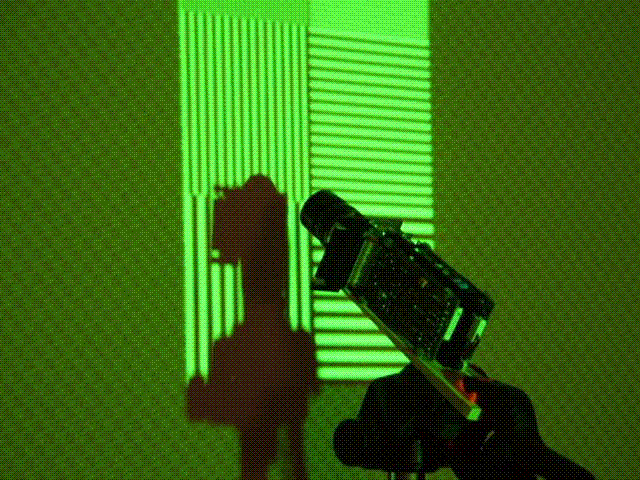
Cool. You can absolutely do this. Your idea of looking at eight points around a spot to determine how round it is sounds great.
To do scheimpflug I think will take four cameras (or a real high res one, like you said). One looks at the top center, one at the left side at the center, yada yada. Focus is easily seen if you project a test pattern of alternating black and white lines. Look at the light profile and compare white level to black level. Best focus is when there is the greatest difference between the two. Adjust the side to side control so left and right patterns "peak" at the same setting. Same with the top and bottom. It is right when you adjust the lens and all four camera displays peak at the same lens setting.
Maybe five cameras with one in the center. Adjust center focus barrel for best center focus then the outside barrel for the best outside focus.
Get the cameras up close to the screen so they are looking at a small area. Put a lens spacer between lens and cam so it can focus up close.
It helps alot to have full horizontal size and full vertical size projected when you do this.
Go for it. This would be a great tool.
Scott
| Description: |
|
| Filesize: |
75.35 KB |
| Viewed: |
7640 Time(s) |
|
_________________
"Were we directed from Washington when to sow and when to reap, we would soon want bread."
Thomas Jefferson
|
|
| Back to top |
|
|
dturco

Joined: 06 Feb 2009
Posts: 3778
Location: Eastern Shore Maryland
TV/Projector: Runco DLP VX-3000i Marquee 9500 parts doner
|
| Posted: Sat Sep 04, 2010 12:02 am Post subject: |
|
|
If you make it easy enough to use I'm in for it. Heck, I'll help you beta test it. If I can do it, well... you know, anyone can. 
Oh, I think the cheap four camera option is best/cheapest, since I don't have a DSLR camera 
_________________
Firefly rules. Can't stop the signal.
http://www.hulu.com/firefly
|
|
| Back to top |
|
|
Nashou66
Joined: 12 Jan 2007
Posts: 16171
Location: West Seneca NY
|
|
| Back to top |
|
|
perisoft
Joined: 29 Aug 2007
Posts: 2920
Location: Ithaca, NY
|
| Posted: Sat Sep 04, 2010 12:40 am Post subject: |
|
|
OK, here we go:
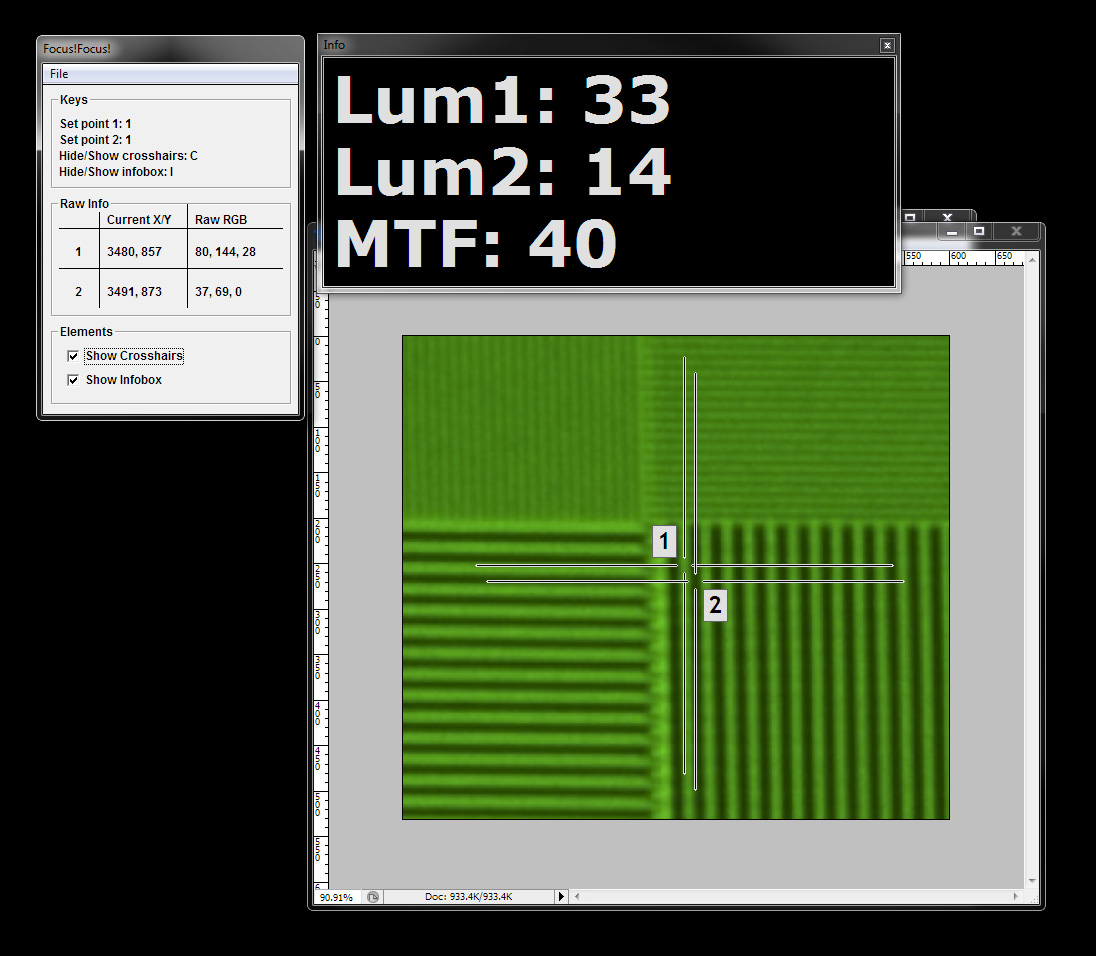
Current features:
• Catchy name
• Always-on-top crosshairs; you can move the image or use GUI elements in the webcam without losing your place
• Crosshair visibility selectable
• Huge-ass MTF readout that assumes you'll be showing Focus!Focus! on your projector and it'll get fuzzy when you change the focus
• Set test points with keyboard so the window doesn't switch as soon as you click
• '1' and '2' labels automatically swap to the position furthest away from each other so they don't obscure the selected pixel
Obvious to-do:
• Complex, overwrought splash screen
• Installer with onerous but probably unenforceable EULA
• Zoom window with internal crosshairs so you can see where the hell your cursor is
• Calculate MTF based on more than one pixel selectably
• Test on an actual webcam screen instead of a screenshot from somewhere on CurtPalme/forum
Not-so-obvious to-do:
• Auto-seek high or low luma pixels near the clicked area to avoid holding down the select key and dragging around until you see the highest/lowest luma value
• Use temporal averaging on selected pixel to avoid crazy-changing MTFs with flickering output
• Selectably-huge-ass MTF readout for different scenarios
...and then there's the Far More Complex stuff like astig support, internal support of webcams, etc...
Anyway, it's a start. If I can determine that it'll actually work on a real webcam, I'll prolly package it up and let you guys play with it.
_________________
|
|
| Back to top |
|
|
Spanky Ham

Joined: 22 Mar 2006
Posts: 5643
Location: Comedy Central
|
| Posted: Wed Sep 08, 2010 9:09 pm Post subject: |
|
|
|
Very interesting idea. Is there a big difference between webcams or are they all pretty much the same?
|
|
| Back to top |
|
|
Hdale85
Joined: 06 Sep 2010
Posts: 56
Location: Masury, Ohio
|
| Posted: Wed Sep 08, 2010 10:04 pm Post subject: |
|
|
|
What about using HD web cams? Also what about things like those little X10 cams or something, they have some really cheap ones but they aren't the highest of resolution.
|
|
| Back to top |
|
|
tse
Joined: 03 May 2006
Posts: 1014
Location: Sweatbucket, Fl.
|
| Posted: Wed Sep 08, 2010 11:37 pm Post subject: |
|
|
| Hdale85 wrote: | | What about using HD web cams? Also what about things like those little X10 cams or something, they have some really cheap ones but they aren't the highest of resolution. |
The resolution hardly matters when you have 10 camera pixels looking at every projector pixel. The MTF test set that I use most at work isn't even a camera. It is a light sensor device with 240 light detectors arrainged in a line. When it is close enough to the screen to "see" only 10 or 12 cycles (one black line and one white line makes a cycle) of a one on/one off line or pixel test pattern it is plenty accurate. What might be more important is the linearity of the light detectors.
When you are making comparisons between is this better or is this better about anything will work if it will focus when close to the screen.
Scott
_________________
"Were we directed from Washington when to sow and when to reap, we would soon want bread."
Thomas Jefferson
|
|
| Back to top |
|
|
perisoft
Joined: 29 Aug 2007
Posts: 2920
Location: Ithaca, NY
|
| Posted: Thu Sep 09, 2010 12:02 am Post subject: |
|
|
The limiting factor with webcams isn't resolution but color depth and post-processing. They're designed to show people 3' away and the software does everything it can to look good in that scenario.
Anything that has no option to turn off auto contrast or gain will be essentially unusable. I was just lucky that this logitech let me manually set gain/contrast.
If I can pull in data via windows maybe that'll give me the 'raw'(ish) sensor data, or maybe the wdm will suck the data through the webcam's software. Time will tell.
_________________
|
|
| Back to top |
|
|
ecrabb
Forum Moderator

Joined: 13 Mar 2006
Posts: 15909
Location: Utah
TV/Projector: JVC RS40, Epson 5010
|
| Posted: Thu Sep 09, 2010 2:14 am Post subject: |
|
|
Feature Creep
apologies to Radiohead
When I was up the night before,
Couldn't focus on the screen
It's such an enigma,
The MTF makes me cry
You help with the sharpness
On a beautiful screen
I wish I was focused
You're so f*ck***' focused
But I'm feature creep,
I'm the solution
What the hell am I solvin' here?
I won't just stop here
SC
|
|
| Back to top |
|
|
perisoft
Joined: 29 Aug 2007
Posts: 2920
Location: Ithaca, NY
|
| Posted: Thu Sep 09, 2010 2:21 am Post subject: |
|
|
| ecrabb wrote: |
But I'm feature creep,
I'm the solution
What the hell am I solvin' here?
I won't just stop here
|
Brilliant. 
_________________
|
|
| Back to top |
|
|
David_Web
Joined: 02 May 2007
Posts: 418
Location: Sweden
|
| Posted: Thu Sep 09, 2010 9:29 am Post subject: |
|
|
That sucks. Had no idea that roborealm turned into a pay app. Used to be free.
btw don't go for an installer, make it portable!
Anything else is just stupid these days.
_________________
SNR of people are ridiculously low.
|
|
| Back to top |
|
|
Ampro at home
Joined: 31 May 2007
Posts: 17
|
| Posted: Sat Sep 11, 2010 8:14 pm Post subject: |
|
|
Menard's has a 3 Megapixel webcam for 5 dollars and 95 cents this week. If the computer has enough USB ports it'd be under $25 to buy the cams. You might need a port expander otherwise which increases the cost slightly.
Mike
_________________
Been using Ampro's since '98, now running 3600HD.
|
|
| Back to top |
|
|
garyfritz
Joined: 08 Apr 2006
Posts: 12088
Location: Fort Collins, CO
|
| Posted: Sun Sep 12, 2010 12:02 am Post subject: |
|
|
|
FWIW $6 for a webcam is not that unusual. Google shopping shows 5Mpix cameras for $6. Of course you'll probably have to pay shipping, unless you wrap it in with a larger Amazon order for free shipping...
|
|
| Back to top |
|
|
perisoft
Joined: 29 Aug 2007
Posts: 2920
Location: Ithaca, NY
|
| Posted: Sun Sep 19, 2010 4:24 pm Post subject: |
|
|
As I just mentioned in another thread - I grabbed an app called YawCam (http://www.yawcam.com/) that snags webcams directly. It should work perfectly for the MTF detector.
| Quote: |
Oh, and by the way, Yawcam will grab any webcam installed, and let you use its settings. And since you can stretch it around on-screen and actually enlarge the image (!) and it uses software, Focus!Focus! (my MTF detector) works perfectly. So there's another problem solved.) |
_________________
|
|
| Back to top |
|
|
|
|




