| Author |
Message |
mycatisretarded
Joined: 18 Jan 2008
Posts: 124
|
| Posted: Sun Jul 25, 2010 7:18 pm Post subject: G70- Setup help. |
|
|
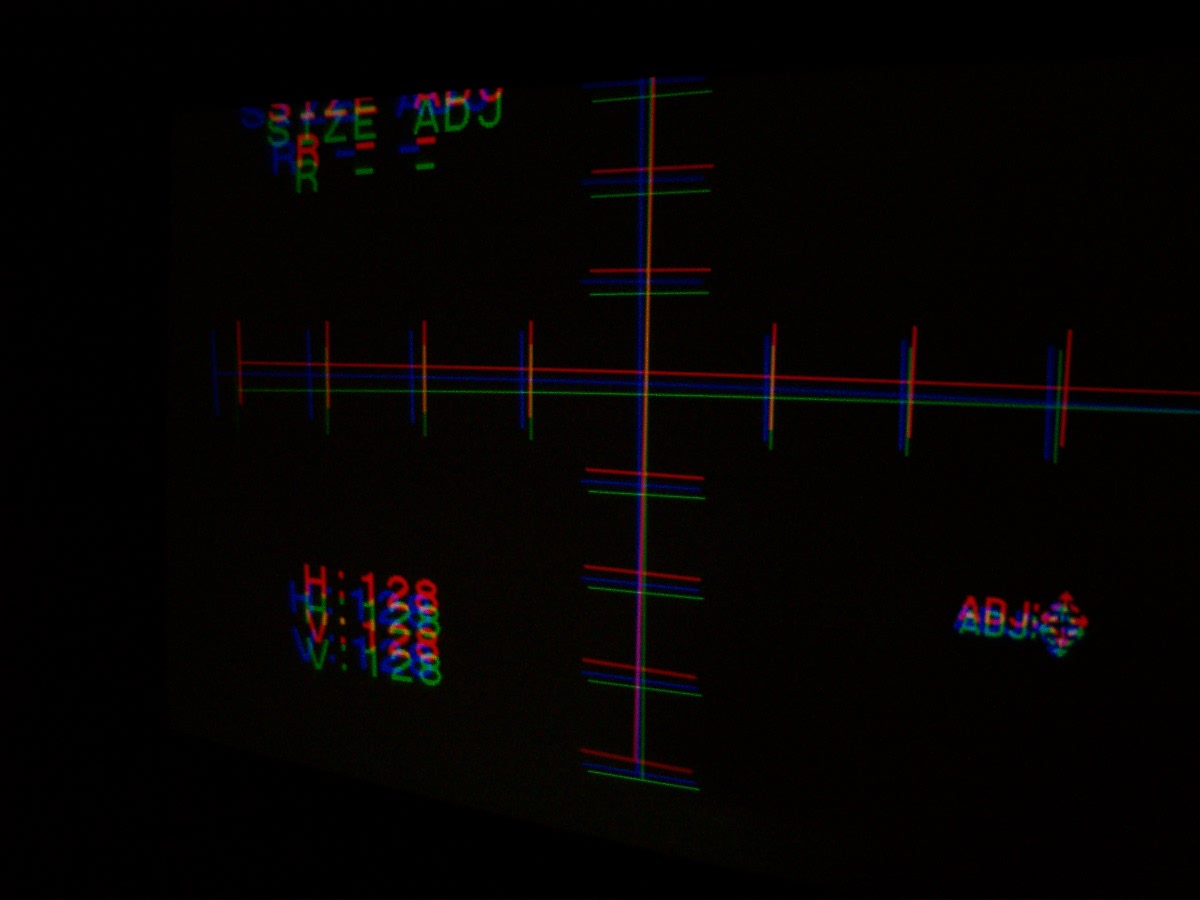
I need help getting the red closer to the green horizontally. Everything is rest to 128, I feel i am square to the screen and level, internal freq is set to P2 (whatever that means). I am running out of adjustment before red ever gets close. Using the red size adjustment i have movement just not enough. Since taking this picture I have turned the defelection yoke to align on the vertical better, but red is still too high compared to green. Any clues? This is my first attempt at a g70 setup so I am probably screwing up somewhere. I have read everything I can find and even have the dvd- but I've hit a wall. help
| Description: |
|
| Filesize: |
80.51 KB |
| Viewed: |
2098 Time(s) |
|
|
|
| Back to top |
|
 |
benareeno
Joined: 22 Mar 2006
Posts: 1614
Location: ottawa, canada
|
| Posted: Sun Jul 25, 2010 9:02 pm Post subject: |
|
|
|
did you read brian hampton's adapted guide for G70 setup? It gets its roots in the NEC setup, but it definitely helped me setup the G70 that I had.
|
|
| Back to top |
|
|
ecrabb
Forum Moderator

Joined: 13 Mar 2006
Posts: 15909
Location: Utah
TV/Projector: JVC RS40, Epson 5010
|
| Posted: Sun Jul 25, 2010 9:32 pm Post subject: |
|
|
Have you done mechanical alignment at all? If not, you need to go back and study the manual, and follow the setup in order... If mechanical setup is correct, you should be able to center the red and blue crosshairs on green all on 128.
SC
|
|
| Back to top |
|
|
AFryia

Joined: 09 Mar 2006
Posts: 965
Location: S.E. Michigan VPH-G70Q
|
| Posted: Sun Jul 25, 2010 11:22 pm Post subject: Re: G70- Setup help. |
|
|
| mycatisretarded wrote: | | I need help getting the red closer to the green horizontally. Everything is rest to 128, I feel i am square to the screen and level, internal freq is set to P2 (whatever that means). I am running out of adjustment before red ever gets close. Using the red size adjustment i have movement just not enough. Since taking this picture I have turned the defelection yoke to align on the vertical better, but red is still too high compared to green. Any clues? This is my first attempt at a g70 setup so I am probably screwing up somewhere. I have read everything I can find and even have the dvd- but I've hit a wall. help |
I'm assuming all convergence settings are reset to 128? At the factory the PJ is setup for a 120" diagonal screen at a set distance. 128 may have the patterns close to lining up just not exact.
Those cross hairs look close to me. Is Horizontal Shift set to wide or narrow?
Before trying to line up R&B on G is the green cross hair center of the tube? You may actually have to adjust green first. If you reset all to factory and run P2 internal oscillator how close are the cross hairs?
|
|
| Back to top |
|
|
winduptoy
Joined: 25 Nov 2006
Posts: 187
Location: Lunenburg, Nova Scotia
|
| Posted: Mon Jul 26, 2010 12:15 am Post subject: |
|
|
If you are ceiling mounted, put a torpedo level on the base of the PJ and adjust your mount until it is level. Make sure the unit is perpendicular to and centered side to side on the screen. Make sure all electronic adj. are neutral. Put up crosshair pattern and adjust (loosen the two screws on the clamp and turn the yoke around the neck of the green tube until the horizontal line is horizontal. Don't worry about the vertical line yet. Do the same for red and blue. Most everything you need to know is in the manual or G70 setup found on Curt's site.
There are quite a few G70 owners who are members of this site who are very helpful. Take your time doing the mechanical setup and find an assistant to help with the tape measure stuff the rest will go much easier. Post questions you may have on this thread and someone will answer. Good Luck.
|
|
| Back to top |
|
|
mycatisretarded
Joined: 18 Jan 2008
Posts: 124
|
| Posted: Mon Jul 26, 2010 1:15 am Post subject: |
|
|
Going to start from scratch tomorrow. The projector is setting on a big plywood table in my mancave, the table may not be as level as I thought, going to build a sturdy cart.
I just found the Brian Hampton document- looks like good stuff. Thanks for the info guys, I just need to bang my head against this thing for a while- I'll get there.
Toooo hot today I think my brain is melted.
|
|
| Back to top |
|
|
jarseneau

Joined: 06 Nov 2007
Posts: 323
Location: WI
|
| Posted: Mon Jul 26, 2010 5:42 pm Post subject: |
|
|
One thing I noticed when setting up my G90 is that the Vertical Scheimpflug adjustment will cause the image to shift Up/Dn and Horizontal Scheimpflug will affect Left/Right. Not that you want to use that adjustment to align anything but be sure you have Scheimpflug dialed in first before you get picky about raster positioning.
_________________
Jerry
|
|
| Back to top |
|
|
_in_peace_

Joined: 21 Jul 2009
Posts: 152
Location: Sweden
|
| Posted: Mon Jul 26, 2010 6:00 pm Post subject: |
|
|
I think it's better to center the cross hatch on the fosfor area than to just put it on 128.
Then do the mecanical alignment to put all three together 
|
|
| Back to top |
|
|
AFryia
Joined: 09 Mar 2006
Posts: 965
Location: S.E. Michigan VPH-G70Q
|
| Posted: Mon Jul 26, 2010 11:08 pm Post subject: |
|
|
| jarseneau wrote: | | One thing I noticed when setting up my G90 is that the Vertical Scheimpflug adjustment will cause the image to shift Up/Dn and Horizontal Scheimpflug will affect Left/Right. Not that you want to use that adjustment to align anything but be sure you have Scheimpflug dialed in first before you get picky about raster positioning. |
Wrong IMO. You can't "dial in" Scheimpflug right off the bat.
1st mechanical setup
2nd center the rasters (unless you need the trace to settle then offset left I beleive for ceiling mount).
Then rough optical focus.
Now adjust the toe in/out.
Rough Scheimpflug, optical focus.
Check the toe in/out adjust if necessary.
Check PJ projection angle (mechanical setup) adjust if necessary.
Adjust Scheimpflug , optical focus if necessary.
Repeat mechanical toe & projection angle, Scheimpflug, and optical focus until there is no more improvement to be gained. Its an iterative process.
|
|
| Back to top |
|
|
winduptoy
Joined: 25 Nov 2006
Posts: 187
Location: Lunenburg, Nova Scotia
|
| Posted: Mon Jul 26, 2010 11:57 pm Post subject: |
|
|
|
The one early thing to do with scheimpflug is make sure the green lens plate is neutral (parallel with the front of the projector) With electronic adjustments set at 128, a proper mech. setup will put the intersection at the center of the screen.
|
|
| Back to top |
|
|
jarseneau
Joined: 06 Nov 2007
Posts: 323
Location: WI
|
| Posted: Tue Jul 27, 2010 12:15 am Post subject: |
|
|
| AFryia wrote: | | Wrong IMO. You can't "dial in" Scheimpflug right off the bat. |
I agree 100%. I should've said roughed in rather than 'dialed in'. I'm just saying it's worthwhile to be aware that one will impact the other.
What Afryia said .
_________________
Jerry
|
|
| Back to top |
|
|
|
|




