| Author |
Message |
AnalogRocks
Forum Moderator

Joined: 08 Mar 2006
Posts: 26706
Location: Toronto, Ontario, Canada
TV/Projector: Sony 1252Q, AMPRO 4000G
|
| Posted: Mon Jul 26, 2010 4:35 pm Post subject: |
|
|
| jeffslife wrote: | | would the 1.5 ft dvi-hdmi adapter cause a proplem if i could get it right next to the pj? |
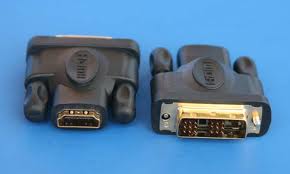
Hold on. Are you talking about a DVI to HDMI cable? That's what you need.
It's the actual DVI to HDMI adaptors that cause problems like this one:
| Description: |
|
| Filesize: |
5.24 KB |
| Viewed: |
6408 Time(s) |
|
_________________
Tech support for nothing
CRT.
HD done right!
|
|
| Back to top |
|
 |
jkruger

Joined: 24 Oct 2007
Posts: 2435
Location: Carlsbad, CA
|
| Posted: Mon Jul 26, 2010 4:49 pm Post subject: |
|
|
|
Doesnt the DVI connector have to be DVI-D, dual link?
|
|
| Back to top |
|
|
jeffslife

Joined: 17 Apr 2010
Posts: 4190
Location: ohio usa
|
| Posted: Mon Jul 26, 2010 4:52 pm Post subject: |
|
|
yes i have dvi to hdmi 1.5 foot cable
_________________
We are ALL job creators !
|
|
| Back to top |
|
|
jeffslife
Joined: 17 Apr 2010
Posts: 4190
Location: ohio usa
|
| Posted: Mon Jul 26, 2010 5:02 pm Post subject: |
|
|
ok, i checked and the cable is NOT a dvi-d dual link. could that be it? the cable is hdmi dvi cable 28 awg with ferrite cores (gold plated) as it reads on the receipt from monoprice.
_________________
We are ALL job creators !
|
|
| Back to top |
|
|
jeffslife
Joined: 17 Apr 2010
Posts: 4190
Location: ohio usa
|
| Posted: Mon Jul 26, 2010 6:22 pm Post subject: |
|
|
i looked and i cannot find a dvi-d dual link to hdmi cable anywhere.
jeff
_________________
We are ALL job creators !
|
|
| Back to top |
|
|
jkruger
Joined: 24 Oct 2007
Posts: 2435
Location: Carlsbad, CA
|
| Posted: Mon Jul 26, 2010 6:28 pm Post subject: |
|
|
|
I think I used the one that came with the hdfury1 advanced kit.
|
|
| Back to top |
|
|
jkruger
Joined: 24 Oct 2007
Posts: 2435
Location: Carlsbad, CA
|
|
| Back to top |
|
|
jeffslife
Joined: 17 Apr 2010
Posts: 4190
Location: ohio usa
|
| Posted: Mon Jul 26, 2010 6:32 pm Post subject: |
|
|
i bought the fury 3 with gamma x package it came with a boatload of cables but not a dvi
jeff
_________________
We are ALL job creators !
|
|
| Back to top |
|
|
jeffslife
Joined: 17 Apr 2010
Posts: 4190
Location: ohio usa
|
| Posted: Mon Jul 26, 2010 6:34 pm Post subject: |
|
|
thanks, i give it a shot it cant hurt to try we've tried almost everything else.
_________________
We are ALL job creators !
|
|
| Back to top |
|
|
jkruger
Joined: 24 Oct 2007
Posts: 2435
Location: Carlsbad, CA
|
| Posted: Mon Jul 26, 2010 6:35 pm Post subject: |
|
|
I'm not saying that will fix your problem. better to get one of the hdfury support guys to chime in here.
I'm not even sure the ts-160 has dvi-d.
|
|
| Back to top |
|
|
jeffslife
Joined: 17 Apr 2010
Posts: 4190
Location: ohio usa
|
| Posted: Mon Jul 26, 2010 6:37 pm Post subject: |
|
|
ok, i'll wait and see if someone picks up on this thread.
thanks jeff
_________________
We are ALL job creators !
|
|
| Back to top |
|
|
jkruger
Joined: 24 Oct 2007
Posts: 2435
Location: Carlsbad, CA
|
| Posted: Mon Jul 26, 2010 8:49 pm Post subject: |
|
|
|
You might try searching the HDFury threads to see if there is any mention of whether it has to be DVI-D.
|
|
| Back to top |
|
|
ecrabb
Forum Moderator

Joined: 13 Mar 2006
Posts: 15909
Location: Utah
TV/Projector: JVC RS40, Epson 5010
|
| Posted: Mon Jul 26, 2010 9:05 pm Post subject: |
|
|
It definitely has to be DVI-D... The HD Fury is converting digital to analog, so if you connected an analog device, there wouldn't be anything to convert from digital. 
And, yes - the SIR-TS160 is definitely DVI-D... You wouldn't be getting any picture at all if it weren't.
This definitely sounds like a handshake issue to me. You can go to a bunch of hassle trying different cables, etc... But an easier method might be a totally different HDTV OTA receiver. Considering they're not too expensive, a slightly newer one with HDMI might be the easiest. Of course, you'll probably still want a DVI-D to HDMI cable, so I guess that's not a waste either way.
I agree with trying a shorter cable bypassing the switch, then trying a short DVI-HDMI cable.
SC
|
|
| Back to top |
|
|
jeffslife
Joined: 17 Apr 2010
Posts: 4190
Location: ohio usa
|
| Posted: Mon Jul 26, 2010 9:54 pm Post subject: |
|
|
Thanks for all the input, well after spending several hours surfing looking for info on the ts 160 i found a forum where a user posted that the maximum cable length out of the ts 160 dvi is 11 feet then it started showing the same problem i was having. so i went to lowes and got some connectors made up a 35 ft length of coax moved the ts 160 under the pj set it on a ladder hooked up the 1.5 ft dvi to hdmi cable to the fury 3 turned on the pj and viola! a beutiful 1080i picture that doesnt flash on and off. Now i have to figure out what is the best course of action to take. Should i buy a 35 ft dvi to hdmi cable attach it to port 2 on the fury 3 and hope the monoprice switcher was the problem or try to SOMEHOW move the ts 160 right next to the pj and run audio cables back to the rest of the system. To be honest i am so relieved it works i dont knoe how to act. if i do try the 35 foot cable route which would be much preferred i have no idea what cable to buy so any help in that department would be appreciated.Again thank you all for all your help.It means alot to me. jeff
_________________
We are ALL job creators !
|
|
| Back to top |
|
|
AnalogRocks
Forum Moderator
Joined: 08 Mar 2006
Posts: 26706
Location: Toronto, Ontario, Canada
TV/Projector: Sony 1252Q, AMPRO 4000G
|
| Posted: Tue Jul 27, 2010 12:41 am Post subject: |
|
|
Jeff that's what I suspected was the case. The best course of action may be to run longer RGBHV cables and use a shorter cable set for the HDMI. The HDfury3 can drive 50 foot analog cables and the GammaX can go out to 60+ so you would be OK there.
Check out bluejeans cables BNC to BNC cables.
Belden 1694A RGBHV or RGBS Cables
http://www.bluejeanscable.com/store/rgbhv/index.htm
You'll also need a set of 5 female to female BNC couplers like these:
http://www.amazon.com/BNC-Female-Adapter/dp/B0002KR0A6/ref=sr_1_1?ie=UTF8&s=electronics&qid=1280190665&sr=8-1
Your other option is to get a buffered (amplified ) HDMI switcher that can take the weak signal from your TS-160 and amplify it to drive the 35 foot cable.
_________________
Tech support for nothing
CRT.
HD done right!
Last edited by AnalogRocks on Tue Jul 27, 2010 1:38 am; edited 1 time in total
|
|
| Back to top |
|
|
dvh99

Joined: 25 Dec 2009
Posts: 2158
Location: nederland
|
| Posted: Tue Jul 27, 2010 1:18 am Post subject: |
|
|
hdmi uses single link and dvi-d dual link uses 2 links of course.
hdmi single link is good for 330 mhz pixelclock max and dvi single link up to 165 mhz (good enough for 1920*1080 60 hz but not good enough for 1920*1080 72 or 75 hz.
connecting a dvi cable to a dual link dvi adapter to hdmi(they do exist, i have 2 and they are 24+1 pins) doesnt work cause the hdmi uses only 1 link so its restricted to 165mhz despite the dual link adapter.
there are dual link hdmi connectors but they are bigger (wider) and have more pins.
running long hdmi cable runs requires quality cables like blue jeans.
get the series 1 like it says on the website.
http://www.bluejeanscable.com/store/hdmi-dvi-cables/index.htm
_________________
1 answer always poses multiple questions.
marquee 9500ultra HD10L moome hdmi1.3 v3+ some mods.
|
|
| Back to top |
|
|
Curt Palme
CRT Tech
Joined: 08 Mar 2006
Posts: 24396
Location: Langley, BC
TV/Projector: All of them!
|
| Posted: Tue Jul 27, 2010 1:23 am Post subject: |
|
|
| jeffslife wrote: | | To be honest i am so relieved it works i dont knoe how to act. |
Turn up Abba's 'Dancing Queen' and do a happy dance. 
Do get a long decent quality BNC to BNC cable, and keep the Fury at the sources.
|
|
| Back to top |
|
|
dvh99
Joined: 25 Dec 2009
Posts: 2158
Location: nederland
|
| Posted: Tue Jul 27, 2010 1:38 am Post subject: |
|
|
??
wouldnt do that.
better to use a high quality dvi-hdmi cable and a very short bnc cable.
what i do not understand is that hdfury doesnt bring out a model with bnc out instead of vga, vga isnt a 75ohm terminal and bnc is.
_________________
1 answer always poses multiple questions.
marquee 9500ultra HD10L moome hdmi1.3 v3+ some mods.
|
|
| Back to top |
|
|
AnalogRocks
Forum Moderator
Joined: 08 Mar 2006
Posts: 26706
Location: Toronto, Ontario, Canada
TV/Projector: Sony 1252Q, AMPRO 4000G
|
| Posted: Tue Jul 27, 2010 1:48 am Post subject: |
|
|
| dvh99 wrote: | ??
wouldnt do that.
better to use a high quality dvi-hdmi cable and a very short bnc cable.
what i do not understand is that hdfury doesnt bring out a model with bnc out instead of vga, vga isnt a 75ohm terminal and bnc is. |
RGBHV is a more robust signal and just works as compared to DVI/HDMI cables in a long run. Also keep in mind he found the spec's and people have said anything beyond 11 feet won't work for the TS-160. So going by that he would need a buffered switcher and a short DVI to HDMI cable.
As to the VGA vs. BNC debate. It's a moot point here. What he has on hand is an HDFury3/GammaX both with VGA out put and VGA to BNC breakout cables that shipped with the kit. So that's what we are working with.
You should hop over to the HDFury post about things you would like to see in the next HDFury4. Maybe it will have BNC outputs.
_________________
Tech support for nothing
CRT.
HD done right!
|
|
| Back to top |
|
|
dvh99
Joined: 25 Dec 2009
Posts: 2158
Location: nederland
|
| Posted: Tue Jul 27, 2010 2:12 am Post subject: |
|
|
sorry i missed that part about the ts160 and the max cable length.
i have an internal moome and it works perfectly well so no need for a hdfury4, yet .
_________________
1 answer always poses multiple questions.
marquee 9500ultra HD10L moome hdmi1.3 v3+ some mods.
|
|
| Back to top |
|
|
|
|




