| Author |
Message |
CZ Eddie
Joined: 23 Mar 2006
Posts: 1601
Location: Austin, TX
|
| Posted: Sat Jul 17, 2010 3:51 pm Post subject: Marquee 8500 scan lines vs. internal resolution? |
|
|
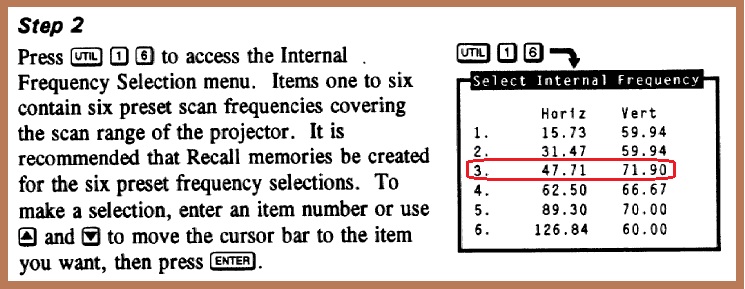
When I select internal resolutions #1 & #2, I get clearly visible scan lines.
When I select #3, the scan lines seem to come & go. I can walk right up to the screen and every moment or so I feel like I can see the scan lines briefly flash.
I'm able to see the phosphor grain on my screen, so I know my optical focus is pretty good. And I move the screen back & forth, but the electrical focus doesn't seem to be any better at any particular position.
Are you guys able to see clearly visible scan lines at internal resolution #3?
I've also nearly maxed out the vertical raster size. Didn't make a difference.
I have not yet touched the magnetics on this projector.
| Description: |
|
| Filesize: |
91.2 KB |
| Viewed: |
3972 Time(s) |
|
_________________
Back after a digital sabatical.
|
|
| Back to top |
|
 |
Nashou66

Joined: 12 Jan 2007
Posts: 16171
Location: West Seneca NY
|
| Posted: Sat Jul 17, 2010 4:06 pm Post subject: |
|
|
Eddie, did you look at each color individually? the reason I ask is that the grids move ever so slightly . this would cause you to some times see them and other times not if all colors are on together. The Grids do not move together to keep the convergence of all three scan lines together. its one of those weird Marquee things. Look at each first individually to see if they are still visible, if so then thats your answer.
Athanasios
_________________
Don't blame your underwear for your crooked ass~ unknown Greek philosopher
"Republicans believe every day is the Fourth of July, but the Democrats believe every day is April 15." --- President Reagan
One Smart Dog!!!
Marquee High Performance Bellows now shipping!!
Marquee Modifications and Performance Enhancement
Marquee C-element and Bellow removal
|
|
| Back to top |
|
|
draganm

Joined: 08 Mar 2006
Posts: 8990
Location: Colorado
|
| Posted: Sat Jul 17, 2010 4:09 pm Post subject: Re: Marquee 8500 scan lines vs. internal resolution? |
|
|
| CZ Eddie wrote: | When I select internal resolutions #1 & #2, I get clearly visible scan lines.
When I select #3, the scan lines seem to come & go. I can walk right up to the screen and every moment or so I feel like I can see the scan lines briefly flash. . |
those aren't scan lines, what your seeing "flash by" is the noise in the G + B tubes being created by the Horizontal deflection module. I bet ya 10 bucks you won't see them in Red.
I don't think you will see scan lines at that resolution with stock neck-boards and FCM.
|
|
| Back to top |
|
|
CZ Eddie
Joined: 23 Mar 2006
Posts: 1601
Location: Austin, TX
|
| Posted: Sat Jul 17, 2010 4:34 pm Post subject: |
|
|
Yes, I was looking at them individually. I don't see constant scan lines in any of the three colors. I've been "marquee-maintenence" modding boards one by one and using the green tube at internal resolution #3 as a reference to see what/if any gains I'm making.
The VNB's have the cap & resistor upgrades done, but not the chips. The HVPS has also been done. I haven't touched the VIM, FCM or anything else yet.
| draganm wrote: | | I don't think you will see scan lines at that resolution with stock neck-boards and FCM. |
bummer 
_________________
Back after a digital sabatical.
|
|
| Back to top |
|
|
CZ Eddie
Joined: 23 Mar 2006
Posts: 1601
Location: Austin, TX
|
| Posted: Sat Jul 17, 2010 6:03 pm Post subject: |
|
|
I'm definitely getting some scan lines I think. It's just that they are "faint" appearing and the video noise makes them come & go, be harder to see.
The noise is not visible from a couple feet away from the screen, btw. Just some noise that appears to move horizontally, quickly. I think it's normal noise that I've seen in all projectors.
_________________
Back after a digital sabatical.
|
|
| Back to top |
|
|
Nashou66
Joined: 12 Jan 2007
Posts: 16171
Location: West Seneca NY
|
| Posted: Sat Jul 17, 2010 6:21 pm Post subject: |
|
|
Yeah thats noise then. I noticed that there is less noise using external patterns to look for Scan lines. The Internal Pattern generators are on the CLM and that has lots of digital circuitry that adds "hash" noise to the internal patterns. At least thats my observation.
I bet scan lines look more defined on the tube face than on the screen.
Athanasios
_________________
Don't blame your underwear for your crooked ass~ unknown Greek philosopher
"Republicans believe every day is the Fourth of July, but the Democrats believe every day is April 15." --- President Reagan
One Smart Dog!!!
Marquee High Performance Bellows now shipping!!
Marquee Modifications and Performance Enhancement
Marquee C-element and Bellow removal
|
|
| Back to top |
|
|
CZ Eddie
Joined: 23 Mar 2006
Posts: 1601
Location: Austin, TX
|
| Posted: Sat Jul 17, 2010 8:35 pm Post subject: |
|
|
Interesting, Athanasios. Too bad I don't have a source hooked up to it right now so I could check external patterns.
I just installed an HD145 lens on my green tube. Then touched up beam focus. The scan lines are slightly more visible now. I can better tell them apart from the video noise. I then put up internal test pattern #2 (60hz?) and it's hard to see any video noise at all. And the scan lines (as expected) are visible all the way back to my seating position (back wall).
_________________
Back after a digital sabatical.
|
|
| Back to top |
|
|
CZ Eddie
Joined: 23 Mar 2006
Posts: 1601
Location: Austin, TX
|
| Posted: Sat Jul 17, 2010 8:50 pm Post subject: |
|
|
Okay, the 72hz scan lines are clearly visible when I take video and then press "pause". Bing - there are the scan lines!
Btw, if anyone is interested, the HD145 added 4.25" width to my raster on-screen, compared against the stock plastic HD-8 lens.
72hz internal test pattern video:
http://www.youtube.com/watch?v=Bg31QFo3B2g
60hz internal test pattern video:
http://www.youtube.com/watch?v=m95eTe-68ds
_________________
Back after a digital sabatical.
|
|
| Back to top |
|
|
cmjohnson

Joined: 03 Apr 2006
Posts: 5180
Location: Buried under G90s
|
| Posted: Sat Jul 17, 2010 9:30 pm Post subject: |
|
|
On mode 3, the scan lines appear to briefly flash because your eyes see them when you scan your vision across the screen at the right rate.
Try tracing your finger down the screen slowly (at about 30 or 60 scan lines per second, actually) and you will always be able to lock in
on whatever scan lines are actually present. You might be able to do this even at 1080p. I can. But it's easier by far with interlaced resolutions.
The flashing of the scan lines is purely a visual effect between your eyes and brain. The scan lines don't change on the CRT face, unless the video signal's critical parameters change.
CJ
|
|
| Back to top |
|
|
garyfritz

Joined: 08 Apr 2006
Posts: 12088
Location: Fort Collins, CO
|
| Posted: Sat Jul 17, 2010 9:38 pm Post subject: |
|
|
Those videos, with the flickering &etc -- did it look that way in person? That looks more like what frequency #1 looks like on my PJ -- flickery, and I can see the scan lines if it'd just hold still. At the start of the video I thought it looked more like a moiré from an external source than like actual scan lines. The lines were waaay too big.
I just looked and I can faintly see scan lines with freq #3, if I'm within a foot or two of the screen. And my focus is not ideal by any stretch. I tried to take pictures but my crappy P&S camera doesn't focus right in the dark. Even so, you can clearly see scan lines with freq #2. The lines on freq #3 were slightly harder to see.
| Description: |
|
| Filesize: |
78.72 KB |
| Viewed: |
3873 Time(s) |
|
|
|
| Back to top |
|
|
CZ Eddie
Joined: 23 Mar 2006
Posts: 1601
Location: Austin, TX
|
| Posted: Sat Jul 17, 2010 9:56 pm Post subject: |
|
|
That makes sense, CJ. I think. 
Gary, the video accentuates any noise or flickering. It doesn't look anywhere near that bad in person.
Thanks for checking your 8500 for me! I feel better now.
_________________
Back after a digital sabatical.
|
|
| Back to top |
|
|
tse
Joined: 03 May 2006
Posts: 1014
Location: Sweatbucket, Fl.
|
| Posted: Sat Jul 17, 2010 11:27 pm Post subject: |
|
|
Internal freq #1 is interlaced. That is why the you see flicker. One set of lines (field) are scanned then another are scanned in between the first set, repeat. This takes two fields at 60 times per second (60Hz) or each set is there 30 times per second. Slow enough for the human system to begin to see.
You can approximate the number of scan lines by dividing the horizontal frequency by the vertical. Internal freq 3 is 47,710 (H) / 71.9 (V) so 664 scan lines. Actually a bit less because of vertical blanking time so about 95% of the 664 are displayed or about 630 visible scan lines.
Scott
_________________
"Were we directed from Washington when to sow and when to reap, we would soon want bread."
Thomas Jefferson
|
|
| Back to top |
|
|
|
|




