| Author |
Message |
opv
Joined: 18 May 2010
Posts: 202
Location: Emek Hefer,Israel
|
| Posted: Thu Jul 08, 2010 7:29 am Post subject: Several issues with BG808s |
|
|
Hi everyone, this is my first message here.
My name is Or, I am enjoying a BG808s for the past 5 years.
I've recently switched from vertical mounting to table top and I have some issues with the setup.
The video source is an Istar H6 media player (similar to popcorn A110) connected via HDMI to a Pioneer Vsx-LX70 AV receiver, connected via HDMI to a Moome Ext card V2 and from the Moome card to the PJ using RGBHV. the resolution is 1080P@ 50Hz
Here is a list of the issues I came out with:
1) Picture is rotated: I've measured the PJ distance to the wall and I checked that it is leveled. Yet, the picture is rotated and I have to set the horizontal skew to 99 in order to get a leveled picture. What could be the cause for this rotation?
2) Noise at the picture top: I have noise in the top of the picture, something like moving vertical lines visible in bright scenes.
3) Halo around lines: When I'm very close to the screen, I can see a halo around thin lines. I really don't know if it's normal or maybe a focus issue.
That's it; I'd love to hear your opinions regarding these issues.
Thanks,
Or
|
|
| Back to top |
|
 |
Decibel

Joined: 31 May 2007
Posts: 904
Location: Roma - Italia
|
| Posted: Thu Jul 08, 2010 8:43 am Post subject: Re: Several issues with BG808s |
|
|
| opv wrote: |
I've recently switched from vertical mounting to table top and I have some issues with the setup.
1) Picture is rotated: I've measured the PJ distance to the wall and I checked that it is leveled. Yet, the picture is rotated and I have to set the horizontal skew to 99 in order to get a leveled picture. What could be the cause for this rotation? |
You must read installation manual, from page 4-1 to page 4-3.
You must change scan switch for set projection configuration.
| opv wrote: |
2) Noise at the picture top: I have noise in the top of the picture, something like moving vertical lines visible in bright scenes. |
Try to move raster from bottom to top (geometry menu/raster shift)
_________________
Domenico (Barco fan!)
|
|
| Back to top |
|
|
opv
Joined: 18 May 2010
Posts: 202
Location: Emek Hefer,Israel
|
| Posted: Thu Jul 08, 2010 8:47 am Post subject: Re: Several issues with BG808s |
|
|
| Decibel wrote: | | opv wrote: |
I've recently switched from vertical mounting to table top and I have some issues with the setup.
1) Picture is rotated: I've measured the PJ distance to the wall and I checked that it is leveled. Yet, the picture is rotated and I have to set the horizontal skew to 99 in order to get a leveled picture. What could be the cause for this rotation? |
You must read installation manual, from page 4-1 to page 4-3.
You must change scan switch for set projection configuration.
| opv wrote: |
2) Noise at the picture top: I have noise in the top of the picture, something like moving vertical lines visible in bright scenes. |
Try to move raster from bottom to top (geometry menu/raster shift) |
Thank you for the reply,
I have read the manuals and changed the scan switches, the picture isn't up side down, it's rotated by ~20 degrees
Regarding raster shift, I'll try that later when I'm home.
|
|
| Back to top |
|
|
Decibel
Joined: 31 May 2007
Posts: 904
Location: Roma - Italia
|
| Posted: Thu Jul 08, 2010 8:58 am Post subject: Re: Several issues with BG808s |
|
|
| opv wrote: |
Thank you for the reply,
I have read the manuals and changed the scan switches, the picture isn't up side down, it's rotated by ~20 degrees |
All colors or green only?
Check deflection yokes.
Set horizontal skew to mid position (49)
Loose the screw of deflection yoke and rotate it, till horizontal line is levelled (center of the screen).
See image
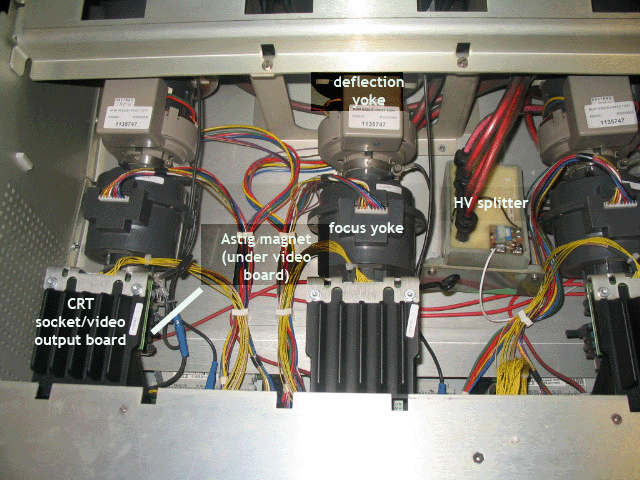
Sorry for language 
_________________
Domenico (Barco fan!)
|
|
| Back to top |
|
|
opv
Joined: 18 May 2010
Posts: 202
Location: Emek Hefer,Israel
|
| Posted: Thu Jul 08, 2010 10:00 am Post subject: |
|
|
|
All colors, not just green. is the deflection yoke answer still relevant?
|
|
| Back to top |
|
|
Decibel
Joined: 31 May 2007
Posts: 904
Location: Roma - Italia
|
| Posted: Thu Jul 08, 2010 10:56 am Post subject: |
|
|
See previous picture.
There is one yoke for each tube.
Set horizontal skew at midposition (49) in geometry menu and rotate each yoke till horizontal line of the relative color is levelled.
I think that you must reset convergence also.
_________________
Domenico (Barco fan!)
|
|
| Back to top |
|
|
opv
Joined: 18 May 2010
Posts: 202
Location: Emek Hefer,Israel
|
| Posted: Thu Jul 08, 2010 11:06 am Post subject: |
|
|
| Decibel wrote: | See previous picture.
There is one yoke for each tube.
Set horizontal skew at midposition (49) in geometry menu and rotate each yoke till horizontal line of the relative color is levelled.
I think that you must reset convergence also. |
I understand, it's just seems really strange that all three yokes moved to this strange position. by the way, is there any risk of electrical shock when moving these yokes while the PJ is on?
|
|
| Back to top |
|
|
Decibel
Joined: 31 May 2007
Posts: 904
Location: Roma - Italia
|
| Posted: Thu Jul 08, 2010 11:15 am Post subject: |
|
|
| opv wrote: | | I understand, it's just seems really strange that all three yokes moved to this strange position. |
Yes is strange but when change projection configuration (ceiling to table) the best way is completely reset convergence and geometry.
| opv wrote: | | by the way, is there any risk of electrical shock when moving these yokes while the PJ is on? |
YES!!! ATTENTION!!!
_________________
Domenico (Barco fan!)
|
|
| Back to top |
|
|
opv
Joined: 18 May 2010
Posts: 202
Location: Emek Hefer,Israel
|
| Posted: Thu Jul 08, 2010 11:40 am Post subject: |
|
|
| Decibel wrote: | | opv wrote: | | I understand, it's just seems really strange that all three yokes moved to this strange position. |
Yes is strange but when change projection configuration (ceiling to table) the best way is completely reset convergence and geometry.
| opv wrote: | | by the way, is there any risk of electrical shock when moving these yokes while the PJ is on? |
YES!!! ATTENTION!!! |
I did reset the geometry and convergence, I just don't understand why the picture is rotated when all the settings are set to mid.
If I do decide to touch the yokes, you have any safety advice for me?
|
|
| Back to top |
|
|
Decibel
Joined: 31 May 2007
Posts: 904
Location: Roma - Italia
|
| Posted: Thu Jul 08, 2010 12:02 pm Post subject: |
|
|
| opv wrote: | | If I do decide to touch the yokes, you have any safety advice for me? |
Don't touch cables, loose screw with little screwdriver and turn the yoke touching the grey plastic.
_________________
Domenico (Barco fan!)
|
|
| Back to top |
|
|
opv
Joined: 18 May 2010
Posts: 202
Location: Emek Hefer,Israel
|
| Posted: Thu Jul 08, 2010 12:36 pm Post subject: |
|
|
OK, I'll keep that in mind, thanks.
Any ideas regarding the third issue?
|
|
| Back to top |
|
|
Decibel
Joined: 31 May 2007
Posts: 904
Location: Roma - Italia
|
| Posted: Thu Jul 08, 2010 12:46 pm Post subject: |
|
|
| opv wrote: | | Any ideas regarding the third issue? |
I think focus issue, you must make optical focus and sheimpflug.
Crt is not digital vpr, when change position you must resetting any mechanical, optical and electronic regulations.
I hope that you understand.
_________________
Domenico (Barco fan!)
|
|
| Back to top |
|
|
opv
Joined: 18 May 2010
Posts: 202
Location: Emek Hefer,Israel
|
| Posted: Thu Jul 08, 2010 12:58 pm Post subject: |
|
|
Maybe I wasn't clear, I did a totaly new setup after moving to table top mounting.
I'm a CRT PJ owner for quite a long time and I know the basics (at least I think).
The issues I pointed here are only problems I didn't find the solution for after trying many options.
I appreciate the help and I'm looking for more ideas, things that I haven't thought of.
|
|
| Back to top |
|
|
Decibel
Joined: 31 May 2007
Posts: 904
Location: Roma - Italia
|
| Posted: Thu Jul 08, 2010 1:14 pm Post subject: |
|
|
Don't worry: my language is simple, directed and essential because I don't speak well in english.
_________________
Domenico (Barco fan!)
|
|
| Back to top |
|
|
macgyver655
Joined: 22 Aug 2007
Posts: 8508
|
| Posted: Thu Jul 08, 2010 3:04 pm Post subject: |
|
|
Make sure the projector is level before turning those yolks. Who set up the projector when it was on the ceiling? It may not have been installed level at one time and the yolks were all turned. And now if its level could be why they are all off. You can wear a rubber glove to move them to avoid a shock but still be careful where you touch. A pointy part can still puncture the glove. But the shock wont hurt for to long, lol.  If I had a nickle for everytime I've been wacked....... well you get the point. If I had a nickle for everytime I've been wacked....... well you get the point. 
|
|
| Back to top |
|
|
opv
Joined: 18 May 2010
Posts: 202
Location: Emek Hefer,Israel
|
| Posted: Thu Jul 08, 2010 3:17 pm Post subject: |
|
|
I did all the setups myself, and I never touched the yokes.
I measured distance from the side walls at the projector front and at the projector's back plus I measured the distance to the screen from the right side of the PJ and from the left side, everything seems to be leveled.
I also used a level above the PJ and it looks OK; it's a small level so there may be a error here.
Any other measurements I can take to make sure it's leveled?
|
|
| Back to top |
|
|
Curt Palme
CRT Tech
Joined: 08 Mar 2006
Posts: 24396
Location: Langley, BC
TV/Projector: All of them!
|
| Posted: Thu Jul 08, 2010 3:25 pm Post subject: |
|
|
I have had skew issues on BG808s, even when everything is stock and not touched after it leaves the factory.Rotating the yokes isn't a big deal. Chances are you will need to offset she skew a bit on the H an v axis, then use the skew/tilt adjustments to correct them, but you'l be at say 60-70 instead of 99. Seems to be a normal issue with BG808 sets, especially the 's' models. Not sure why.
as for the lines on the top, can you blank those out with the blanking controls? If not, you can take the lenses off and mask them off with black electrical tape, as long as they are outside the image.
as for the haloing, it's probably halos due to the non LC housing. can you capture the issue in a picture?
|
|
| Back to top |
|
|
opv
Joined: 18 May 2010
Posts: 202
Location: Emek Hefer,Israel
|
| Posted: Thu Jul 08, 2010 3:31 pm Post subject: |
|
|
Thanks Curt,
Regarding the lines on top, since the lines are in the picture area I'll try to change the raster shift and see if I can get them out of the picture.
Regarding taking a picture of the screen, I have a problem, I have a simple compact digital camera and I don't know how to avoid getting running lines when I take a picture of the screen. any advice here?
|
|
| Back to top |
|
|
opv
Joined: 18 May 2010
Posts: 202
Location: Emek Hefer,Israel
|
| Posted: Fri Jul 09, 2010 1:38 pm Post subject: |
|
|
OK, some updates
Regarding the noise in the top of the picture, it is somehow related to the top blanking mechanism. when I set the top blanking to the maximal value above the picture I get the noise, when I set it to lower values there is no noise.
Regarding the halo, I switched resolution to 1080i@50Hz and ran a full setup, I found out that the picture is shaking and the halo appears only on vertical lines because the picture is shaking up an down. could this be the fault of the deflection yokes not firmly connected?
|
|
| Back to top |
|
|
|
|




