| Author |
Message |
JustGreg

Joined: 07 Mar 2006
Posts: 3098
Location: Kenosha, WI
|
| Posted: Thu Jun 24, 2010 9:20 am Post subject: Geometry funky after full initialization-Marquee 8500 |
|
|
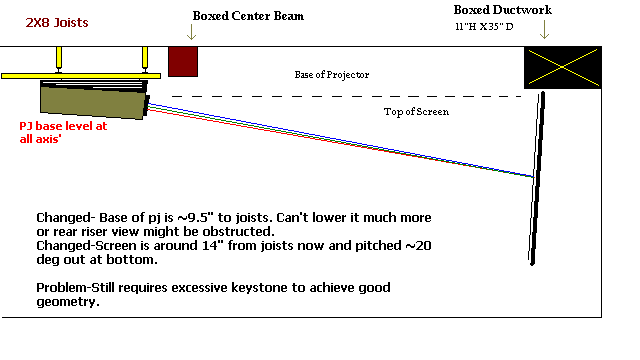
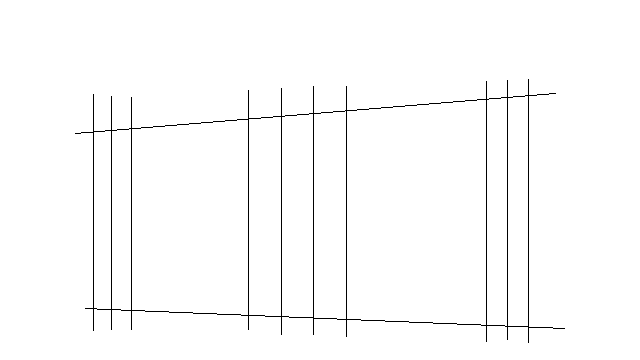
See attached crude graphics. I exaggerated the suspected trapezoid issue.
The only thing I've done after a full reset, with CPC"s nulled, is mechanical focus, electrical focus, PIN top/bottom and sides, H&V Size and Keystone. I'm almost finished with Scheimflug (blue is fighting me a bit).
I haven't set up this pj from scratch more than 3 times in 5 years so can't remember if the rough graphic I've attached is how it looked after reinitializing. I'm running a different set of heatsink boards and haven't put the originals back in to test yet. I'm on my way to bed so no time to check before posting this.
I'm also having to run Keystone down to 5 even though I've just lowered the pj down ~4" all the way around, raised the screen as much as I can, and angled the screen out at the bottom around 15-20-ish degrees. The pj is level at all axis' but I added another 4-5 deg to the built in 12deg by adding a nut at the front between the AllThread and the Unistrut. I can lower it down only a bit more before obstructing the view from the rear riser seats.
Also, as you can see in the exaggerated trapezoid graphic the linearity is also funky. I have to run Vert S linearity all the way up to almost 100. (I think it's vertical S...too tired to remember.)
Given these three things I think are out of the norm I'm inclined to think something is up with a board but I'm not sure which board specifically might be responsible. I know the VDM and HDM are involved in KEY PIN from recent problems I was having but after that I got nothing. I'm fairly certain I have the pj square to the screen...I put three hours into trying different methods. I suppose it could still be out but I doubt it.
Any ideas?
Thanks again folks!
| Description: |
| I can add angle data if needed |
|
| Filesize: |
11.73 KB |
| Viewed: |
9873 Time(s) |
|
| Description: |
| Both left and right top sides also curve inward toward the screen centerline. (starting about 1/2 way up the pattern). |
|
| Filesize: |
9.42 KB |
| Viewed: |
9873 Time(s) |
|
_________________
Greg
"Is it ignorance or apathy? Hey, I don't know and I don't care!" --Jimmy Buffett
Last edited by JustGreg on Thu Jun 24, 2010 9:01 pm; edited 1 time in total
|
|
| Back to top |
|
 |
CasetheCorvetteman

Joined: 09 Nov 2008
Posts: 6326
Location: Australia
|
| Posted: Thu Jun 24, 2010 9:48 am Post subject: |
|
|
Which way is it keystoned at null on the key settings? Looking at the picture at the top there it looks like youve got the screen about as parallel to the lens faces as you can, would this be the case? If that is the case, i wouldnt think youd need any keystone correction at all.
Is the screen the exact same distance to the projector on both sides? Does the right corner of the projector to the right edge of the screen and left corner of the projector measure the exact same amount? Are the rasters all doing this as well or just the projected picture? If its just the onscreen image it must be a location issue, but if its how its leaving the tube faces, well that is something else.
I wouldnt expect you to get a picture like the one you describe with the bottom image unless the projector is cockeyed to the screen.
|
|
| Back to top |
|
|
Sparky015

Joined: 12 May 2009
Posts: 1185
Location: Cleveland / Akron, OH
|
| Posted: Thu Jun 24, 2010 12:47 pm Post subject: |
|
|
Greg,
If you are that confident in your mechanical setup, then I would turn to your vertical deflection module. That module I believe is what controls keystone and pincushion. If you aren't using your main set of heat sink boards, the first thing I would do then is swap them out with your originals now that you found your other issue and see if that resolves it. I have some thoughts on what's wrong, but I'll PM you since that's diving into the details. 
_________________
~Paul
|
|
| Back to top |
|
|
Nashou66

Joined: 12 Jan 2007
Posts: 16171
Location: West Seneca NY
|
| Posted: Thu Jun 24, 2010 8:44 pm Post subject: |
|
|
What do the grids look like after the initialization, no geometry or convergence done.
Are they all level on the tube face?
Are they skewed top and bottom?
Are the grids the same size pretty much?
if not then Id say mechanical set up on the magnetics, specifically the deflection yoke and the convergence yoke.
Then youd have to do focus coils and CPC's after.
and possible schiemflug/tube positioning issue.
If you can take pics of the grids after initialization for each tube with the camera level so we can see the correlation of each color to itself it better help us to diagnose it.
Athanasios
_________________
Don't blame your underwear for your crooked ass~ unknown Greek philosopher
"Republicans believe every day is the Fourth of July, but the Democrats believe every day is April 15." --- President Reagan
One Smart Dog!!!
Marquee High Performance Bellows now shipping!!
Marquee Modifications and Performance Enhancement
Marquee C-element and Bellow removal
|
|
| Back to top |
|
|
JustGreg
Joined: 07 Mar 2006
Posts: 3098
Location: Kenosha, WI
|
| Posted: Thu Jun 24, 2010 9:17 pm Post subject: |
|
|
| CasetheCorvetteman wrote: | Which way is it keystoned at null on the key settings? Looking at the picture at the top there it looks like youve got the screen about as parallel to the lens faces as you can, would this be the case? If that is the case, i wouldnt think youd need any keystone correction at all.
That was my plan last night (early this AM!). It should be close...within +/- 5 degrees.
Is the screen the exact same distance to the projector on both sides?
I'm going with yes but you know how it's easy to second guess yourself so I'll triple check it again.
Does the right corner of the projector to the right edge of the screen and left corner of the projector measure the exact same amount?
Again I'm going with yes but will recheck
Are the rasters all doing this as well or just the projected picture?
See next answer
If its just the onscreen image it must be a location issue, but if its how its leaving the tube faces, well that is something else.
Good point but IIRC (sinus meds don't promote that at all) all patterns were square on the tube face before putting the lenses back on. I'll pull them again to make sure. If the patterns are square on the faces logic dictates it MUST be the pj orientation. I'll be damned if I can see how I got it that horribly wrong tho. That damn boxed in beam prevents me from measuring from the foot bolt holes to the screen so I'm trying to figure out how to get good measurements. I'll have to try using the tube top plate bracket.
I wouldnt expect you to get a picture like the one you describe with the bottom image unless the projector is cockeyed to the screen.
Agreed.
|
_________________
Greg
"Is it ignorance or apathy? Hey, I don't know and I don't care!" --Jimmy Buffett
|
|
| Back to top |
|
|
JustGreg
Joined: 07 Mar 2006
Posts: 3098
Location: Kenosha, WI
|
| Posted: Thu Jun 24, 2010 9:19 pm Post subject: |
|
|
| Sparky015 wrote: | Greg,
If you are that confident in your mechanical setup, then I would turn to your vertical deflection module. That module I believe is what controls keystone and pincushion. If you aren't using your main set of heat sink boards, the first thing I would do then is swap them out with your originals now that you found your other issue and see if that resolves it. I have some thoughts on what's wrong, but I'll PM you since that's diving into the details. |
Yeah I'm not feeling so confident in the pj orientation now. I'm almost 100% sure the patterns on the tube faces were square which can only mean I've futzed the mounting somehow. People with large HT's with no beams in them don't know how lucky they are!
_________________
Greg
"Is it ignorance or apathy? Hey, I don't know and I don't care!" --Jimmy Buffett
|
|
| Back to top |
|
|
Nashou66
Joined: 12 Jan 2007
Posts: 16171
Location: West Seneca NY
|
| Posted: Thu Jun 24, 2010 9:23 pm Post subject: |
|
|
| JustGreg wrote: | | Sparky015 wrote: | Greg,
If you are that confident in your mechanical setup, then I would turn to your vertical deflection module. That module I believe is what controls keystone and pincushion. If you aren't using your main set of heat sink boards, the first thing I would do then is swap them out with your originals now that you found your other issue and see if that resolves it. I have some thoughts on what's wrong, but I'll PM you since that's diving into the details. |
Yeah I'm not feeling so confident in the pj orientation now. I'm almost 100% sure the patterns on the tube faces were square which can only mean I've futzed the mounting somehow. People with large HT's with no beams in them don't know how lucky they are! |
I had a beam, i had to lower the PJ just like you did. what i would do is if possible move the pJ back and raise the screen in front of the duct work..
Now you can lower the rear of the PJ and remove some Keystone. its what I did when i had a single PJ.
nashou
_________________
Don't blame your underwear for your crooked ass~ unknown Greek philosopher
"Republicans believe every day is the Fourth of July, but the Democrats believe every day is April 15." --- President Reagan
One Smart Dog!!!
Marquee High Performance Bellows now shipping!!
Marquee Modifications and Performance Enhancement
Marquee C-element and Bellow removal
|
|
| Back to top |
|
|
CasetheCorvetteman
Joined: 09 Nov 2008
Posts: 6326
Location: Australia
|
| Posted: Thu Jun 24, 2010 9:46 pm Post subject: |
|
|
Greg, if you cant measure past the beam to the foot holes, measure from them to the beam, then the beam to the screen. Id image the beam is square to the wall where the screen is? That would make it nice and easy!! If it is, and you get the screen centered and sqaure to the beam, get the projector centered to the screen and square it to the beam. 
|
|
| Back to top |
|
|
JustGreg
Joined: 07 Mar 2006
Posts: 3098
Location: Kenosha, WI
|
| Posted: Fri Jun 25, 2010 12:32 am Post subject: |
|
|
| Nashou66 wrote: |
I had a beam, i had to lower the PJ just like you did. what i would do is if possible move the pJ back and raise the screen in front of the duct work..
Now you can lower the rear of the PJ and remove some Keystone. its what I did when i had a single PJ.
nashou |
I seriously considered moving the screen but that would put the front two 'King and Queen' seats within ~6ft of it...too close. The room just isn't big enough for that. I already moved it out almost a foot to optimize tube face.
What a dilemna! I can't lower the pj another 5 inches without obstructing the view from the rear seats...I can't bring the screen out and raise it because it's too close, and additionally the center channel is over the screen mounted to the face of the boxed in ductwork and if I place the center channel under the screen the rear seats won't hear it well...I can't floor mount the pj because there isn't room between the front seats, and can't move the seats apart any more because of obstructions.... 
*sigh* To hash this out anyway...
1) The screen is angled ~4 degrees out at the bottom
2) The pj is at 10 degress from center of green to center of screen (angle gauge on green mount plate)
3) The top edge of the screen is 12.5" from the ceiling, the pj base is 8" from the ceiling
4) I just confirmed the screen and pj are centered within +/- 1/4"
If I angled the screen another 6 degrees would that negate the need for excessive KEYSTONE and additionally get the light back down to the viewing height?
Man...I REALLY had this setup poorly for the last 4 years! I don't remember using this much KEYSTONE though.
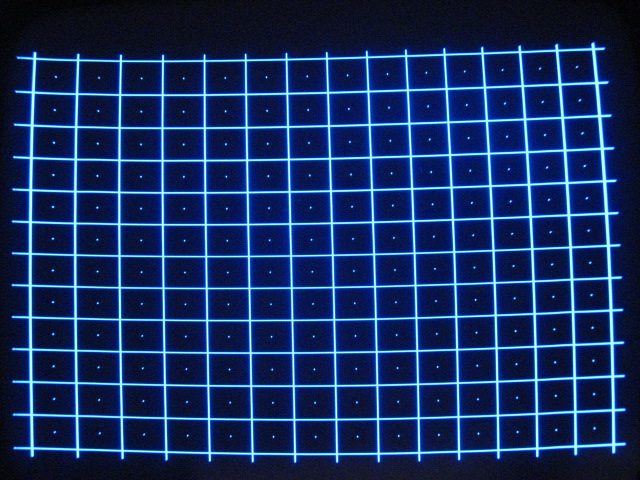
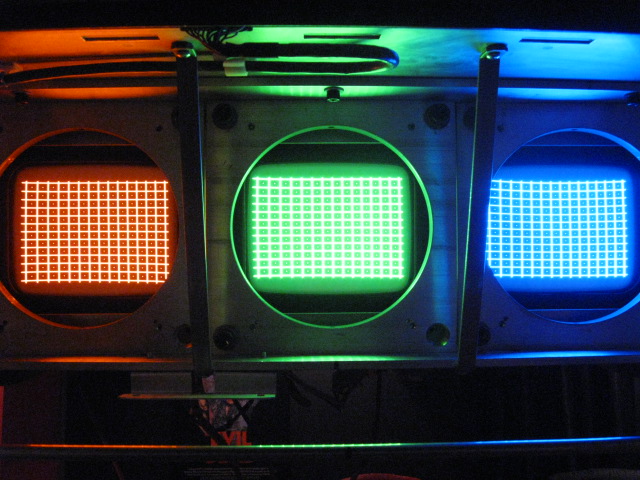
Different issue...As you can see in the pix the blue tube geometry is bowed up (down when inverted) whereas the G&R are close. If I add any more pin to the tops of those two it's over exaggerated at the blue and I end up with a worse hump.
Something is wrong with the blue tube PIN even with a full initialization. I've changed the VDM and gone back to the original one but it followed.
| Description: |
| Blue grid hump. Can't adjust it out without over adjusting G&R |
|
| Filesize: |
147.42 KB |
| Viewed: |
9768 Time(s) |
|
| Description: |
| After a full initialization and nothing but PIN and Focus adjusted. Notice the blue pattern sag/hump |
|
| Filesize: |
132.38 KB |
| Viewed: |
9768 Time(s) |
|
_________________
Greg
"Is it ignorance or apathy? Hey, I don't know and I don't care!" --Jimmy Buffett
|
|
| Back to top |
|
|
Sparky015
Joined: 12 May 2009
Posts: 1185
Location: Cleveland / Akron, OH
|
| Posted: Fri Jun 25, 2010 1:57 am Post subject: |
|
|
Greg,
That blue pattern looks similar to what I had in my pj if I recall, so that maybe the magnetics setup on the blue tube.
Arg! That reminds me I need to stop playing in the garage and get you that scope info!
_________________
~Paul
|
|
| Back to top |
|
|
Nashou66
Joined: 12 Jan 2007
Posts: 16171
Location: West Seneca NY
|
| Posted: Fri Jun 25, 2010 3:44 am Post subject: |
|
|
Greg , Paul is right, you do not have your convergence yoke aligned right from what i can tell. With the PJ on and being very careful not to get zapped loosen the clamps and use the wires to move the Convergence yoke, slight changes make big moves so watch the tube face while doing it. when you get it right you'll know. the dips and bumps will be gone.
Athanasios
_________________
Don't blame your underwear for your crooked ass~ unknown Greek philosopher
"Republicans believe every day is the Fourth of July, but the Democrats believe every day is April 15." --- President Reagan
One Smart Dog!!!
Marquee High Performance Bellows now shipping!!
Marquee Modifications and Performance Enhancement
Marquee C-element and Bellow removal
|
|
| Back to top |
|
|
JustGreg
Joined: 07 Mar 2006
Posts: 3098
Location: Kenosha, WI
|
| Posted: Fri Jun 25, 2010 7:27 am Post subject: |
|
|
| Nashou66 wrote: | Greg , Paul is right, you do not have your convergence yoke aligned right from what i can tell. With the PJ on and being very careful not to get zapped loosen the clamps and use the wires to move the Convergence yoke, slight changes make big moves so watch the tube face while doing it. when you get it right you'll know. the dips and bumps will be gone.
Athanasios |
I appreciate the feedback. To tell the truth I didn't know the Conv yoke could be tweeked like that. Huh. I'll revisit it later today if time and get back with (hopefully) a pic of it all fixed. I'm still bumming over having to run KEYSTONE down to 12-ish to get good geometry but I can't see any other way around it with the physical restrictions of the room. Bummer man.
To hijack my own thread...because my brain somehow wandered to the heat that will be generated driving the electronics so hard...
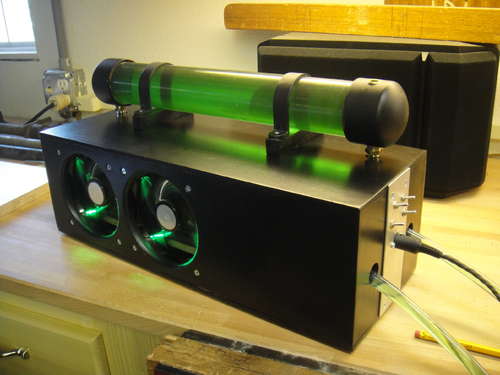
I've been putzing around for several months as time permits pulling the parts together to convert the rear heatsink from passive cooling to active via liquid cooling. It's based on a project for PC cooling but mine is more...robust.  (Pic attached) (Pic attached)
If I can ever get this pj setup hammered out that's next on the list. I've attached a pic of the design I based mine on except mine will be a wall mounted food grade stainless NEMA enclosure inside an insulated sump pump closet in the corner of the theater. Should be a fun project.
| Description: |
| Nifty looking but mine will be more utilitarian. |
|
| Filesize: |
21.66 KB |
| Viewed: |
9737 Time(s) |
|
_________________
Greg
"Is it ignorance or apathy? Hey, I don't know and I don't care!" --Jimmy Buffett
|
|
| Back to top |
|
|
CasetheCorvetteman
Joined: 09 Nov 2008
Posts: 6326
Location: Australia
|
| Posted: Fri Jun 25, 2010 9:25 am Post subject: |
|
|
|
If you raised the screen and lowered the projector, i wouldnt expect youd need so much keystone, especially with it on the angle like you have. Can you raise the front of the projector and lower the rear abit? That should lessen the need for keystone id think.
|
|
| Back to top |
|
|
JustGreg
Joined: 07 Mar 2006
Posts: 3098
Location: Kenosha, WI
|
|
| Back to top |
|
|
CasetheCorvetteman
Joined: 09 Nov 2008
Posts: 6326
Location: Australia
|
| Posted: Sun Jun 27, 2010 12:39 pm Post subject: |
|
|
No worries on the late reply mate, i only just got here myself. Had a huge night of gaming and drinking up at my new place.
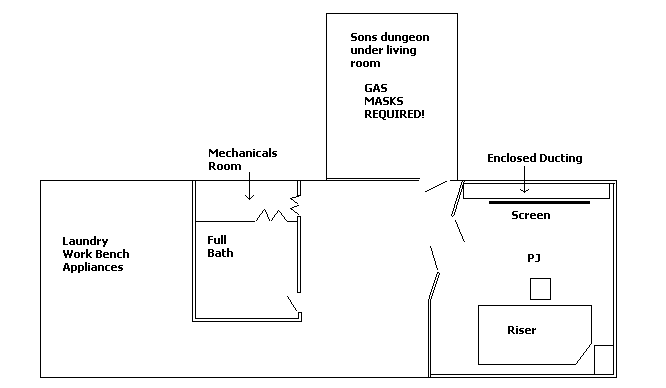
Can you get rid of that duct or move it elsewhere? What is it for? What is in the area where you have "Enclosed ducting" written on your drawing? Can the ducting be moved to that side of the wall with a bit of work?
Can you swap the Son's dungeon with the present HT room?
|
|
| Back to top |
|
|
Nashou66
Joined: 12 Jan 2007
Posts: 16171
Location: West Seneca NY
|
| Posted: Sun Jun 27, 2010 1:51 pm Post subject: |
|
|
Case might have a point about the duct work, go down the side wall across the floor then back up the other wall. The area that the duct work is on the floor you can make it look like a small raised stage under the screen. Now you can move the screen to the wall and up. Move the PJ forward. It might work nicely. There is more involved but it should be doable.
Athanasios
_________________
Don't blame your underwear for your crooked ass~ unknown Greek philosopher
"Republicans believe every day is the Fourth of July, but the Democrats believe every day is April 15." --- President Reagan
One Smart Dog!!!
Marquee High Performance Bellows now shipping!!
Marquee Modifications and Performance Enhancement
Marquee C-element and Bellow removal
|
|
| Back to top |
|
|
tse
Joined: 03 May 2006
Posts: 1014
Location: Sweatbucket, Fl.
|
| Posted: Sun Jun 27, 2010 4:14 pm Post subject: |
|
|
For the blue raster shape try unplugging the blue convergence coil and see if it straightens out. If it doesn't check that the blue deflection yoke is hard up against the tube bell. If it is tilted in reference to the tube screen you can get the shape that you are showing. You might have to remove the hot glue to get it placed right. If you have to do that be careful to not pull the wires out of place on the yoke.
Scott
_________________
"Were we directed from Washington when to sow and when to reap, we would soon want bread."
Thomas Jefferson
|
|
| Back to top |
|
|
dvh99

Joined: 25 Dec 2009
Posts: 2158
Location: nederland
|
| Posted: Sun Jun 27, 2010 5:38 pm Post subject: |
|
|
AVERTISSEMENT
be careful not to kill yourself (deflection yokes carry lethal voltages)
_________________
1 answer always poses multiple questions.
marquee 9500ultra HD10L moome hdmi1.3 v3+ some mods.
|
|
| Back to top |
|
|
JustGreg
Joined: 07 Mar 2006
Posts: 3098
Location: Kenosha, WI
|
| Posted: Sun Jun 27, 2010 8:02 pm Post subject: |
|
|
Thanks guys. It wouldn't be practical to tear out the ductwork and reroute it. Too many CA returns and feeds to other parts of the house depend on those two runs.
I even thought of flipping the room 180 but there isn't enough headroom for anyone over 5'5" to walk around on the 10" riser so that's out.
I have no choice but to bring the screen out another 4-ish inches and mount it higher. I'll have to deal with the center channel issue. The front seats will get the full benefit of it but not so much from the riser. It isn't like I have reference audio capabilities anyway. It will work out better in the long run because I'll have to move the pj back some, which will give me room to get the PS's out of it without dropping it every time.
Tim, I already disconnected the convergence and the center hump @ the blue persisted. I'll pull the tube and realign the deflection yoke. Fragile windings warning noted. 
_________________
Greg
"Is it ignorance or apathy? Hey, I don't know and I don't care!" --Jimmy Buffett
|
|
| Back to top |
|
|
cmjohnson

Joined: 03 Apr 2006
Posts: 5180
Location: Buried under G90s
|
| Posted: Sun Jun 27, 2010 8:09 pm Post subject: |
|
|
Tse is the resident expert here but I'm going to back him up. A tilted deflection or focus yoke WILL cause a sagging grid pattern as seen.
I think that it can also be caused by the yoke in question having a balance issue. If there's a turn to turn short in a deflection yoke, it will reduce the amount of current drive through that coil, and deflection yokes work on well balanced pairs of coils.
It's not impossible that it could be an unbalanced yoke drive signal, too, which would point at an issue on that channel of the HDM.
In the case where it could be due to a focus coil, which is mechanically set up correctly, then it's possible that the static magnetic field
strength from the internal permanent magnets could be non-uniform. In the case of the Thomson focus coils, this is very possible as
the magnet structure consists of six cylindrical magnets between two steel plates, in a squirrel cage arrangement. If some of those
magnets were to be well off their proper strength, it would cause the total magnetic field shape to be off, and geometrically similar to
the field generated by a tilted yoke.
Check the yokes. Focus first because they're easier to get to. Check alignment with the coils disconnected. If the sag is still there,
swap the deflection yoke drive cables between this tube and one other. (It's generally best to leave green untouched since it's your
point of reference.) If the sag switches to the other tube, it says bad HDM. If the sag doesn't change, it could still be either the
focus coil or the deflection yoke. swap the focus coils between this tube and another tube. Then try swapping focus coils. If the sag
still doesn't move, then the last thing left is the deflection yoke. In this case it might be better to just pick up a spare deflection
yoke from Curt (I'm sure he's got a ton of them) rather than have to go to the effort of stripping down TWO tube stacks and realigning
both of them later.
Warning: The HDM generates up to 1500 volts at a high frequency. (The horizontal deflection frequency.) Contact with a live connection
carrying this signal will result in an instant burn almost exactly like poking yourself with a sharp and hot soldering iron. Been there, done
that, have the scar to show for it.
And, while it is safe to swap focus leads around on a running projector, do NOT attempt this with the HDM leads. NEVER. Even if you
don't get your hands burned off, you'll probably destroy the HDM and maybe much more.
You can mess with convergence, focus, and astig coils and connections while the PJ is running, but under no circumstances is anyone
to ever mess with the deflection coil connections on a running projector. And if you should have to do alignment and rotation of a
deflection coil, which will be necessary if you remove the coil from the neck but will usually be glued in its correct position from the
factory, then you may want to apply a nice thick layer of RTV silicone to the exposed pins on the yoke and let it cure up completely
before reaching in there and tweaking the deflection yoke. RTV is cheap insurance and will make a very good insulator if you use
enough of it. I highly recommend putting RTV over deflection yoke pins as a matter of routine safety, when there is no integral cover
on the yoke assembly.
CJ
CJ
|
|
| Back to top |
|
|
|
|




 I can't move