|
As this forum is rarely used anymore, we've locked it. Feel free to browse and read. Questions? Please reach out to us directly. Cheers! |

|
 |
|
|
| Author |
Message |
JustGreg

Joined: 07 Mar 2006
Posts: 3098
Location: Kenosha, WI
|
| Posted: Wed Jun 02, 2010 7:41 am Post subject: Projector base to screen edge-How much deviation is too much |
|
|
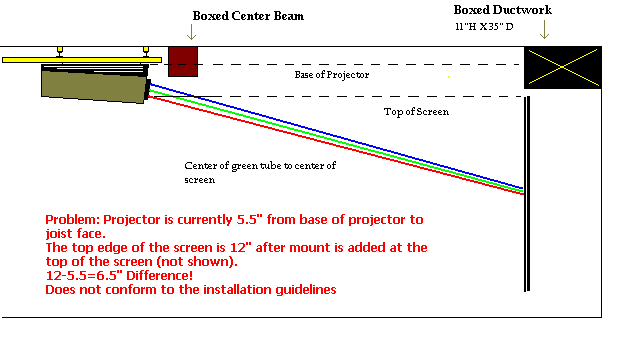
The subject pretty much says it all but because a picture is worth a thousand dollars (to the Enquirer), I whipped up a little graphic.
I used to run the projector with the pj (ceiling mounted) with a pretty big deviation of the setup guidelines. I couldn't even guess how much but probably close to 12" and compensated with a mix of tilting the screen, increasing the base angle (in addition to the built in 10 degrees), and electronically. I don't want to do that this 'from scratch' installation/setup.
As you can see I have 6.5" of deviation between the 2. I can always add longer AllThread rods and drop it down a little bit but I can't go nuts because the riser seating will be affected. To clarify that, people who are sitting on their butts won't have any issues with the pj being in the way but the thing hanging down too far will just look crappy and intrusive to me.
The screen height is carved in stone due to the boxed in ductwork over it. So nothing to do there.
How much can I push the pj angle before I might have flare/stig issues that can't be compensated for electroncially? (Guesses or general info is OK) The goal of course is to not use ANY electronic compensation but that's The Perfect World...or at least a winning lottery ticket! 
Any thoughts are appreciated as I've just recently gotten 'serious' about my pj...as opposed to just slapping it up there and using it like I did for years.
FYI: In the graphic when I reference the "joist face" I mean the spine of the floor joist over the pj. (ceiling isn't finished on that side of the boxed in center beam yet)
Thanks!
| Description: |
|
| Filesize: |
11.52 KB |
| Viewed: |
2008 Time(s) |
|
_________________
Greg
"Is it ignorance or apathy? Hey, I don't know and I don't care!" --Jimmy Buffett
|
|
| Back to top |
|
 |
CasetheCorvetteman

Joined: 09 Nov 2008
Posts: 6326
Location: Australia
|
| Posted: Wed Jun 02, 2010 10:20 am Post subject: |
|
|
How far can you drop it down?
Itll work the way it is, youll just need to angle the front down more and use more keystone correction, which will mean youll get uneven wear on the tubes, and itll probably effect their life and their abilty to display a really ultra sharp picture, due to less phosphor being used at the bottom compared to the top of the tube face ( pretty sure itll be that way round for ceiling mount )
Ultimately, with the raster centered, and the picture centered within the raster, then the cross hair patern centered within the picture within the raster, if indeed that can be done on your rig, you want the horizontal lines of that cross hair to be in the center of the screen, and if that means moving the whole projector down abit, do that before tilting it down at the front, but if it cant come down far enough, youll have to tilt the front down abit.
That is my take on it all anyway, but im of the opinion that you should always try to keep the tube face usage as even and square as possible, minimising keystone correction, and that should help the tubes last longer 
|
|
| Back to top |
|
|
cmjohnson

Joined: 03 Apr 2006
Posts: 5180
Location: Buried under G90s
|
| Posted: Wed Jun 02, 2010 11:37 am Post subject: |
|
|
Your absolute limit is determined by how much keystone correction and scheimpflug you can dial in. As long as you are within those limits, you're fine. But of course, the closer to an angle of zero between the PJ and the screen, the better off you'll be.
CJ
|
|
| Back to top |
|
|
JustGreg
Joined: 07 Mar 2006
Posts: 3098
Location: Kenosha, WI
|
| Posted: Wed Jun 02, 2010 8:45 pm Post subject: |
|
|
Thanks guys.  That's mostly what I already knew except I didn't think about the uneven wear. That's mostly what I already knew except I didn't think about the uneven wear.
As the tubes will all be new by next week I want to get them off to a healthy start so....looks like I add ~3-4" to the AllThread and drop it down a bit. Not zero'd but every little bit should help relieve some electronic correction overhead.
Good stuff. Thanks again.
_________________
Greg
"Is it ignorance or apathy? Hey, I don't know and I don't care!" --Jimmy Buffett
|
|
| Back to top |
|
|
|
|
|
|
|
You cannot post new topics in this forum
You cannot reply to topics in this forum
You cannot edit your posts in this forum
You cannot delete your posts in this forum
You cannot vote in polls in this forum
You cannot attach files in this forum
You can download files in this forum
|
Forum powered by phpBB © phpBB Group
|
|



