| Author |
Message |
CZ Eddie
Joined: 23 Mar 2006
Posts: 1601
Location: Austin, TX
|
| Posted: Tue Jun 01, 2010 3:14 am Post subject: |
|
|
Bummer.
Nope, arcing isn't normal for new tubes in my experience.
Are you still not getting any crackle, but you are getting heater lights at the back of the tubes?
_________________
Back after a digital sabatical.
|
|
| Back to top |
|
 |
Sparky015

Joined: 12 May 2009
Posts: 1185
Location: Cleveland / Akron, OH
|
| Posted: Tue Jun 01, 2010 3:28 am Post subject: |
|
|
that's right, no crackle, but I get the heater glow at the rear of all three tubes.
This is where I wish I had a set of spare boards and supplies, although my concern is that there is something else wrong that caused this. I'm still holding out that it's the protect circuit that's keeping it from powering up, but I'm at a loss at the two large snaps that I heard and saw.
_________________
~Paul
|
|
| Back to top |
|
|
cmjohnson

Joined: 03 Apr 2006
Posts: 5180
Location: Buried under G90s
|
| Posted: Tue Jun 01, 2010 3:45 am Post subject: |
|
|
Do you have ALL your grounding leads and straps connected up properly? And I DO mean ALL of them.
Disconnect any boards that are not totally essential. Unplug the focus board, the astig board, your second input board, your quad input
board if you have one. Astig coils, convergence coils. CMM board. Basically just leave the deflection systems, neck boards, power supplies, CLM, and VIM connected up. The more you eliminate from consideration, the simpler the remaining problem becomes.
Be very sure the G2 lines are hooked up properly, too.
I'd just take it apart and rebuild it slowly and carefully, inspecting everything as I go.
Also, get the neck card jumper data from Tse and make up two jumper plugs. Try out the PJ with only ONE tube installed. If it won't run like that, then something major is wrong. The indicator lights on the CLM will suggest what board(s) are likely to be at fault.
Fortunately, everything's available.
CJ
|
|
| Back to top |
|
|
km987654

Joined: 25 Jul 2007
Posts: 2874
Location: Australia
TV/Projector: Barco BG809s
|
| Posted: Tue Jun 01, 2010 3:46 am Post subject: |
|
|
|
Sounds like no HV with those symptoms. I would be looking at the HV components.
|
|
| Back to top |
|
|
Curt Palme
CRT Tech
Joined: 08 Mar 2006
Posts: 24396
Location: Langley, BC
TV/Projector: All of them!
|
| Posted: Tue Jun 01, 2010 3:50 am Post subject: |
|
|
This is a Marquee from the sound of it. Did you put the ground straps on the tube? I do that once in a while which causes arcing.
It is rare but possible that a tube is bad, I've had a nek crack in transit, but not enough to snap it, so I installed it and there was arcing.
Also possible that there's impurities in the tube, causing arcing in the neck.
I also had a tube where the electron gun came loose in transit, and it was rattling around in the neck, still connected to the pins. that also created a light show.
Note that all these are really rare, but those are possibilities anyways..well, except for the missing ground leads, stupidity runs rampant here in Langley..
|
|
| Back to top |
|
|
dvh99

Joined: 25 Dec 2009
Posts: 2158
Location: nederland
|
| Posted: Tue Jun 01, 2010 3:58 am Post subject: |
|
|
i dont know if it will hurt but can you put the defl yoke beside the pj and connect it to the vdm and hdm plus the other 2 tubes in a normal way of course.
_________________
1 answer always poses multiple questions.
marquee 9500ultra HD10L moome hdmi1.3 v3+ some mods.
|
|
| Back to top |
|
|
Sparky015
Joined: 12 May 2009
Posts: 1185
Location: Cleveland / Akron, OH
|
| Posted: Tue Jun 01, 2010 12:57 pm Post subject: |
|
|
Yes Curt, this is a Marquee. I did not have any of the ground straps connected. I had the heat sink open and was just powering it up for the first time to make sure things worked. Is that what caused my arcing? I had all of the plastic covers over the CPCs off, so the ground strap connecting the top metal cover to the rear cover was dangling. TO be honest, I'm not sure if it was touching the tube or not. The rear ground straps on the neck board cages were also dangling, but not near the tubes. I didn't realize they needed to be in place. I guess I've been playing with fire. I fired up the duds before I removed them this way as well.
When I get home, I will investigate the tube further. I stripped all of the magnetics off it and inspected it and it seems fine. So sounds like the two large snaps are most likely caused by either not having the ground straps connected, or because of impurities in the tube, and that most likely took out my HDM board, which put the pj in protect mode killing the HV? If that is the case, I 'm hunting ghosts trying to find the source of my arc, and I need to concentrate on repairing the HDM.
_________________
~Paul
|
|
| Back to top |
|
|
Nashou66

Joined: 12 Jan 2007
Posts: 16171
Location: West Seneca NY
|
| Posted: Tue Jun 01, 2010 1:09 pm Post subject: |
|
|
Paul the main ground straps that should be connected are the ones from the Copper tape to the VNB. if those are not connected massive amounts of static electricity builds up and will spark to the closest path. once it was my finger Yeoweee!!!!!
Those will cause the HV to shut off but usually the HV comes back up after a static spark surge. It might have taken out a component on the HDM.
Athanasios
_________________
Don't blame your underwear for your crooked ass~ unknown Greek philosopher
"Republicans believe every day is the Fourth of July, but the Democrats believe every day is April 15." --- President Reagan
One Smart Dog!!!
Marquee High Performance Bellows now shipping!!
Marquee Modifications and Performance Enhancement
Marquee C-element and Bellow removal
|
|
| Back to top |
|
|
Sparky015
Joined: 12 May 2009
Posts: 1185
Location: Cleveland / Akron, OH
|
| Posted: Tue Jun 01, 2010 1:17 pm Post subject: |
|
|
Thanks Nash. When it happend, I heard the crackle of the HV on, and then a snap, then a crackle like the HV was re-engaging, then the second snap. HV did not return after that, only an H-fail light. That would seem to indicate a static snap as you describe. The copper tape ground straps were connected, however I reused those ground straps from the dud tubes. Ok, I'm going to say this because I was unsure of myself when I did it, but now I have a feeling the god of stupidity bit me. The tube labels on the new tubes are on the sides of the tube neck. Rather than peeling off the label and moving it to the top out of the way, I put the ground strap over it, thinking the other half of the strap is on the tube on the bottom of the neck.
_________________
~Paul
|
|
| Back to top |
|
|
Nashou66
Joined: 12 Jan 2007
Posts: 16171
Location: West Seneca NY
|
| Posted: Tue Jun 01, 2010 1:24 pm Post subject: |
|
|
Yes, that is exactly what happens. it should power up again hopefuly, make sure the connection of the aguadag( spelling?) straps are right on the tube. clean the tube well so a good connection is made. The proper tape to use over the copper is an antistatic tape but i just used regular clear Duck Brand packaging tape.
Athanasios
_________________
Don't blame your underwear for your crooked ass~ unknown Greek philosopher
"Republicans believe every day is the Fourth of July, but the Democrats believe every day is April 15." --- President Reagan
One Smart Dog!!!
Marquee High Performance Bellows now shipping!!
Marquee Modifications and Performance Enhancement
Marquee C-element and Bellow removal
|
|
| Back to top |
|
|
Sparky015
Joined: 12 May 2009
Posts: 1185
Location: Cleveland / Akron, OH
|
| Posted: Tue Jun 01, 2010 1:31 pm Post subject: |
|
|
Ok, I'm feeling better now. I'm glad this happened because of stupidity, not because of a bad tube.  I did use the Kapton tape over the copper tape. Apparently there is a reason the copper tape covers two sides of the tube. Now I know! So now I need to correct the grounding mess I made and move the tube labels to the top, then investigate the HDM. Most likely I blew a transistor or FET, hopefully that's all. I did use the Kapton tape over the copper tape. Apparently there is a reason the copper tape covers two sides of the tube. Now I know! So now I need to correct the grounding mess I made and move the tube labels to the top, then investigate the HDM. Most likely I blew a transistor or FET, hopefully that's all.
_________________
~Paul
|
|
| Back to top |
|
|
Sparky015
Joined: 12 May 2009
Posts: 1185
Location: Cleveland / Akron, OH
|
| Posted: Tue Jun 01, 2010 3:22 pm Post subject: |
|
|
Thinking about this a little more from all of the comments. I had the aquadog grounds hooked up (albeit, only half of the strap was on the tube, doh!), and those are connected to the neck board. The neck board is grounded to the neck board cage through the two white grounds. Since I did not have the ground straps connected to the rear heat sink, essentially the tube/neck assembly is still floating in comparison to chassis ground. Static built up on the red tube, had no where to go, so it probably discharged through the deflection yoke.
Does this make sense?
_________________
~Paul
|
|
| Back to top |
|
|
cmjohnson
Joined: 03 Apr 2006
Posts: 5180
Location: Buried under G90s
|
| Posted: Tue Jun 01, 2010 6:31 pm Post subject: |
|
|
Yeah, that's exactly how it's going to work in that case. Your HDM probably fried, or more specifically, the control ICs on it probably fried.
Most of the high voltage components could have withstood the spike, I'll wager.
BTW,that's aquaDAG, not aquaDOG. A wet mutt has nothing to do with this!
Get another HDM and try it. It'll probably fix the PJ. If not, you'll have a spare HDM for when you DO get it fixed, and having a good
spare HDM is never a bad idea.
CJ
|
|
| Back to top |
|
|
Sparky015
Joined: 12 May 2009
Posts: 1185
Location: Cleveland / Akron, OH
|
| Posted: Tue Jun 01, 2010 6:54 pm Post subject: |
|
|
aquadog sounds better! It seems my typing has been steadily getting worse.
Thanks CJ. Even though I was a bone head, I suppose this is better than a torched new tube.
It's an ultra HDM, so if anyone has one to sell let me know and a price. Either way, I know I will be troubleshooting tonight. Hopefully the damage is minimal.
_________________
~Paul
|
|
| Back to top |
|
|
mp20748
Joined: 12 Sep 2006
Posts: 5689
Location: Maryland
TV/Projector: 9500LC Ultra / Super 02 and 03 VIM
|
| Posted: Tue Jun 01, 2010 7:56 pm Post subject: |
|
|
| Sparky015 wrote: | aquadog sounds better! It seems my typing has been steadily getting worse.
Thanks CJ. Even though I was a bone head, I suppose this is better than a torched new tube.
It's an ultra HDM, so if anyone has one to sell let me know and a price. Either way, I know I will be troubleshooting tonight. Hopefully the damage is minimal. |
Replace Q501 on the daughter board on the HDM. There's no need to replace the entire HDM when the arching almost 100% of the time will only take out that FET.
|
|
| Back to top |
|
|
Curt Palme
CRT Tech
Joined: 08 Mar 2006
Posts: 24396
Location: Langley, BC
TV/Projector: All of them!
|
| Posted: Tue Jun 01, 2010 8:00 pm Post subject: |
|
|
|
Otherwise I can repair it.
|
|
| Back to top |
|
|
JustGreg

Joined: 07 Mar 2006
Posts: 3098
Location: Kenosha, WI
|
| Posted: Tue Jun 01, 2010 9:34 pm Post subject: |
|
|
| mp20748 wrote: | | Sparky015 wrote: | aquadog sounds better! It seems my typing has been steadily getting worse.
Thanks CJ. Even though I was a bone head, I suppose this is better than a torched new tube.
It's an ultra HDM, so if anyone has one to sell let me know and a price. Either way, I know I will be troubleshooting tonight. Hopefully the damage is minimal. |
Replace Q501 on the daughter board on the HDM. There's no need to replace the entire HDM when the arching almost 100% of the time will only take out that FET. |
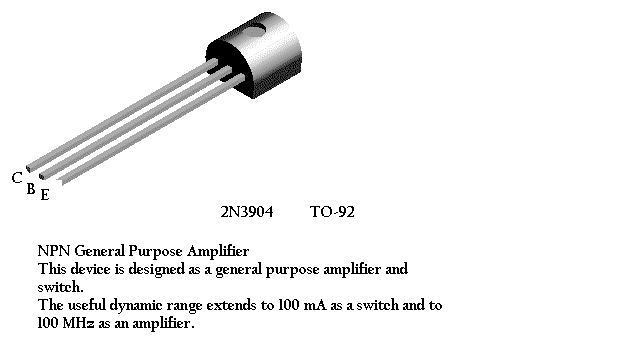
Paul, the P/N is 2N3904 40V .2A 35W NPN.
Surprisingly it looks as though Radio Shack has this in stock in 'most' stores for $0.79. If so it will be the first thing they've ever had that anyone needed for a Marquee repair/mod. 
http://www.radioshack.com/product/index.jsp?productId=2062609&CAWELAID=107595524
| Description: |
|
| Filesize: |
14.01 KB |
| Viewed: |
4827 Time(s) |
|
_________________
Greg
"Is it ignorance or apathy? Hey, I don't know and I don't care!" --Jimmy Buffett
|
|
| Back to top |
|
|
mp20748
Joined: 12 Sep 2006
Posts: 5689
Location: Maryland
TV/Projector: 9500LC Ultra / Super 02 and 03 VIM
|
| Posted: Tue Jun 01, 2010 10:01 pm Post subject: |
|
|
Q501 is on the mini board (daughter board) mounted on the HDM. It's a TO92 transistor that can also be found on either a "Contrast Modulation" or "ACON" board.
http://www.fairchildsemi.com/ds/2N/2N7000.pdf
|
|
| Back to top |
|
|
CZ Eddie
Joined: 23 Mar 2006
Posts: 1601
Location: Austin, TX
|
| Posted: Tue Jun 01, 2010 10:48 pm Post subject: |
|
|
Ahh, there you go. The contrast mod board is in most (all?) 8500/9500's and is not required for function.
Not many have the ACON boards though.
_________________
Back after a digital sabatical.
|
|
| Back to top |
|
|
Sparky015
Joined: 12 May 2009
Posts: 1185
Location: Cleveland / Akron, OH
|
| Posted: Wed Jun 02, 2010 12:50 am Post subject: |
|
|
thanks for the posts guys. I'm diving in tonight, so we'll see what the deal is.
_________________
~Paul
|
|
| Back to top |
|
|
|
|




