|
As this forum is rarely used anymore, we've locked it. Feel free to browse and read. Questions? Please reach out to us directly. Cheers! |
|
|
 |
|
|
| Author |
Message |
akajester

Joined: 09 Jul 2008
Posts: 934
Location: Wisconsin
|
| Posted: Tue May 25, 2010 9:03 pm Post subject: |
|
|
|
What I'm curious about is perhaps the mkv file is just fine and it's the playback that's messed up. Would seem very possible, if he's following the same steps as everyone else and the ripping is succeeding.
|
|
| Back to top |
|
 |
Mark_A_W
Joined: 15 Mar 2006
Posts: 3068
Location: Sunny Melbourne Australia
|
| Posted: Tue May 25, 2010 9:56 pm Post subject: |
|
|
Yes, playback is screwed up.
The mkv's will be fine.
|
|
| Back to top |
|
|
chadd

Joined: 09 Dec 2009
Posts: 46
|
| Posted: Wed May 26, 2010 1:01 pm Post subject: |
|
|
| perisoft wrote: | Mike,
...as far as the preview goes - a) it just doesn't work, no matter what I do, following directions or not. And b) even if it worked, it defeats the purpose, because if I'm going to watch a movie I haven't seen, the last thing I want to do is preview it and look for text and listen for audio to confirm everything is right! Kinda ruins the whole thing... 
|
preview always works fine for me 
i've noticed that if you just look at the opening credits in the preview, you can "usually" tell form that if it is in english or not, no need to watch the entire movie
that being said, it would be nice if there was some database somewhere that you could look up which version on the disc is in which language...
_________________
landchark!
|
|
| Back to top |
|
|
perisoft

Joined: 29 Aug 2007
Posts: 2920
Location: Ithaca, NY
|
| Posted: Thu May 27, 2010 4:46 pm Post subject: |
|
|
| chadd wrote: | | perisoft wrote: | Mike,
...as far as the preview goes - a) it just doesn't work, no matter what I do, following directions or not. And b) even if it worked, it defeats the purpose, because if I'm going to watch a movie I haven't seen, the last thing I want to do is preview it and look for text and listen for audio to confirm everything is right! Kinda ruins the whole thing...
|
preview always works fine for me
i've noticed that if you just look at the opening credits in the preview, you can "usually" tell form that if it is in english or not, no need to watch the entire movie
that being said, it would be nice if there was some database somewhere that you could look up which version on the disc is in which language... |
Well, obviously the information is in the disc -somewhere-, or commercial players wouldn't be able to tell, either! So where the hell is it... is it heavily encrypted, or something? OK, I know that deciphering the whole menu structure is difficult, but it seems like someone ought to be able to find where they store the information about language / subs for each set of streams, given that we can find the seamless branching sets themselves...
_________________

|
|
| Back to top |
|
|
perisoft
Joined: 29 Aug 2007
Posts: 2920
Location: Ithaca, NY
|
| Posted: Thu May 27, 2010 4:52 pm Post subject: |
|
|
OK, and here's an .mpls I just opened in notepad:
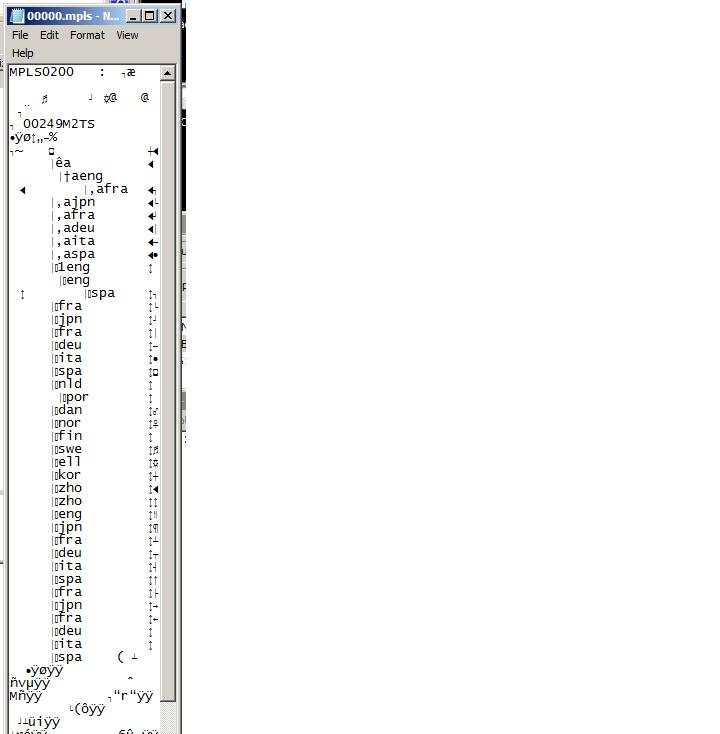
The information is there. And stuff like AnotherEAC3to GUI is looking at it. So why not figure out what's what for the languages / subs from there? It might not be -easy-, but it looks more than possible, and god knows it'd be worth it!
_________________
|
|
| Back to top |
|
|
|
|
|
|
|
You cannot post new topics in this forum
You cannot reply to topics in this forum
You cannot edit your posts in this forum
You cannot delete your posts in this forum
You cannot vote in polls in this forum
You cannot attach files in this forum
You can download files in this forum
|
Forum powered by phpBB © phpBB Group
|
|



