| Author |
Message |
yonexsp
Joined: 25 Apr 2006
Posts: 311
|
|
| Back to top |
|
 |
macgyver655
Joined: 22 Aug 2007
Posts: 8508
|
| Posted: Thu May 06, 2010 12:20 am Post subject: |
|
|
None. They are not on the neck board. I already looked at those pictures and there are not any pics of what you need to disconnect.
let me look in the service manual. Give me a few. Unless someone else has a pic.
|
|
| Back to top |
|
|
macgyver655
Joined: 22 Aug 2007
Posts: 8508
|
| Posted: Thu May 06, 2010 12:43 am Post subject: |
|
|
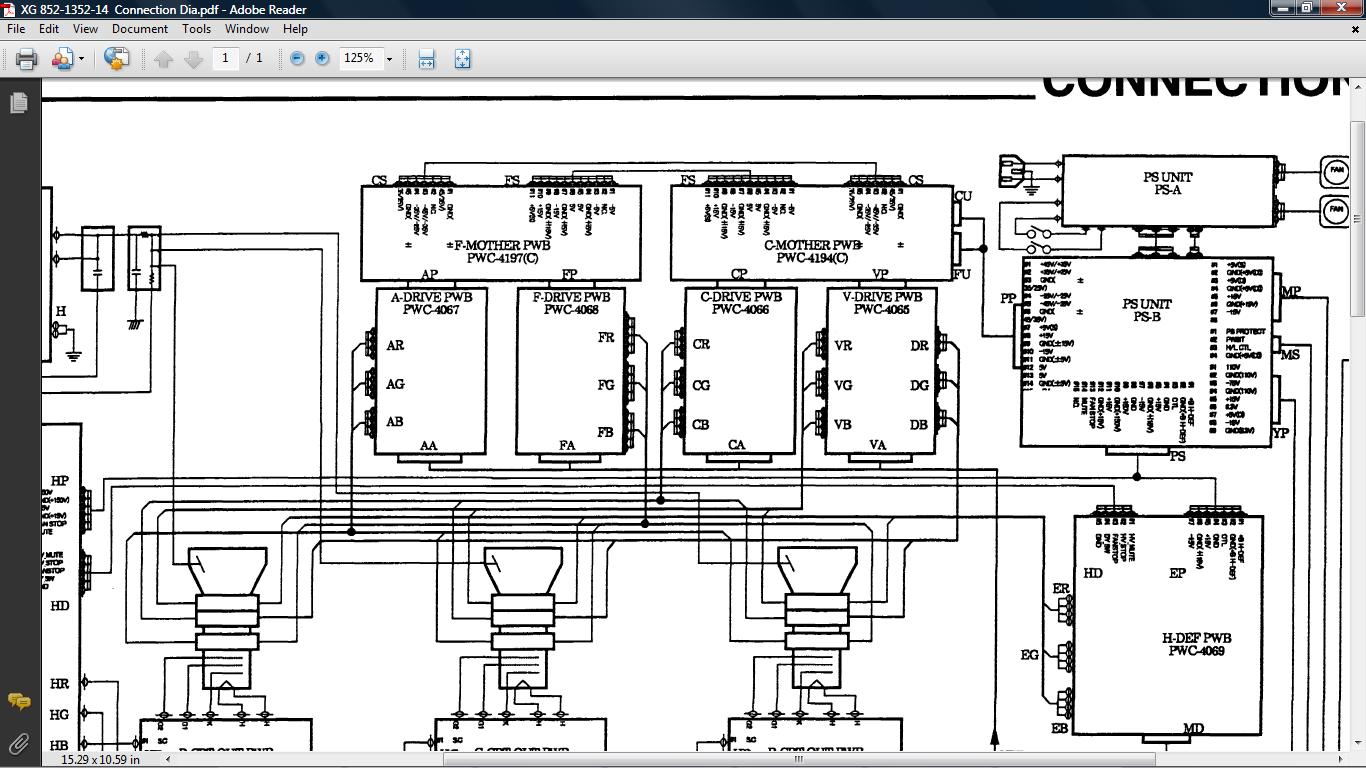
Here's the best image I could find. Disconnect the wires from the C and A drive and see if it affects the line.
| Description: |
|
| Filesize: |
179.68 KB |
| Viewed: |
2564 Time(s) |
|
|
|
| Back to top |
|
|
yonexsp
Joined: 25 Apr 2006
Posts: 311
|
| Posted: Thu May 06, 2010 12:50 am Post subject: |
|
|
|
why am I feeling nervous now lol!!!
|
|
| Back to top |
|
|
macgyver655
Joined: 22 Aug 2007
Posts: 8508
|
| Posted: Thu May 06, 2010 1:06 am Post subject: |
|
|
Crap. I just realized I need to be specific with you. DONT disconnect all the wires to these 2 boards. Only the ones going to the deflection yolks (tubes). It probably wont run if you disconnect the other wires.
CR, CG, CB.......AR, AG, and AB.
|
|
| Back to top |
|
|
yonexsp
Joined: 25 Apr 2006
Posts: 311
|
| Posted: Thu May 06, 2010 5:52 pm Post subject: |
|
|
| Mark_A_W wrote: | | yonexsp wrote: | | no, only full white |
Internal test pattern only?
Or external video/images? |
Both
|
|
| Back to top |
|
|
royuk
Joined: 28 Dec 2007
Posts: 41
|
| Posted: Fri May 07, 2010 11:08 pm Post subject: |
|
|
i have the save 'vertical line' with my 1209s and have never got rid of it until now.
It has bugged me since i got my pj and seen in any white/light colour areas of a movie. Very annoying!!!
Just got a lumagen hdp and hdfury3. When i run 1080p through this the line is gone. With 1080i it's still there.
The lumagen has not been set-up properly yet and the pj needs a reconvergence!
|
|
| Back to top |
|
|
royuk
Joined: 28 Dec 2007
Posts: 41
|
| Posted: Fri May 07, 2010 11:15 pm Post subject: |
|
|
|
As for your horizontal line. Is it to simple to say that's the 'line of co-incidence'. I have that too depending on the set-up.
|
|
| Back to top |
|
|
yonexsp
Joined: 25 Apr 2006
Posts: 311
|
| Posted: Wed May 12, 2010 4:01 pm Post subject: |
|
|
| royuk wrote: | | As for your horizontal line. Is it to simple to say that's the 'line of co-incidence'. I have that too depending on the set-up. |
Seems to be. It is not there I guess with other signals.
Maybe the old girl is just showing here age
|
|
| Back to top |
|
|
dvb1994
Joined: 23 Apr 2010
Posts: 17
Location: Aarhus, Denmark
|
| Posted: Thu May 13, 2010 7:38 pm Post subject: |
|
|
Hi, i had the same problem with my barco cine 6 and it turned out that the problem was the offset correction i the service menu.
i don't know if this is your problem or if there is an offset correction on your projector, so if i'm wrong please correct me
|
|
| Back to top |
|
|
Mark_A_W
Joined: 15 Mar 2006
Posts: 3068
Location: Sunny Melbourne Australia
|
| Posted: Fri May 14, 2010 12:27 am Post subject: |
|
|
| yonexsp wrote: | | macgyver655 wrote: | | yonexsp wrote: | | macgyver655 wrote: | | If you disconnect the video to the neck boards how are you getting a raster on the screen? Are you turning up the brightness? |
Yes |
Ok, not to contradict Mark on this but without video connected I cant see it being a white balance issue since white balance comes through the video. |
To add, tyhe vertical line does not appear with the video disconnected. But the faint horizontal line is still there |
The vertical line is a white balance issue.
Usually a horizontal line is caused by over use of convergence/alignment. Other than that, I have no idea.
|
|
| Back to top |
|
|
|
|




