| Author |
Message |
yonexsp
Joined: 25 Apr 2006
Posts: 311
|
| Posted: Sun May 02, 2010 5:26 pm Post subject: Help: Bright line in the middle of the screen |
|
|
I have a problem developed with my XGLC.
There is a straight white line in the middle of the image, faint but there that has just recently appeared.
It does not matter what signal or input I use it is still there.
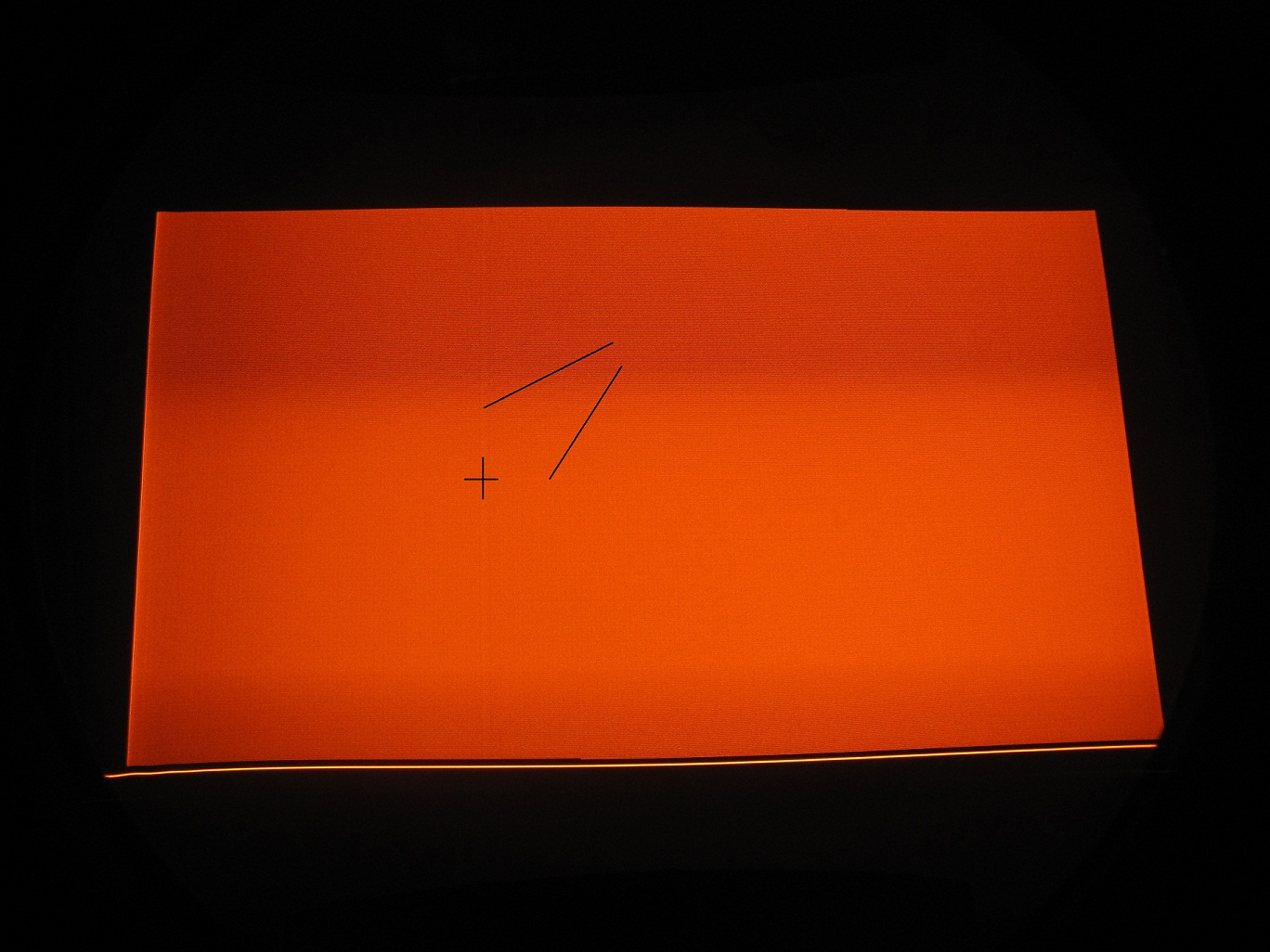
Also, if I select all white from the test patterns, a very clear to see cross is visible on the screen. Almost like the cross test patten, but off center and obviously faint, but bright enough compared to the background that it is visible. It appears on all tubes, R,G,B.
I tried disconnecting all inputs as well, removing the moome card etc, but it is still there. It is like the PJ is generating a cross signal all on it's own that shows up everywhere.
Any ideas? Is it aboard issue, some setting I missed?
FYI It is not the AKB line
|
|
| Back to top |
|
 |
Tim in Phoenix

Joined: 21 Oct 2006
Posts: 4409
Location: Phoenix
|
| Posted: Sun May 02, 2010 6:03 pm Post subject: |
|
|
Hello
You might unplug video feeds to the neckboards, see if the problem remains. Then maybe unplug convergence and stig yokes, see if any difference.
|
|
| Back to top |
|
|
Mark_A_W
Joined: 15 Mar 2006
Posts: 3068
Location: Sunny Melbourne Australia
|
| Posted: Sun May 02, 2010 11:07 pm Post subject: |
|
|
Up down or L-R?
A line across the screen can be caused by too much vertical linearity balance, or one of the other linearity controls.
Funny vertical lines/patches in the "back raster" indicate the need for a full mech white balance.
Mark
|
|
| Back to top |
|
|
Curt Palme
CRT Tech
Joined: 08 Mar 2006
Posts: 24396
Location: Langley, BC
TV/Projector: All of them!
|
| Posted: Sun May 02, 2010 11:42 pm Post subject: |
|
|
|
A customer that got a new to him PG had the same thing, and it was too much top red keystone. Back off on the key and pin controls towards 50%, and see if it goes away.
|
|
| Back to top |
|
|
yonexsp
Joined: 25 Apr 2006
Posts: 311
|
| Posted: Mon May 03, 2010 1:49 pm Post subject: |
|
|
Left to right.
I reset the PJ back to factory default and it is still there 
|
|
| Back to top |
|
|
Curt Palme
CRT Tech
Joined: 08 Mar 2006
Posts: 24396
Location: Langley, BC
TV/Projector: All of them!
|
| Posted: Mon May 03, 2010 2:28 pm Post subject: |
|
|
|
Is it on all three tubes? You can unplug the astig, convergence and focus connectors going to the yokes to see if the problem goes away to narrow it down.
|
|
| Back to top |
|
|
yonexsp
Joined: 25 Apr 2006
Posts: 311
|
| Posted: Mon May 03, 2010 6:52 pm Post subject: |
|
|
| Curt Palme wrote: | | Is it on all three tubes? You can unplug the astig, convergence and focus connectors going to the yokes to see if the problem goes away to narrow it down. |
What cables do I need to disconnect? i.e. what is written on them?
I presume the signal one/s are on the neck board?
|
|
| Back to top |
|
|
yonexsp
Joined: 25 Apr 2006
Posts: 311
|
| Posted: Mon May 03, 2010 7:11 pm Post subject: |
|
|
If I disconnect the video input cable from the neck cards, then the Vertical line disappears, but the very feint horizontal line stays.
That line stays after I disconnect the cables to the focus yokes as well.
So looks like 2 different issues, or a board that is starting to fail perhaps?
I took a picture of the tubeface with the 'All white' test pattern that shows the problem. Bit hard to see, but you can make it out.
| Description: |
|
| Filesize: |
316.04 KB |
| Viewed: |
6030 Time(s) |
|
|
|
| Back to top |
|
|
yonexsp
Joined: 25 Apr 2006
Posts: 311
|
| Posted: Tue May 04, 2010 11:41 pm Post subject: |
|
|
|
bump
|
|
| Back to top |
|
|
Mark_A_W
Joined: 15 Mar 2006
Posts: 3068
Location: Sunny Melbourne Australia
|
| Posted: Wed May 05, 2010 3:31 am Post subject: |
|
|
|
Picture?
|
|
| Back to top |
|
|
yonexsp
Joined: 25 Apr 2006
Posts: 311
|
| Posted: Wed May 05, 2010 2:48 pm Post subject: |
|
|
It is an attachment in an earlier post
|
|
| Back to top |
|
|
macgyver655
Joined: 22 Aug 2007
Posts: 8508
|
| Posted: Wed May 05, 2010 3:59 pm Post subject: |
|
|
|
I'd like to see an all white screen picture.
|
|
| Back to top |
|
|
yonexsp
Joined: 25 Apr 2006
Posts: 311
|
| Posted: Wed May 05, 2010 6:15 pm Post subject: |
|
|
| macgyver655 wrote: | | I'd like to see an all white screen picture. |
Why? all 3 tubes show the lines in the same place.
I'll see what I can do
|
|
| Back to top |
|
|
LOTREE

Joined: 19 Mar 2006
Posts: 401
Location: Paradise, Newfoundland
|
| Posted: Wed May 05, 2010 6:34 pm Post subject: |
|
|
I have the same issue on my 1200x just it runs horizontally mid image. Mostly noticeable on bright images of any color.
_________________
Zenith Pro 1200x | Electrohome ECP 4500 | Yamaha HTR-5740 | HTPC & Speaker build to follow
|
|
| Back to top |
|
|
Mark_A_W
Joined: 15 Mar 2006
Posts: 3068
Location: Sunny Melbourne Australia
|
| Posted: Wed May 05, 2010 9:51 pm Post subject: |
|
|
Not sure about the colour bands running across the screen (camera artifact?).
But the the vertical line means it needs a white balance.
|
|
| Back to top |
|
|
yonexsp
Joined: 25 Apr 2006
Posts: 311
|
| Posted: Wed May 05, 2010 10:20 pm Post subject: |
|
|
| Mark_A_W wrote: | Not sure about the colour bands running across the screen (camera artifact?).
But the the vertical line means it needs a white balance. |
Why do you say that?
I did the G2 not that long ago, and did the greyscale at the same time.
What did I miss?
Also, I see those bands on the tube face as well, so not a camera artifact, but I don;t see them in a projected image, only the internal test pattern.
|
|
| Back to top |
|
|
Mark_A_W
Joined: 15 Mar 2006
Posts: 3068
Location: Sunny Melbourne Australia
|
| Posted: Wed May 05, 2010 10:25 pm Post subject: |
|
|
I think it's the back raster showing.
I'm not sure which control affects it (sub brite this, blah blah that).
But mine was similar when I got it, but much worse, with more lines over on the RH side, and doing the full mech balance fixed it.
Is the line still visible on a black image? That's the giveaway.
|
|
| Back to top |
|
|
yonexsp
Joined: 25 Apr 2006
Posts: 311
|
| Posted: Wed May 05, 2010 10:32 pm Post subject: |
|
|
|
no, only full white
|
|
| Back to top |
|
|
Mark_A_W
Joined: 15 Mar 2006
Posts: 3068
Location: Sunny Melbourne Australia
|
| Posted: Wed May 05, 2010 10:40 pm Post subject: |
|
|
Ok, I've thought about it.
I think it means the black level (blanking) is not set to the pedestal correctly. This is the fundamental brightness control, you need to set it with a scope using a test pattern with vertical white stripes. It's very difficult to figure out which bit of the messy waveform is the pedestal...
If this is wrong, everything is wrong. But you may get away with just turning down the BLKG pots (using a scope and test pattern!).
|
|
| Back to top |
|
|
Mark_A_W
Joined: 15 Mar 2006
Posts: 3068
Location: Sunny Melbourne Australia
|
| Posted: Wed May 05, 2010 10:41 pm Post subject: |
|
|
| yonexsp wrote: | | no, only full white |
Internal test pattern only?
Or external video/images?
|
|
| Back to top |
|
|
|
|





