| Author |
Message |
AnalogRocks
Forum Moderator

Joined: 08 Mar 2006
Posts: 26706
Location: Toronto, Ontario, Canada
TV/Projector: Sony 1252Q, AMPRO 4000G
|
| Posted: Thu Apr 29, 2010 4:12 am Post subject: Sony Sony KP-61HS10 |
|
|
Hi Mac,
do you happen to know if this TV has any sync issues at 1080i?
I have a guy with one and we've tried 1080i via RGBHV and YPbPr and he get's 3 images side by side.
_________________
Tech support for nothing
CRT.
HD done right!
|
|
| Back to top |
|
 |
macgyver655
Joined: 22 Aug 2007
Posts: 8508
|
| Posted: Thu Apr 29, 2010 1:57 pm Post subject: |
|
|
|
I have some thoughts but there are a few things I need to check out first. Give me till later today.
|
|
| Back to top |
|
|
AnalogRocks
Forum Moderator
Joined: 08 Mar 2006
Posts: 26706
Location: Toronto, Ontario, Canada
TV/Projector: Sony 1252Q, AMPRO 4000G
|
| Posted: Thu Apr 29, 2010 2:25 pm Post subject: |
|
|
OKee
_________________
Tech support for nothing
CRT.
HD done right!
|
|
| Back to top |
|
|
macgyver655
Joined: 22 Aug 2007
Posts: 8508
|
| Posted: Thu Apr 29, 2010 8:53 pm Post subject: |
|
|
Ok, lets try this first. Go into the service menu, then go to the OP (option) section. Then look at item 01 (16:9 on/off) and change the standard data from 0 to a 1. If its already a 1 then leave it.
Now look at item 03. This is video 5 force 1080i. Change the standard data from 0 to a 1. Save that and see if it excepts 1080i now.
Your sure your input device is set at 1080i right? Not 1080p. I know, I know..... but I have to ask anyways, lol.
|
|
| Back to top |
|
|
AnalogRocks
Forum Moderator
Joined: 08 Mar 2006
Posts: 26706
Location: Toronto, Ontario, Canada
TV/Projector: Sony 1252Q, AMPRO 4000G
|
| Posted: Thu Apr 29, 2010 11:26 pm Post subject: |
|
|
| macgyver655 wrote: | Ok, lets try this first. Go into the service menu, then go to the OP (option) section. Then look at item 01 (16:9 on/off) and change the standard data from 0 to a 1. If its already a 1 then leave it.
Now look at item 03. This is video 5 force 1080i. Change the standard data from 0 to a 1. Save that and see if it excepts 1080i now.
Your sure your input device is set at 1080i right? Not 1080p. I know, I know..... but I have to ask anyways, lol. |
Wanna PM me how to get into the service menu? I'll have to talk ( email ) the customer through it.
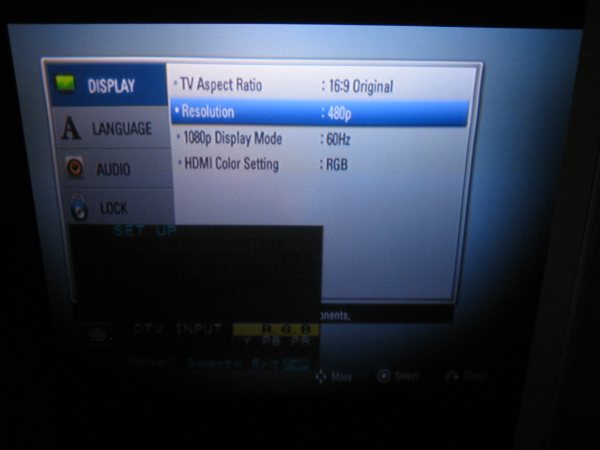
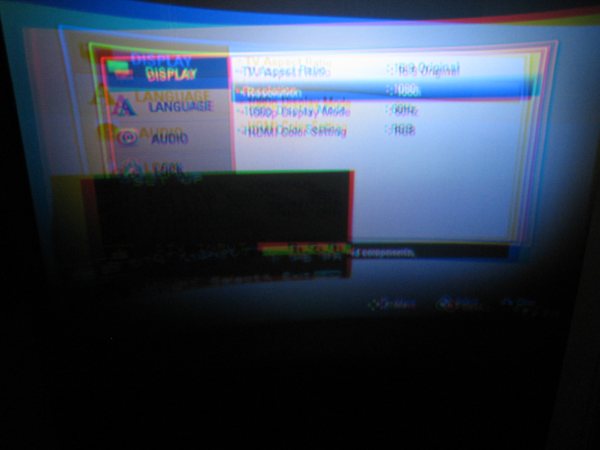
Ahhh ha! He just sent me these two pictures:
Looks like the TV isn't switching over to 1080i memory location.
| Description: |
|
| Filesize: |
24.26 KB |
| Viewed: |
68 Time(s) |
|
| Description: |
|
| Filesize: |
24.64 KB |
| Viewed: |
68 Time(s) |
|
_________________
Tech support for nothing
CRT.
HD done right!
|
|
| Back to top |
|
|
macgyver655
Joined: 22 Aug 2007
Posts: 8508
|
| Posted: Fri Apr 30, 2010 12:39 am Post subject: |
|
|
What that is, is that the tv was never aligned and converged for 1080i. I believe this tv upconverts 480i to 480p but sends 1080i direct through. So 1080i has to be set up.
Tell him to try the flash focus while sending it that 1080i signal.
|
|
| Back to top |
|
|
AnalogRocks
Forum Moderator
Joined: 08 Mar 2006
Posts: 26706
Location: Toronto, Ontario, Canada
TV/Projector: Sony 1252Q, AMPRO 4000G
|
| Posted: Fri Apr 30, 2010 2:30 am Post subject: |
|
|
He tried that to no effect.
_________________
Tech support for nothing
CRT.
HD done right!
|
|
| Back to top |
|
|
macgyver655
Joined: 22 Aug 2007
Posts: 8508
|
| Posted: Fri Apr 30, 2010 3:00 am Post subject: |
|
|
Then he is going to have to do it manually. This procedure will fall under the force 1080i video 5 input. I can send you a copy of the service manual and you guys can hack away at it if you like.
You want it?
|
|
| Back to top |
|
|
AnalogRocks
Forum Moderator
Joined: 08 Mar 2006
Posts: 26706
Location: Toronto, Ontario, Canada
TV/Projector: Sony 1252Q, AMPRO 4000G
|
| Posted: Fri Apr 30, 2010 3:02 am Post subject: |
|
|
| macgyver655 wrote: | Then he is going to have to do it manually. This procedure will fall under the force 1080i video 5 input. I can send you a copy of the service manual and you guys can hack away at it if you like.
You want it? |
Sure. Jeremy AT curtpalme DOT com
_________________
Tech support for nothing
CRT.
HD done right!
|
|
| Back to top |
|
|
macgyver655
Joined: 22 Aug 2007
Posts: 8508
|
| Posted: Fri Apr 30, 2010 3:09 am Post subject: |
|
|
There was an accident a few miles up the road and no power for some time now. I'm typing on a failing laptop battery, air card and an oil lamp. LOL
So I will have to send it tomorrow. 
|
|
| Back to top |
|
|
AnalogRocks
Forum Moderator
Joined: 08 Mar 2006
Posts: 26706
Location: Toronto, Ontario, Canada
TV/Projector: Sony 1252Q, AMPRO 4000G
|
| Posted: Fri Apr 30, 2010 3:10 am Post subject: |
|
|
| macgyver655 wrote: | There was an accident a few miles up the road and no power for some time now. I'm typing on a failing laptop battery, air card and an oil lamp. LOL
So I will have to send it tomorrow. |
Oh dam! 
OK no problem.
_________________
Tech support for nothing
CRT.
HD done right!
|
|
| Back to top |
|
|
macgyver655
Joined: 22 Aug 2007
Posts: 8508
|
| Posted: Fri Apr 30, 2010 2:07 pm Post subject: |
|
|
|
Manual sent. Let me know how you make out.
|
|
| Back to top |
|
|
AnalogRocks
Forum Moderator
Joined: 08 Mar 2006
Posts: 26706
Location: Toronto, Ontario, Canada
TV/Projector: Sony 1252Q, AMPRO 4000G
|
| Posted: Sun May 02, 2010 4:06 am Post subject: |
|
|
Lemme run this by you.
We get into the service mode and scroll through using the '2' key on the remote until we are at "OP".
Then we use "1" or "4" to select the adjustment we want in that category.
We scroll over to item '3' and set the value from '0' to '1' using the "3" or "6" keys on the remote.
Once we have 1080i set to value "1" for input 5 we try again with the 1080i input.
And as always, DO NOT touch any other adjustments while in the service menu.
If this doesn't work then the TV didn't have 1080i aligned at the factory and he will need to either tackle this himself or hire a pro.
_________________
Tech support for nothing
CRT.
HD done right!
|
|
| Back to top |
|
|
macgyver655
Joined: 22 Aug 2007
Posts: 8508
|
| Posted: Sun May 02, 2010 4:49 am Post subject: |
|
|
|
I'm guessing that since that second picture shows it acknowledging a 1080i signal it is going to have to be aligned. It may have never been set up originally. I often find I have to align the DTV input on these RPTV's.
|
|
| Back to top |
|
|
AnalogRocks
Forum Moderator
Joined: 08 Mar 2006
Posts: 26706
Location: Toronto, Ontario, Canada
TV/Projector: Sony 1252Q, AMPRO 4000G
|
| Posted: Sun May 02, 2010 11:56 am Post subject: |
|
|
Hope that's not the case here. I guess we will see.
_________________
Tech support for nothing
CRT.
HD done right!
|
|
| Back to top |
|
|
jkruger

Joined: 24 Oct 2007
Posts: 2435
Location: Carlsbad, CA
|
| Posted: Fri Jun 25, 2010 4:49 pm Post subject: |
|
|
|
markwoge, your posts are looking like you are a spammer.
|
|
| Back to top |
|
|
|
|




