| Author |
Message |
andreas
Joined: 31 Mar 2010
Posts: 92
|
| Posted: Sat Apr 24, 2010 1:21 pm Post subject: sheimflugs problem |
|
|
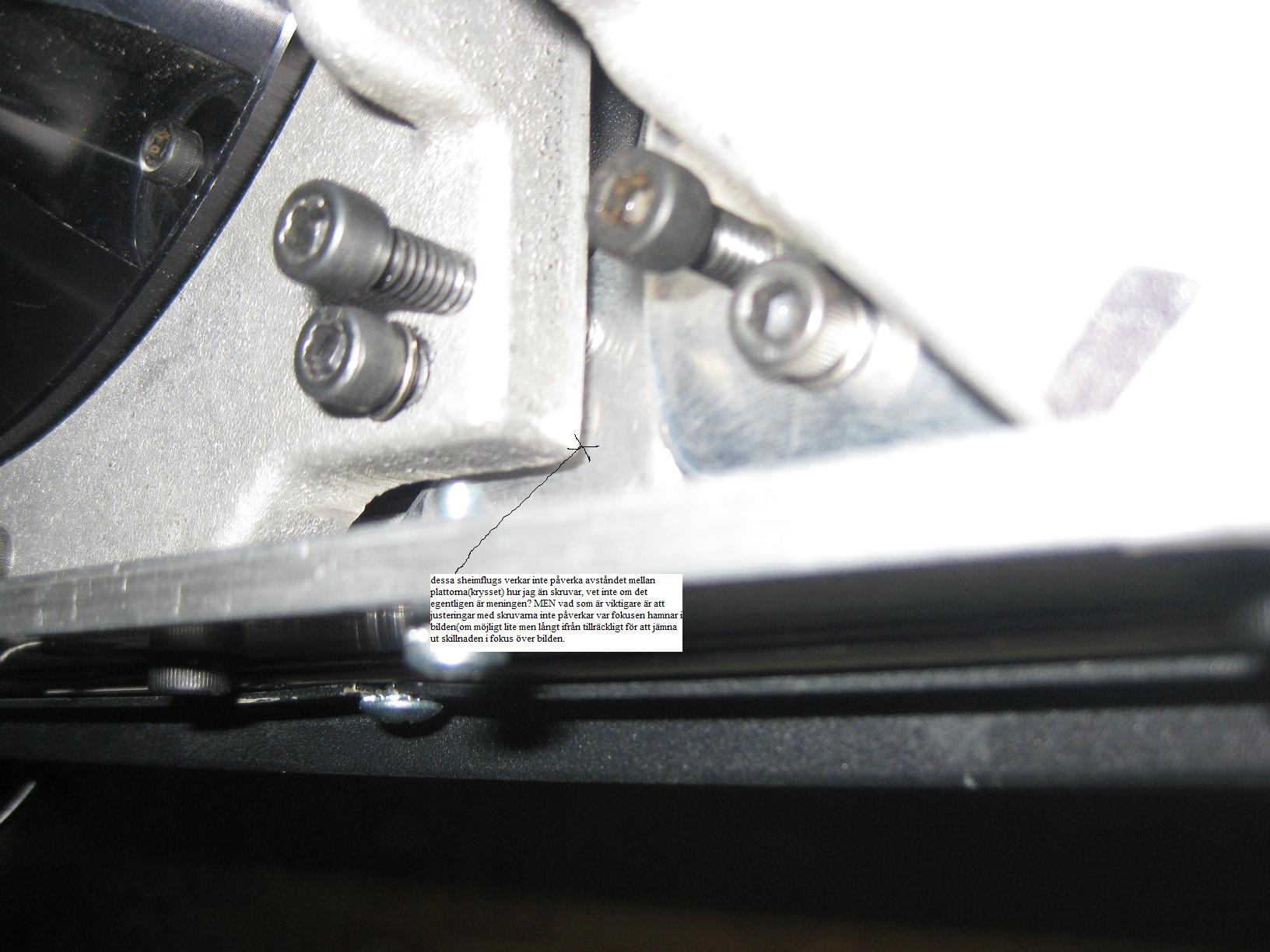
It seems like the flugs on red is not functioning properly. No matter how i turn the skrews, the difference is still to big to get an equally focused or defocused picture. ive tried to move the screen sideways but with no good results. here comes some pictures:
| Description: |
| the gap between the plates does not seem to change when turning the flugs, is that normal? but worse, the flugs dont effect the focus enough |
|
| Filesize: |
184.39 KB |
| Viewed: |
5161 Time(s) |
|
|
|
| Back to top |
|
 |
andreas
Joined: 31 Mar 2010
Posts: 92
|
| Posted: Sat Apr 24, 2010 1:27 pm Post subject: |
|
|
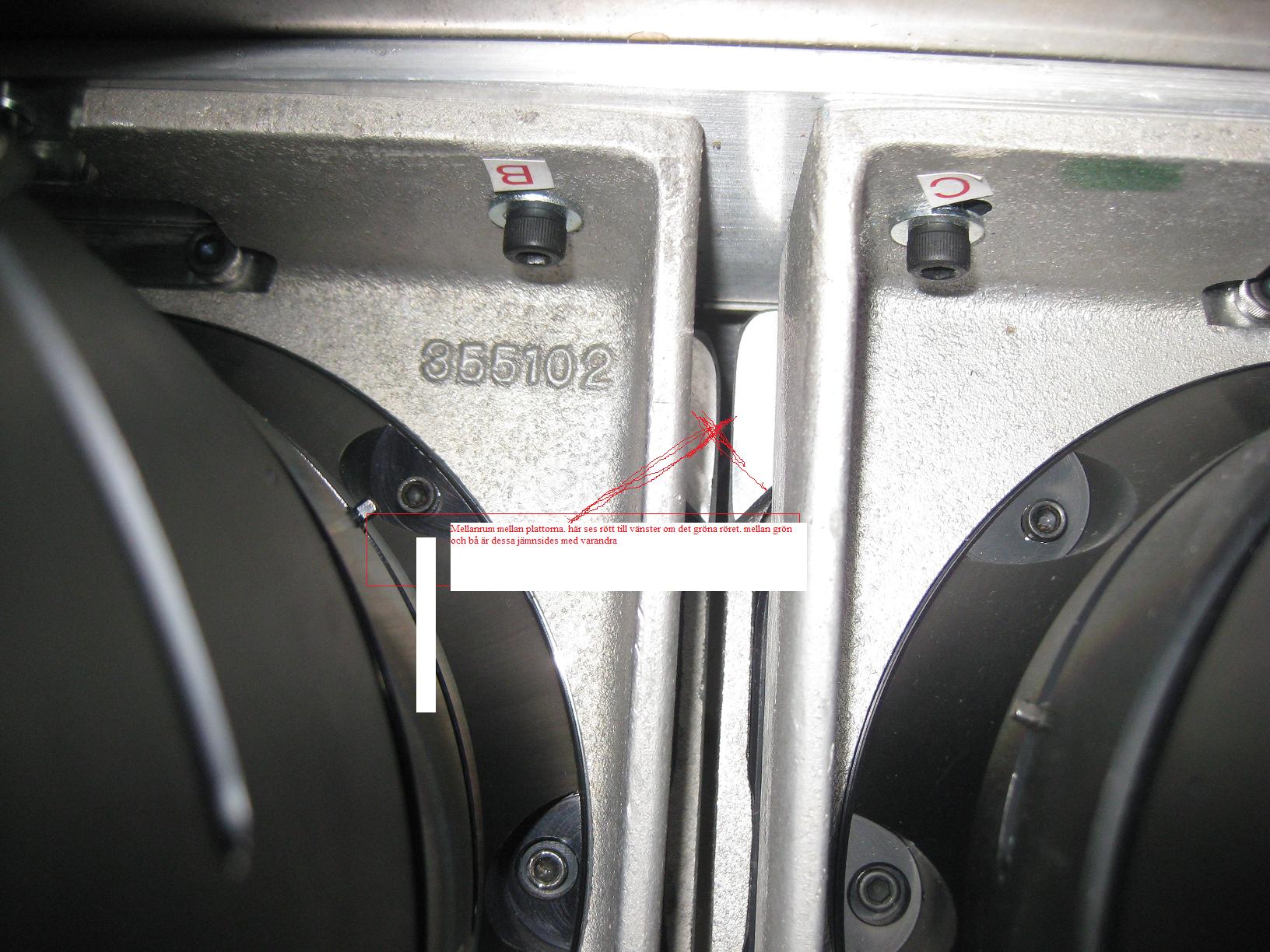
gap between plates.
| Description: |
| there is a gap between those plates that is obvious. this is between the red and green tube. there is not such a difference between the green and blue. is that normal? |
|
| Filesize: |
269.25 KB |
| Viewed: |
5123 Time(s) |
|
|
|
| Back to top |
|
|
dvh99

Joined: 25 Dec 2009
Posts: 2158
Location: nederland
|
| Posted: Sat Apr 24, 2010 2:08 pm Post subject: |
|
|
the projector needs to be placed horizontal and the blue and red tube needs to be at an equal distance to the screen.
if placement of the pj is not right its almost impossible to get scheimpflug right (there is just so much scheimpflug can do)
here is my setup this is between blue and green

and between green and red

you may need to turn on the lenses a bit while adjusting scheimpflug. (the front barrel closest to the screen).
if i were you i would put the screws in a somewhat neutral position and start over.
getting the edges to focus involves zone focus and astig too.
if they are too far off you wont get edge focus.
|
|
| Back to top |
|
|
andreas
Joined: 31 Mar 2010
Posts: 92
|
| Posted: Sat Apr 24, 2010 4:38 pm Post subject: |
|
|
thank you! i have done the rgb focus and the astig(the corner are not as round as the center but i guess thats normal) but no improvement it seems to be an optic problem.. I will follow your advise and trye to phisicaly move the mascine i litle bit
/andreas
|
|
| Back to top |
|
|
andreas
Joined: 31 Mar 2010
Posts: 92
|
| Posted: Wed Apr 28, 2010 1:58 pm Post subject: |
|
|
|
ive tried to move it around/and the screen to) but i does not seem to help. the red lens looks like its equal to the blue but the plate(marked on my picture) seems to be leaning backwards! how to correct that? do i have to take it apart and start from there?
|
|
| Back to top |
|
|
dvh99
Joined: 25 Dec 2009
Posts: 2158
Location: nederland
|
| Posted: Wed Apr 28, 2010 2:03 pm Post subject: |
|
|
what lenses do you use.
perhaps its a lens issue.
i have hd10gt17 lenses and my screen is 2.5mtr (width).
_________________
1 answer always poses multiple questions.
marquee 9500ultra HD10L moome hdmi1.3 v3+ some mods.
|
|
| Back to top |
|
|
dvh99
Joined: 25 Dec 2009
Posts: 2158
Location: nederland
|
| Posted: Wed Apr 28, 2010 2:08 pm Post subject: |
|
|
stockholm is an hour flight, are you near stockholm 
|
|
| Back to top |
|
|
andreas
Joined: 31 Mar 2010
Posts: 92
|
| Posted: Wed Apr 28, 2010 2:22 pm Post subject: |
|
|
hello! im using delta hd10r5m. Well perhaps but woudnt the other lenses have the same problem then? i live in norrköping its about 1.5hour car trip from stockholm. That would be rely nice if i could afford it, i have maximum about2000sek/abot 250us hehe) but maybe in the future if i dont figure the problem out
best regards
|
|
| Back to top |
|
|
andreas
Joined: 31 Mar 2010
Posts: 92
|
| Posted: Wed Apr 28, 2010 2:33 pm Post subject: |
|
|
|
i may have forgot to say, it is possible to get a good focus all over the screen with the red, just not at the same time. If one corner turns focused the other looks bad and so on.
|
|
| Back to top |
|
|
dvh99
Joined: 25 Dec 2009
Posts: 2158
Location: nederland
|
| Posted: Wed Apr 28, 2010 2:36 pm Post subject: |
|
|
HD10 FAMILY DESIGN SPECIFICATIONSThe HD10 family of lenses has been designed to maximize performance and
versatility for professional CRT projection video, data and graphics applications.
All HD10 family lenses are optically coupled and designed to cover a full 178mm
(7”) raster diagonal. They are all fully color corrected hybrid designs,
incorporating both plastic and glass elements and share the same C-element and
mounting geometry, making it possible to interchange the lenses on the same
projector.
The following is a brief description of lenses in the HD10 family.
HD10E – The HD10E covers 167mm focal length (7”) CRT raster diagonal. It
was designed to provide good performance over the largest possible
magnification range (14-45X). For this reason, CPL recommends the HD10E
lens for applications where the intended screen size requirements may vary over
this wide range (90” – 300” diagonal).
HD10L – The HD10L is designed for optimized performance for smaller screen
sizes not covered by other HD10 family lenses. This lens provides excellent
performance for a specific magnification range (9-13X). CPL recommends the
HD10L lens for applications requiring screen sizes of 60-90” diagonal.
HD10GT17 – The HD10GT17 is designed for improved resolution over the HD10
lens over a specific magnification range. This lens provides excellent
performance for magnifications of 14-20X. CPL recommends the HD10GT17
lens for applications requiring screen sizes of 100-140” diagonal.
HD10GT26 – The HD10GT26 lens is designed for improved resolution over the
HD10E lens for magnifications of 21-30X. CPL recommends the HD10GT26 for
applications requiring screen sizes of 150-200” diagonal.
HD10GT30-67 – The HD10GT30-67 is designed for improved resolution over the
HD10E for magnifications of 30-45X and to extend the range of the family up to
67X. CPL recommends the HD10GT30-67 for high magnification applications
requiring screen diagonals of 210-460”.
The HD10R5M lens is designed for improved resolution utilizing a curved 4 meter
diameter screen application. It is designed for magnifications of 15-70X. This
lens is designed for Simulation applications and thus was designed for a domed
screen.
got his from avs seems you need other lenses
dennis
_________________
1 answer always poses multiple questions.
marquee 9500ultra HD10L moome hdmi1.3 v3+ some mods.
|
|
| Back to top |
|
|
David_Web
Joined: 02 May 2007
Posts: 418
Location: Sweden
|
| Posted: Wed Apr 28, 2010 2:50 pm Post subject: |
|
|
That explains it. It's made for a curved screen.
How about making a high gain torus screen.
Some vinyl screen material and a fan. + a box of course.
I think there are is guide somewhere ether here or on AVS.
Do marquees have any modification done to them for a curved screen?
_________________
SNR of people are ridiculously low.
|
|
| Back to top |
|
|
andreas
Joined: 31 Mar 2010
Posts: 92
|
| Posted: Wed Apr 28, 2010 2:54 pm Post subject: |
|
|
thank you dennis! well ive heard that they was optimal for a curved screen, but the guy i bought the machine from insisted that it would work relly good even in my contitions. i also saw him demo everything and it looked really good with my throw distance and screen size. Besides the blue and green still looks ok. i know it sounds strange. One guy that looked at the projektor last night did not understand what was wrong either but thought it was something with the optical.
wonder what lenses would be optimum and what it would cost if thats the issue....
|
|
| Back to top |
|
|
dvh99
Joined: 25 Dec 2009
Posts: 2158
Location: nederland
|
| Posted: Wed Apr 28, 2010 3:16 pm Post subject: |
|
|
take your pick its all described in the post from avs.
hd10gt17 are excellent lenses for 2.5 mtr width.
did the guy show you test patterns or video material cause it is with test patterns that really shows the lenses focussing range.
on the buy sell forum here they might be for sale.
_________________
1 answer always poses multiple questions.
marquee 9500ultra HD10L moome hdmi1.3 v3+ some mods.
|
|
| Back to top |
|
|
andreas
Joined: 31 Mar 2010
Posts: 92
|
| Posted: Mon May 03, 2010 4:36 pm Post subject: |
|
|
hello crt lovers! I've talked to the person i bought the machine from and he insists that the lenses works for my condition because they have a "wide range corner focus" He did show test patterns that looked normal to me(the first time I've watched a crt). However, he will come to my town tomorrow and help me out so i will update after that. If it doesn't work i will consider to get other lenses
best regards
|
|
| Back to top |
|
|
garyfritz

Joined: 08 Apr 2006
Posts: 12088
Location: Fort Collins, CO
|
| Posted: Mon May 03, 2010 5:17 pm Post subject: |
|
|
Hopefully he can work it out. Thought: have you over-maximized the raster? Maybe you're too far out toward the edges of the lenses? But I would think all 3 tubes would have the same problem.
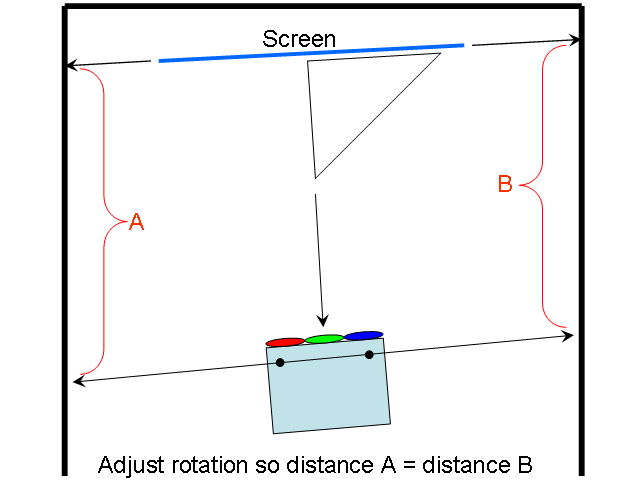
I'm a bit disturbed by your comments about moving the screen around, etc. You should NOT do that. For everything to work optimally, the projector should be ABSOLUTELY parallel/perpendicular to the screen, preferably exactly in the center of the screen. Hopefully your screen is mounted on the wall so it won't move once you've set it up.
Here's a trick to help you line up the projector with the screen:
Sight along two points you know are "square" with the projector, like the projector feet, and note where the line of site falls on the side wall. Rotate the projector until distances A & B are the same. It's very easy to get alignment within a fraction of a degree with this method.
| Description: |
|
| Filesize: |
12.41 KB |
| Viewed: |
7063 Time(s) |
|
|
|
| Back to top |
|
|
Tim in Phoenix

Joined: 21 Oct 2006
Posts: 4409
Location: Phoenix
|
| Posted: Mon May 03, 2010 5:41 pm Post subject: |
|
|
Guys!
Another possibility is that a pivot pin is not properly seated (or missing entirely) from the side of the red tube. This puts the tube face out of square with the lens.
.
|
|
| Back to top |
|
|
andreas
Joined: 31 Mar 2010
Posts: 92
|
| Posted: Mon May 03, 2010 7:35 pm Post subject: |
|
|
thanks again! is it possible that the pivot pin has been damaged or turned loose when doing the sheimflugs? if so that could be it. I agree with you that the to big raster problem should be at all tubes if that was the case. i'm sure its not the issue here because i've done several setups and some times did not use the hole surface of the tube, it looks the same on all tubes when i look inside them, centered and not to near the edges.
I shall trie and use the method described in the picture above(that is what i've done already, turned the screen in the same tilt as the projector so it looks like the picture but i have not measured it like that). I'm really exited about tomorrow!
|
|
| Back to top |
|
|
Tim in Phoenix
Joined: 21 Oct 2006
Posts: 4409
Location: Phoenix
|
| Posted: Mon May 03, 2010 8:29 pm Post subject: |
|
|
| andreas wrote: | thanks again! is it possible that the pivot pin has been damaged or turned loose when doing the sheimflugs? if so that could be it. I agree with you that the to big raster problem should be at all tubes if that was the case. i'm sure its not the issue here because i've done several setups and some times did not use the hole surface of the tube, it looks the same on all tubes when i look inside them, centered and not to near the edges.
I shall trie and use the method described in the picture above(that is what i've done already, turned the screen in the same tilt as the projector so it looks like the picture but i have not measured it like that). I'm really exited about tomorrow! |
The pin(s) can fall out when a projector is shipped, or when a replacement tube was shipped. If they are not crimped in properly they can vibrate loose and fall out.
.
|
|
| Back to top |
|
|
andreas
Joined: 31 Mar 2010
Posts: 92
|
| Posted: Wed May 05, 2010 7:00 am Post subject: |
|
|
|
problem solved! The guy fixed it. It was the sheimflug screw that had gone bad(don't know the word for it). Now it focuses good. astig on green was a little off so i have to open the machine once more. It already looks good. I watched avatar last night and that was really great(the picture, not the film)! thanks for all tips
|
|
| Back to top |
|
|
dvh99
Joined: 25 Dec 2009
Posts: 2158
Location: nederland
|
| Posted: Wed May 05, 2010 12:54 pm Post subject: |
|
|
glad all worked out for you and i agree afvaltar is a sh*tty movie the watchmen is a great film.
_________________
1 answer always poses multiple questions.
marquee 9500ultra HD10L moome hdmi1.3 v3+ some mods.
|
|
| Back to top |
|
|
|
|





