| Author |
Message |
MikeMcM1956
Joined: 18 Apr 2010
Posts: 4
Location: Houston, TX
|
| Posted: Sun Apr 18, 2010 9:45 pm Post subject: Electrohome ECP-4100 - Displaying Gibberish/Pig Latin? |
|
|
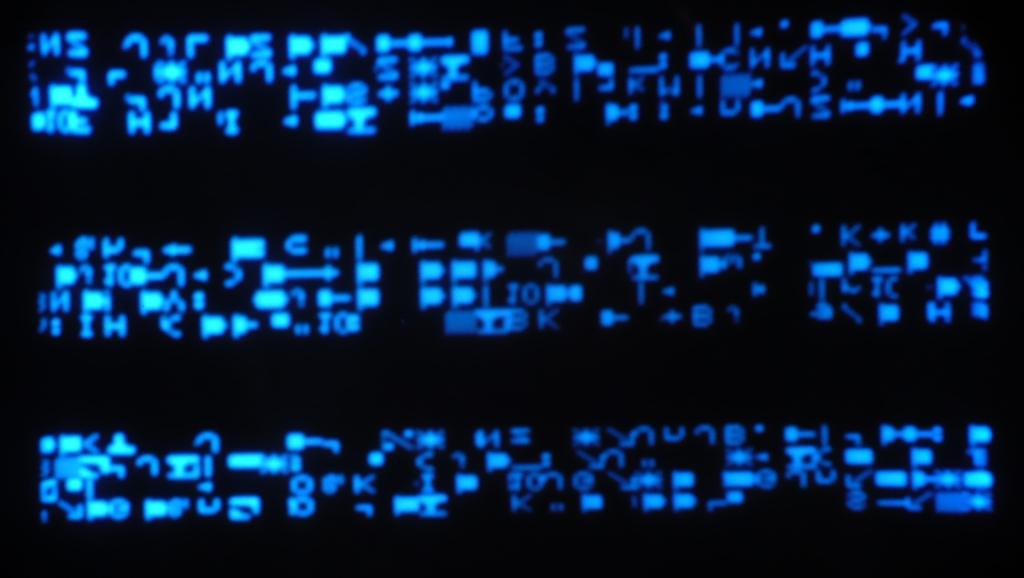
I recently picked up an ECP-4100 and am trying to get it up and running. It has the standard 800916 10 Pin Input Card in Slot 1, and a 38-800930-95 Multi-Standard Card in Slot 0. On power up all three tubes light up nice and bright. Couldn't do a manual focus from 10' distance, or using electronic focus from the remote. Just a fuzzy image of four fat multicolored lines jumping around. Performed a hard reset using reset on remote/CPU, no change. However, with the bright/contrast cranked way down I can see 'alien communications' on the screen. See attached photo for details, it's the same on all three tubes.
Any ideas? I've got a nice Mits 82" DLP, but I'd like to get this working and see how it looks on a 110" screen in the dark. But if it's cost prohibitive, I guess I'll part it out if anyone is interested. The original owner was an old PC/AV rental company and said the unit had low hours on it.
TIA for any help, it is appreciated....
Mike
| Description: |
|
| Filesize: |
64.19 KB |
| Viewed: |
3183 Time(s) |
|
_________________
My Blog: ThatGeekGuy.net
Twitter: ThatGeekGuy
|
|
| Back to top |
|
 |
Curt Palme
CRT Tech
Joined: 08 Mar 2006
Posts: 24396
Location: Langley, BC
TV/Projector: All of them!
|
| Posted: Sun Apr 18, 2010 10:02 pm Post subject: |
|
|
|
Do a hard reset on it. There's instructions in the 'tips' section on the ECP on how to do that.
|
|
| Back to top |
|
|
MikeMcM1956
Joined: 18 Apr 2010
Posts: 4
Location: Houston, TX
|
| Posted: Sun Apr 18, 2010 10:21 pm Post subject: |
|
|
Curt,
Already tried that, unless I'm doing something wrong. The first time I held down the Reset on the remote and then pressed and held the red reset on the CPU PCBA for a few seconds. Released them both and the unit powered down. I powered it back up, same problem. The did the same process using the Recall on the remote and the CPU button, same results. Pretty sure it reset, because the brightness and contrast were much lower when I powered it back up.
Help me Mister Wizard! Think it's the Dallas chip? It has a date code of 9025, so it's knocking on its 20th birthday shortly. If so, where the heck does one find one of these? I did a Google on DS1235YW-150 (that's what's on the PCBA), and all that turned up was a bunch of ads for obsolete component brokers.
Thanks again for your help....
Mike
_________________
My Blog: ThatGeekGuy.net
Twitter: ThatGeekGuy
|
|
| Back to top |
|
|
macgyver655
Joined: 22 Aug 2007
Posts: 8508
|
| Posted: Sun Apr 18, 2010 10:21 pm Post subject: |
|
|
Ahhhh. A letter from my uncle Orion. Must of been sent to your email by mistake. Thanks. 
|
|
| Back to top |
|
|
Curt Palme
CRT Tech
Joined: 08 Mar 2006
Posts: 24396
Location: Langley, BC
TV/Projector: All of them!
|
| Posted: Sun Apr 18, 2010 10:23 pm Post subject: |
|
|
OK, try pushing HARD on all socketed chips on all boards. They usually 'click' indicating they moved up a bit in the socket.
You did indeed reset the unit if everything defaults to '5' and the contrast to '3'.
I should have a Dallas chip here, some are discontinued, so mine is new old stock..
|
|
| Back to top |
|
|
MikeMcM1956
Joined: 18 Apr 2010
Posts: 4
Location: Houston, TX
|
| Posted: Sun Apr 18, 2010 11:08 pm Post subject: |
|
|
No better, and a new problem. Pulled all the cards and reseated both the socketed DIPs and the socketed PLCCs. Removed card stacks and reseated chips on those as well. Reassembled stacks and replaced cards in their slots. Now the gibberish is less and arranged differently, but still there. Also, now the red gun won't light up. Did hard resets using both reset and recall and no change. Must've really screwed the pooch now  .... ....
Mike
_________________
My Blog: ThatGeekGuy.net
Twitter: ThatGeekGuy
|
|
| Back to top |
|
|
Sparky015

Joined: 12 May 2009
Posts: 1185
Location: Cleveland / Akron, OH
|
| Posted: Mon Apr 19, 2010 12:33 pm Post subject: |
|
|
Before you put the fork in it, did you clean all the sockets as well when you reseated the chips and boards? Not sure how clean the thing is, but dust does conduct....
_________________
~Paul
|
|
| Back to top |
|
|
Curt Palme
CRT Tech
Joined: 08 Mar 2006
Posts: 24396
Location: Langley, BC
TV/Projector: All of them!
|
| Posted: Mon Apr 19, 2010 12:41 pm Post subject: |
|
|
|
Check the red CRT socket. One of the problems common on these sets is the video line (2 pin connector) where it plugs into , the motherboard. Those solder joints die often, and they are a PITA to get to. Maybe the red CRT socket just wiggled loose. or you turned the red CRT on/off switch to off?
|
|
| Back to top |
|
|
|
|





