| Author |
Message |
Brian Hampton

Joined: 22 Apr 2006
Posts: 1173
|
| Posted: Fri Feb 26, 2010 10:09 pm Post subject: |
|
|
I'm loving the internet movie poster awards site. They seem to have posters for every disc I have and many of them have large high rez versions (they call XLG)
Last edited by Brian Hampton on Sat Feb 27, 2010 4:34 am; edited 1 time in total
|
|
| Back to top |
|
 |
MikeEby

Joined: 24 Jun 2007
Posts: 5237
Location: Osceola, Indiana
|
| Posted: Fri Feb 26, 2010 10:17 pm Post subject: |
|
|
| Brian Hampton wrote: | | I'm loving the internet movie poster awards site. They seem to have posters for every disc I have and many of them have large high rez versions (they call XGL) |
Can you provide a link to internet movie poster awards? There would be no reason why you couldn't use PowerPoint to make some cool transitions too.
Edit: http://www.impawards.com/
Looks nice!
Mike
_________________
Doing HD since the last century!
|
|
| Back to top |
|
|
akajester

Joined: 09 Jul 2008
Posts: 934
Location: Wisconsin
|
| Posted: Sat Feb 27, 2010 1:19 am Post subject: |
|
|
XLG, does that stand for Xtra Large? 
|
|
| Back to top |
|
|
Brian Hampton
Joined: 22 Apr 2006
Posts: 1173
|
| Posted: Sat Feb 27, 2010 4:34 am Post subject: |
|
|
Yeah,... XLG or something... anyway, they have bigger hi-rez posters of many.
I love that site now.
-
|
|
| Back to top |
|
|
Tedd
Joined: 18 May 2006
Posts: 156
Location: Ontario
|
| Posted: Tue Mar 02, 2010 1:25 am Post subject: |
|
|
|
www.movieposterdb.com is a pay site for high resolution movie posters. With the increased resolution, my plan is to resize and/or do some cutting to all posters to end up with a 16:10 1920x1200 format.
|
|
| Back to top |
|
|
MikeEby
Joined: 24 Jun 2007
Posts: 5237
Location: Osceola, Indiana
|
|
| Back to top |
|
|
Tedd
Joined: 18 May 2006
Posts: 156
Location: Ontario
|
| Posted: Tue Mar 02, 2010 2:20 am Post subject: |
|
|
|
I initially found moviedb.org but I found I much prefer movieposterdb, the increased resolution, and it's emphasis on movie posters. (1000x1500 works good for a 28.5" 1920x1200 display.)
|
|
| Back to top |
|
|
ecrabb
Forum Moderator

Joined: 13 Mar 2006
Posts: 15909
Location: Utah
TV/Projector: JVC RS40, Epson 5010
|
| Posted: Tue Mar 02, 2010 3:51 pm Post subject: |
|
|
Tedd,
How much do the the credits cost, or more to the point, how much do the poster downloads cost once you join?
SC
|
|
| Back to top |
|
|
Tedd
Joined: 18 May 2006
Posts: 156
Location: Ontario
|
| Posted: Tue Mar 02, 2010 10:11 pm Post subject: |
|
|
100 credits 5 euros
250 credits 10 euros
750 credits 25 euros
2000 credits 50 euros
I went for 2000 credits about a year ago. I think it was about $65. About a year alter, I have 60 credits left and 1,341 high resolution movie posters and tv series posters. Wasted a few credits on duplicates... Most new movies are 2 credits and the rest 1 credit.
|
|
| Back to top |
|
|
ecrabb
Forum Moderator
Joined: 13 Mar 2006
Posts: 15909
Location: Utah
TV/Projector: JVC RS40, Epson 5010
|
| Posted: Tue Mar 02, 2010 10:21 pm Post subject: |
|
|
Cool, thanks. So, if you average about 1.5 credits/poster (mix of new and old), for $30 or $35 for the 750-credit deal, that would net you about what, 500 posters or so... I could see that.
SC
|
|
| Back to top |
|
|
Tedd
Joined: 18 May 2006
Posts: 156
Location: Ontario
|
| Posted: Tue Mar 02, 2010 10:40 pm Post subject: |
|
|
I found the convenience factor easily worth the expense. My next 2000 credits should last me several years. 
95% of my posters are 2000x3000 or better, which I downrez and also be able to cut and paste for better fit, since a 16:10 panel is narrower then a movie poster.
|
|
| Back to top |
|
|
JustGreg

Joined: 07 Mar 2006
Posts: 3098
Location: Kenosha, WI
|
| Posted: Thu May 13, 2010 7:22 am Post subject: |
|
|
I have a 17" DV-75170 Digital Signage display I got from a biz that went under a couple years ago. I tried to make it work for streaming vid for my HT lobby but I got frustrated with it and quit. It has a 1GB CF card as well as ethernet capabilities and a header for a laptop IDE HD.
I figured out how to get vids to the CF card and change a rudimentary ini file to find them and play them just fine at 720p but what a PITA to get all that done just so it can hang on a wall....and need periodic updating. 
I'm at the point now where I think I'll just fill the CF card with HT buildout pix and maybe some family type stuff and hang it. When I got the thing (~3 years ago) 16:9 27-32" LCD displays were priced ungodly. Now it's probably not even worth the effort to try and make it work for the HT.
It has some type of OS but I'll be damned if I can figure out what it is. I have never been able to figure out how to get into the BIOS.. but I don't think it has a BIOS that I'm used to, eg, full featured and adjustable. I think the BIOS is coded to do nothing more than what the display already does.
CRAP! Now I have to dig into the damn thing again and maybe pester Clarence for some technical hand-holding. Thanks alot!  (Damn OCD!) (Damn OCD!)
_________________
Greg
"Is it ignorance or apathy? Hey, I don't know and I don't care!" --Jimmy Buffett
|
|
| Back to top |
|
|
AnalogRocks
Forum Moderator

Joined: 08 Mar 2006
Posts: 26706
Location: Toronto, Ontario, Canada
TV/Projector: Sony 1252Q, AMPRO 4000G
|
| Posted: Thu May 13, 2010 7:29 am Post subject: |
|
|
Just load up the CF card with movie posters Greg. Viola!
_________________
Tech support for nothing
CRT.
HD done right!
|
|
| Back to top |
|
|
Tedd
Joined: 18 May 2006
Posts: 156
Location: Ontario
|
| Posted: Thu May 13, 2010 12:07 pm Post subject: |
|
|
Isn't the memory controller on CF cards and that means it should accept larger capacity cards?
I also saw an Apple tv the other day at BB, that was running a scrolling screensaver using various sized mulitple images and thought it might be an inexpensive frontend.
|
|
| Back to top |
|
|
JustGreg
Joined: 07 Mar 2006
Posts: 3098
Location: Kenosha, WI
|
| Posted: Fri May 14, 2010 12:05 am Post subject: |
|
|
| Tedd wrote: | Isn't the memory controller on CF cards and that means it should accept larger capacity cards?
I also saw an Apple tv the other day at BB, that was running a scrolling screensaver using various sized mulitple images and thought it might be an inexpensive frontend. |
You got me on that one. I know very little about memory register access for peripheral memory/storage. It probably isn't worth getting a larger CF card when I can just buy a used LCD on CL and burn inexpensive DVD's when I want to change the content. I was hoping to stream to it but not sure it's capable. I had pix of the innards once upon a time but seem to have lost them. I'll have to open it up and take some more and post for comments and suggestions.
AR...see above cheap LCD on CL comment. I just hate to not do anything with the thing seeing as I have it and it's HD (720p) capable. I'll snag some pix later tonight. If anything it will give everybody here something to jump in and help make work... or trash.
_________________
Greg
"Is it ignorance or apathy? Hey, I don't know and I don't care!" --Jimmy Buffett
|
|
| Back to top |
|
|
Tedd
Joined: 18 May 2006
Posts: 156
Location: Ontario
|
|
| Back to top |
|
|
JustGreg
Joined: 07 Mar 2006
Posts: 3098
Location: Kenosha, WI
|
| Posted: Fri May 14, 2010 9:19 pm Post subject: |
|
|
Thanks for taking the time to hunt that down and reply Tedd. 
Sorry for the mini hijacking guys...this thing has been nagging me for 2 years now and I can't give it up. 
Yeah I have the users 'manual' pdf too. It's very vague as you can see. IIRC I was unable to find a heckuva lot of info about the how-to's on this thing or even a support website.
I thought it should do streaming too that's why I snagged it but I gave up on it before I found a media server.
Anybody have recommendations for a freebie 'down and dirty' media server I can test with? If it can be done I'll buy a program but I don't want to spend any $$$ on it at this time. IIRC (again) I tried M$ Media Center but got nowhere with it.
BTW...found the pix. Have better ones somewhere in this mess I call an office. 
http://i268.photobucket.com/albums/jj13/JustGreg_1/th_IMG_0552.jpg
http://i268.photobucket.com/albums/jj13/JustGreg_1/IMG_0557.jpg
Thanks!
_________________
Greg
"Is it ignorance or apathy? Hey, I don't know and I don't care!" --Jimmy Buffett
|
|
| Back to top |
|
|
randomwit
Joined: 21 Aug 2010
Posts: 1
|
| Posted: Sat Aug 21, 2010 8:43 am Post subject: |
|
|
Hello to all and greetings from your newest member at this point.
I also have a DV-75170 screen that I picked up from a wireless dealer today. It was used for Telenav Sales Display. I believe it was created by Telenav.
I believe this device could be easily made to work for watching whatever you like. I do not yet have the remote, but I will ask the store owner to find it for me if possible. If not, I will make my own remote to access the menu. Afterward, I will likely make some changes to the server IP listed within and make it update videos from my server.
I have barely taken a look at it, but removal of the back cover lets you know some great things about the hardware build. It has a motherboard with it's own power supply, the CF dock is connected to an IDE cable meaning that a different drive could be attached. The power is actually fed to the motherboard from a secondary, alternative power source mounted on the LAN/Audio Out/Power module. The speakers are easily removed and larger speakers could simply be mounted in their place. Though there is 3.5mm audio out.
I will be hacking on this in the near future. I anticipate having time within the next week or two. I am currently working heavily on a WebOS kitchen that runs on my virtual Debian install within my Windows Server 2003, and a little ASP stuff.
I am a CDMA technician with emphasis on software, however I can work a little hardware magic if needed. I am also a PC hardware/software whiz with my latest time being spent picking up Python.
Back to the point. I would love to de-solder the NAND on this thing and dump it, but that is a little outside of my expertise and would take much more effort than I am willing to put into this piece of po0p. Mine has a small batch of pixels that have gone out.
JustGreg, I hope to have some good news for you soon. I am not a low-level h/w or s/w guy, but I'm okay.
|
|
| Back to top |
|
|
Tedd
Joined: 18 May 2006
Posts: 156
Location: Ontario
|
| Posted: Thu Sep 01, 2016 2:39 am Post subject: |
|
|
I just came across this thread once again, and my messing around with this, leads to here:
https://www.curtpalme.com/forum_archived/viewtopic.php@t=38093.html
It's simplistic with a hdtv + a usb jump drive. One could get a lot more flexibility with a Pi or Odroid, but
planting posters in themed folders for playback, works nicely.
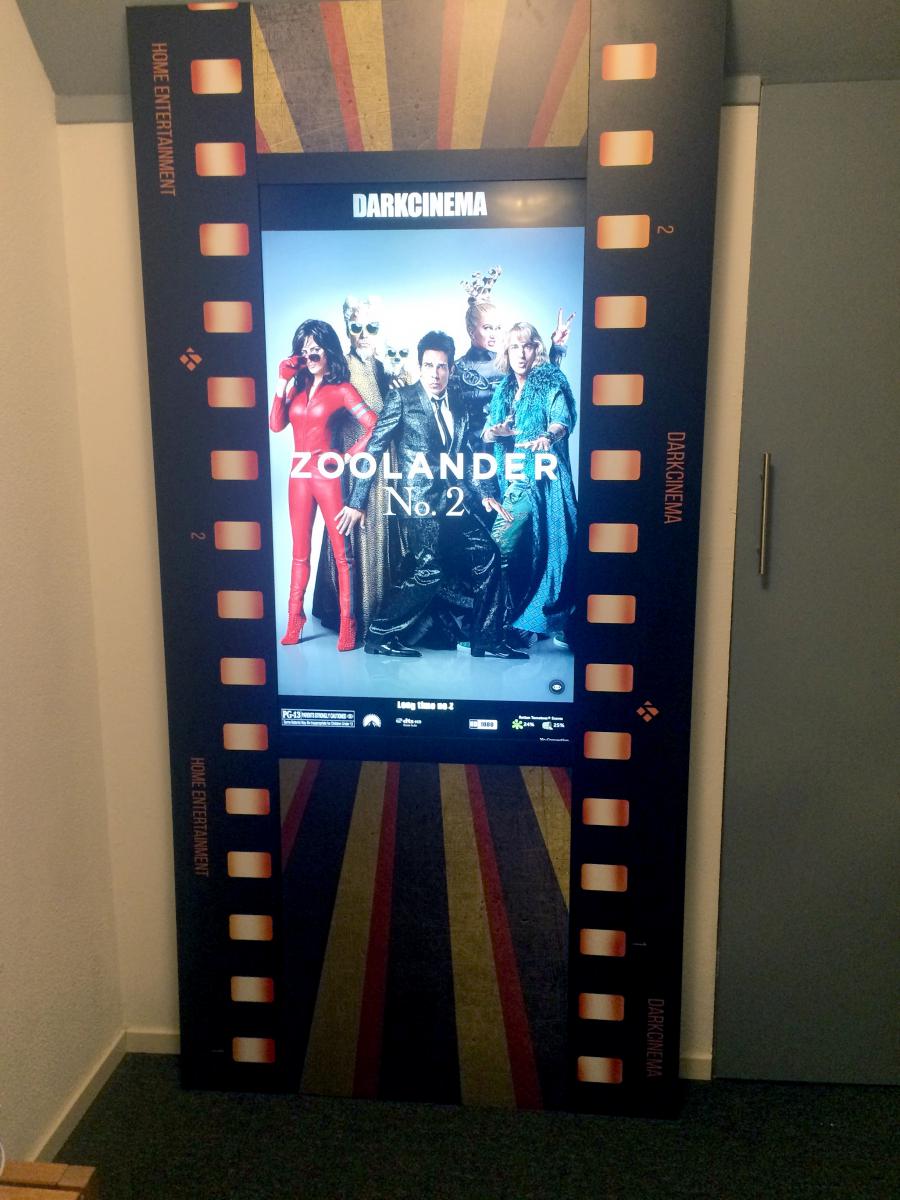
I expect I am pulling this thread back from the dead, but there has been some very cool digital movie poster
LCD light boxes come up in the last year.
|
|
| Back to top |
|
|
Tedd
Joined: 18 May 2006
Posts: 156
Location: Ontario
|
| Posted: Thu Sep 01, 2016 2:41 am Post subject: |
|
|
like Opeters' Dark Cinema filmstrip themed lightbox.
| Description: |
|
| Filesize: |
117.71 KB |
| Viewed: |
26560 Time(s) |
|
|
|
| Back to top |
|
|
|
|





