|
As this forum is rarely used anymore, we've locked it. Feel free to browse and read. Questions? Please reach out to us directly. Cheers! |

|
 |
|
|
| Author |
Message |
cmjohnson

Joined: 03 Apr 2006
Posts: 5180
Location: Buried under G90s
|
| Posted: Fri Jan 15, 2010 2:14 pm Post subject: Opinions on Barco Data 708? |
|
|
I have the opportunity to pick up a Barco Data 708 for half a song. I haven't removed the lenses to check out the
CRTs fully but shining lights into them shows no visible wear.
The unit does work. It powered right up and I was able to access the menus easily enough. I can't attest to the
brightness as it was in a well lit room, too bright for a CRT projector. I got a visible image (grid pattern and menus)
and it was reasonably sharp.
The clock reads 28,000 hours on it but the CRT condition implies fairly recent retubing. They're too nice to be even
close to that many hours. As I said, they look minty as far as I can tell without pulling the lenses.
Does anyone have any opinions on the Data 708?
And, can someone tell me the menu sequence to go through (onboard keypad only, no external remote with the unit) to get to the various test patterns that I presume are in there?
Finally, and perhaps most important, does it have any value in today's market? I'm guessing the tubes (if in good shape)
may have some value.
All I know about the 708 is what's written about it on Curt's projector pages. It's the predecessor to the Cine 7 and
capable of up to 1080i.
CJ
|
|
| Back to top |
|
 |
Elaine Benes
Joined: 25 Apr 2006
Posts: 1416
|
| Posted: Sat Jan 16, 2010 11:22 pm Post subject: Re: Opinions on Barco Data 708? |
|
|
| cmjohnson wrote: |
Finally, and perhaps most important, does it have any value in today's market? I'm guessing the tubes (if in good shape)
may have some value.
CJ |
In a word, no.
Its a small, light, fairly good looking ES focus projector that puts out a TON of light for the size, but its virtually worthless as a resale item...If you're looking for something to make money on, stick to buying 9"LC units for $200. or less and reselling them, they're the ONLY place profit resides nowadays...
Personally, I'd be surprised if you could even sell a 708, there's one fairly local to me that has been for sale about 6 months in the condition you describe for $200. asking price, and another for $350. neither has sold, nor do I expect them to unless I end up buying one to play with...
They're small and quiet and fun, but not "worth" anything any more...
And keep in mind they're only ES focus, so you need fresh tubes for them to look even a little sharp
The P16 tubes are the best, the T180 Toshiba tubes are REALLY nice looking, and VERY VERY bright, the Sony tubes are crap, very soft and not bright(even brand new)...You can tell what tubes they are by the front hardware. Toshiba's look very similar to Marquee MEC front hardware, Sony's look like all Sony small tubes, and I've never personally seen the P16 tubes in a 708 so I can't say what they look like...
You can sell the quad and splitter as they work in lots of Barco's, but why bother buying a projector just to tear it down ?
|
|
| Back to top |
|
|
Curt Palme
CRT Tech
Joined: 08 Mar 2006
Posts: 24396
Location: Langley, BC
TV/Projector: All of them!
|
| Posted: Sun Jan 17, 2010 12:11 am Post subject: |
|
|
Sorry, I should have posted here as well.
What Elaine says is correct, but I'll add a bit. The Data 708 is capable of 720p. If it's an early 708, it will use the 180DGB tubes, which are not nearly as good as the later P16 versions. to give you an idea. VDC was charging $295 for the 180 tubes, $645 for the P16s. THe P16s are a bit brighter and hold focusing for longer.
After the 701, Barco no longer used the Sony tubes. The 701s used the 180s which trickled over to the early 708s. In Sony's defense, 750 lumens out of their 07MS tubes was pretty good back when they were popular.
They are the same tubes as in the DWIN 700 that also used the P16s.
Reliability- the convergence board is way too close to the HV leads, so an arc almost always takes the convergence output board out. It's a bitch to fix. See if you can sell it to a bar. I sold the last one for $2500 installed late last year, and it's a good replacement for the Runco 940 or 947 if someone wants to keep their CRT. (Runco did nothing to the 708 other than paint it black and add a screen relay output.
The 708 has a built in transcoder, so plug a 1080i component input right into the set, and you're good to go.
As for value, Yes, hard to sell at this point, but
|
|
| Back to top |
|
|
Scott Greer
Joined: 13 Nov 2008
Posts: 9
Location: Brentwood, TN
|
| Posted: Tue Jan 26, 2010 6:04 am Post subject: |
|
|
Hi Curt and others,
I have one of these as well and am interested in adding some higher-rez sources to it...HD DVR, Blu-Ray, etc. You mention in this thread that you can plug in a 1080i component input right into the unit. Where does this connection occur? My unit has the standard RGBHV input (although it requires a "T" connector for the HV sync portion- only 4 total connectors) and an S-Video input. I don't recall anything further other than RS-232 input and output ports.
Am I missing something or have I got a different unit than I thought? Perhaps.... 
Either way, I do enjoy the brightness that unit offers and it is good sized and quiet as previously mentioned. I believe that I read somewhere that the scan rate limits it to only 1080i, not 1080p. Regardless, I'd like to get something more fed into it other than the 480i sources it currently has.
I don't mean to hijack this thread...just curious if anyone could assist.
Thanks as always,
Scott
|
|
| Back to top |
|
|
Scott Greer
Joined: 13 Nov 2008
Posts: 9
Location: Brentwood, TN
|
| Posted: Tue Jan 26, 2010 6:08 am Post subject: I also have pdf's of the manual |
|
|
Hi CJ,
Forgot to mention in previous post...I have some pdf's of the 70x user guide and installation guides. Feel free to let me know if you'd like them emailed to you.
Thanks again!
Scott
|
|
| Back to top |
|
|
Elaine Benes
Joined: 25 Apr 2006
Posts: 1416
|
| Posted: Thu Jan 28, 2010 2:34 pm Post subject: |
|
|
| Scott Greer wrote: | Hi Curt and others,
I have one of these as well and am interested in adding some higher-rez sources to it...HD DVR, Blu-Ray, etc. You mention in this thread that you can plug in a 1080i component input right into the unit. Where does this connection occur? My unit has the standard RGBHV input (although it requires a "T" connector for the HV sync portion- only 4 total connectors) and an S-Video input. I don't recall anything further other than RS-232 input and output ports.
Am I missing something or have I got a different unit than I thought? Perhaps.... :?
Either way, I do enjoy the brightness that unit offers and it is good sized and quiet as previously mentioned. I believe that I read somewhere that the scan rate limits it to only 1080i, not 1080p. Regardless, I'd like to get something more fed into it other than the 480i sources it currently has.
I don't mean to hijack this thread...just curious if anyone could assist.
Thanks as always,
Scott |
The component input IS the RGBS connectors, you simply connect the Y to Green, B-Y to Blue, and R-Y to Red, then choose input "5" (I think...) to display your component signal.
|
|
| Back to top |
|
|
Scott Greer
Joined: 13 Nov 2008
Posts: 9
Location: Brentwood, TN
|
| Posted: Thu Jan 28, 2010 6:24 pm Post subject: I've never tried that... |
|
|
Hey Elaine,
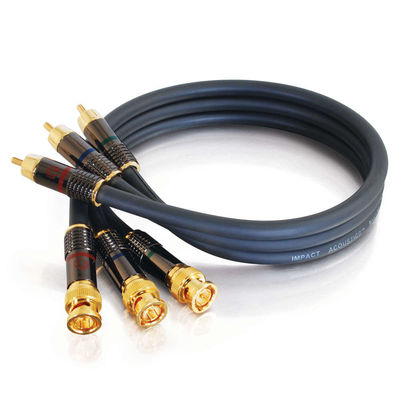
I've never tried that before. So, if I understand you correctly, you can connect a component source directly into 3 of the BNC inputs (the R, G, and B inputs) via a cable. I did a quick search to find an appropriate cable that has RCA connectors on one end (the likely connector on the source item like a DVD player or HD DVR) and have BNC connectors on the other end (which is the type of connection on the Barco unit).
This is what I found. Will this do the trick without needing any kind of input on the sync portion of the BNC inputs? I would love to see a 720p or 1080i image on the unit to see the difference from 480p. If this does the job, I'll feel like giving you one of Elaine's patented 2-handed shoulder shoves while yelling "get out!" 
| Description: |
|
| Filesize: |
21.64 KB |
| Viewed: |
9865 Time(s) |
|
|
|
| Back to top |
|
|
joatmon
Joined: 17 Mar 2009
Posts: 127
Location: Ottawa, Ontario
|
| Posted: Thu Jan 28, 2010 6:34 pm Post subject: Re: I've never tried that... |
|
|
| Scott Greer wrote: | | So, if I understand you correctly, you can connect a component source directly into 3 of the BNC inputs (the R, G, and B inputs) via a cable. I did a quick search to find an appropriate cable that has RCA connectors on one end (the likely connector on the source item like a DVD player or HD DVR) and have BNC connectors on the other end (which is the type of connection on the Barco unit) |
Yes, it works. I've got a 708 as well and have hooked it up to an old xbox (running XBMC) via component at 1080i.
You can usually find BNC-to-RCA adapters at The Source (Radio Shack).
|
|
| Back to top |
|
|
Elaine Benes
Joined: 25 Apr 2006
Posts: 1416
|
| Posted: Thu Jan 28, 2010 6:42 pm Post subject: |
|
|
Yes, that's what you need, and don't blow a wad on them either, you can get the same thing at monoprice.com CHEAP, or if you're in Canada, stop by a Princess Auto and look in the Surplus section, they've had some nice BNC to RCA component cables there for a while now at about $8.
Not EVERY single 7xx projector *can* take component direct, I think, but the majority of them can. Don't ask me how to tell which will and which won't, but I do recall I've run across at least one which didn't. I think it was a really early 700 model, but I'm not sure it was a long time ago.
Also, I'm not totally sure it is input number "5" so try other numbers when you have your source hooked up. I think it tells you somewhere in the Operators manual which numbers correspond to which inputs, but its been a while since I looked at that manual too...
Here's the monoprice option: http://www.monoprice.com/products/product.asp?c_id=102&cp_id=10203&cs_id=1020308&p_id=623&seq=1&format=2 Three of those cost you $6. and change plus shipping....
Adapters are also available if you prefer to use them:
http://www.monoprice.com/products/product.asp?c_id=104&cp_id=10401&cs_id=1040116&p_id=4121&seq=1&format=2
Last edited by Elaine Benes on Thu Jan 28, 2010 6:44 pm; edited 1 time in total
|
|
| Back to top |
|
|
Scott Greer
Joined: 13 Nov 2008
Posts: 9
Location: Brentwood, TN
|
| Posted: Thu Jan 28, 2010 6:43 pm Post subject: Cool! I had seen some warnings... |
|
|
That's great! I had seen some warnings listed in product descriptions of these cables such as:
"NOTE: if you are trying to connect a set top box, DVD player, etc to an older HDTV that has 5, repeat 5, BNC connectors this cable will not work as you need those additional 2 (horizontal & vertical sync signals) connectors also."
This was listed in the description of one such cable at:
http://www.hdtvsupply.com/3bncto3rcaco.html
This led me to believe that this type of cable was not an option (although my 701s only has 4 bnc inputs, it still has one for the sync that I use a t-connector on with my VGA to 5 BNC cable currently). I'll give it a shot if you've actually seen it in action with postive results.
Thanks again for the input...so to speak! 
--Scott
|
|
| Back to top |
|
|
joatmon
Joined: 17 Mar 2009
Posts: 127
Location: Ottawa, Ontario
|
|
| Back to top |
|
|
Elaine Benes
Joined: 25 Apr 2006
Posts: 1416
|
| Posted: Thu Jan 28, 2010 6:51 pm Post subject: |
|
|
The warnings you're talking about are because people get the different SIGNAL TYPES confused.
Component refers to a SIGNAL TYPE, it is a signal which combines sync with the luminance signal (Y) of a color system such as YPbPr.
RGB is a SIGNAL TYPE which carries the sync portion of the signal either separately on Horizontal and Vertical channels, or combined into one Synch signal with BOTH H and V sync signals, or one other variation combines the two sync signals and places them both on the G color channel.
RGB and component signals are different. USUALLY, if you have a device where there are 5 connectors, you CAN'T use a component signal, but SOME devices, like your projector, allow you to use EITHER type of signal. I happen to have a Philips HDTV that also allows both types of signals, but usually it is one OR the other, not both...
|
|
| Back to top |
|
|
Scott Greer
Joined: 13 Nov 2008
Posts: 9
Location: Brentwood, TN
|
| Posted: Thu Jan 28, 2010 7:44 pm Post subject: Can't thank you enough...as always |
|
|
CJ,
Thanks again for letting me use this thread to get a few questions answered...not always a lot of discussions on the 70x series and this has really helped a lot. Elaine and others, thanks for your input on all these matters, including some well-priced sources for the items that I need and the source input info. I really appreciate all of your assistance!
Now if someone can direct me to a source for a wireless remote for the 701s, I may never come out of the man cave again!
--Scott
|
|
| Back to top |
|
|
Elaine Benes
Joined: 25 Apr 2006
Posts: 1416
|
| Posted: Thu Jan 28, 2010 8:02 pm Post subject: |
|
|
Buy a used Pronto TSU-2000 from ebay, make sure to get the serial cable with it, don't spend more than $30.
Download the ccf file from remotecentral.com, load it onto the Pronto and Bob's your uncle. If you want a "hard button" remote to use with the Barco, I'd suggest a Sony RM-VL600, but make sure its the later edition with "Learning" capabilities. These should be available in the US for about $15. online if you look around. They will learn the IR commands for the Barco direct from the Pronto and are a nice, cheap "hard button" solution.
Personally, I find the Pronto's Barco ccf to be easy enough that I can use it even for exacting setup without looking at it, unlike say the NEC ccf.
Or, just keep an eye on ebay for a remote, they come up sometimes...
|
|
| Back to top |
|
|
|
|
|
|
|
You cannot post new topics in this forum
You cannot reply to topics in this forum
You cannot edit your posts in this forum
You cannot delete your posts in this forum
You cannot vote in polls in this forum
You cannot attach files in this forum
You can download files in this forum
|
Forum powered by phpBB © phpBB Group
|
|



