| Author |
Message |
Nashou66

Joined: 12 Jan 2007
Posts: 16171
Location: West Seneca NY
|
| Posted: Wed Jan 13, 2010 6:37 pm Post subject: |
|
|
| cmjohnson wrote: | Yes, or just hit COLOR 2 and do your adjustments on green only.
You would want to intentionally misalign the grid (shift the focus and astig so they're NOT sharp) so you can see best how they work
when you change the delay settings. It doesn't do much good to have everything already turned to the sharpest settings, not when
setting the delays. You need to see WHERE the adjustments are working on the screen for this, not try to make those misadjusted zones
look their best with this adjustment.
It's very important to realize that. When setting delays, you are NOT tuning for best picture. You're putting the active adjustment zones
where they need to be.
As has been mentioned earlier, there are trim pots on some of the related boards. Some of them are used to match up the delay
timing between one color and another.
CJ |
I am not sure if i agree here or you need to explain it a bit. I have noticed when in the RGB focus of the normal
service menu that at 50 for all colors they are not all optimally focused , I am only talking about the central zone.
Would this not be the timing is off for the focus of each color? For example green at 50 in the service menu is perfect, however red needs to be under 50 and blue needs to go over. Wouldn't that mean the timing for green is ok and you would need to bring the blue and red to the same timing pulses as the greens?
Regarding the pots on boards, i have only seen pots on the VNB's and that is for cutoff voltage if i am not mistaken.
The ones mentioned in the thread are for the Barcos.
Athanasios
_________________
Don't blame your underwear for your crooked ass~ unknown Greek philosopher
"Republicans believe every day is the Fourth of July, but the Democrats believe every day is April 15." --- President Reagan
One Smart Dog!!!
Marquee High Performance Bellows now shipping!!
Marquee Modifications and Performance Enhancement
Marquee C-element and Bellow removal
|
|
| Back to top |
|
 |
cmjohnson

Joined: 03 Apr 2006
Posts: 5180
Location: Buried under G90s
|
| Posted: Wed Jan 13, 2010 8:47 pm Post subject: |
|
|
I think Scott would have to address this because he has more detailed knowledge of this than I do, but I'm pretty sure that the delay
settings are universal, covering all colors at once. I know of no way to trim red and blue individually but that doesn't mean it can't be done.
CJ
|
|
| Back to top |
|
|
Nashou66
Joined: 12 Jan 2007
Posts: 16171
Location: West Seneca NY
|
| Posted: Wed Jan 13, 2010 9:13 pm Post subject: |
|
|
| cmjohnson wrote: | I think Scott would have to address this because he has more detailed knowledge of this than I do, but I'm pretty sure that the delay
settings are universal, covering all colors at once. I know of no way to trim red and blue individually but that doesn't mean it can't be done.
CJ |
thanks Chris, i guess this is where HK-Steve's Channel matching of components comes into play. 
Athanasios
_________________
Don't blame your underwear for your crooked ass~ unknown Greek philosopher
"Republicans believe every day is the Fourth of July, but the Democrats believe every day is April 15." --- President Reagan
One Smart Dog!!!
Marquee High Performance Bellows now shipping!!
Marquee Modifications and Performance Enhancement
Marquee C-element and Bellow removal
|
|
| Back to top |
|
|
backslap
Joined: 26 Jan 2009
Posts: 36
Location: the netherlands
|
| Posted: Wed Jan 13, 2010 11:16 pm Post subject: |
|
|
Excuse me, guys. Just wanted to let you know that I've found a way to display the reds in an appropriate way. I've changed the resolution from 1280 x 720 x 120Hz to 1280 x 720 x 96Hz. In this display mode the reds are nice and focused, just as the other colors.
I'm guessing the 96Hz makes this setting fall into another scan slot than the 120Hz?
| Nashou66 wrote: | | The mosfet amps that switch in and out certain caps for the higher bandwidth resolutions are not working. |
To display 120Hz properly I would still need a replacement focus board, right? Or was I just over-stressing the hardware?
Grtx, Elwin
|
|
| Back to top |
|
|
CRT_Ben
Joined: 28 Aug 2006
Posts: 1684
Location: Northern Virginia
|
| Posted: Thu Jan 14, 2010 12:15 am Post subject: |
|
|
| backslap wrote: | Excuse me, guys. Just wanted to let you know that I've found a way to display the reds in an appropriate way. I've changed the resolution from 1280 x 720 x 120Hz to 1280 x 720 x 96Hz. In this display mode the reds are nice and focused, just as the other colors.
I'm guessing the 96Hz makes this setting fall into another scan slot than the 120Hz?
| Nashou66 wrote: | | The mosfet amps that switch in and out certain caps for the higher bandwidth resolutions are not working. |
To display 120Hz properly I would still need a replacement focus board, right? Or was I just over-stressing the hardware?
Grtx, Elwin |
ahhh..umm...why are you displaying 720p at 120Hz?
|
|
| Back to top |
|
|
cmjohnson
Joined: 03 Apr 2006
Posts: 5180
Location: Buried under G90s
|
| Posted: Thu Jan 14, 2010 12:22 am Post subject: |
|
|
Yeah, 120 Hz is ridiculous. You'll get a better picture if you slow down the refresh rate to the point that flicker is just eliminated. Anything beyond that is counterproductive.
CJ
|
|
| Back to top |
|
|
Nashou66
Joined: 12 Jan 2007
Posts: 16171
Location: West Seneca NY
|
| Posted: Thu Jan 14, 2010 12:23 am Post subject: |
|
|
Ben he was just using the internal frequencies to focus the grids, at least I hope he was!!! He must have because no matter what you set the internal frequency at if you
go tot he source t will display the source at that frequency sent to the PJ. But Elwin, for 96 and 120 they use the same mosfets I am pretty sure.
Athanasios
_________________
Don't blame your underwear for your crooked ass~ unknown Greek philosopher
"Republicans believe every day is the Fourth of July, but the Democrats believe every day is April 15." --- President Reagan
One Smart Dog!!!
Marquee High Performance Bellows now shipping!!
Marquee Modifications and Performance Enhancement
Marquee C-element and Bellow removal
|
|
| Back to top |
|
|
tse
Joined: 03 May 2006
Posts: 1014
Location: Sweatbucket, Fl.
|
| Posted: Thu Jan 14, 2010 12:46 am Post subject: |
|
|
| Nashou66 wrote: |
I am not sure if i agree here or you need to explain it a bit. I have noticed when in the RGB focus of the normal
service menu that at 50 for all colors they are not all optimally focused , I am only talking about the central zone.
Would this not be the timing is off for the focus of each color? For example green at 50 in the service menu is perfect, however red needs to be under 50 and blue needs to go over. Wouldn't that mean the timing for green is ok and you would need to bring the blue and red to the same timing pulses as the greens?
Regarding the pots on boards, i have only seen pots on the VNB's and that is for cutoff voltage if i am not mistaken.
The ones mentioned in the thread are for the Barcos.
Athanasios |
There is no timing for the center focus. It is there all the time. When the upper left corner is being scanned, when the center is being scanned, when the lower right corner is being scanned. The center focus makes a fine adjustment to the gauss strength of the focus magnet.
The start pulses align their fuction with the left and right sides of the raster. I usually set the dynamic focus with a scope. The geometry pulse can be set by maximising the skew on the horizontal lines and setting the pulse for minimum or equal crap at the sides. The convergence works the same way, adjust the center horizontal line like it is skewed max with the point convergence and adjust the start pulse for that band for minimum or equal crap at the sides. Of course, you set everything else to midrange before making the adjustments.
Scott
_________________
"Were we directed from Washington when to sow and when to reap, we would soon want bread."
Thomas Jefferson
|
|
| Back to top |
|
|
Nashou66
Joined: 12 Jan 2007
Posts: 16171
Location: West Seneca NY
|
| Posted: Thu Jan 14, 2010 12:56 am Post subject: |
|
|
| tse wrote: | | Nashou66 wrote: |
I am not sure if i agree here or you need to explain it a bit. I have noticed when in the RGB focus of the normal
service menu that at 50 for all colors they are not all optimally focused , I am only talking about the central zone.
Would this not be the timing is off for the focus of each color? For example green at 50 in the service menu is perfect, however red needs to be under 50 and blue needs to go over. Wouldn't that mean the timing for green is ok and you would need to bring the blue and red to the same timing pulses as the greens?
Regarding the pots on boards, i have only seen pots on the VNB's and that is for cutoff voltage if i am not mistaken.
The ones mentioned in the thread are for the Barcos.
Athanasios |
There is no timing for the center focus. It is there all the time. When the upper left corner is being scanned, when the center is being scanned, when the lower right corner is being scanned. The center focus makes a fine adjustment to the gauss strength of the focus magnet.
The start pulses align their fuction with the left and right sides of the raster. I usually set the dynamic focus with a scope. The geometry pulse can be set by maximising the skew on the horizontal lines and setting the pulse for minimum or equal crap at the sides. The convergence works the same way, adjust the center horizontal line like it is skewed max with the point convergence and adjust the start pulse for that band for minimum or equal crap at the sides. Of course, you set everything else to midrange before making the adjustments.
Scott |
oh, gotcha on the focus. But how you use the scope?Please tell us !! its not the "poor mans macrovision" method is it?
Also what do you mean by Crap? When i did the convergence timing adjustments i did not see any crap
Athanasios
_________________
Don't blame your underwear for your crooked ass~ unknown Greek philosopher
"Republicans believe every day is the Fourth of July, but the Democrats believe every day is April 15." --- President Reagan
One Smart Dog!!!
Marquee High Performance Bellows now shipping!!
Marquee Modifications and Performance Enhancement
Marquee C-element and Bellow removal
|
|
| Back to top |
|
|
tse
Joined: 03 May 2006
Posts: 1014
Location: Sweatbucket, Fl.
|
| Posted: Thu Jan 14, 2010 1:34 am Post subject: |
|
|
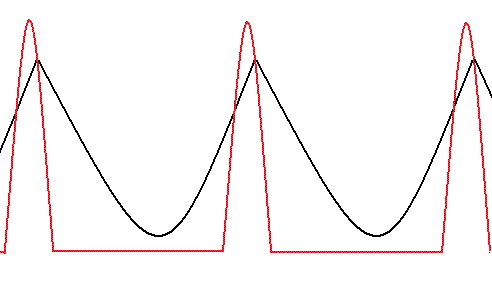
Connect one scope probe to junction of R263 and C217 on FGM. Place another probe near the deflection yoke wires to pick up the flyback pulse. Input video source that you are most intersted in. Adjut left and right green focus to max. Adjust start pulse so peaks of the two wavforms happen at the same time. The pic shows the focus waveform (black) happening after the flyback pulse. Match the peaks up.
Scott
| Description: |
|
| Filesize: |
5.21 KB |
| Viewed: |
8564 Time(s) |
|
_________________
"Were we directed from Washington when to sow and when to reap, we would soon want bread."
Thomas Jefferson
|
|
| Back to top |
|
|
Nashou66
Joined: 12 Jan 2007
Posts: 16171
Location: West Seneca NY
|
|
| Back to top |
|
|
garyfritz

Joined: 08 Apr 2006
Posts: 12088
Location: Fort Collins, CO
|
| Posted: Thu Jan 14, 2010 4:33 am Post subject: |
|
|
| cmjohnson wrote: | Yes, or just hit COLOR 2 and do your adjustments on green only.
You would want to intentionally misalign the grid (shift the focus and astig so they're NOT sharp) so you can see best how they work when you change the delay settings. It doesn't do much good to have everything already turned to the sharpest settings, not when setting the delays. You need to see WHERE the adjustments are working on the screen for this, not try to make those misadjusted zones look their best with this adjustment. |
OK, I guess I'm dense. I'm not visualizing how you adjust this. You change the FOCUS setting off-optimal (e.g. maybe at 40 if 50 is sharp focus), then what? Adjust the focus timing and see how it affects different areas of the screen, or...??
|
|
| Back to top |
|
|
Nashou66
Joined: 12 Jan 2007
Posts: 16171
Location: West Seneca NY
|
| Posted: Thu Jan 14, 2010 6:02 am Post subject: |
|
|
| garyfritz wrote: | | cmjohnson wrote: | Yes, or just hit COLOR 2 and do your adjustments on green only.
You would want to intentionally misalign the grid (shift the focus and astig so they're NOT sharp) so you can see best how they work when you change the delay settings. It doesn't do much good to have everything already turned to the sharpest settings, not when setting the delays. You need to see WHERE the adjustments are working on the screen for this, not try to make those misadjusted zones look their best with this adjustment. |
OK, I guess I'm dense. I'm not visualizing how you adjust this. You change the FOCUS setting off-optimal (e.g. maybe at 40 if 50 is sharp focus), then what? Adjust the focus timing and see how it affects different areas of the screen, or...?? |
I guess if not using a scope you should have the same amount of focus on the left and right sides when the focus is set to 100 on both sides. So match how they both look.
Athanasios
_________________
Don't blame your underwear for your crooked ass~ unknown Greek philosopher
"Republicans believe every day is the Fourth of July, but the Democrats believe every day is April 15." --- President Reagan
One Smart Dog!!!
Marquee High Performance Bellows now shipping!!
Marquee Modifications and Performance Enhancement
Marquee C-element and Bellow removal
|
|
| Back to top |
|
|
backslap
Joined: 26 Jan 2009
Posts: 36
Location: the netherlands
|
| Posted: Thu Jan 14, 2010 7:49 am Post subject: |
|
|
| CRT_Ben wrote: | | ahhh..umm...why are you displaying 720p at 120Hz? |
Well... 
Because the previous owner told me it had more light output on higher refresh rates. Something to do with the Pt-43 Phosfor of the green tube. Does that make sense? Or could it be that it just put out more light because all the lines thicken up?
But Nashou66, you say that 1280 x 720 x 120Hz uses the same circuit as 1280 x 720 x 96Hz. How can the defocusing be explained then?
What would be the optimum frequency to display 720p, according to you guys? (1080p is impossible because my ATI x1400 videocard all but locks up when anything moven on screen!)
Grtx. Elwin
|
|
| Back to top |
|
|
Nashou66
Joined: 12 Jan 2007
Posts: 16171
Location: West Seneca NY
|
|
| Back to top |
|
|
cmjohnson
Joined: 03 Apr 2006
Posts: 5180
Location: Buried under G90s
|
| Posted: Sat Jan 16, 2010 5:20 am Post subject: |
|
|
For the late joiners, I've given a simple clue to the password in this topic. Read this topic carefully and you won't have to ask me for the password directly. It's all here.
CJ
|
|
| Back to top |
|
|
karmat63
Joined: 19 Dec 2007
Posts: 157
Location: Italy
|
| Posted: Sat Jan 16, 2010 10:03 am Post subject: |
|
|
It's very simple now to get the password; but another info is needed: to enter the ss code you have first entering standard service menu (UTIL, 9, 0901); then entering 0 or 9, you will requested to enter the ss code.
Now, I think, the info is complete..
|
|
| Back to top |
|
|
Nashou66
Joined: 12 Jan 2007
Posts: 16171
Location: West Seneca NY
|
|
| Back to top |
|
|
cmjohnson
Joined: 03 Apr 2006
Posts: 5180
Location: Buried under G90s
|
| Posted: Sat Jan 16, 2010 3:40 pm Post subject: |
|
|
I must admit, I do have my reservations about giving this information out to everybody. Someone who doesn't know how to get into the first password-protected service menu, much less the second, probably should avoid the temptation to mess around in the factory
service adjustments and leave it for a later time.
Small steps. Learn how to use the service adjustments before exploring the factory adjustments. If your green convergence isn't set right, you're not ready for the factory delay adjustments. Learn to walk before you enter the marathon.
CJ
|
|
| Back to top |
|
|
J Kildare
Joined: 28 Sep 2006
Posts: 164
|
| Posted: Sun Jan 17, 2010 8:45 pm Post subject: |
|
|
Guys,
Can anyone tell me how to lock the settings below?
The original settings on my red tube were way off 50 and I think they should only be a couple of clicks off. Everytime I hit converge 0 the settings go back to 50 and while this seems a lot closer I would like them to stay where I set them. I also don't think I want to hit conv7 without confirmation.
Please PM if you do not want to put it on the open forum. Any help would be appreciated.
Thanks
Jim
| mp20748 wrote: | .. or you could deal with it another way.........oops, I forgot I'm not supposed to go into that menu..
 |
|
|
| Back to top |
|
|
|
|




