| Author |
Message |
yonexsp
Joined: 25 Apr 2006
Posts: 311
|
| Posted: Fri Jan 08, 2010 12:07 am Post subject: VP50 Vs VP50 Pro Which one for Cutom timings |
|
|
Which one do I need to do custom timings has I do on my HTPC with Powerstrip?
I woudl want to run 1080i@96 with custom porch settings etc
|
|
| Back to top |
|
 |
MikeEby

Joined: 24 Jun 2007
Posts: 5237
Location: Osceola, Indiana
|
| Posted: Fri Jan 08, 2010 1:35 am Post subject: |
|
|
Dropzone7 has a non-pro with an XG you might PM him and see if he tried 1080i@96Hz, I don't see him post much here lately. I don't thing there is much difference between the non pro and pro in that area.
Mike
_________________
Doing HD since the last century!
|
|
| Back to top |
|
|
yonexsp
Joined: 25 Apr 2006
Posts: 311
|
| Posted: Fri Jan 08, 2010 1:41 am Post subject: |
|
|
| MikeEby wrote: | Dropzone7 has a non-pro with an XG you might PM him and see if he tried 1080i@96Hz, I don't see him post much here lately. I don't thing there is much difference between the non pro and pro in that area.
Mike |
thx Mike,
Do you know what the real differences are in day to day use between the 2?
|
|
| Back to top |
|
|
VideoGrabber
Joined: 09 Apr 2006
Posts: 933
Location: Michigan
|
| Posted: Mon Jan 11, 2010 2:32 am Post subject: |
|
|
Ken,
the VP50 Pro adds:
• Mosquito Noise Reduction
• Fine Detail Enhancement
• Edge Enhancement
• HDMI 1.3 Enabled
• ISF ccc Certification
• 2 programmable 12v triggers
• Upgradeable to SD/HD-SDI Dual Input Module
• Panamorph Mode 1 and Mode 1 compatible
For a little bit more discussion of these features (not a lot), see their FAQ.
_________________
- Tim
|
|
| Back to top |
|
|
VideoGrabber
Joined: 09 Apr 2006
Posts: 933
Location: Michigan
|
| Posted: Mon Jan 11, 2010 2:43 am Post subject: |
|
|
Oh, and as far as Custom Timings, they both have the same capabilities. Neither of which includes 96i. 
They failed to see the need to include that framerate in the firmware, even though I've been told by Dale (private communications) that the hardware can handle it just fine. The only locked output rates they support are: 25, 50, 75; and 24, 48, 60, and 72. (Of course, locked 60 here means 59.94, etc.)
~~~
One more note, to anticipate possible questions, the output framerate can be set in small increments (0.01 Hz IIRC), anywhere from 24 all the way up to 120 Hz. Which sounds great. The problem being that you'll get frame drops as the source moves in and out of sync with the displayrate, even if they're both theoretically the same.
It would have been nice if SyncLock was an independent option, that simply sync'ed to the source, whatever rate it might have been at, with the user being able to set the multiplier (1x,2x,3x,4x,5x). Sadly, I can think of many other nice things that have just as little probability of ever happening.
_________________
- Tim
|
|
| Back to top |
|
|
yonexsp
Joined: 25 Apr 2006
Posts: 311
|
| Posted: Tue Jan 12, 2010 4:45 am Post subject: |
|
|
| VideoGrabber wrote: | Oh, and as far as Custom Timings, they both have the same capabilities. Neither of which includes 96i.
|
That takes care of that then
|
|
| Back to top |
|
|
Mark_A_W
Joined: 15 Mar 2006
Posts: 3068
Location: Sunny Melbourne Australia
|
| Posted: Tue Jan 12, 2010 5:02 am Post subject: |
|
|
I'm not so sure.
I'm 100% certain Dave (Person99) had 1080i72hz working on a VP of some sort. I think it was a VP-50.
It may not be a sync locked rate, and you will have to enter the timing manually.
|
|
| Back to top |
|
|
1031

Joined: 22 Mar 2006
Posts: 657
Location: Finland
|
|
| Back to top |
|
|
VideoGrabber
Joined: 09 Apr 2006
Posts: 933
Location: Michigan
|
| Posted: Tue Jan 12, 2010 6:31 am Post subject: |
|
|
Mark_A_W commented:
> I'm 100% certain Dave (Person99) had 1080i72hz working on a VP of some sort. I think it was a VP-50. <
Yes, as have I. 72i works great on the VP50, and is sync locked.
> It may not be a sync locked rate, and you will have to enter the timing manually. <
There's no problem entering 95.90 at all, and the VP50 will do 1080i @96Hz. And it will not be a sync locked framerate (though it could be, if ABT cared to make it so). The problem is that you will then see periodic glitches, due to dropped frames, as the two drift in and out of sync. I must have done a poor job of explaining that.
When you download a firmware update on the dvdo website, there's a field where you can enter "the one thing you most like to see added in the future". I've entered "sync-locked 1080i @96Hz", for several years. Since it hasn't happened yet, and the VP50 is now a discontinued product (soon to be followed by the VP50Pro, I'd expect), I don't think it's gonna happen.
Like many companies these days, DVDO has no interest in spending even a tiny amount of time to benefit their customers by making improvements to units they're not currently selling. They're orphans, and victims of our "throwaway society". [Their last update, which was about a year ago, did nothing more than the minimum to make some stuff work that had some issues (always a good thing). It was a rather small update, with no new functionality.] But to be fair to DVDO, the number of people this improvement would help out is fairly small (only CRTers, looking to maximize PQ). It would be pretty useless on any other display technology.
_________________
- Tim
|
|
| Back to top |
|
|
Mark_A_W
Joined: 15 Mar 2006
Posts: 3068
Location: Sunny Melbourne Australia
|
| Posted: Tue Jan 12, 2010 8:19 am Post subject: |
|
|
What about 120hz?
That's common for LCDs these days.
|
|
| Back to top |
|
|
yonexsp
Joined: 25 Apr 2006
Posts: 311
|
| Posted: Wed Jan 13, 2010 12:06 am Post subject: |
|
|
| Mark_A_W wrote: | What about 120hz?
That's common for LCDs these days. |
have you tried 120i?
I bet it reduces the max size width wise for the picture, reducing the amount of phosphor I can use compared to 96i
I posted my 96i settings that absolutely max the phosphor on an XG for that refresh rate on the bg808 thread
|
|
| Back to top |
|
|
Mark_A_W
Joined: 15 Mar 2006
Posts: 3068
Location: Sunny Melbourne Australia
|
| Posted: Wed Jan 13, 2010 12:24 am Post subject: |
|
|
No, haven't seriously tried it.
And yes, it will reduce the size, it is a higher scanrate (same as standard 1080p - or thereabouts depending how you tweak it).
Yes, I saw the timings, I will try them, thanks 
|
|
| Back to top |
|
|
yonexsp
Joined: 25 Apr 2006
Posts: 311
|
| Posted: Wed Jan 13, 2010 2:18 pm Post subject: |
|
|
| Mark_A_W wrote: | No, haven't seriously tried it.
And yes, it will reduce the size, it is a higher scanrate (same as standard 1080p - or thereabouts depending how you tweak it).
Yes, I saw the timings, I will try them, thanks |
I an going to tweak them again, as the refresh is off a little
|
|
| Back to top |
|
|
cinema mad
Joined: 25 Nov 2009
Posts: 219
|
| Posted: Wed Jan 13, 2010 2:59 pm Post subject: |
|
|
If it reduces the max size why not just use the adjustable timing parameters to fill out the raster ? front/back porch & shift.
Running A custom Timing for Pal DVD playback of 720p @75hz I was able to adjust the timings to use all of the Raster
As the standard pal 720p timing has this Reduce size issue..
The VP 50/ 50pro is similar to Power strip when setting up custom timings just way more stable than
A PC in most cases  .... ....
Cheers...
|
|
| Back to top |
|
|
yonexsp
Joined: 25 Apr 2006
Posts: 311
|
| Posted: Wed Jan 13, 2010 9:18 pm Post subject: |
|
|
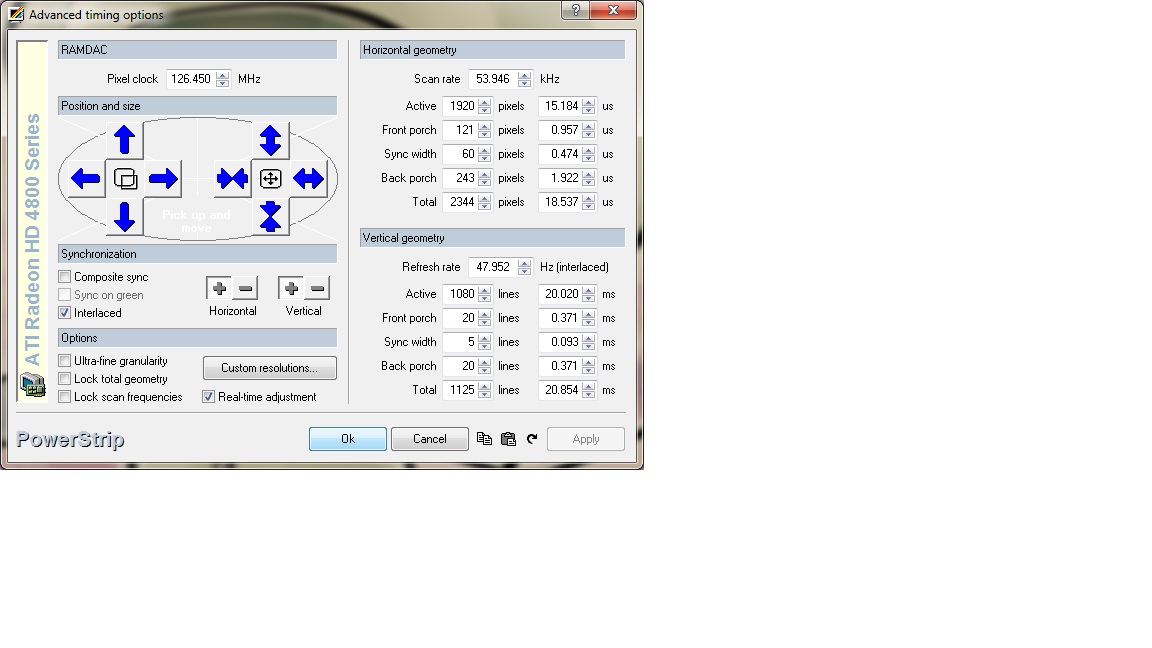
Here are the corrected XG 96i settings.
| Description: |
|
| Filesize: |
122.9 KB |
| Viewed: |
9080 Time(s) |
|
|
|
| Back to top |
|
|
yonexsp
Joined: 25 Apr 2006
Posts: 311
|
| Posted: Wed Jan 13, 2010 9:19 pm Post subject: |
|
|
| cinema mad wrote: | If it reduces the max size why not just use the adjustable timing parameters to fill out the raster ? front/back porch & shift.
Running A custom Timing for Pal DVD playback of 720p @75hz I was able to adjust the timings to use all of the Raster
As the standard pal 720p timing has this Reduce size issue..
The VP 50/ 50pro is similar to Power strip when setting up custom timings just way more stable than
A PC in most cases ....
Cheers... |
I do this already with 96i. 120i is more bandwidth so you will run out of porch options before it is as big as the 96i setting. But I will screw with it tonight for fun anyway again.
If I recall, there is not big difference in the image, with 120i being softer, and 96i actually being better.
|
|
| Back to top |
|
|
cinema mad
Joined: 25 Nov 2009
Posts: 219
|
| Posted: Thu Jan 14, 2010 2:48 am Post subject: |
|
|
Yeah I would imagine 1080 @ 96i is plenty good anough, @ 120i I dont see any benefits due to the higher bandwidth the softer the image Especialy for us lowly 8" owners, unless running lower res like 720 maybe (3D  )... )...
Cheers..
|
|
| Back to top |
|
|
yonexsp
Joined: 25 Apr 2006
Posts: 311
|
| Posted: Thu Jan 14, 2010 4:13 pm Post subject: |
|
|
| cinema mad wrote: | Yeah I would imagine 1080 @ 96i is plenty good anough, @ 120i I dont see any benefits due to the higher bandwidth the softer the image Especialy for us lowly 8" owners, unless running lower res like 720 maybe (3D )...
Cheers.. |
I ran 120 last night. It is softer, but I get a problem on the left side of the screen at max screen size. I get a line running down the side which is like a speed bump if you flipped the image 90 degrees.
Not worth the effort, and 96i is better looking.
|
|
| Back to top |
|
|
Mark_A_W
Joined: 15 Mar 2006
Posts: 3068
Location: Sunny Melbourne Australia
|
| Posted: Thu Jan 14, 2010 10:38 pm Post subject: |
|
|
|
The only benefit of 120hz is both film and ntsc/hd video will play smooth.
|
|
| Back to top |
|
|
kschmit2
Joined: 09 Mar 2006
Posts: 1141
Location: Heidelberg, Germany
|
| Posted: Fri Jan 15, 2010 5:01 am Post subject: |
|
|
|
glad I chose a Lumagen VisionPro HDP as it genlocks to 96i
|
|
| Back to top |
|
|
|
|




