| Author |
Message |
AnalogRocks
Forum Moderator

Joined: 08 Mar 2006
Posts: 26706
Location: Toronto, Ontario, Canada
TV/Projector: Sony 1252Q, AMPRO 4000G
|
|
| Back to top |
|
 |
macgyver655
Joined: 22 Aug 2007
Posts: 8508
|
| Posted: Fri Jan 15, 2010 5:13 am Post subject: |
|
|
I reread my PM to you and this is what I said.
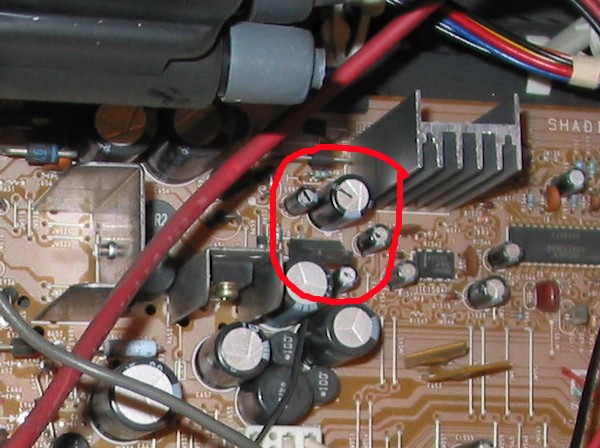
"Check the value on the caps that are in these locations to make sure its the same as the values I have given. "
I can see how this could be misinterpreted. I meant to check the value (numbers on the capacitor case) to be sure its the same as the values I gave you for the replacements.
It could of been read as to check the value (with a meter).
So I will give you full credit...... 
|
|
| Back to top |
|
|
AnalogRocks
Forum Moderator
Joined: 08 Mar 2006
Posts: 26706
Location: Toronto, Ontario, Canada
TV/Projector: Sony 1252Q, AMPRO 4000G
|
| Posted: Fri Jan 15, 2010 5:24 am Post subject: |
|
|
| macgyver655 wrote: | I reread my PM to you and this is what I said.
"Check the value on the caps that are in these locations to make sure its the same as the values I have given. "
I can see how this could be misinterpreted. I meant to check the value (numbers on the capacitor case) to be sure its the same as the values I gave you for the replacements.
It could of been read as to check the value (with a meter).
So I will give you full credit...... |
OK, see I took an inspection mirror with me, verified that those were the correct values, looked for leakage and swelling including all the surrounding bits and no signs of anything burnt. SO I guess I DID follow your instructions
I spent an hour up here looking for a DMM too hahahah!
_________________
Tech support for nothing
CRT.
HD done right!
|
|
| Back to top |
|
|
AnalogRocks
Forum Moderator
Joined: 08 Mar 2006
Posts: 26706
Location: Toronto, Ontario, Canada
TV/Projector: Sony 1252Q, AMPRO 4000G
|
| Posted: Fri Jan 15, 2010 5:26 am Post subject: |
|
|
By the way, any recommendations on how to fix my oops with the broken bit? I'm thinking a thin wire and lots of hot melt glue ohhh and some solder of course.
_________________
Tech support for nothing
CRT.
HD done right!
|
|
| Back to top |
|
|
macgyver655
Joined: 22 Aug 2007
Posts: 8508
|
| Posted: Fri Jan 15, 2010 2:49 pm Post subject: |
|
|
| AnalogRocks wrote: | SO I guess I DID follow your instructions
I spent an hour up here looking for a DMM too hahahah! |
Except for changing them, lol.
You dont need your DMM yet. Only if the replacement caps dont solve the problem.
|
|
| Back to top |
|
|
macgyver655
Joined: 22 Aug 2007
Posts: 8508
|
| Posted: Fri Jan 15, 2010 2:52 pm Post subject: |
|
|
| AnalogRocks wrote: | | By the way, any recommendations on how to fix my oops with the broken bit? I'm thinking a thin wire and lots of hot melt glue ohhh and some solder of course. |
Hard to say without seeing what you have but whatever works.
|
|
| Back to top |
|
|
AnalogRocks
Forum Moderator
Joined: 08 Mar 2006
Posts: 26706
Location: Toronto, Ontario, Canada
TV/Projector: Sony 1252Q, AMPRO 4000G
|
| Posted: Fri Feb 05, 2010 5:47 am Post subject: |
|
|
Ok all done. We're getting closer. The front panel power light is no longer flashing but now the tubes are.
The green is still on bright, the red and blue are flickering but have an image on them. We get green color when the set is just sitting there and we can get full color when we change channels but only for a split second, then it goes back to green.
Best part is it didn't let the magic smoke out when I powered it back up.
_________________
Tech support for nothing
CRT.
HD done right!
|
|
| Back to top |
|
|
AnalogRocks
Forum Moderator
Joined: 08 Mar 2006
Posts: 26706
Location: Toronto, Ontario, Canada
TV/Projector: Sony 1252Q, AMPRO 4000G
|
| Posted: Wed Feb 10, 2010 8:52 pm Post subject: |
|
|
My neighbour just told me he turns it on and it shut's its self off now. Hmmmm
_________________
Tech support for nothing
CRT.
HD done right!
|
|
| Back to top |
|
|
macgyver655
Joined: 22 Aug 2007
Posts: 8508
|
| Posted: Sat Mar 13, 2010 9:50 pm Post subject: |
|
|
|
Guess I left you hanging on this one. Whats its status?
|
|
| Back to top |
|
|
AnalogRocks
Forum Moderator
Joined: 08 Mar 2006
Posts: 26706
Location: Toronto, Ontario, Canada
TV/Projector: Sony 1252Q, AMPRO 4000G
|
| Posted: Sun Mar 14, 2010 6:17 am Post subject: |
|
|
| macgyver655 wrote: | | Guess I left you hanging on this one. Whats its status? |
Just as I wrote in my post's above. I was waiting to see if you were still around. 
_________________
Tech support for nothing
CRT.
HD done right!
|
|
| Back to top |
|
|
macgyver655
Joined: 22 Aug 2007
Posts: 8508
|
| Posted: Fri Mar 26, 2010 1:41 pm Post subject: |
|
|
|
Ok. Where were we. The green is bright and on all the time, correct. Did you try running it with the green neck board removed from the tube?
|
|
| Back to top |
|
|
AnalogRocks
Forum Moderator
Joined: 08 Mar 2006
Posts: 26706
Location: Toronto, Ontario, Canada
TV/Projector: Sony 1252Q, AMPRO 4000G
|
| Posted: Fri Mar 26, 2010 1:57 pm Post subject: |
|
|
| macgyver655 wrote: | | Ok. Where were we. The green is bright and on all the time, correct. Did you try running it with the green neck board removed from the tube? |
Hi Mac,
No I didn't remove any of the neck boards yet they have about 10lbs of glue on each of them.
Also my neighbour twideled something and put the set into shut down so I first have to undo that.
I will say though after I changed those caps the image when from fuzzy to clear and the color was trying to com back in on the other two tubes. Every time you would switch a channel it would go full color for 2-3 seconds then back to green.
_________________
Tech support for nothing
CRT.
HD done right!
|
|
| Back to top |
|
|
macgyver655
Joined: 22 Aug 2007
Posts: 8508
|
| Posted: Fri Mar 26, 2010 2:09 pm Post subject: |
|
|
Well my thought is the if the green is going bright, whether its the tube or screen control or bad component then the set maybe going into IK shut down. Is the front led blinking when the set shuts down?
Pull that green neck board and lets see if it will stay on. Maybe try turning down the green screen control also. I'll pull up the manual again and look it over.
|
|
| Back to top |
|
|
AnalogRocks
Forum Moderator
Joined: 08 Mar 2006
Posts: 26706
Location: Toronto, Ontario, Canada
TV/Projector: Sony 1252Q, AMPRO 4000G
|
| Posted: Fri Mar 26, 2010 2:19 pm Post subject: |
|
|
OK will do. Thanks.
_________________
Tech support for nothing
CRT.
HD done right!
|
|
| Back to top |
|
|
AnalogRocks
Forum Moderator
Joined: 08 Mar 2006
Posts: 26706
Location: Toronto, Ontario, Canada
TV/Projector: Sony 1252Q, AMPRO 4000G
|
| Posted: Thu Feb 16, 2012 7:25 am Post subject: |
|
|
Hey, getting back to this ( almost 2 years later ) I'm going to either fix this or scrap it. I may need some more instruction Mac 
He had been using a nice 34 inch direct view in the mean time that someone gave him.
_________________
Tech support for nothing
CRT.
HD done right!
|
|
| Back to top |
|
|
AnalogRocks
Forum Moderator
Joined: 08 Mar 2006
Posts: 26706
Location: Toronto, Ontario, Canada
TV/Projector: Sony 1252Q, AMPRO 4000G
|
| Posted: Fri Feb 17, 2012 2:15 am Post subject: |
|
|
Bump so Mac catches this.
_________________
Tech support for nothing
CRT.
HD done right!
|
|
| Back to top |
|
|
macgyver655
Joined: 22 Aug 2007
Posts: 8508
|
| Posted: Fri Feb 17, 2012 4:01 pm Post subject: |
|
|
|
Where are we at with this?
|
|
| Back to top |
|
|
AnalogRocks
Forum Moderator
Joined: 08 Mar 2006
Posts: 26706
Location: Toronto, Ontario, Canada
TV/Projector: Sony 1252Q, AMPRO 4000G
|
| Posted: Fri Feb 17, 2012 4:08 pm Post subject: |
|
|
| macgyver655 wrote: | | Where are we at with this? |
I replaced the capacitors and the fuzzy screen cleared up. It's still green.
We can get full color, just for a second, when we switch channels up or down.
Then everything goes back to green after the channel change is complete.
_________________
Tech support for nothing
CRT.
HD done right!
|
|
| Back to top |
|
|
macgyver655
Joined: 22 Aug 2007
Posts: 8508
|
| Posted: Fri Feb 17, 2012 7:08 pm Post subject: |
|
|
|
Change C666 (2200uf/10v) on the G board.
|
|
| Back to top |
|
|
Jeremy112

Joined: 28 Sep 2006
Posts: 2649
Location: Fond du Lac, WI
|
| Posted: Mon Feb 20, 2012 4:18 pm Post subject: |
|
|
AR,
To fix the PCB issue, use superglue for gluing the busted piece back onto the board, let it dry, then scrape some of the laquer off the broken contact and solder the busted connection back together. It will be good as new again.
Superglue hold the PCBs together extremely well. I had to use some to fix a board on my AVR 5805, and also on a 1272Q for the rear infrared sensor (we busted the sensor while mounting the projector, 8 pieces all back into one thanks to Loctite superglue )
_________________
When I'm asking for a Model number, that doesn't mean I'm asking for a nude photo with your number on it
|
|
| Back to top |
|
|
|
|




 OK I'll go pick up some tomorrow if I get a chance.