|
As this forum is rarely used anymore, we've locked it. Feel free to browse and read. Questions? Please reach out to us directly. Cheers! |

|
 |
|
|
| How much space do you have |
| <500GB |
|
7% |
[ 3 ] |
| <1TB |
|
2% |
[ 1 ] |
| 1-2TB |
|
28% |
[ 11 ] |
| 2-4TB |
|
10% |
[ 4 ] |
| 4-6TB |
|
10% |
[ 4 ] |
| 6-10TB |
|
41% |
[ 16 ] |
|
| Total Votes : 39 |
|
| Author |
Message |
greg_mitch
Joined: 03 May 2006
Posts: 5320
|
| Posted: Sat Jan 02, 2010 5:54 am Post subject: |
|
|
| VideoGrabber wrote: | Zebu wrote about Chris:
> we'll just have to put you in your own special unpolled group <
And you'll have to add me to that group as well. I'll just say "over 10 TB", but if your poll was logarithmic, you'd need another 4 notches.
I buy nothing smaller than 1.5 TB drives now (doesn't make sense on a $/GB basis), but did pick up a 2 TB WD on sale for ~$125 during the post Thanksgiving sales ($140, minus Bing @10%). Both the Samsung and WD 1.5 TB "green" drives can be had for $100 or less, most of the time.
I'll probably avoid buying many of the 2 TB drives as long as I can... primarily because incoming burn-in testing takes so long
(~23 hours), and I never put a drive into service without 100% pre-qual tests first. |
Everything I have seen the 1TB is best for $/GB...best I have done is $65/TB.
Are you seeing other prices?
|
|
| Back to top |
|
 |
MikeEby

Joined: 24 Jun 2007
Posts: 5237
Location: Osceola, Indiana
|
| Posted: Sat Jan 02, 2010 6:34 am Post subject: |
|
|
| greg_mitch wrote: |
Everything I have seen the 1TB is best for $/GB...best I have done is $65/TB.
Are you seeing other prices? |
I agree with that...Problem is SATA ports on your motherboard will start to run out. I've go 10 and I'm already using 4. NewEgg had a 2TB Samsung for $149 last week with free shipping, this week it's back up to $169
I'm buying nothing smaller than 2TB from now on because I want to maximize port useage...+ power to run a 2TB would be about the same as a 1TB.
Mike
_________________
Doing HD since the last century!
|
|
| Back to top |
|
|
greg_mitch
Joined: 03 May 2006
Posts: 5320
|
| Posted: Sat Jan 02, 2010 6:43 am Post subject: |
|
|
Ok, let's revise the post to "How many TB in one computer??"
My most is 2TB. I can't imagine putting all 10TB in one box!!! It is spread out over three computers, NAS, and external HDD's.
|
|
| Back to top |
|
|
VideoGrabber
Joined: 09 Apr 2006
Posts: 933
Location: Michigan
|
| Posted: Sat Jan 02, 2010 10:53 am Post subject: |
|
|
Greg,
> Everything I have seen the 1TB is best for $/GB...best I have done is $65/TB. <
I normally pay $100 for a 1.5 TB, though I've gotten a fair number at $85-90 (about 10 or so), in the last few months. Even if the 1 TB drives were under 60 bucks (which I don't recall seeing yet), they still would be less desirable from a storage density standpoint.
> Ok, let's revise the post to "How many TB in one computer??" <
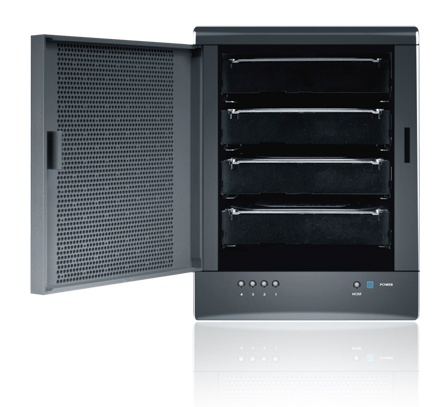
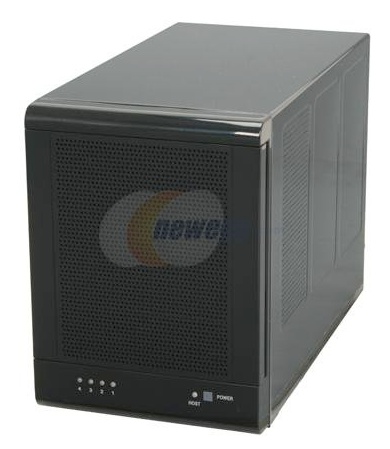
Naaah. The last thing I'd want to do is put a boatload of TB inside a computer. That just makes it hot and noisy. Plus then they're also tied down to one machine. The highest density I have is 6 TB in a small eSata box (Sans Digital), that I picked up when they were on sale for $100. And those 4 drive bays are hot-swappable, with no trays required.
| Description: |
|
| Filesize: |
40.41 KB |
| Viewed: |
8778 Time(s) |
|
| Description: |
|
| Filesize: |
39.95 KB |
| Viewed: |
8778 Time(s) |
|
_________________
- Tim
|
|
| Back to top |
|
|
WanMan

Joined: 19 Mar 2006
Posts: 10270
|
| Posted: Sat Jan 02, 2010 12:04 pm Post subject: |
|
|
| greg_mitch wrote: | 2TB Hitachi's on sale at Newegg...can't find the coupon now but I think they were $170 each.
I have 3TB worth of Hitachi's now and haven't had a hiccup in over a year. |
I bought 1.5TB WD for $89 around Xmas.
_________________
Trust no one. Absolutely no one. Advice of the board.
|
|
| Back to top |
|
|
nombz

Joined: 09 Mar 2006
Posts: 119
Location: Stockholm, Sweden
|
| Posted: Sat Jan 02, 2010 12:06 pm Post subject: |
|
|
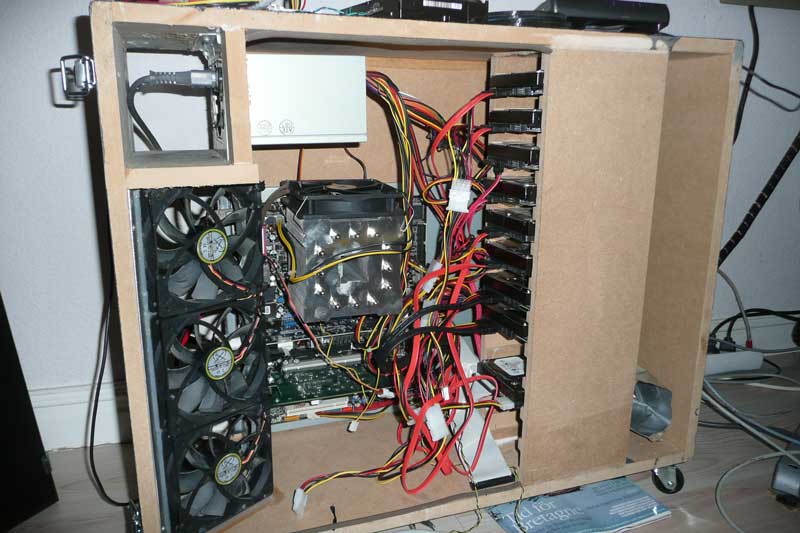
I have more than 10TB. 10TB (10 x 1TB) disks and 200GB system disk, all in one box.
Since it is RAID5, it doesnt give me more than just above 9TB of usable disk so that is the option I choose in the poll.
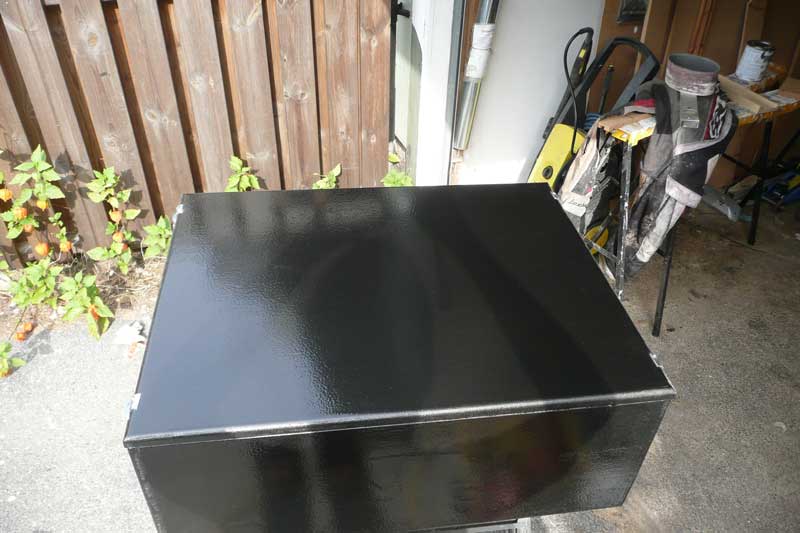
I wasnt happy with the noise level and layout (also the prices of the really good ones) of the boxes on the market so I built one in MDF.
In the picture, it is not fully equipped yet so only 8TB there. I have room for 12 physical disks so I have some more space.
It was a succesfull project, I now have a central storage point for all the families computers and it is pretty safe too (being raided). I love the possibility to just add another disk and grow the raid without data loss, very flexible.
If I need all the space? Probably not, but it tends to fill up anyway (mkv, and full blu-rays) and it was definitiely a fun project.  Didnt cost me much more than the price of the disks either. Didnt cost me much more than the price of the disks either.
| Description: |
|
| Filesize: |
59.97 KB |
| Viewed: |
8774 Time(s) |
|
| Description: |
|
| Filesize: |
46.99 KB |
| Viewed: |
8774 Time(s) |
|
_________________
BarcoGraphics 1208s/2 and BarcoGraphics 1209s/E
|
|
| Back to top |
|
|
WanMan
Joined: 19 Mar 2006
Posts: 10270
|
| Posted: Sat Jan 02, 2010 12:32 pm Post subject: |
|
|
| nombz wrote: | I have more than 10TB. 10TB (10 x 1TB) disks and 200GB system disk, all in one box.
Since it is RAID5, it doesnt give me more than just above 9TB of usable disk so that is the option I choose in the poll.
I wasnt happy with the noise level and layout (also the prices of the really good ones) of the boxes on the market so I built one in MDF.
In the picture, it is not fully equipped yet so only 8TB there. I have room for 12 physical disks so I have some more space.
It was a succesfull project, I now have a central storage point for all the families computers and it is pretty safe too (being raided). I love the possibility to just add another disk and grow the raid without data loss, very flexible.
If I need all the space? Probably not, but it tends to fill up anyway (mkv, and full blu-rays) and it was definitiely a fun project. Didnt cost me much more than the price of the disks either. |
I like the fact that you made your own case, but I noticed you kept the original case-component orientation. I'm guessing this was to have a narrow box (flat if not standing up), but the MDF certainly brings to question concerns of cooling.
And while you have space for 12 physical disks, how are you planning on connecting them to the motherboard? I've always wanted to make a custom enclosures for hard drives because most cases that are not sky-high in price, but the concern of getting power to all of them is yet another question.
_________________
Trust no one. Absolutely no one. Advice of the board.
|
|
| Back to top |
|
|
nuttall_chris
Joined: 08 Mar 2006
Posts: 832
Location: Ottawa, Ontario, Canada
|
| Posted: Sat Jan 02, 2010 2:36 pm Post subject: |
|
|
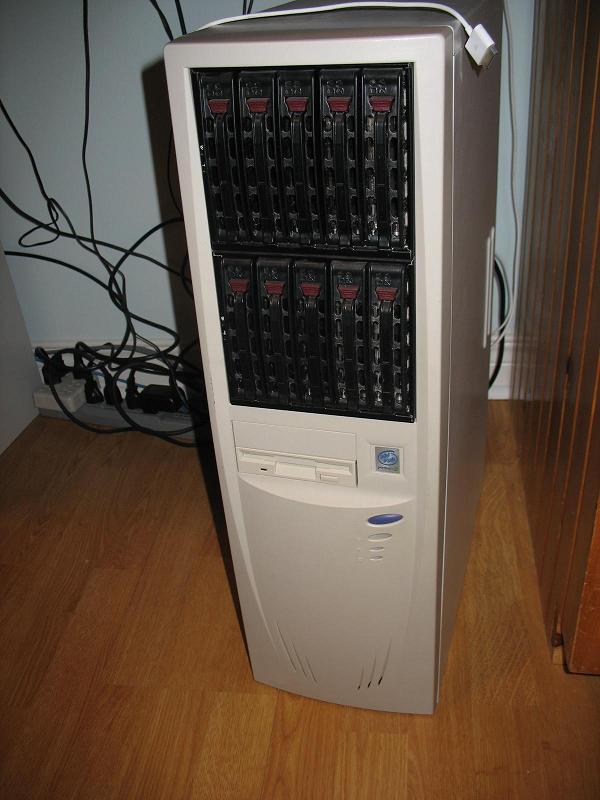
Here is a pic of my "server" All drives are in the one case, 11TB. 10 in the hot swap rack and 2 in the main chassis. My mobo only has 4 sata ports but I added 2 of these PCI to sata cards to add 8 more ports. It's noisy but the massive fans keep it all nice and cool.
http://www.ncix.com/products/index.php?sku=33441&vpn=SD-SATA-4P&manufacture=Syba
Chris.
| Description: |
|
| Filesize: |
64.77 KB |
| Viewed: |
8760 Time(s) |
|
Last edited by nuttall_chris on Sat Jan 02, 2010 2:46 pm; edited 1 time in total
|
|
| Back to top |
|
|
nuttall_chris
Joined: 08 Mar 2006
Posts: 832
Location: Ottawa, Ontario, Canada
|
| Posted: Sat Jan 02, 2010 2:45 pm Post subject: |
|
|
| greg_mitch wrote: | | VideoGrabber wrote: | Zebu wrote about Chris:
> we'll just have to put you in your own special unpolled group <
And you'll have to add me to that group as well. I'll just say "over 10 TB", but if your poll was logarithmic, you'd need another 4 notches.
I buy nothing smaller than 1.5 TB drives now (doesn't make sense on a $/GB basis), but did pick up a 2 TB WD on sale for ~$125 during the post Thanksgiving sales ($140, minus Bing @10%). Both the Samsung and WD 1.5 TB "green" drives can be had for $100 or less, most of the time.
I'll probably avoid buying many of the 2 TB drives as long as I can... primarily because incoming burn-in testing takes so long
(~23 hours), and I never put a drive into service without 100% pre-qual tests first. |
Everything I have seen the 1TB is best for $/GB...best I have done is $65/TB.
Are you seeing other prices? |
I'm in Canada so the prices will be a little different. I only use Western Digital "Green" drives and currently the 1.5TB are the best $/GB with the cost for 1.5TB at around $115. 2TB start at around $210. 1TB are at around $90.
Chris.
|
|
| Back to top |
|
|
nombz
Joined: 09 Mar 2006
Posts: 119
Location: Stockholm, Sweden
|
| Posted: Sat Jan 02, 2010 3:08 pm Post subject: |
|
|
| Quote: |
I like the fact that you made your own case, but I noticed you kept the original case-component orientation. I'm guessing this was to have a narrow box (flat if not standing up), but the MDF certainly brings to question concerns of cooling.
|
I use some original parts yes, but they have all been modified. The reason to keep them is for simplicity. Much easier to use the steel parts of the chassie for the cards instead of trying to create something in MDF.
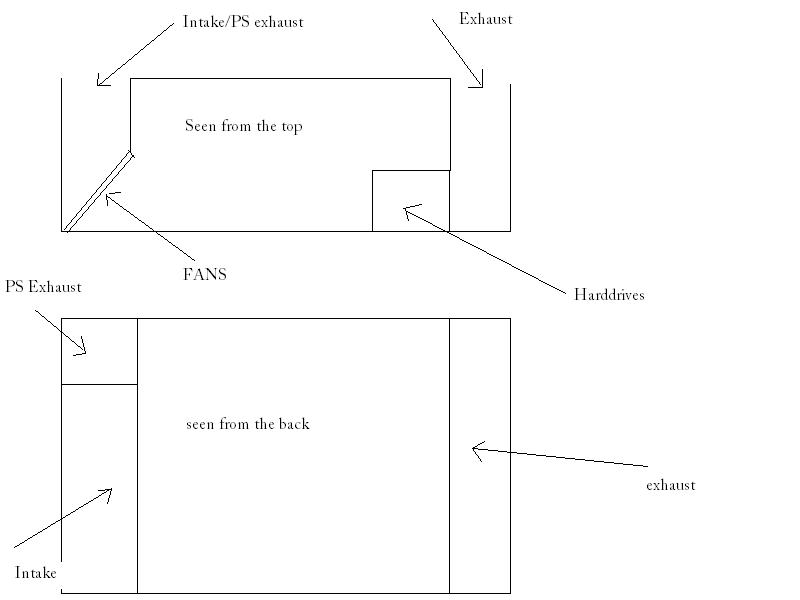
When it comes to cooling, the box has been designed for good airflow. You cant really see how on these pictures, but 3x120mm low RPM fans push the air from one side through all the discs out on the other side. I dont think you count on heat transfer through the steel plates in a "ordinary" chassis either, so I dont see this as any different. The tempsensors within show that the temp is lower than I have hade with a ordinary chassis so the design seems to be working.
If you are interested more pics available on http://www.facebook.com/album.php?aid=101942&id=562939546&l=6f6bf70fc6 (no login or anything required).
| Quote: |
And while you have space for 12 physical disks, how are you planning on connecting them to the motherboard? I've always wanted to make a custom enclosures for hard drives because most cases that are not sky-high in price, but the concern of getting power to all of them is yet another question. |
I have 8x sata connectors on the mothboard but unfortunately only 4 works in linux (and I will never use windows for a sw raid ). I have an extensing PCI-X card that has 8xsata2 connetions so I have 12xsata connections in the machine.
http://www.supermicro.com/products/accessories/addon/AOC-SAT2-MV8.cfm I believe it is important to have something more powerful than PCI since you will be reading and writing in parallell to all disks, but PCI-X covers the need nicely. There isnt a lot of good PCI-e options yet, most of them are full blown hardware raid cards, which I didnt want to use (for several reasons).
Regarding power, I simply split the sata power connectors again and again. I have a weak PS (~350W I think) but I have had no problems yet. The disks are all WD Digital 1TB green (EADS) which uses less power and hence produce less heat that "ordinary" disks. I have done some calculations on the needed PS for these particular disks, and it should be any problem. The performance of the server is good even though each indivdual disk might not be top of the line (one of the benefits of raid5).
Edit: Actually I was wrong regarding PCI-e options, seems like Marvel has a 8 channel PCI-e solution now!
_________________
BarcoGraphics 1208s/2 and BarcoGraphics 1209s/E
|
|
| Back to top |
|
|
Spanky Ham

Joined: 22 Mar 2006
Posts: 5643
Location: Comedy Central
|
| Posted: Sat Jan 02, 2010 11:55 pm Post subject: |
|
|
I put in less than 500gb. I will probably buy a 1.5tb drive soon. I am not sure how high I will go, as I am not sure how many movies I really care to have archived. No offense to any of you guys with mega storage, but how many of those movies have you watched more than once? Even at current prices, it is still around $1.50 per movie.
As for pricing, you can usually find deals on the 1.5tb drives for under $100. I have seen Frys have them for as low as $69. It was a no-name brand (at least in the ad), but I have seen the WDs for $79. I usually go to slickdeals for this.
http://slickdeals.net/forums/forumdisplay.php?f=9&sort=lastpost&order=desc&icon=41
nombz,
I like the case. I have thought about making one like yours, but a little wider. I was thinking of putting 2" acoustic foam on the swing out panel to drastically reduce the noise.
Tim,
You may have mentioned it before, but how do you burn-in your drives?
|
|
| Back to top |
|
|
greg_mitch
Joined: 03 May 2006
Posts: 5320
|
| Posted: Sun Jan 03, 2010 3:47 am Post subject: |
|
|
I agree with you to an extent spanky...mostly it is the desire to collect things for me. I like to have them handy and I regularly watch parts of movies (much to the annoyance of my wife I'm sure).
It is great to have some movies, in high quality audio and video, on the ready.
My ever growing home HD videos are starting to take up just as much space though, and having multiple backed up versions for safety sakes begins to take up a bunch of space.
|
|
| Back to top |
|
|
emdawgz1

Joined: 14 Mar 2006
Posts: 7949
|
| Posted: Sun Jan 03, 2010 4:01 am Post subject: |
|
|
| Spanky Ham wrote: | I put in less than 500gb. I will probably buy a 1.5tb drive soon. I am not sure how high I will go, as I am not sure how many movies I really care to have archived. No offense to any of you guys with mega storage, but how many of those movies have you watched more than once? Even at current prices, it is still around $1.50 per movie.
As for pricing, you can usually find deals on the 1.5tb drives for under $100. I have seen Frys have them for as low as $69. It was a no-name brand (at least in the ad), but I have seen the WDs for $79. I usually go to slickdeals for this.
http://slickdeals.net/forums/forumdisplay.php?f=9&sort=lastpost&order=desc&icon=41
|
I dont know about the other guys but what takes up my space is Tv series seasons....Sons of Anarchy, Entourage, Martin, Dharma and Greg, The Wire... ... and several others... i watch them all the time. It's great to have them on the network so i can just bring them up and watch... no digging for discs.
_________________
Follow my blog
www.thesinglebrother.com
|
|
| Back to top |
|
|
nombz
Joined: 09 Mar 2006
Posts: 119
Location: Stockholm, Sweden
|
| Posted: Sun Jan 03, 2010 10:49 am Post subject: |
|
|
| Spanky Ham wrote: |
No offense to any of you guys with mega storage, but how many of those movies have you watched more than once? Even at current prices, it is still around $1.50 per movie.
|
I must admit that that is true. But then again, this is much more than "I need storage". It is also a fun project 
| Spanky Ham wrote: |
nombz,
I like the case. I have thought about making one like yours, but a little wider. I was thinking of putting 2" acoustic foam on the swing out panel to drastically reduce the noise.
|
It is actually pretty wide. I have about 9" clearance from the back of the motherboard to the swing out panel. I did that for the same reason you mentioned, but I havent gotten around to add the foam yet. It is actually VERY quiet without it. There is also other options for noise reduction in form of 5mm thick plates sometimes used within speakers to reduce vibrations (I have no idea what they are called in english, it is a asphalt like material).
If you are thinking about it, just do it. It was well worth the effort. I used "hammerite hammarlack" (again, no idea what that is called in english) to get the "rough" finish.
_________________
BarcoGraphics 1208s/2 and BarcoGraphics 1209s/E
|
|
| Back to top |
|
|
VideoGrabber
Joined: 09 Apr 2006
Posts: 933
Location: Michigan
|
| Posted: Sun Jan 03, 2010 8:25 pm Post subject: |
|
|
Spanky Ham asked:
> You may have mentioned it before, but how do you burn-in your drives? <
I use a tool from Western Digital, called Data Lifeguard Diagnostics (DLGDIAG for Windows). It's a free download on their website, and works with drives from all vendors. (I've tested Hitachi, Samsung, Seagate, and Maxtor with it.)
The key is not to do a Quick Test, which takes just ~1 minute, and samples the entire extent. Nor to do an Extended Test, which takes a long time and reads the whole thing. Rather, do a Write Zeroes test, which writes and reads every sector on the disk, one track at a time. If there's a problem with the disk, it will find it. I've used it to weed out ~5 bad apples out of about 100 drives. It takes ~16 hours to qualify a 1.5TB drive.
Surprisingly enough, a full disk read of every sector will NOT expose all potential drive issues. I learned that lesson the hard way a number of years ago, after having decided a new 500G drive was clean, and then finding fatal flaws about 350G in while writing. The ReadTest didn't find the problem, but the WriteZeroes test did.
Lots of folks I've talked to have the impression that manufacturers actually test their "brand new" drives before shipping them, and while I'm sure they do perform random sampling, with current prices there is no possible way they could actually test the enitre surface(s) for write/read functionality. (They rely on the built-in error recovery mechanism to deal with it. The problem is that some drives hit a patch where the error density is so high it can't cope with it.) Since they don't test fully, I do... and about 100 drives later, I'm pretty satisfied with the results.
When I buy new drives, I always test them immediately, and RMA those back that fail. If everyone did that, there'd be a lot less negative ratings on Newegg. As it is, every time someone draws the short straw and gets a defective drive, up goes the negative review, along with a comment that they're never going to buy brand XYZ again, and will stick with brand ABC. Of course, you can find the same "evaluations" with ABC and XYZ reversed, from other posters.
The funny thing is that people will buy drives and put them in service, thinking that since they're brand new, they're just fine. A couple months down the road (or a few weeks, or a year later!) they finally use enough of the disk to find the problem area, and conclude "it went bad on them", when in fact, it was bad the day it arrived!
_________________
- Tim
Last edited by VideoGrabber on Sun Jan 03, 2010 8:50 pm; edited 2 times in total
|
|
| Back to top |
|
|
VideoGrabber
Joined: 09 Apr 2006
Posts: 933
Location: Michigan
|
| Posted: Sun Jan 03, 2010 8:43 pm Post subject: WARNING: Read that data, periodically! |
|
|
WARNING: Read that data, periodically!
This might be a good place to point out to those who are using high capacity hard drives as archival storage mechanisms (like myself), that engineers from several major drive manufacturers have admitted that filling a drive then putting it on the shelf for years is not a good idea. The newer drives were never designed with that in mind, and expect that the drive surfaces will be read periodically, on a fairly regular basis. That will give it a chance to detect that the read signal level is deteriorating, and rewrite the affected blocks. (In place... most of the time, when possible, or relocated, if necessary.)
The problem is that the magnetic field imposed on the medium tends to self-demagnetize over long periods of time, so if you pull out a drive after 5 years that you filled once, which was 100% perfect when written, there's a good possibility that not everything will be readable. There will be a certain percentage of data loss... just from sitting on the shelf. This is something that the LOC and others who archive large volumes of magnetic data over long periods need to be aware of.
The good news is that all it takes to avoid this problem is simply to do a full surface read on each drive, once every 2 years (1 year, if you're really paranoid). In the process of doing so, any deteriorating data will be detected and refreshed automatically, before it degrades to the point that it becomes irretrievable.
_________________
- Tim
|
|
| Back to top |
|
|
VideoGrabber
Joined: 09 Apr 2006
Posts: 933
Location: Michigan
|
| Posted: Sun Jan 03, 2010 9:05 pm Post subject: |
|
|
Spanky Ham commented:
> ...you can usually find deals on the 1.5tb drives for under $100. ...I have seen the WDs for $79. I usually go to slickdeals for this. <
Wow! I've totally missed those. At $79 for a 1.5TB WD, I'd grab 10 or 20, to fill out my MediaServer array. I guess I need to keep my eye on SlickDeals.
BTW, for a peek at a compact 1800 TB storage system, take a look at the scene in the movie "Eagle Eye", where the central drive array in the ARIA supercomputer is arranged in a circular column. There are 10 floor-to-ceiling columns around the periphery, with each column holding 10 rack-mount cages, with each rack holding a dozen hot-swappable drive trays vertically. (I'm just assuming they were supposed to be populated with 1.5 TB drives, given the time-frame... in actuality, they were probably all empty trays.)
_________________
- Tim
|
|
| Back to top |
|
|
Spanky Ham
Joined: 22 Mar 2006
Posts: 5643
Location: Comedy Central
|
| Posted: Sun Jan 03, 2010 11:36 pm Post subject: |
|
|
| Spanky Ham wrote: |
nombz,
I like the case. I have thought about making one like yours, but a little wider. I was thinking of putting 2" acoustic foam on the swing out panel to drastically reduce the noise.
|
It is actually pretty wide. I have about 9" clearance from the back of the motherboard to the swing out panel. I did that for the same reason you mentioned, but I havent gotten around to add the foam yet. It is actually VERY quiet without it. There is also other options for noise reduction in form of 5mm thick plates sometimes used within speakers to reduce vibrations (I have no idea what they are called in english, it is a asphalt like material).
If you are thinking about it, just do it. It was well worth the effort. I used "hammerite hammarlack" (again, no idea what that is called in english) to get the "rough" finish.[/quote]
Depending on the frequency of the fans, I would guess that the MDF would do a decent job of muffling the sound. It looks like you have your slot or exhaust hole on the mobo side panel. You could have further reduced the sound by putting the slot out the back. With foam on the side where your hole is now, the sound from the fans would have been directed into the foam. As for noise reduction, yes there are other options, but I would rather go with a cheap foam like foambymail.com. I need a new computer before I need to worry about a case.
Tim,
Thanks for the info. This should be a sticky for new hard drives. It is funny that you mention people bashing a drive that doesn't work. My best friend likes the WDs and hates Maxtor. He loved giving me a hard time when I was having problems with my seven year old Maxtor 80gb. I am only able to use about 70gbs on it now, but it runs and I will continue to use it.
As for Slickdeals, fortunately they have a drive's section so you don't have to deal with wading through all of the stuff you may not be interested in. If I see that Frys deal come up on the no-name, then I may give it a try with your burn-in procedure. I can at least take it back for a refund.
|
|
| Back to top |
|
|
nombz
Joined: 09 Mar 2006
Posts: 119
Location: Stockholm, Sweden
|
| Posted: Mon Jan 04, 2010 2:45 pm Post subject: |
|
|
[quote="Spanky Ham"] | Spanky Ham wrote: |
nombz,
I like the case. I have thought about making one like yours, but a little wider. I was thinking of putting 2" acoustic foam on the swing out panel to drastically reduce the noise.
|
| Nombz wrote: |
It is actually pretty wide. I have about 9" clearance from the back of the motherboard to the swing out panel. I did that for the same reason you mentioned, but I havent gotten around to add the foam yet. It is actually VERY quiet without it. There is also other options for noise reduction in form of 5mm thick plates sometimes used within speakers to reduce vibrations (I have no idea what they are called in english, it is a asphalt like material).
If you are thinking about it, just do it. It was well worth the effort. I used "hammerite hammarlack" (again, no idea what that is called in english) to get the "rough" finish. |
| Spanky Ham wrote: |
Depending on the frequency of the fans, I would guess that the MDF would do a decent job of muffling the sound. It looks like you have your slot or exhaust hole on the mobo side panel. You could have further reduced the sound by putting the slot out the back. With foam on the side where your hole is now, the sound from the fans would have been directed into the foam. As for noise reduction, yes there are other options, but I would rather go with a cheap foam like foambymail.com. I need a new computer before I need to worry about a case.
|
The "exhaust" and the intake are both on the back of the chassis and the plan is to have foam in both exhaust and intake, but again, this machine is quiet as it is so I havent gotten around to it yet.
I added a quick(no kidding ) scetch of the design.
| Description: |
|
| Filesize: |
26.52 KB |
| Viewed: |
8627 Time(s) |
|
_________________
BarcoGraphics 1208s/2 and BarcoGraphics 1209s/E
|
|
| Back to top |
|
|
VideoGrabber
Joined: 09 Apr 2006
Posts: 933
Location: Michigan
|
| Posted: Mon Jan 04, 2010 5:48 pm Post subject: |
|
|
Spanky wrote:
> As for Slickdeals, fortunately they have a drive's section so you don't have to deal with wading through all of the stuff you may not be interested in. <
Really? Is this "section" a special feature for Registered users only? Because I can't find anything like it on the site, and I went up and down the Forum tree several times. I really have no time to scan all the "Hot Deals" on mattresses, jackets, lawn chairs, etc. to find a potential deal on a hard drive.
Ah, wait a minute. What are these teeny, tiny icon buttons at the bottom, if you scroll ALL the way down? "Filter by Category". Hmmm. Apparel, Sports, Beauty, Drives! Yeah, that's the ticket. Beauty! Oops, I meant Drives. Too bad it's not also filterable by capacity.
I'll leave this silliness in, just in case someone else is suffering from the same myopia as I was. (Justs adds "&icon=41" to the URL string.)
_________________
- Tim
|
|
| Back to top |
|
|
|
|
|
|
|
You cannot post new topics in this forum
You cannot reply to topics in this forum
You cannot edit your posts in this forum
You cannot delete your posts in this forum
You cannot vote in polls in this forum
You cannot attach files in this forum
You can download files in this forum
|
Forum powered by phpBB © phpBB Group
|
|




