|
As this forum is rarely used anymore, we've locked it. Feel free to browse and read. Questions? Please reach out to us directly. Cheers! |

|
 |
|
|
| Author |
Message |
marc
Joined: 09 Jul 2008
Posts: 28
Location: Athens, Greece
|
| Posted: Sat Jan 16, 2010 3:48 pm Post subject: |
|
|
maybe you could come down next time you're in Greece. Im guessing I'll need to replace my bellows too, but that would be too hard for me to do. 
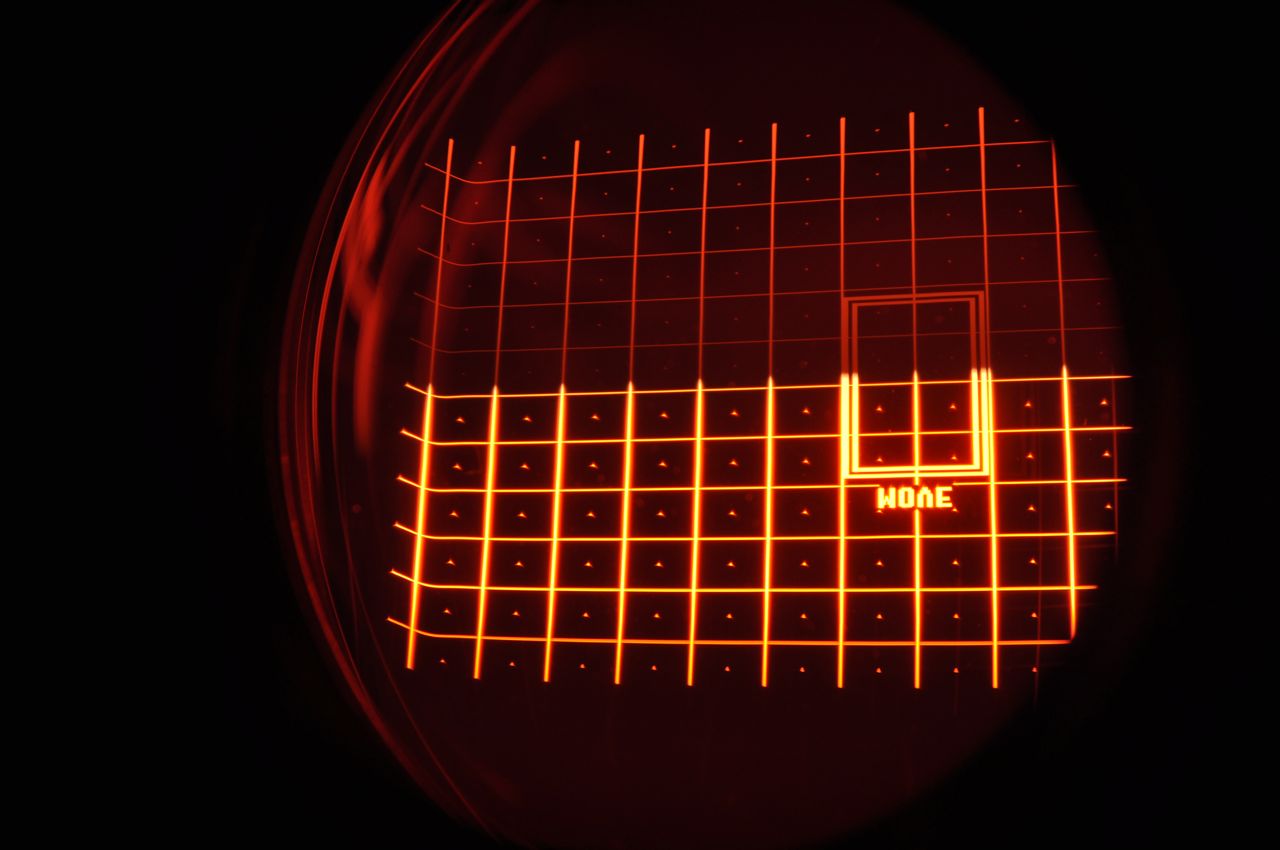
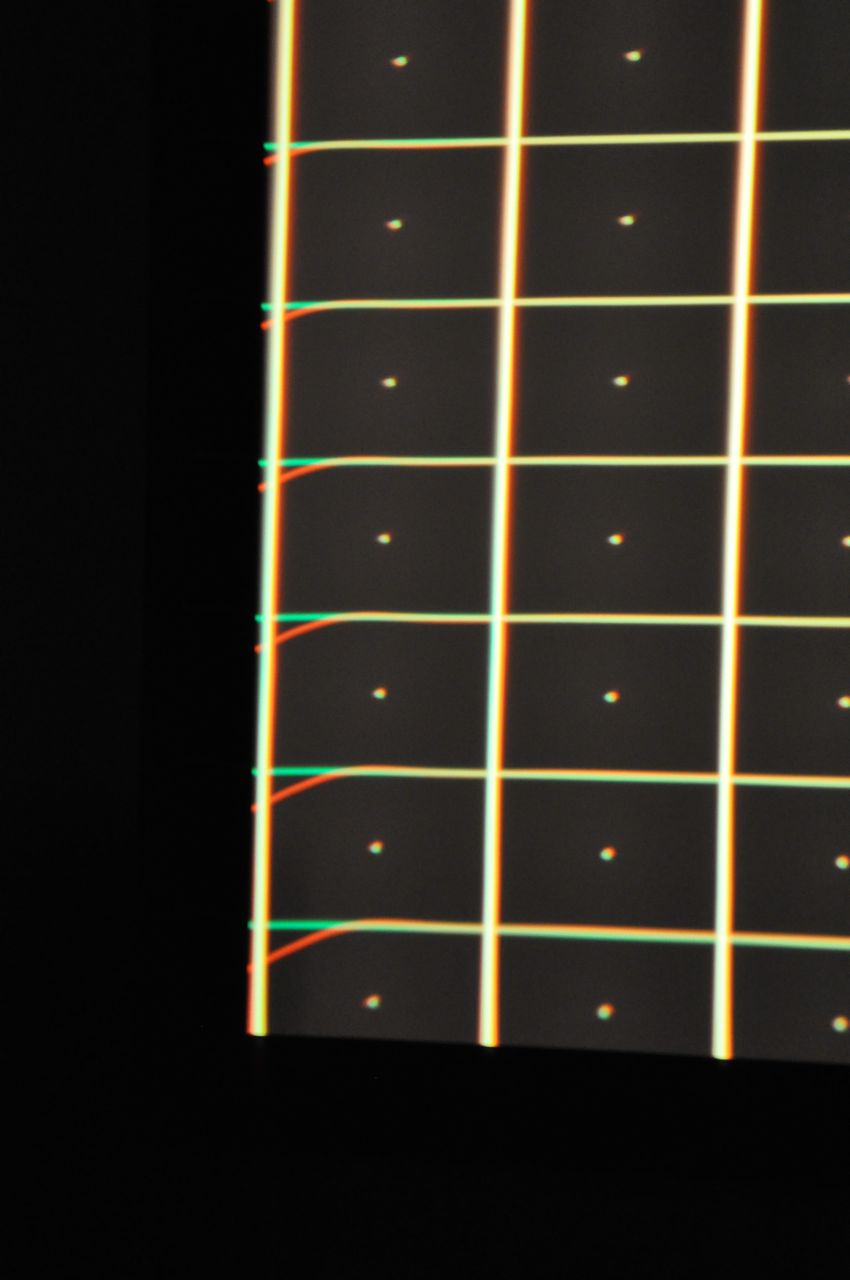
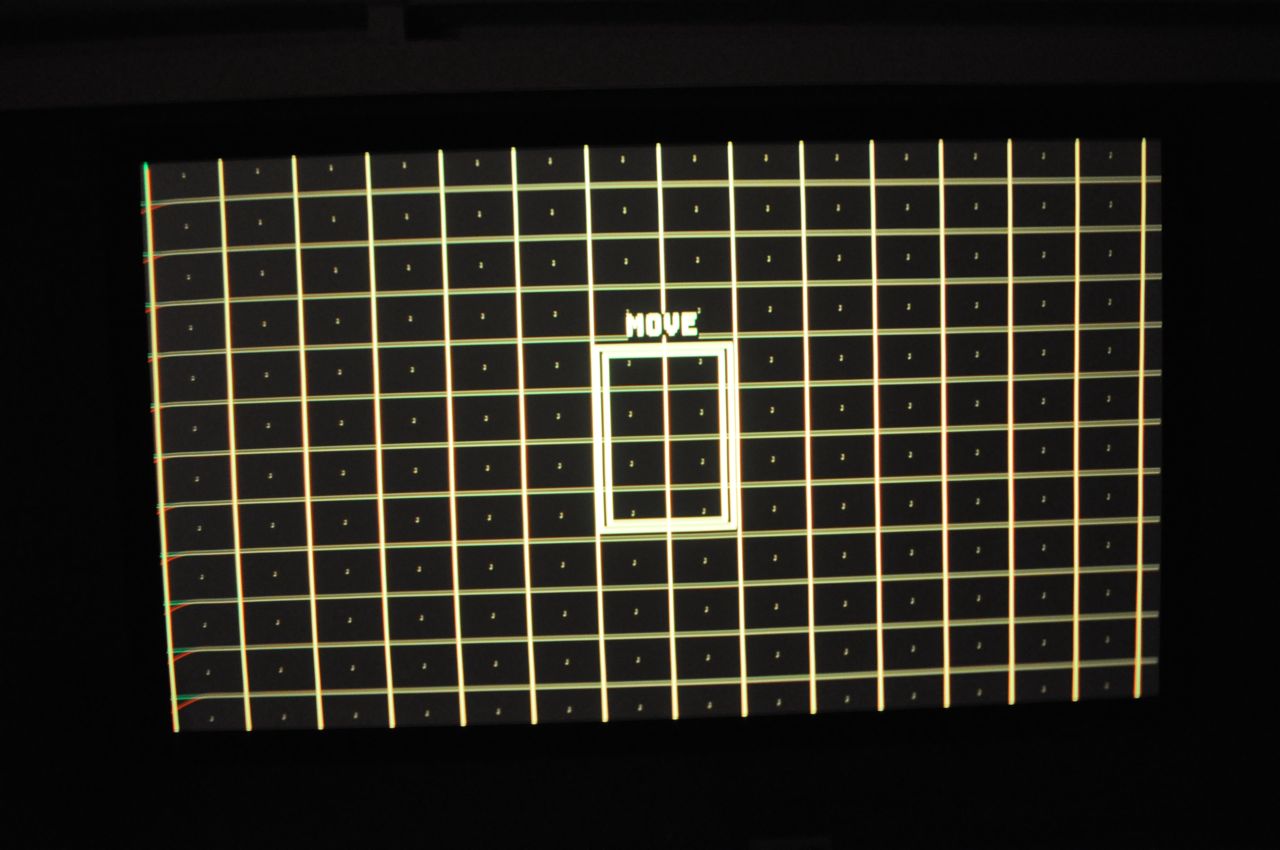
I read from one of your posts I should be using 1080p/60 and not 1080i so I changed it and the image is MUCH improved but I found there is a problem with the red set up. I've attached a few images so you can see whats wrong and how do i fix it. looking into the red lens it looks like the red is folded along the edge.
| Description: |
| into the red lens - looks like a fold |
|
| Filesize: |
83.2 KB |
| Viewed: |
2508 Time(s) |
|
| Description: |
|
| Filesize: |
63.75 KB |
| Viewed: |
3422 Time(s) |
|
| Description: |
| notice the red on the left edge |
|
| Filesize: |
106.05 KB |
| Viewed: |
2511 Time(s) |
|
_________________
Marquee 9500LC Ultra+moome HDMI+Dragan HD Mod, Oppo BDP-83, 110" 16:9 Stewart Luxus Deluxe ScreenWall, PS Audio Powerplant P5, Sony TA-E900ES / 2 x N 9000ES, Kef Q55, 100c & Q15, SVS PB-13Ultra, Rel Strata III, SVS AS-EQ1, Monarchy DIP II 24/96, Van Den Hul First Ultimate & TeaTrack
|
|
| Back to top |
|
 |
draganm

Joined: 08 Mar 2006
Posts: 8990
Location: Colorado
|
| Posted: Sat Jan 16, 2010 6:39 pm Post subject: |
|
|
| Nashou66 wrote: | I could also do the work Drags but I would not want to take a sale away from him.
Athanasios |
don't worry about that Nash, this isn't my day job.  If you want to take your Iron with you next time to Greece then that's fine. Biggest obstacle for my International customers is shipping, $100. each way for 9 Kilo's. If you want to take your Iron with you next time to Greece then that's fine. Biggest obstacle for my International customers is shipping, $100. each way for 9 Kilo's.
| marc wrote: |
I read from one of your posts I should be using 1080p/60 and not 1080i so I changed it and the image is MUCH improved but I found there is a problem with the red set up. I've attached a few images so you can see whats wrong and how do i fix it. looking into the red lens it looks like the red is folded along the edge. |
Your red raster is folded over the edge of the tube, that's from a poor set-up.
Also those grid lines are really fat. If that's the best focus you can get out of that machine it really needs some work, either electronically or set-up wise.. Maybe you can start with a basic set-up and go back through it for now and at least fix the folded red raster. I'll send you a basic set-up guide I wrote in a PM if I can attach it
Last edited by draganm on Sat Jan 16, 2010 6:40 pm; edited 1 time in total
|
|
| Back to top |
|
|
Nashou66

Joined: 12 Jan 2007
Posts: 16171
Location: West Seneca NY
|
| Posted: Sat Jan 16, 2010 8:23 pm Post subject: |
|
|
Drags its a bit deceiving, I am not sure its folded over or just skewed up. With out a pic of the whole tube face i'm not 100% sure. But if it is then you need to go into mechanical set up and sift the red raster over so it matches the location of the green. then you'll need to swivel the entire red lens and tube to match the green.
If i do plan to come to greece Id fly into Athens first instead of Thessaloniki this way I can spend a few days there .
If not this spring then the fall.
Athanasios
_________________
Don't blame your underwear for your crooked ass~ unknown Greek philosopher
"Republicans believe every day is the Fourth of July, but the Democrats believe every day is April 15." --- President Reagan
One Smart Dog!!!
Marquee High Performance Bellows now shipping!!
Marquee Modifications and Performance Enhancement
Marquee C-element and Bellow removal
|
|
| Back to top |
|
|
marc
Joined: 09 Jul 2008
Posts: 28
Location: Athens, Greece
|
| Posted: Sat Jan 16, 2010 8:52 pm Post subject: |
|
|
That is the best focus I'm getting  when I was playing 1080i the lines were even thicker. I would like to go through you guide to fix this. I'll send you my email if needed. when I was playing 1080i the lines were even thicker. I would like to go through you guide to fix this. I'll send you my email if needed.
_________________
Marquee 9500LC Ultra+moome HDMI+Dragan HD Mod, Oppo BDP-83, 110" 16:9 Stewart Luxus Deluxe ScreenWall, PS Audio Powerplant P5, Sony TA-E900ES / 2 x N 9000ES, Kef Q55, 100c & Q15, SVS PB-13Ultra, Rel Strata III, SVS AS-EQ1, Monarchy DIP II 24/96, Van Den Hul First Ultimate & TeaTrack
|
|
| Back to top |
|
|
Nashou66
Joined: 12 Jan 2007
Posts: 16171
Location: West Seneca NY
|
| Posted: Sat Jan 16, 2010 8:58 pm Post subject: |
|
|
Its not that hard Marcose. Just follow the mechanical set up guide in the help menu on the remote. You can look it over with out actually doing anything just to get familiar with what it is telling you to do. just follow the steps and you should get a nice picture. I guaranty the red tube/lens needs to be shifted over by loosening the two hex nuts and the 4 A bolts, then shifting the red raster over which can be done going through the Mechanical set up guide in the help menu.
Look it over, just keep pressing help to move to the next instruction Screen, if you want to go back a screen press recall.
its very simple
_________________
Don't blame your underwear for your crooked ass~ unknown Greek philosopher
"Republicans believe every day is the Fourth of July, but the Democrats believe every day is April 15." --- President Reagan
One Smart Dog!!!
Marquee High Performance Bellows now shipping!!
Marquee Modifications and Performance Enhancement
Marquee C-element and Bellow removal
|
|
| Back to top |
|
|
marc
Joined: 09 Jul 2008
Posts: 28
Location: Athens, Greece
|
| Posted: Sat Jan 16, 2010 9:08 pm Post subject: |
|
|
I'll try for a better pic of the tube face but from what I see the image is centered on the face as the other colours.
Thano, if you can visit you'd be very welcome and weather permitting there's a cool swimming pool . Happy name day for Monday 
_________________
Marquee 9500LC Ultra+moome HDMI+Dragan HD Mod, Oppo BDP-83, 110" 16:9 Stewart Luxus Deluxe ScreenWall, PS Audio Powerplant P5, Sony TA-E900ES / 2 x N 9000ES, Kef Q55, 100c & Q15, SVS PB-13Ultra, Rel Strata III, SVS AS-EQ1, Monarchy DIP II 24/96, Van Den Hul First Ultimate & TeaTrack
|
|
| Back to top |
|
|
Nashou66
Joined: 12 Jan 2007
Posts: 16171
Location: West Seneca NY
|
| Posted: Sat Jan 16, 2010 9:12 pm Post subject: |
|
|
| marc wrote: | I'll try for a better pic of the tube face but from what I see the image is centered on the face as the other colours.
Thano, if you can visit you'd be very welcome and weather permitting there's a cool swimming pool . Happy name day for Monday |
Ok, but is it going off the side of the tube face or is it just bending up on the flat part of the tube?
If so then it might be an off centered deflection yoke or convergence yoke. or you need to add more total pixel to the timings, one thing to try, go into the menu for pic and see what happens if you change the long and short retrace. you might cut off some of the picture but the convergence will be fixed on the edge.
Athansios
_________________
Don't blame your underwear for your crooked ass~ unknown Greek philosopher
"Republicans believe every day is the Fourth of July, but the Democrats believe every day is April 15." --- President Reagan
One Smart Dog!!!
Marquee High Performance Bellows now shipping!!
Marquee Modifications and Performance Enhancement
Marquee C-element and Bellow removal
|
|
| Back to top |
|
|
draganm
Joined: 08 Mar 2006
Posts: 8990
Location: Colorado
|
| Posted: Sat Jan 16, 2010 11:29 pm Post subject: |
|
|
| marc wrote: | | That is the best focus I'm getting when I was playing 1080i the lines were even thicker. I would like to go through you guide to fix this. I'll send you my email if needed. |
you'll have to, it was too large to attach to a PM
|
|
| Back to top |
|
|
marc
Joined: 09 Jul 2008
Posts: 28
Location: Athens, Greece
|
| Posted: Sun Jan 17, 2010 1:14 am Post subject: |
|
|
| Nashou66 wrote: | [Ok, but is it going off the side of the tube face or is it just bending up on the flat part of the tube?
If so then it might be an off centered deflection yoke or convergence yoke. or you need to add more total pixel to the timings, one thing to try, go into the menu for pic and see what happens if you change the long and short retrace. you might cut off some of the picture but the convergence will be fixed on the edge.
Athansios |
It is bending on the flat part of the tube face. The raster is slightly off center by about 2-3mm only (as far as i can see)
retrace is set to short. when i set it to long the image is better but im cutting about 7% off either side of the image.
_________________
Marquee 9500LC Ultra+moome HDMI+Dragan HD Mod, Oppo BDP-83, 110" 16:9 Stewart Luxus Deluxe ScreenWall, PS Audio Powerplant P5, Sony TA-E900ES / 2 x N 9000ES, Kef Q55, 100c & Q15, SVS PB-13Ultra, Rel Strata III, SVS AS-EQ1, Monarchy DIP II 24/96, Van Den Hul First Ultimate & TeaTrack
|
|
| Back to top |
|
|
Nashou66
Joined: 12 Jan 2007
Posts: 16171
Location: West Seneca NY
|
| Posted: Sun Jan 17, 2010 1:40 am Post subject: |
|
|
| marc wrote: | | Nashou66 wrote: | [Ok, but is it going off the side of the tube face or is it just bending up on the flat part of the tube?
If so then it might be an off centered deflection yoke or convergence yoke. or you need to add more total pixel to the timings, one thing to try, go into the menu for pic and see what happens if you change the long and short retrace. you might cut off some of the picture but the convergence will be fixed on the edge.
Athansios |
It is bending on the flat part of the tube face. The raster is slightly off center by about 2-3mm only (as far as i can see)
retrace is set to short. when i set it to long the image is better but im cutting about 7% off either side of the image. |
Yepp, thats what i thought if you went to long. The Marquees are very sensitive to timings. Even with a Moome card or HD fury you need to be able to add or delete pixel lines. This is where a Video Processor comes into play, Like the Lumagen HDP or HDQ series. You can play with the timings to fit the Image on the screen and still use long retrace which gives more room for the scan lines to not get distorted or to show ringing. But with VP you can more total pixels to give more room for image manipulation. you can still do it with out but it take lots of tweaking and messing around with raster placement.
Centering the red raster is the best way so far and then moving the physical lens. Do shift only the red raster you need to use the mechanical Set up Guide in the help menu. you can just move through all the other stuff till you get to adjust red grid, move it over a little and see if the grid with an image warps then.
Athanasios
_________________
Don't blame your underwear for your crooked ass~ unknown Greek philosopher
"Republicans believe every day is the Fourth of July, but the Democrats believe every day is April 15." --- President Reagan
One Smart Dog!!!
Marquee High Performance Bellows now shipping!!
Marquee Modifications and Performance Enhancement
Marquee C-element and Bellow removal
|
|
| Back to top |
|
|
marc
Joined: 09 Jul 2008
Posts: 28
Location: Athens, Greece
|
| Posted: Mon Jan 18, 2010 9:25 pm Post subject: |
|
|
I have gone through the mechanical setup on my proj and have got focus improved slightly, but I cant clean up the fold on the red tube, even by moving the raster around on the tube face the fold remains the same. A tempory solution, I have just enlarged the pic size by 3-4% to move most of the fold off the screen, im missing the anamorphic upgrade on my marquee so anyway im loosing 3% top & bottom. I think this is the best option I have right now if I want to continue to use 1080P, or I go back to 1080i and I get no fold and can see the whole image.
I'd like to ask something else, I've got the focus the best i can by loosening the bolts on the lense and twisting the lense. But there are no bolts labeled 'B' &'D' as it decribes in the Mechanical setup and I looked around and still abit lost as what bolts they are talking about. My proj is a 8500 that has been upgraded to 9500 ultra so im guessing those 'B' & 'D' bolts were trashed. Im confused.
Also, there seems alot of glow around the grid lines on all colours even with a sharp focus, is this normal? or should I expect it to be better?
thanks Marc
_________________
Marquee 9500LC Ultra+moome HDMI+Dragan HD Mod, Oppo BDP-83, 110" 16:9 Stewart Luxus Deluxe ScreenWall, PS Audio Powerplant P5, Sony TA-E900ES / 2 x N 9000ES, Kef Q55, 100c & Q15, SVS PB-13Ultra, Rel Strata III, SVS AS-EQ1, Monarchy DIP II 24/96, Van Den Hul First Ultimate & TeaTrack
|
|
| Back to top |
|
|
|
|
|
|
|
You cannot post new topics in this forum
You cannot reply to topics in this forum
You cannot edit your posts in this forum
You cannot delete your posts in this forum
You cannot vote in polls in this forum
You cannot attach files in this forum
You can download files in this forum
|
Forum powered by phpBB © phpBB Group
|
|




