| Author |
Message |
km987654

Joined: 25 Jul 2007
Posts: 2874
Location: Australia
TV/Projector: Barco BG809s
|
| Posted: Mon Dec 21, 2009 8:49 pm Post subject: Barco RCVDS 800 Manual |
|
|
|
Would anyone have a manual for one of these?
|
|
| Back to top |
|
 |
scoobydoo

Joined: 06 Apr 2006
Posts: 358
Location: Victoria BC
|
| Posted: Mon Dec 21, 2009 9:12 pm Post subject: |
|
|
Have you done a google search for one? I found mine online.
If you can't find one, i'll look tonight at home and see if I have a pdf version on one of my backup discs.
|
|
| Back to top |
|
|
km987654
Joined: 25 Jul 2007
Posts: 2874
Location: Australia
TV/Projector: Barco BG809s
|
| Posted: Tue Dec 22, 2009 6:39 am Post subject: |
|
|
|
I have tried google without any luck there are references to the manual but the links are broken. I even tried Curt but he doesn't have one.
|
|
| Back to top |
|
|
kschmit2
Joined: 09 Mar 2006
Posts: 1141
Location: Heidelberg, Germany
|
| Posted: Tue Dec 22, 2009 2:36 pm Post subject: |
|
|
|
you want to mod it for external (non-Barco) control?
|
|
| Back to top |
|
|
km987654
Joined: 25 Jul 2007
Posts: 2874
Location: Australia
TV/Projector: Barco BG809s
|
| Posted: Tue Dec 22, 2009 8:36 pm Post subject: |
|
|
| kschmit2 wrote: | | you want to mod it for external (non-Barco) control? |
I want to use it with a Barco. I would like to know what the connection options are.
|
|
| Back to top |
|
|
scoobydoo
Joined: 06 Apr 2006
Posts: 358
Location: Victoria BC
|
| Posted: Tue Dec 22, 2009 9:10 pm Post subject: |
|
|
Hey Keith.
didn't realize you are in Australia. So my rcvds5 may cost too much to ship to you.
Hopefully i'll find the manual in pdf at home tonight.
How I had my rcvds 800 and then my rcvds5 was that I had my standard definition tv, momitsu dvd player and vcr hooked up to it then out to my Barco Data 800.
|
|
| Back to top |
|
|
kschmit2
Joined: 09 Mar 2006
Posts: 1141
Location: Heidelberg, Germany
|
|
| Back to top |
|
|
Curt Palme
CRT Tech
Joined: 08 Mar 2006
Posts: 24396
Location: Langley, BC
TV/Projector: All of them!
|
| Posted: Wed Dec 23, 2009 6:49 pm Post subject: |
|
|
|
Yes please, that will save me from figuring it out.
|
|
| Back to top |
|
|
kschmit2
Joined: 09 Mar 2006
Posts: 1141
Location: Heidelberg, Germany
|
| Posted: Fri Dec 25, 2009 3:10 pm Post subject: |
|
|
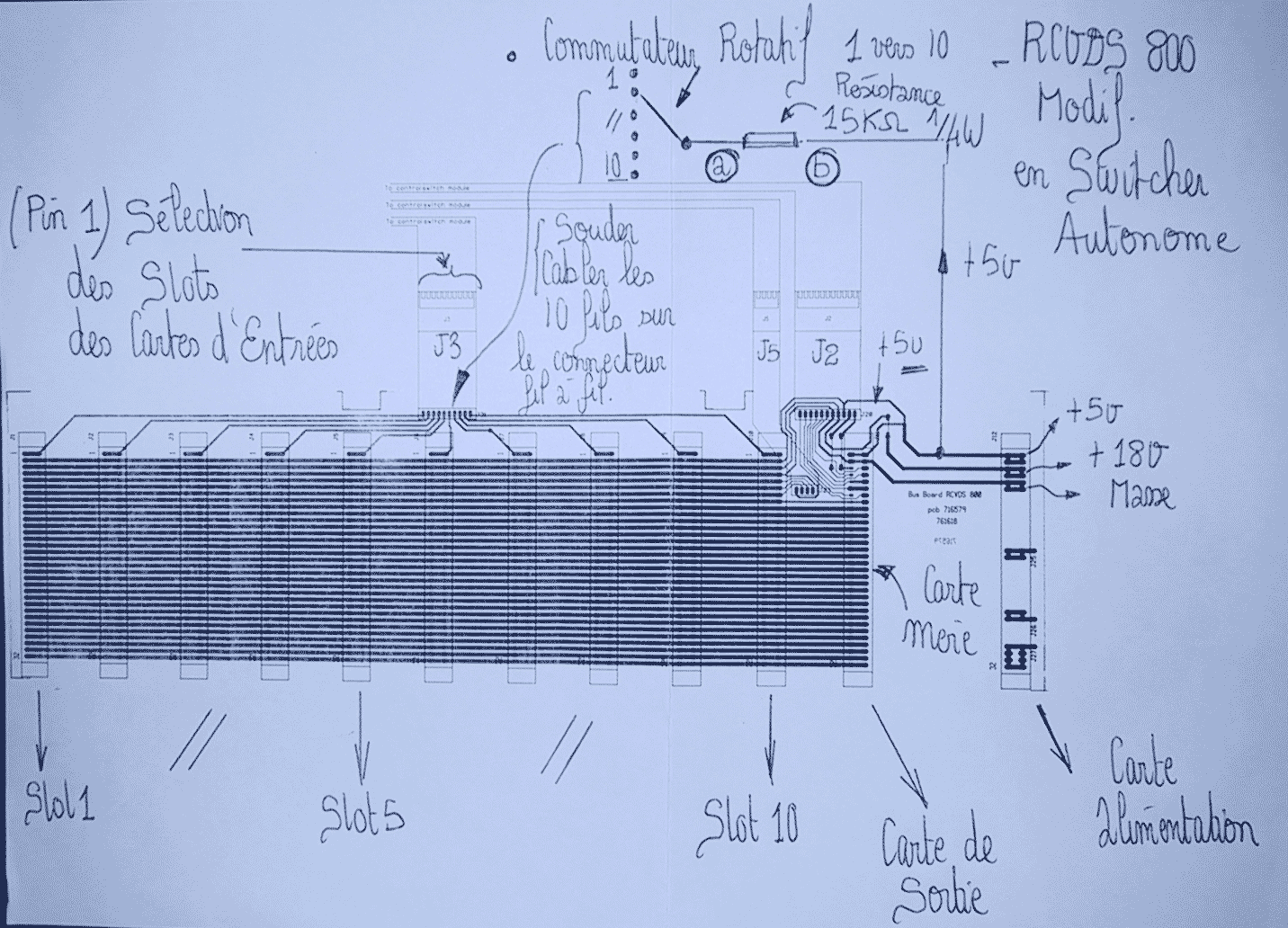
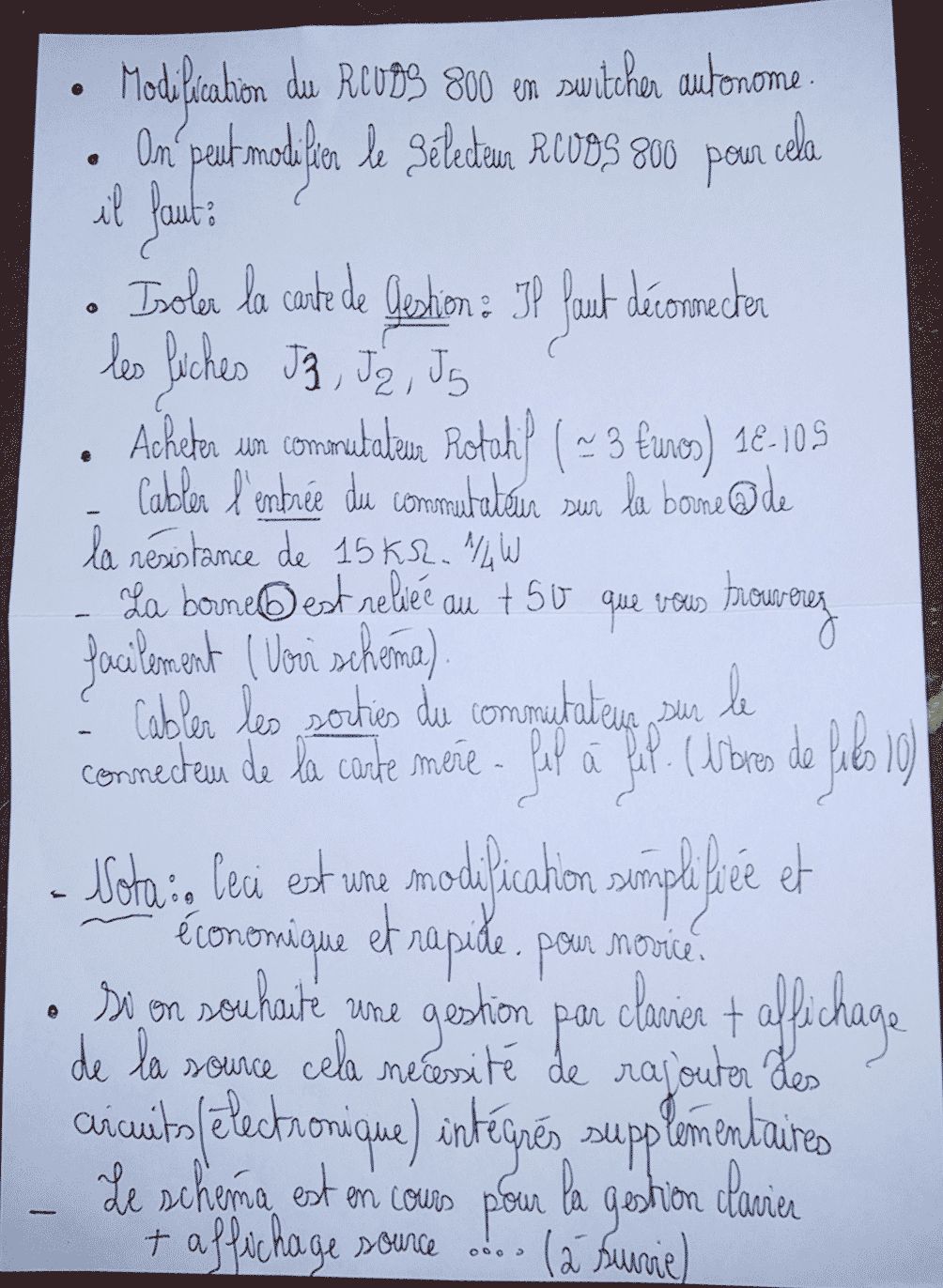
RCVDS 800 instructions to convert it to standalone mode
Unfortunately it's all in French, but that shouldn't be such a big deal in Canada 
| Description: |
|
| Filesize: |
344.4 KB |
| Viewed: |
5430 Time(s) |
|
| Description: |
|
| Filesize: |
341.26 KB |
| Viewed: |
5391 Time(s) |
|
|
|
| Back to top |
|
|
AGrey
Joined: 29 Jul 2010
Posts: 19
|
| Posted: Wed Aug 04, 2010 7:26 pm Post subject: |
|
|
For those of us not in Canada (and not around french speakers), can anyone translate?
Thanks!!
|
|
| Back to top |
|
|
kschmit2
Joined: 09 Mar 2006
Posts: 1141
Location: Heidelberg, Germany
|
| Posted: Thu Aug 05, 2010 5:50 pm Post subject: |
|
|
modification du RCVDS-800 en switcher autonome
on peut modifier la selecteur RCVDS-800 pour cela il faut:
isoler la carte de gestion: il faut déconnecter les fiches J3, J2, J5.
acheter un commutateur rotatif (just a couple of euros) 1E-10S
cabler l'entrée du commutateur sur la borne "a" de la résistance de 15 kOhm, 1/4 W
La borne "b" est reliée au +5 V que vous trouverez facilement (voir schéma)
cabler les sorties du commutateur sur le connecteur de la carte mère. fil à fil (nombres de fil est 10)
Nota: ceci est une modification simplifiée et economique et rapide. pour novice.
si on souhaite une gestion par clavier et affichage de la source, cela necessité de rajouter des circuits electroniques integrées supplementaires
La schema est en cours pour la gestion clavier et affichage source ... (a suivre)
Translation (quick and dirty):
Change RCVD-800 switcher to standalone mode.
You can change the switcher RCVDS-800. this requires:
Isolate the card management (Control PCB ?): you must disconnect plugs/pins J3, J2, J5.
Buy a rotary selector (just a couple of euros) 1E-10S (should be 1 exit, 10 switching positions)
Wire the input of the switch to terminal "a" of resistance of 15 kOhm, 1/4 W
The terminal "b" is connected to +5 V which you can find easily (see diagram).
Wire the outputs of the selector to the connectors on the motherboard. wire by wire (wire total is 10)
Note: This is a simplified, economic and quick modification. suitable for novices.
If you want a keypad and display management of the source, it is necessary to add additional integrated electronic circuits.
The schematic is being worked on to manage keypad and source display ... (more to follow)
|
|
| Back to top |
|
|
kschmit2
Joined: 09 Mar 2006
Posts: 1141
Location: Heidelberg, Germany
|
| Posted: Thu Aug 05, 2010 5:55 pm Post subject: |
|
|
some additional translations for the other image:
1 vers 10: thats the 10 in 1 out selector
Masse = ground
carte alimentation = power pcb
carte de sortie = output pcb
souder cables les 10 fils sur le connecteur fil à fil = solder 10 cables to the 10 pins/connectors wire by wire
|
|
| Back to top |
|
|
AGrey
Joined: 29 Jul 2010
Posts: 19
|
| Posted: Thu Aug 05, 2010 10:26 pm Post subject: |
|
|
Thanks Kai!
You are awesome!
|
|
| Back to top |
|
|
|
|





