| Author |
Message |
Will
Joined: 08 Nov 2009
Posts: 5
Location: UK
|
| Posted: Sun Nov 08, 2009 8:40 am Post subject: PC RGBHV Nvidia 9400 to Selco 350 CRT settings PAL |
|
|
Hi there. I'm having trouble setting my old PJ up to my computer so to allow me to play blue ray dvd's. The computers Motherboard is a GA-E7AUM-DS2H with intergrated Nvidia 9400. And I am trying to hook it up to my PJ via the VGA conection on the computer to the 5 RGA bnc input on the PJ, RGBHV. MY PC OS is Vista.
I have had alot of help from Bobbyblaze in the UK AVForum, but we have hit a dead end. Does anyone know what I need to do. Please read the thread in the UK Forums to get an idea of where I am up to.
http://www.avforums.com/forums/crt-projectors/1092211-seleco-350p-new-post.html
Please note, I am not to hot on computers, so if you can help please make it idiot proof............Regards. Magicj1
|
|
| Back to top |
|
 |
AnalogRocks
Forum Moderator

Joined: 08 Mar 2006
Posts: 26706
Location: Toronto, Ontario, Canada
TV/Projector: Sony 1252Q, AMPRO 4000G
|
| Posted: Sun Nov 08, 2009 2:13 pm Post subject: Re: PC to CRT settings |
|
|
| Magicj1 wrote: | Hi there. I'm having trouble setting my old PJ up to my computer so to allow me to play blue ray dvd's. The computers Motherboard is a GA-E7AUM-DS2H with intergrated Nvidia 9400. And I am trying to hook it up to my PJ via the VGA conection on the computer to the 5 RGA bnc input on the PJ, RGBHV.
MY PC OS is Vista. |
I'm sorry for you. 
| Magicj1 wrote: |
I have had alot of help from Bobbyblaze in the UK AVForum, but we have hit a dead end. Does anyone know what I need to do. Please read the thread in the UK Forums to get an idea of where I am up to.
http://www.avforums.com/forums/crt-projectors/1092211-seleco-350p-new-post.html
Please note, I am not to hot on computers, so if you can help please make it idiot proof............Regards. Magicj1 |
Hi Will,
I just looked up your mother board. Too bad powerstrip doesn't like the 9400 cards. What I find with the Nvidia drivers is that they are hit and miss. I have an 8600 card that would hold it's custom settings but only until a reboot.
I don't have Vista, I'm using XP Pro 32 bit. So I'm not sure how to go about setting this up for you but hey I'll give it a shot.
Gimme a minute to look at the Nvidia drivers on this PC and I'll see what I can come up with.
You need 576i at 48Hz right?
_________________
Tech support for nothing
CRT.
HD done right!
|
|
| Back to top |
|
|
Will
Joined: 08 Nov 2009
Posts: 5
Location: UK
|
| Posted: Sun Nov 08, 2009 2:30 pm Post subject: |
|
|
Hi there. Thanks for your help. You know to be totally honest I don't know. I have a manual which states receiving bands 48,25Mhz-168,25Mhz, you can see this manual at http://www.curtpalme.com/docs/Seleco310_350_Install_User.pdf But I'm at a loss with the tech side of things, even though I've had my PJ for donkeys of years I've never gone into the spec side of things... 
|
|
| Back to top |
|
|
AnalogRocks
Forum Moderator
Joined: 08 Mar 2006
Posts: 26706
Location: Toronto, Ontario, Canada
TV/Projector: Sony 1252Q, AMPRO 4000G
|
| Posted: Sun Nov 08, 2009 3:00 pm Post subject: |
|
|
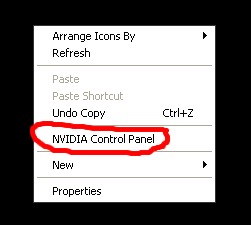
Step 1:
Right click on your windows desktop and select the "NVIDIA CONTROL PANEL"
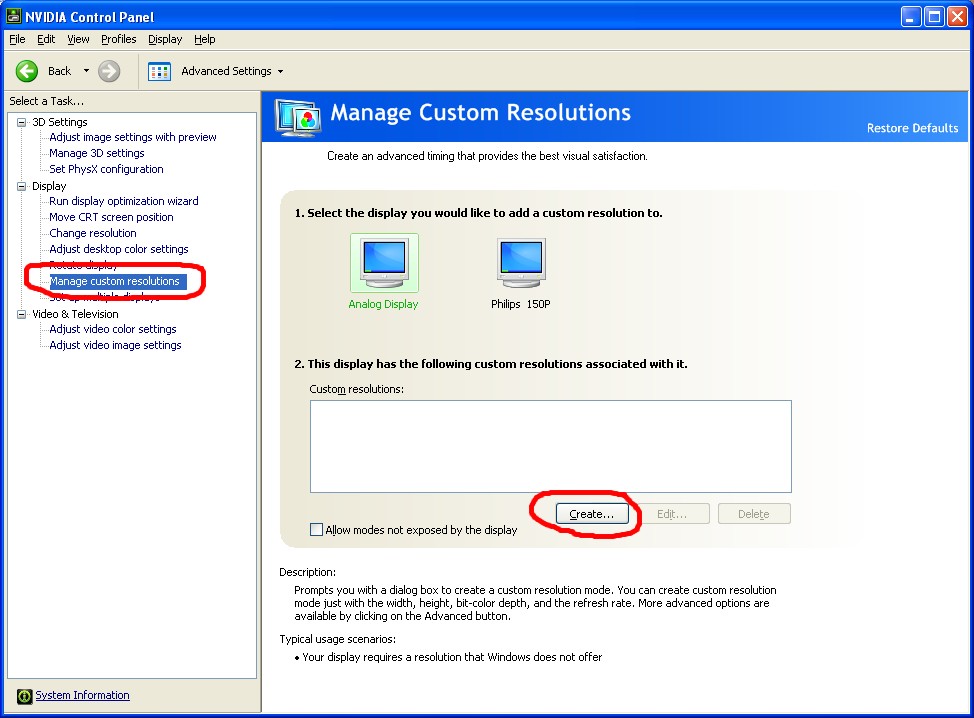
Step 2:
Once in the Nvidia Control panel select
Manage Custom Resolutions from the left list. Then click on the "Create" button on the right side.
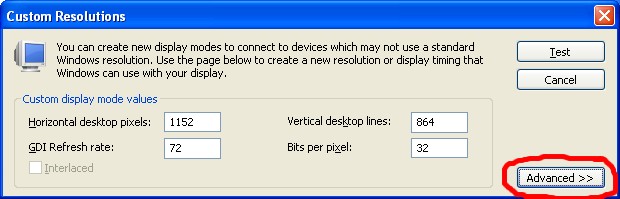
Step 3:
Click on the "ADVANCED" box
Step 4:
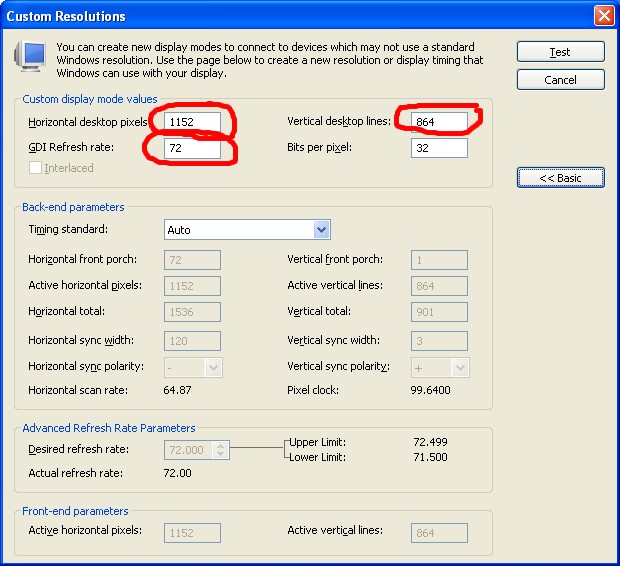
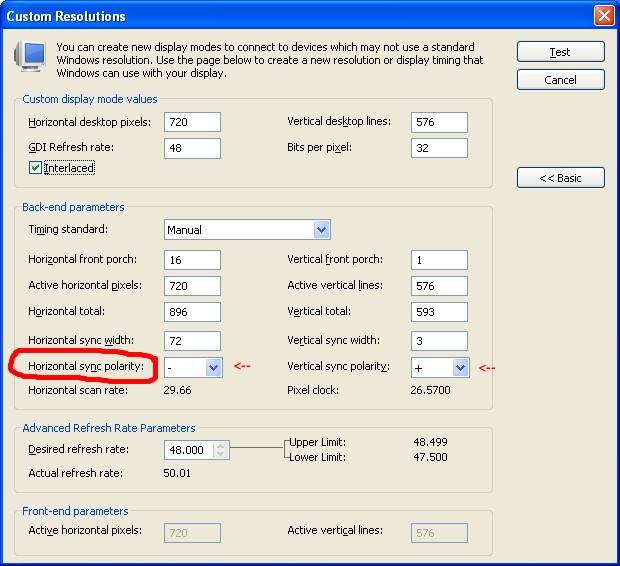
Enter the "Custom Display Mode Values" in other words your screen resolution. 720, 576 and 48
Step 5:
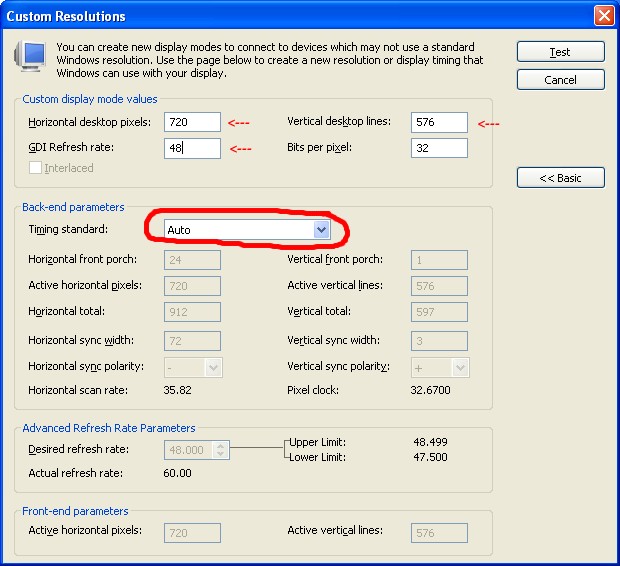
Click on the Timing Standard box where it says "AUTO"
Step 6:
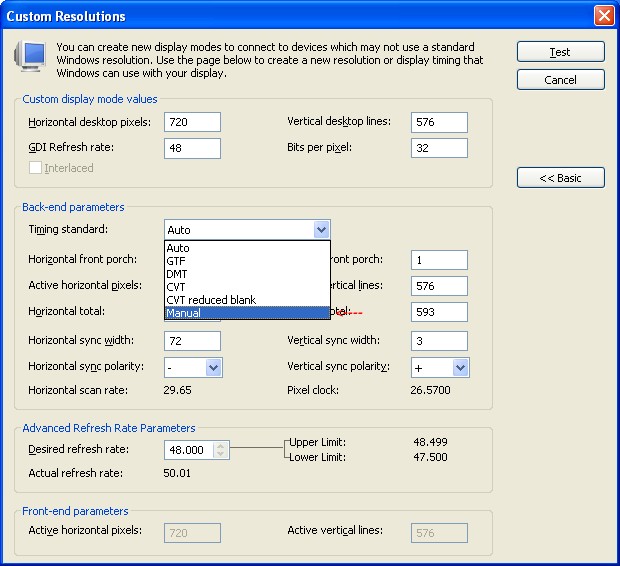
Scroll down the timing standard list and select MANUAL
Step 7:
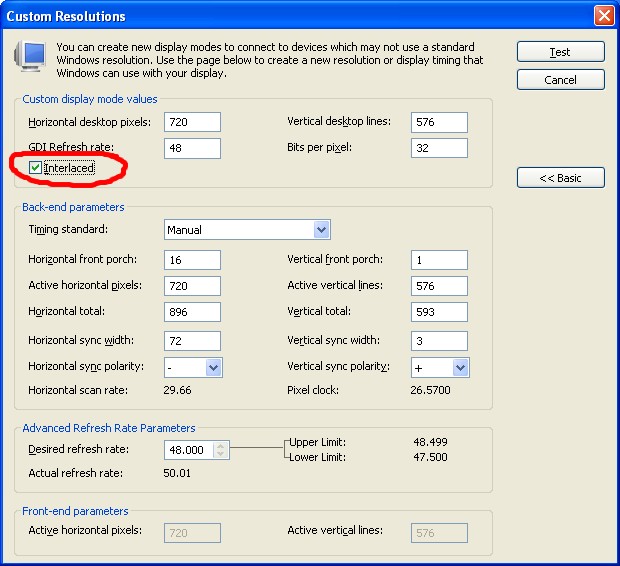
Check off the INTERLACED box
Step 8:
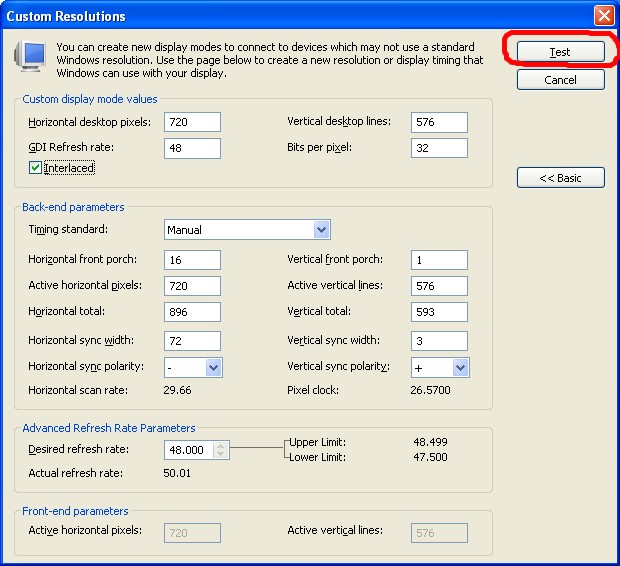
Now push the TEST button and see what you get on your screen.
Step 9:
You may need to adjust the horizontal and vertical sync polarity
Keep in mind I'm using Windows XP Pro 32 bit so I'm not sure if this will work for you on Vista but give it a try.
| Description: |
| Right click on your windows desktop and select the "NVIDIA CONTROL PANEL" |
|
| Filesize: |
12.47 KB |
| Viewed: |
8211 Time(s) |
|
| Description: |
Once in the Nvidia Control panel select
Manage Custom Resolutions from the left list. Then click on the "Create" button on the right side. |
|
| Filesize: |
127 KB |
| Viewed: |
8210 Time(s) |
|
| Description: |
| Click on the "ADVANCED" box |
|
| Filesize: |
38.49 KB |
| Viewed: |
8210 Time(s) |
|
| Description: |
| Enter the "Custom Display Mode Values" in other words, your screen resolution 720, 576 and 48 |
|
| Filesize: |
86.76 KB |
| Viewed: |
8210 Time(s) |
|
| Description: |
| Click on the Timing Standard box where it says "AUTO" |
|
| Filesize: |
85.93 KB |
| Viewed: |
8211 Time(s) |
|
| Description: |
| Scroll down the timing standard list and select MANUAL |
|
| Filesize: |
85.38 KB |
| Viewed: |
8210 Time(s) |
|
| Description: |
| Check off the INTERLACED box |
|
| Filesize: |
86.49 KB |
| Viewed: |
8210 Time(s) |
|
| Description: |
| Now push the TEST button and see what you get on your screen. |
|
| Filesize: |
86.04 KB |
| Viewed: |
8210 Time(s) |
|
| Description: |
| You may need to adjust the horizontal and vertical sync polarity |
|
| Filesize: |
87.03 KB |
| Viewed: |
8210 Time(s) |
|
_________________
Tech support for nothing
CRT.
HD done right!
Last edited by AnalogRocks on Sun Nov 08, 2009 3:13 pm; edited 1 time in total
|
|
| Back to top |
|
|
AnalogRocks
Forum Moderator
Joined: 08 Mar 2006
Posts: 26706
Location: Toronto, Ontario, Canada
TV/Projector: Sony 1252Q, AMPRO 4000G
|
| Posted: Sun Nov 08, 2009 3:11 pm Post subject: |
|
|
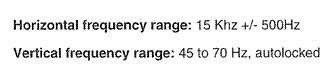
And just for future reference here are the Selco 350 spec's from the manual
EDIT: updated the thread title as well so we know what's in it.
| Description: |
|
| Filesize: |
8.04 KB |
| Viewed: |
8200 Time(s) |
|
_________________
Tech support for nothing
CRT.
HD done right!
|
|
| Back to top |
|
|
Will
Joined: 08 Nov 2009
Posts: 5
Location: UK
|
| Posted: Sun Nov 08, 2009 3:51 pm Post subject: |
|
|
W'hey!!! It seems to work, there's a bit of fine tunning to do, but I've got a picture at last, thank you so much for your help, it is very much appreciated  What I will do is give my mate a call, he built my computer, so I will get him to pop round this week to do the fine tweaking, I don't wan't mess things up What I will do is give my mate a call, he built my computer, so I will get him to pop round this week to do the fine tweaking, I don't wan't mess things up  I shall let you know how I get on. Cheers for now... I shall let you know how I get on. Cheers for now...
|
|
| Back to top |
|
|
AnalogRocks
Forum Moderator
Joined: 08 Mar 2006
Posts: 26706
Location: Toronto, Ontario, Canada
TV/Projector: Sony 1252Q, AMPRO 4000G
|
| Posted: Sun Nov 08, 2009 4:28 pm Post subject: |
|
|
Cool! Glad you got a picture. DO let us know how it goes.
Later on when you get it up and running screen shot's are mandatory
_________________
Tech support for nothing
CRT.
HD done right!
|
|
| Back to top |
|
|
AnalogRocks
Forum Moderator
Joined: 08 Mar 2006
Posts: 26706
Location: Toronto, Ontario, Canada
TV/Projector: Sony 1252Q, AMPRO 4000G
|
| Posted: Mon Nov 30, 2009 4:18 am Post subject: |
|
|
Hi Will, how's the battle?
_________________
Tech support for nothing
CRT.
HD done right!
|
|
| Back to top |
|
|
Will
Joined: 08 Nov 2009
Posts: 5
Location: UK
|
| Posted: Mon Nov 30, 2009 6:32 am Post subject: |
|
|
|
Good news sad news i'm affraid. The sad news is i've taken the seleco down after 12 years. The good news is the picture inspired me to invest in a jvc 350/rs10 'just managed to get my hands on one that was on offer' as I was sold on the HD picture. The seleco'c life is not over either as my friend is keen on having it for his new fitness centre.....Kind regards Will
|
|
| Back to top |
|
|
Will
Joined: 08 Nov 2009
Posts: 5
Location: UK
|
| Posted: Mon Nov 30, 2009 8:53 pm Post subject: |
|
|
|
Hey AnalogRocks. Just want to say a BIG thankyou for all your help, it was spot on. I had been using your settings agian last saturday just before I took the seleco down from my ceiling. A sad day, but i've got to go fowards me thinks, I just needed to see how she would perform. Changes happened quicker than I had imagine, than I possible wanted, but with Rs10/350 is in short supply in the UK so I had to act fast. Cheers again my friend. Yours Will
|
|
| Back to top |
|
|
|
|




