| Author |
Message |
ginger123456

Joined: 26 Mar 2008
Posts: 27
Location: Gosport, United Kingdom
|
| Posted: Fri Oct 30, 2009 8:47 pm Post subject: Panoram Panomaker V Blend and Warp Unit |
|
|
Hi,
I have a Panoram Panomaker V pure digital unit, is there anybody out there in CRT land who may have used these units before, sorry but I cannot put a link up from the Panoram site as the site closed down a few months ago, I believe the company folded.
These units were very high end and used by large corporations to allow both blending and warping with black level controls for use with both crt and digital projector systems.
I have the control software to set up the units but its not a simple plug and play device, so if there are any techie people out there who have set these units up before please shout out as it would be a shame just to watch dust gather on the unit.
Thanks
Ginger123456
|
|
| Back to top |
|
 |
macgyver655
Joined: 22 Aug 2007
Posts: 8508
|
|
| Back to top |
|
|
Nashou66

Joined: 12 Jan 2007
Posts: 16171
Location: West Seneca NY
|
|
| Back to top |
|
|
ginger123456
Joined: 26 Mar 2008
Posts: 27
Location: Gosport, United Kingdom
|
| Posted: Fri Oct 30, 2009 11:25 pm Post subject: |
|
|
Thanks Macgyver655
I know the company folded and think it went through liquidation, I think 3d perception bought all the patents from them, I also know that support for the units for paying customers stopped sometime in 2007 for these units, however I will try the support link you posted.
Thanks Nashou66
I have seen mention in old posts of Bruce09 and his panomaker unit I think he has an earlier version 3 model.
Thanks
Ginger123456
|
|
| Back to top |
|
|
Nashou66
Joined: 12 Jan 2007
Posts: 16171
Location: West Seneca NY
|
|
| Back to top |
|
|
Tim in Phoenix

Joined: 21 Oct 2006
Posts: 4409
Location: Phoenix
|
| Posted: Fri Oct 30, 2009 11:36 pm Post subject: |
|
|
Hello
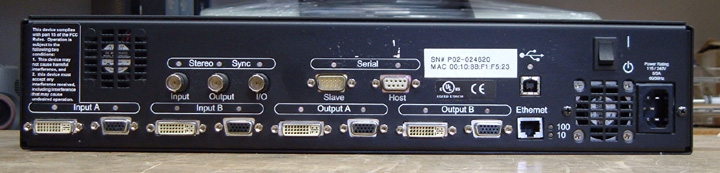
Post some pix of the back panel close enough to read the labelling; the nature of the inputs should suggest what the capabilities are.
.
|
|
| Back to top |
|
|
ginger123456
Joined: 26 Mar 2008
Posts: 27
Location: Gosport, United Kingdom
|
| Posted: Fri Oct 30, 2009 11:44 pm Post subject: |
|
|
pdf and pic attached
Ginger123456
| Description: |
|
| Filesize: |
63.89 KB |
| Viewed: |
9933 Time(s) |
|
| Description: |
|

Download |
| Filename: |
panomaker.pdf |
| Filesize: |
278.42 KB |
| Downloaded: |
558 Time(s) |
|
|
| Back to top |
|
|
ginger123456
Joined: 26 Mar 2008
Posts: 27
Location: Gosport, United Kingdom
|
| Posted: Fri Oct 30, 2009 11:50 pm Post subject: |
|
|
and manual
ginger123456
| Description: |
|
Download |
| Filename: |
PanoMaker V Manual_1_0.pdf |
| Filesize: |
1.73 MB |
| Downloaded: |
484 Time(s) |
|
|
| Back to top |
|
|
Nashou66
Joined: 12 Jan 2007
Posts: 16171
Location: West Seneca NY
|
| Posted: Sat Oct 31, 2009 12:01 am Post subject: |
|
|
Just quickly looking over the manual looks like it needs a hardware Key and possibly software keys too. and special keys for the advanced blend features so you can customize the blend curve. If you dont have all that i am not sure it will work. At least thats what i got from the quick scan of the manual. Usually hardware keys are connected to RS232 or parallel ports. its just a connector that has the keys internally and the unit wont work with out it. If thats what they mean by Hardware Keys.
Athanasios
_________________
Don't blame your underwear for your crooked ass~ unknown Greek philosopher
"Republicans believe every day is the Fourth of July, but the Democrats believe every day is April 15." --- President Reagan
One Smart Dog!!!
Marquee High Performance Bellows now shipping!!
Marquee Modifications and Performance Enhancement
Marquee C-element and Bellow removal
|
|
| Back to top |
|
|
ginger123456
Joined: 26 Mar 2008
Posts: 27
Location: Gosport, United Kingdom
|
| Posted: Sat Oct 31, 2009 12:13 am Post subject: |
|
|
Hi Nashou66
I have the software keys to operate the unit, it is only a software key required, no hardware key ie dongle or usb is used for software protection.
GINGER123456
|
|
| Back to top |
|
|
Nashou66
Joined: 12 Jan 2007
Posts: 16171
Location: West Seneca NY
|
| Posted: Sat Oct 31, 2009 12:30 am Post subject: |
|
|
| ginger123456 wrote: | Hi Nashou66
I have the software keys to operate the unit, it is only a software key required, no hardware key ie dongle or usb is used for software protection.
GINGER123456 |
Ok Cool, it looks pretty straight forward from the manual. I like how you can set the aspect ratio, id definitely use 2.40 for CRT or any 4x3 native aspect ratio Digital PJ. If using a crt to keep the res for each pj at a true 1.33 aspect then since you can use from 12.5% to 25% overlap blend zone id go with the larger maybe 20%. I use about that on my Blend Tv-One units. here is the thread https://www.curtpalme.com/forum_archived/viewtopic.php@t=15737.html its very important to get the geometry of both PJ's exact where the blend zone will be. that is perfectly vertical grid and level horizon along with equal sized grid squares and circles. there is an alignment software program called align on Tim Martins Electrohome site, http://www.etechvideo.com/downloads.htm this helps a lot as you can add circles and diagonals to the grid for perfect geometry. then you need to color match the PJ's. Do one then use that 100% IRE feild as the target white point and match the second PJ to the first. I am still working on this. the hard part is setting the black and white levels for both PJs as close as possible to be able to get the color matching right.
there is lots of work but the challenge is fun.
Athanasios
_________________
Don't blame your underwear for your crooked ass~ unknown Greek philosopher
"Republicans believe every day is the Fourth of July, but the Democrats believe every day is April 15." --- President Reagan
One Smart Dog!!!
Marquee High Performance Bellows now shipping!!
Marquee Modifications and Performance Enhancement
Marquee C-element and Bellow removal
|
|
| Back to top |
|
|
Tim in Phoenix
Joined: 21 Oct 2006
Posts: 4409
Location: Phoenix
|
| Posted: Sat Oct 31, 2009 1:48 am Post subject: |
|
|
Hello
Wade through the manual; my guess is that it inputs two computer signals, "left half" and "right half" of an image and provides contrast modulation; this is of dubious value for home use.
.
|
|
| Back to top |
|
|
ginger123456
Joined: 26 Mar 2008
Posts: 27
Location: Gosport, United Kingdom
|
| Posted: Sat Oct 31, 2009 1:51 am Post subject: |
|
|
Thanks for your comments Athanasios and the links, I just wish it was that straight forward, all the parameter changes and setups are done in the control software on a seperate pc running windows 2000 then loaded via LAN to the unit, the problem is the communication link between the unit and the pc.
I have only connected the unit through one vga terminal to one pj at the moment just to display an image however the last users settings are locked in the panomakers memory all I get at the moment is distorted image.
Ginger123456
|
|
| Back to top |
|
|
Nashou66
Joined: 12 Jan 2007
Posts: 16171
Location: West Seneca NY
|
|
| Back to top |
|
|
ginger123456
Joined: 26 Mar 2008
Posts: 27
Location: Gosport, United Kingdom
|
| Posted: Sat Oct 31, 2009 2:11 am Post subject: |
|
|
Hi Tim in Phoenix
The unit takes the same signal through a splitter to the panomaker inputs A and B either dvi or vga then splits the video signal performs the blend to whatever % overlap is required by the user then sends each signal out through each separate output to each pj.
There is also a facility to warp the image on a curved screen, and black level adjustment required more for our digital friends, am not sure where your coming from regarding the "dubious value for home use" statement,
it is a blender, and a very expensive one at that, not that i spent $50,000 on it  it is worth trying to make this work so i can blend without spending lots. and its better in the hands off a crt enthusiast and not on a rubbish tip somewhere it is worth trying to make this work so i can blend without spending lots. and its better in the hands off a crt enthusiast and not on a rubbish tip somewhere
Ginger123456
|
|
| Back to top |
|
|
ginger123456
Joined: 26 Mar 2008
Posts: 27
Location: Gosport, United Kingdom
|
| Posted: Sat Oct 31, 2009 2:39 am Post subject: |
|
|
Hi Athanasios
I think your suggestion to try the rs232 connection will be my next step, will have to go out and purchase a cable to give it a go, many thanks.
Ginger123456
|
|
| Back to top |
|
|
Nashou66
Joined: 12 Jan 2007
Posts: 16171
Location: West Seneca NY
|
| Posted: Sat Oct 31, 2009 3:26 am Post subject: |
|
|
| ginger123456 wrote: | Hi Athanasios
I think your suggestion to try the rs232 connection will be my next step, will have to go out and purchase a cable to give it a go, many thanks.
Ginger123456 |
now there are two types of RS 232 cables regular and Null. not sure which one it will need so you might have to buy both. Read the manual more to see what kind it would require. Id like to see how it works also. MadMrH here and on AVforums in england uses the Tv-Ones like I do he might be able to help you out if you live nearby.
now go to bed its late!!!!
Athanasios
_________________
Don't blame your underwear for your crooked ass~ unknown Greek philosopher
"Republicans believe every day is the Fourth of July, but the Democrats believe every day is April 15." --- President Reagan
One Smart Dog!!!
Marquee High Performance Bellows now shipping!!
Marquee Modifications and Performance Enhancement
Marquee C-element and Bellow removal
|
|
| Back to top |
|
|
ginger123456
Joined: 26 Mar 2008
Posts: 27
Location: Gosport, United Kingdom
|
| Posted: Sat Oct 31, 2009 3:54 am Post subject: |
|
|
Hi Athanasios
I was looking through the manual for the very same information while you were posting, it does not state in the manual which sort, I presume the difference is that the null version allows information both ways?? or am I wrong? anyway I think the one i need would be the type that allows communication both ways.
Go to bed LOL wish I could its only 03;50am here, and I am at work, do not finish till 06:00. Bed will have to wait
Ginger123456
|
|
| Back to top |
|
|
macgyver655
Joined: 22 Aug 2007
Posts: 8508
|
| Posted: Sat Oct 31, 2009 4:51 am Post subject: |
|
|
I dont think this device will do what you are thinking. And I think this is what Tim was referring to. The usual blending devices take 1 image input and then outputs it in 2, 1/2 picture outputs to the projectors.
I believe this device takes 2 separate image inputs and then outputs the separate images to the projectors. Think of it like you take 2 cameras and place them side by side with a common center point but wider view then by themselves. Then take each image and send it to the device, 1 input from one camera and the other input from the other camera. Each output would be from the common input. Then you blend the 2 images at a common center point and produce 1 panoramic picture.
Is this what you were referring to Tim?
|
|
| Back to top |
|
|
ginger123456
Joined: 26 Mar 2008
Posts: 27
Location: Gosport, United Kingdom
|
| Posted: Sat Oct 31, 2009 5:17 am Post subject: |
|
|
Hi Macgyver655
The usual blending devices you refer to you are correct that they only have one input, thats todays modern blend units, this unit hit the streets in 2003, I do not know why its configured the way it is maybe to simplify the internal components, its still the same video feed however you look at it, the panoram unit has a blend range from 0% edge blend to any % overlap up to 100% as used in a stack configuration.
The unit does project to two different outputs each half to each projector depending on the blend parameters set within the control software and uploaded to the unit.
I am still not sure what your trying to describe, isnt what I have described still blending?
Ginger123456
|
|
| Back to top |
|
|
|
|





