|
As this forum is rarely used anymore, we've locked it. Feel free to browse and read. Questions? Please reach out to us directly. Cheers! |

|
 |
|
|
| Author |
Message |
zangeena
Guest
|
| Posted: Wed Oct 07, 2009 9:10 am Post subject: vga |
|
|
Would it work if I used a DVI-VGA adapter and cable to connect laptop to HDTV? I have a IBM Thinkpad T60 with only a VGA output, and an HDTV with only DVI and S-video input. Would it work if I used a DVI to VGA adapter and then a VGA cable to connect my laptop to the TV?
______________________
SPAM REMOVED!
Last edited by zangeena on Sat Oct 10, 2009 7:00 am; edited 1 time in total
|
|
| Back to top |
|
 |
AnalogRocks
Forum Moderator

Joined: 08 Mar 2006
Posts: 26706
Location: Toronto, Ontario, Canada
TV/Projector: Sony 1252Q, AMPRO 4000G
|
| Posted: Wed Oct 07, 2009 1:09 pm Post subject: |
|
|
Sleepy edit. Sorry guys. 
_________________
Tech support for nothing
CRT.
HD done right!
Last edited by AnalogRocks on Wed Oct 07, 2009 1:32 pm; edited 1 time in total
|
|
| Back to top |
|
|
ecrabb
Forum Moderator

Joined: 13 Mar 2006
Posts: 15909
Location: Utah
TV/Projector: JVC RS40, Epson 5010
|
| Posted: Wed Oct 07, 2009 1:29 pm Post subject: |
|
|
Slow down, Jeremy! He said the thinkpad only has a VGA output.
OP, whether you can use a VGA-DVI cable depends on whether the TV will accept an analog signal (DVI-I). I'll guess not, but what is the model no is the TV?
The other option is picking up a dock for they've thinkpad - most of the thinkpad docks have DVI outputs on them. Many are available pretty inexpensively on eBay or from refurbers/liquidators.
SC
Last edited by ecrabb on Wed Oct 07, 2009 2:19 pm; edited 2 times in total
|
|
| Back to top |
|
|
perisoft

Joined: 29 Aug 2007
Posts: 2920
Location: Ithaca, NY
|
| Posted: Wed Oct 07, 2009 1:30 pm Post subject: Re: vga |
|
|
AR, read his post:
| zangeena wrote: | | I have a IBM Thinkpad T60 with only a VGA output |
...that means you'll only be feeding the analog pins on the DVI output, even after you put the converter in. The TV will expect a digital signal in; it won't have connections for the RGBHV (analog) pins in the DVI connector - so, no, it won't work. You need something with real digital output, or a VGA-Component transcoder so you can use the component inputs on the TV with your VGA output.
It's also worth noting that Powerstrip often won't work with laptops, and the T60 is unlikely to support by default any widescreen resolutions, or the ability to make custom resolutions.
However, the T60 has an ATI X1400 in it, so you might be able to use these drivers to bypass the locks in functionality that the usual laptop drivers enforce.
_________________

|
|
| Back to top |
|
|
AnalogRocks
Forum Moderator
Joined: 08 Mar 2006
Posts: 26706
Location: Toronto, Ontario, Canada
TV/Projector: Sony 1252Q, AMPRO 4000G
|
| Posted: Wed Oct 07, 2009 1:32 pm Post subject: Re: vga |
|
|
| perisoft wrote: | AR, read his post:
| zangeena wrote: | | I have a IBM Thinkpad T60 with only a VGA output |
...that means you'll only be feeding the analog pins on the DVI output, even after you put the converter in. The TV will expect a digital signal in; it won't have connections for the RGBHV (analog) pins in the DVI connector - so, no, it won't work. You need something with real digital output, or a VGA-Component transcoder so you can use the component inputs on the TV with your VGA output.
It's also worth noting that Powerstrip often won't work with laptops, and the T60 is unlikely to support by default any widescreen resolutions, or the ability to make custom resolutions.
However, the T60 has an ATI X1400 in it, so you might be able to use these drivers to bypass the locks in functionality that the usual laptop drivers enforce. |
WHoops! Sorry still asleep here.
What Peri said 
_________________
Tech support for nothing
CRT.
HD done right!
|
|
| Back to top |
|
|
ecrabb
Forum Moderator
Joined: 13 Mar 2006
Posts: 15909
Location: Utah
TV/Projector: JVC RS40, Epson 5010
|
| Posted: Wed Oct 07, 2009 2:20 pm Post subject: |
|
|
Hey, what about what *I* said?!?!

SC
|
|
| Back to top |
|
|
jkruger

Joined: 24 Oct 2007
Posts: 2435
Location: Carlsbad, CA
|
| Posted: Wed Oct 07, 2009 2:22 pm Post subject: |
|
|
|
Any use of this advise, in any manner whatsoever, will increase the amount of disorder in the universe. Although no liability is implied herein, the consumer is warned that this process will ultimately lead to the heat death of the universe.
|
|
| Back to top |
|
|
AnalogRocks
Forum Moderator
Joined: 08 Mar 2006
Posts: 26706
Location: Toronto, Ontario, Canada
TV/Projector: Sony 1252Q, AMPRO 4000G
|
| Posted: Wed Oct 07, 2009 2:38 pm Post subject: |
|
|
| ecrabb wrote: | Hey, what about what *I* said?!?!
SC |
Yeah you too
_________________
Tech support for nothing
CRT.
HD done right!
|
|
| Back to top |
|
|
macgyver655
Joined: 22 Aug 2007
Posts: 8508
|
| Posted: Wed Oct 07, 2009 3:00 pm Post subject: |
|
|
| ecrabb wrote: | Hey, what about what *I* said?!?!
SC |
I'll second that with some info:
DVI - Digital Visual Interface
HIS Technology, January 1, 2008
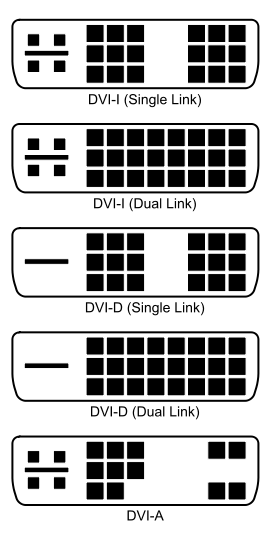
The Digital Visual Interface (DVI) is a video interface standard designed to maximize the visual quality of digital display devices such as flat panel LCD computer displays and digital projectors. It was developed by an industry consortium, the Digital Display Working Group (DDWG). It is designed for carrying uncompressed digital video data to a display. It is partially compatible with the High-Definition Multimedia Interface (HDMI) standard in digital mode (DVI-D), and VGA in analog mode (DVI-A).
The DVI connector usually contains pins to pass the DVI-native digital video signals. In the case of dual-link systems, additional pins are provided for the second set of data signals.
As well as digital signals, the DVI connector includes pins providing the same analog signals found on a VGA connector, allowing a VGA monitor to be connected with a simple plug adapter. This feature was included in order to make DVI universal, as it allows either type of monitor (analog or digital) to be operated from the same connector.
The DVI connector on a device is therefore given one of three names, depending on which signals it implements:
* DVI-D (digital only)
* DVI-A (analog only)
* DVI-I (integrated, digital & analog)
The connector also includes provision for a second data link for high resolution displays, though many devices do not implement this. In those that do, the connector is sometimes referred to as DVI-DL (dual link).
The long flat pin on a DVI-I connector is wider than the same pin on a DVI-D connector, so it is not possible to connect a male DVI-I to a female DVI-D by removing the 4 analog pins. It is possible, however, to connect a male DVI-D cable to a female DVI-I connector. Many flat panel LCD monitors have only the DVI-D connection so that a DVI-D male to DVI-D male cable will suffice when connecting the monitor to a computer's DVI-I female connector.
| Description: |
|
| Filesize: |
17.08 KB |
| Viewed: |
13227 Time(s) |
|
|
|
| Back to top |
|
|
macgyver655
Joined: 22 Aug 2007
Posts: 8508
|
| Posted: Wed Oct 07, 2009 3:07 pm Post subject: |
|
|
| ecrabb wrote: | Slow down, Jeremy! He said the thinkpad only has a VGA output.
OP, whether you can use a VGA-DVI cable depends on whether the TV will accept an analog signal (DVI-I). I'll guess not, but what is the model no is the TV?
The other option is picking up a dock for they've thinkpad - most of the thinkpad docks have DVI outputs on them. Many are available pretty inexpensively on eBay or from refurbers/liquidators.
SC |
Oooop's. I'll second that without the "I'll guess not". Most TV's that I've seen with DVI are analog but there is the slim possibility if its an earily flat panel that it'll be digital. So I wont guess until I see a model number.
|
|
| Back to top |
|
|
macgyver655
Joined: 22 Aug 2007
Posts: 8508
|
| Posted: Wed Oct 07, 2009 3:14 pm Post subject: |
|
|
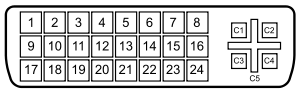
A female DVI-I socket from the front
Pin 1 TMDS Data 2- Digital red - (Link 1)
Pin 2 TMDS Data 2+ Digital red + (Link 1)
Pin 3 TMDS Data 2/4 shield
Pin 4 TMDS Data 4- Digital green - (Link 2)
Pin 5 TMDS Data 4+ Digital green + (Link 2)
Pin 6 DDC clock
Pin 7 DDC data
Pin 8 Analog vertical sync
Pin 9 TMDS Data 1- Digital green - (Link 1)
Pin 10 TMDS Data 1+ Digital green + (Link 1)
Pin 11 TMDS Data 1/3 shield
Pin 12 TMDS Data 3- Digital blue - (Link 2)
Pin 13 TMDS Data 3+ Digital blue + (Link 2)
Pin 14 +5 V Power for monitor when in standby
Pin 15 Ground Return for pin 14 and analog sync
Pin 16 Hot plug detect
Pin 17 TMDS data 0- Digital blue - (Link 1) and digital sync
Pin 18 TMDS data 0+ Digital blue + (Link 1) and digital sync
Pin 19 TMDS data 0/5 shield
Pin 20 TMDS data 5- Digital red - (Link 2)
Pin 21 TMDS data 5+ Digital red + (Link 2)
Pin 22 TMDS clock shield
Pin 23 TMDS clock+ Digital clock + (Links 1 and 2)
Pin 24 TMDS clock- Digital clock - (Links 1 and 2)
C1 Analog red
C2 Analog green
C3 Analog blue
C4 Analog horizontal sync
C5 Analog ground Return for R, G and B signals
Just check your DVI connector for the 4 pins over by the +.....c1, c2, c3 and c4,
| Description: |
|
| Filesize: |
10.87 KB |
| Viewed: |
13219 Time(s) |
|
|
|
| Back to top |
|
|
ecrabb
Forum Moderator
Joined: 13 Mar 2006
Posts: 15909
Location: Utah
TV/Projector: JVC RS40, Epson 5010
|
| Posted: Wed Oct 07, 2009 4:00 pm Post subject: |
|
|
| macgyver655 wrote: | | Oooop's. I'll second that without the "I'll guess not". Most TV's that I've seen with DVI are analog but there is the slim possibility if its an earily flat panel that it'll be digital. So I wont guess until I see a model number. |
My wife's Olëvia has a DVI-D, but then it has a VGA (RGB or comp), two component inputs, and an HDMI input. But, reading the OP's post again, I see where he said the HDTV had only the DVI connector and S-video. In that case, I'll change my guess and say it has analog input capability and a VGA/DVI-I cable would work just fine.
Even given that though, depending on the display (analog or digital), the dock with DVI interface and DVI-D cable running an all-digital link with 1:1 pixel mapping might be the best solution. Totally depends on the TV, though. We'll have to wait and see what the OP has to make the best recommendation.
Cheers,
SC
|
|
| Back to top |
|
|
macgyver655
Joined: 22 Aug 2007
Posts: 8508
|
| Posted: Wed Oct 07, 2009 4:30 pm Post subject: |
|
|
| ecrabb wrote: | | macgyver655 wrote: | | Oooop's. I'll second that without the "I'll guess not". Most TV's that I've seen with DVI are analog but there is the slim possibility if its an earily flat panel that it'll be digital. So I wont guess until I see a model number. |
My wife's Olëvia has a DVI-D, but then it has a VGA (RGB or comp), two component inputs, and an HDMI input. But, reading the OP's post again, I see where he said the HDTV had only the DVI connector and S-video. In that case, I'll change my guess and say it has analog input capability and a VGA/DVI-I cable would work just fine.
Even given that though, depending on the display (analog or digital), the dock with DVI interface and DVI-D cable running an all-digital link with 1:1 pixel mapping might be the best solution. Totally depends on the TV, though. We'll have to wait and see what the OP has to make the best recommendation.
Cheers,
SC |
Yea, thats why I said most and not all. There are always exceptions to the rule. Is that Olevia a CRT or flatpanel?
Your second paragraph would only apply if its not DVI-A only.... 
Oh, and where I said most tv's I've seen with DVI are analog....I meant also analog...meaning both digital and analog, and early flat panel would be digital only. I wasn't clear with what I was saying...... 
|
|
| Back to top |
|
|
ecrabb
Forum Moderator
Joined: 13 Mar 2006
Posts: 15909
Location: Utah
TV/Projector: JVC RS40, Epson 5010
|
| Posted: Wed Oct 07, 2009 6:11 pm Post subject: |
|
|
The wife's Olëvia is a 2006-vintage 37" LCD, so not "early" by any means, but not very new, either. I think I paid $1299 with a $300 rebate. Now, you can get a much better set the same size for less than half that price.
| macgyver655 wrote: | | Your second paragraph would only apply if its not DVI-A only.... |
I think in all my years, I've only seen one DVI-A connector, and it's on an IBM ThinkVision Sony Trinitron.
| macgyver655 wrote: | | Oh, and where I said most tv's I've seen with DVI are analog....I meant also analog...meaning both digital and analog, and early flat panel would be digital only. I wasn't clear with what I was saying...... |
I knew what you meant. DVI-I seems to be by far the most common, DVI-D being less common, while DVI-A seems pretty damn rare from what I've seen.
SC
|
|
| Back to top |
|
|
macgyver655
Joined: 22 Aug 2007
Posts: 8508
|
| Posted: Wed Oct 07, 2009 9:08 pm Post subject: |
|
|
| ecrabb wrote: | The wife's Olëvia is a 2006-vintage 37" LCD, so not "early" by any means, but not very new, either. I think I paid $1299 with a $300 rebate. Now, you can get a much better set the same size for less than half that price.
| macgyver655 wrote: | | Your second paragraph would only apply if its not DVI-A only.... |
I think in all my years, I've only seen one DVI-A connector, and it's on an IBM ThinkVision Sony Trinitron.
| macgyver655 wrote: | | Oh, and where I said most tv's I've seen with DVI are analog....I meant also analog...meaning both digital and analog, and early flat panel would be digital only. I wasn't clear with what I was saying...... |
I knew what you meant. DVI-I seems to be by far the most common, DVI-D being less common, while DVI-A seems pretty damn rare from what I've seen.
SC |
You must be only use to seeing computer monitors. Most (but not all)CRT based RPTV's are DVI-A. It wasn't until they started making DLP and LCD RPTV's that they switched to the digital part of the DVI connection which was a missmuch. Then most flat panels DVI's were digital only.... but also a missmuch.
Last edited by macgyver655 on Wed Oct 07, 2009 9:16 pm; edited 2 times in total
|
|
| Back to top |
|
|
tri_joel

Joined: 03 Jul 2007
Posts: 646
Location: Northern Virginia
|
| Posted: Wed Oct 07, 2009 9:11 pm Post subject: |
|
|
My Philips flat LCD has RGBHV.
_________________
www.vawinesnob.com
|
|
| Back to top |
|
|
macgyver655
Joined: 22 Aug 2007
Posts: 8508
|
| Posted: Wed Oct 07, 2009 9:15 pm Post subject: |
|
|
| tri_joel wrote: | | My Philips flat LCD has RGBHV. |
Yes and some even have VGA along with other connections. I'm just talking about the DVI connections in particular.
|
|
| Back to top |
|
|
macgyver655
Joined: 22 Aug 2007
Posts: 8508
|
| Posted: Wed Oct 07, 2009 9:17 pm Post subject: |
|
|
| tri_joel wrote: | | My Philips flat LCD has RGBHV. |
I saw where you may of misunderstood my post so I changed it....
|
|
| Back to top |
|
|
AnalogRocks
Forum Moderator
Joined: 08 Mar 2006
Posts: 26706
Location: Toronto, Ontario, Canada
TV/Projector: Sony 1252Q, AMPRO 4000G
|
| Posted: Thu Oct 08, 2009 3:05 am Post subject: |
|
|
Wow I started off with an unclear response and we just kept heading down that rabbit hole. 
_________________
Tech support for nothing
CRT.
HD done right!
|
|
| Back to top |
|
|
|
|
|
|
|
You cannot post new topics in this forum
You cannot reply to topics in this forum
You cannot edit your posts in this forum
You cannot delete your posts in this forum
You cannot vote in polls in this forum
You cannot attach files in this forum
You can download files in this forum
|
Forum powered by phpBB © phpBB Group
|
|




