| Author |
Message |
AFryia

Joined: 09 Mar 2006
Posts: 965
Location: S.E. Michigan VPH-G70Q
|
| Posted: Fri Jul 24, 2009 3:41 am Post subject: Adding Memeory Problem |
|
|
Is there any reason the OS WIN-XP would have problems with more than two memory sticks?
I have 4 DDR2 PC3200 400 512K memory sticks KR400/512. Any pair will work in the A1/B1 slot. If add the 3rd and 4th to A2/B2 the system reboots.
The PC boots fine, passes the memory test. Its not until WinXP starts to load that something craps out and the PC re-boots it self over and over again.
The MB is a socket 478 ASUS P4V800D-X. what gives? 
|
|
| Back to top |
|
 |
greg_mitch
Joined: 03 May 2006
Posts: 5320
|
| Posted: Fri Jul 24, 2009 4:08 am Post subject: |
|
|
Something doesnt sound right there...DDR2 is 240pin and your mobo accepts DDR which is 184 pin?
At least that is what google tells me.
|
|
| Back to top |
|
|
macgyver655
Joined: 22 Aug 2007
Posts: 8508
|
| Posted: Fri Jul 24, 2009 4:10 am Post subject: |
|
|
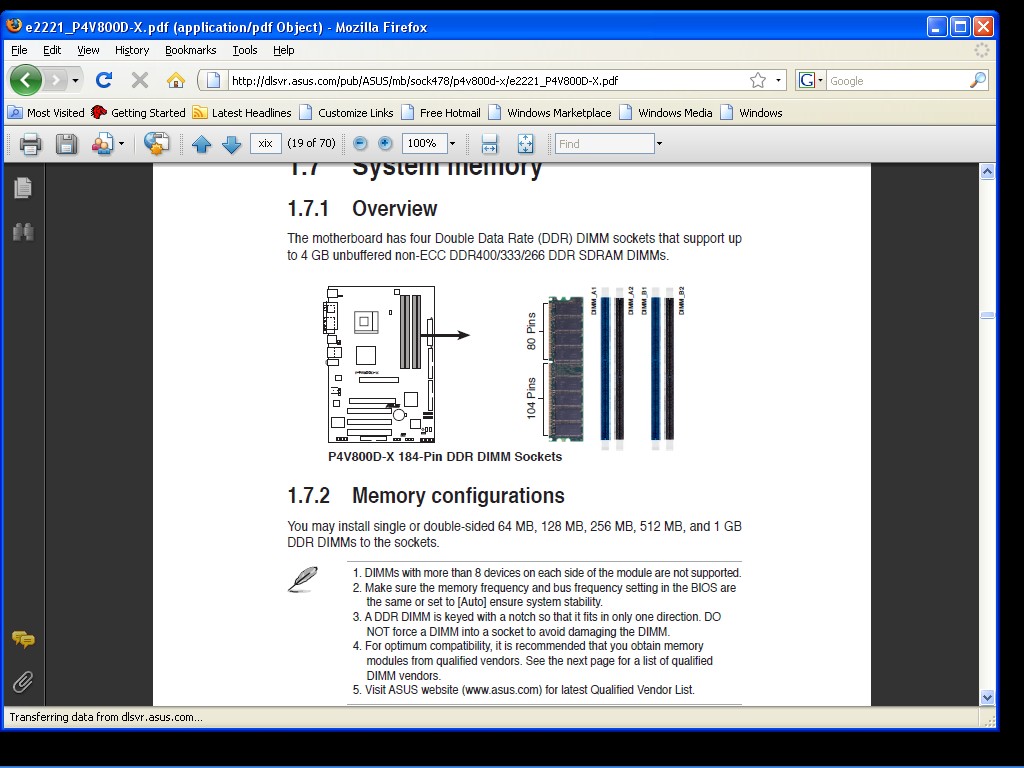
Note 1 an 2 on page.
| Description: |
|
| Filesize: |
169.86 KB |
| Viewed: |
2973 Time(s) |
|
|
|
| Back to top |
|
|
macgyver655
Joined: 22 Aug 2007
Posts: 8508
|
| Posted: Fri Jul 24, 2009 4:20 am Post subject: |
|
|
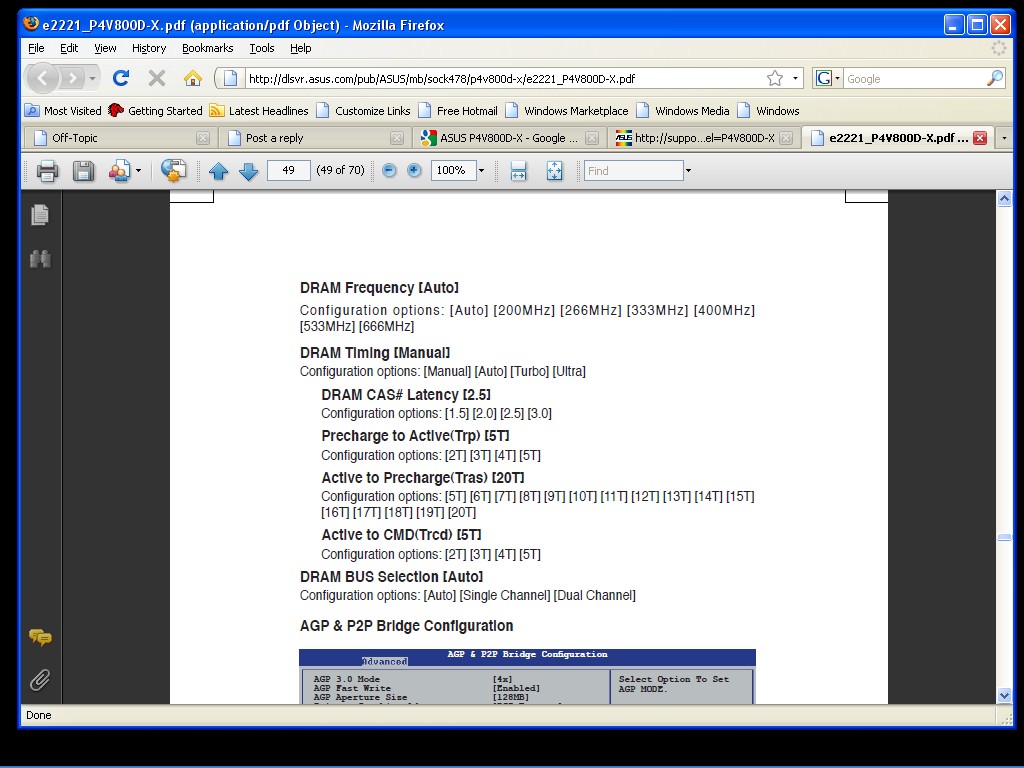
Also note:
| Description: |
|
| Filesize: |
162.69 KB |
| Viewed: |
2969 Time(s) |
|
|
|
| Back to top |
|
|
Mark_A_W
Joined: 15 Mar 2006
Posts: 3068
Location: Sunny Melbourne Australia
|
| Posted: Fri Jul 24, 2009 5:54 am Post subject: |
|
|
My PC was unstable with 4 sticks until I bumped up the ram voltage by 0.1v.
A reasonably common issue.
Take you 5 mins to test, maybe a voltage bump will help, maybe not, but worth a try.
|
|
| Back to top |
|
|
macgyver655
Joined: 22 Aug 2007
Posts: 8508
|
| Posted: Fri Jul 24, 2009 1:34 pm Post subject: |
|
|
|
I must of been tired last last. I just reread your post and see that its Windows giving you a problem. If your still having problems I have another option for you. Let me know.
|
|
| Back to top |
|
|
AFryia
Joined: 09 Mar 2006
Posts: 965
Location: S.E. Michigan VPH-G70Q
|
| Posted: Sat Jul 25, 2009 12:33 am Post subject: |
|
|
Ya your right, straight DDR memory.
It appears to be a XP problem I assume because 4 sticks of memory pass the the POST/mem test and puke on OS load.
I did switch the memory from auto to 400Mhz. I'll try bumping the voltage next.
_________________
My Volt Blog
|
|
| Back to top |
|
|
BGSPCS

Joined: 23 Aug 2006
Posts: 115
Location: Pottstown, PA
|
| Posted: Thu Jul 30, 2009 2:53 am Post subject: |
|
|
I've gone through RAM issues on my desktop PC. Try downloading Memtest86+, its a free memory testing application that you can download as an CD Image(ISO) to burn to a cd. After you burn it to a CD insert it in your CD rom drive and boot off of the CD. When it loads it will immediately begin testing your memory. Alot of times with memory its not a windows problem, its memory settings. There are several tests that it runs, once it finishes the last test it will loop. If you don't get any red errors that list at the bottom of the screen then you are good. If you do get errors, then its back to the drawing board.
If you try testing with all of your RAM in the computer, and it gives errors try removing a pair of memory and retest. Test both pairs to see if there are any problems.
Here is the program
http://www.memtest.org/
You will want to download a precompiled bootable ISO
_________________
--
Brad S
Pottstown PA
|
|
| Back to top |
|
|
|
|





