| Author |
Message |
416ray4538
Joined: 14 Jul 2009
Posts: 517
Location: near Toronto Ont
|
| Posted: Sat Nov 14, 2009 3:32 am Post subject: |
|
|
| benareeno wrote: | | I would consider 5 channel analog hookup....unless your receiver bitstreams the new codecs. |
My preamp is a little outdated as far as picture but the sound is OK so I'm running the PJ srtaight from the Blu-ray>Fury>PJ and the sound goes Blu-ray optical>preamp.
|
|
| Back to top |
|
 |
416ray4538
Joined: 14 Jul 2009
Posts: 517
Location: near Toronto Ont
|
| Posted: Sat Nov 14, 2009 4:09 am Post subject: |
|
|
| stefuel wrote: | Did you even read the instructions that came with your Fury2.
OK forget about the projector for now and hook up the fury to your PC monitor and see if it works there and make sure it's set to RGB.
You're giving AmPro owners a bad name  |
Far be it from to give anyone a bad name. I read what came with the Fury: some squinty print on the blue packaging material. I don't remember reading anything about sparks/arcs. The little bit of literature I have seen was on the advert for the Fury nd once again no mention of sparks or arcs. There was however mention of the optical cable that came with the package. It didn't say anything about the large end that doesn't fit into anything I have. That's not a problem though, I just bought a normal cable with both ends the same and it works just fine.
Thanks again for all the support, patience, and assistance.
|
|
| Back to top |
|
|
stefuel

Joined: 07 Mar 2006
Posts: 3353
Location: Green Harbor MA USA
|
| Posted: Sat Nov 14, 2009 12:34 pm Post subject: |
|
|
Now that you have a image, the Box 1020 or 1021 (I can't remember which) has image centering which is what you'll need to counter the full right shift at 1080P.
As far as arcs or sparks go, you should never "hot swap" digital devices while they are powered up. Everything should be shut off first. Wall-wart power supplies should be connected to their associated device first then plugged into the wall. The Fury has dual power capability. It can get it's power via the HDMI connection or the wall wart so don't add power to it while it's running.
_________________
Chip
A Barco is only a AmPro with training wheels
Card carrying member of the AVS chain gang.
|
|
| Back to top |
|
|
416ray4538
Joined: 14 Jul 2009
Posts: 517
Location: near Toronto Ont
|
| Posted: Sat Nov 14, 2009 2:38 pm Post subject: |
|
|
| stefuel wrote: | Now that you have a image, the Box 1020 or 1021 (I can't remember which) has image centering which is what you'll need to counter the full right shift at 1080P.
As far as arcs or sparks go, you should never "hot swap" digital devices while they are powered up. Everything should be shut off first. Wall-wart power supplies should be connected to their associated device first then plugged into the wall. The Fury has dual power capability. It can get it's power via the HDMI connection or the wall wart so don't add power to it while it's running. |
Thanks,The PJ was off but of course the green and white in the plug are unswitched and stay connected to ground so there is a possibility of a loop and the arc came from the grounding plug. It doesn't seem to have damaged anything but I just wondered if anyone else had had a similar experience.
Oh ya, I ordered the box for centering the image (1040 I think it was) The reading material for the Fury mentions that it can adjust the image centering but I haven't seen any explanation or instructions for how to do this.
Thanks again
|
|
| Back to top |
|
|
416ray4538
Joined: 14 Jul 2009
Posts: 517
Location: near Toronto Ont
|
| Posted: Sat Nov 14, 2009 9:49 pm Post subject: |
|
|
Two little questions if anyone has answers:
1) I bought a little scaler so that I could watch my old VHS classics. The prolem with running the VHS (besides the picture being VHS quality) is that the picture rolls. If I was looking at my old TV and saw this I would turn the VERT knob until the picture stopped doing this. Where can I find the equivalent of the VERT knob on my Ampro.
2) When running the PJ from my new Blu-ray player though the Fury2, there is a section on the left 1/4 of the screen that looks almost like a reflection. If I hit help when running the B-ray and scroll through to the test paterns, the squares look like a single row of the mark of Zoro repeated down the left of the screen. Slap me in the side of the head, call me an idiot. then suggest what I've screwed up.
Thanks
|
|
| Back to top |
|
|
AnalogRocks
Forum Moderator

Joined: 08 Mar 2006
Posts: 26706
Location: Toronto, Ontario, Canada
TV/Projector: Sony 1252Q, AMPRO 4000G
|
| Posted: Sat Nov 14, 2009 11:03 pm Post subject: |
|
|
Use the Phase control to move the image from side to side to make that wrap go away.
The Box1040 has an I A C ( Image Alignment Control ) Put it back in the signal chain and turn on the IAC. Your screen may go black, this is normal. S L O W L Y turn the IAC knob until you get a picture and then center it.
_________________
Tech support for nothing
CRT.
HD done right!
|
|
| Back to top |
|
|
416ray4538
Joined: 14 Jul 2009
Posts: 517
Location: near Toronto Ont
|
| Posted: Sun Nov 15, 2009 1:24 am Post subject: |
|
|
| AnalogRocks wrote: | Use the Phase control to move the image from side to side to make that wrap go away.
The Box1040 has an I A C ( Image Alignment Control ) Put it back in the signal chain and turn on the IAC. Your screen may go black, this is normal. S L O W L Y turn the IAC knob until you get a picture and then center it. |
Cool. Thanks. As soon as the postman brings the 1040 I'll do that.
Thanks again
|
|
| Back to top |
|
|
stefuel
Joined: 07 Mar 2006
Posts: 3353
Location: Green Harbor MA USA
|
| Posted: Sun Nov 15, 2009 1:26 am Post subject: |
|
|
Push [4] and then test for a genlocked test pattern while watching bluray. Then press [step] to cycle through the available test patterns. With the cross-hatch pattern up, then press [blank] and select the side that is causing you the reflection. Try moving the blanking back and forth and I'll bet it goes away. Open the blanking up top, bottom, left and right to insure you have the whole image showing. Turn the brightness up to illuminate the raster and use phase to center the image within the raster. While the raster is showing, use shift to center it on the tube face. After that, turn down the brightness until the raster just goes away. Then bring the blanking just back to the edge of the image on all sides.
_________________
Chip
A Barco is only a AmPro with training wheels
Card carrying member of the AVS chain gang.
|
|
| Back to top |
|
|
416ray4538
Joined: 14 Jul 2009
Posts: 517
Location: near Toronto Ont
|
| Posted: Sun Nov 15, 2009 2:22 am Post subject: |
|
|
Thanks
Any thoughts on the vertical hold question ?
|
|
| Back to top |
|
|
AnalogRocks
Forum Moderator
Joined: 08 Mar 2006
Posts: 26706
Location: Toronto, Ontario, Canada
TV/Projector: Sony 1252Q, AMPRO 4000G
|
| Posted: Sun Nov 15, 2009 6:11 am Post subject: |
|
|
| 416ray4538 wrote: | Thanks
Any thoughts on the vertical hold question ? |
What's the output from the scaler? RGBHV? If so T the H+V together and that may stop your rolling. I know on my 4000 I can't use the V input, it will hold for a bit then start to roll. Curt sent me 3 cards and it did it all three times so mine's just hooked up RGBS (H+V T'd together )
_________________
Tech support for nothing
CRT.
HD done right!
|
|
| Back to top |
|
|
tse
Joined: 03 May 2006
Posts: 1014
Location: Sweatbucket, Fl.
|
| Posted: Sun Nov 15, 2009 5:40 pm Post subject: |
|
|
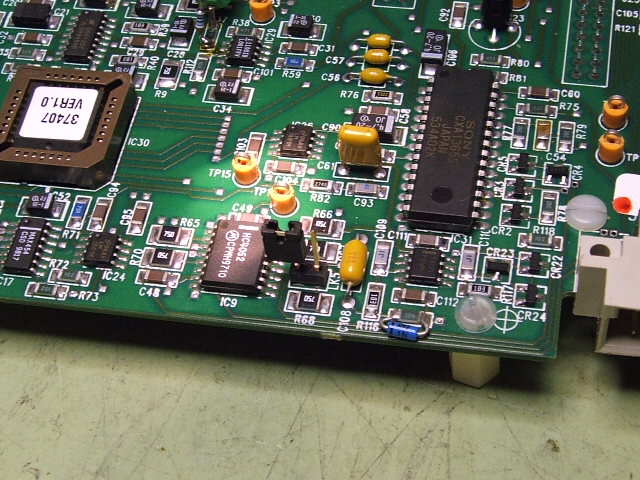
If LK5 is installed on the RGB board, remove it or move to just one pin. That will often fix a vertical rolling problem. That removes the 75 ohm termination from the vertical sync input. The older Ampro RGB boards can have the same problem which can be righted by removing the 75 ohm vsync terminating resistor from the board.
Scott
| Description: |
|
| Filesize: |
120.55 KB |
| Viewed: |
9099 Time(s) |
|
_________________
"Were we directed from Washington when to sow and when to reap, we would soon want bread."
Thomas Jefferson
|
|
| Back to top |
|
|
416ray4538
Joined: 14 Jul 2009
Posts: 517
Location: near Toronto Ont
|
| Posted: Fri Nov 20, 2009 8:46 pm Post subject: |
|
|
| tse wrote: | If LK5 is installed on the RGB board, remove it or move to just one pin. That will often fix a vertical rolling problem. That removes the 75 ohm termination from the vertical sync input. The older Ampro RGB boards can have the same problem which can be righted by removing the 75 ohm vsync terminating resistor from the board.
Scott |
Did I mention that the projector works just fine with other sources besides the scaler. Somewhere in the connections I'm losing the Vert signal. My first impression is that the scaler is not outputting this signal but more likely there is something I'm missing.The scaler is new.
Thanks
|
|
| Back to top |
|
|
416ray4538
Joined: 14 Jul 2009
Posts: 517
Location: near Toronto Ont
|
| Posted: Fri Nov 20, 2009 9:16 pm Post subject: |
|
|
OK I think I've made some progress. The box 1040 came today and it also has this rolling problem but only some of the time.
My suspicion is that most of these little boxes barely has the balls to put a signal down a wire and if the wire is too long they start to pant and some of the signal suffers. If this is the case how close do we have to put everything to our projectors, I mean Ok if that's what it takes.
By the way Curt, do you have an input board for an Ampro ( mine has only one set of inputs) so that I can choose one source or another without swapping wires.
Thanks
|
|
| Back to top |
|
|
AnalogRocks
Forum Moderator
Joined: 08 Mar 2006
Posts: 26706
Location: Toronto, Ontario, Canada
TV/Projector: Sony 1252Q, AMPRO 4000G
|
| Posted: Sat Nov 21, 2009 2:35 am Post subject: |
|
|
| 416ray4538 wrote: | OK I think I've made some progress. The box 1040 came today and it also has this rolling problem but only some of the time.
My suspicion is that most of these little boxes barely has the balls to put a signal down a wire and if the wire is too long they start to pant and some of the signal suffers. If this is the case how close do we have to put everything to our projectors, I mean Ok if that's what it takes.
By the way Curt, do you have an input board for an Ampro ( mine has only one set of inputs) so that I can choose one source or another without swapping wires.
Thanks |
Just the FAQ's man: https://www.curtpalme.com/forum_archived/viewtopic.php@t=10987.html
"The Box1040's cable driver stage also lets you use an analog output cable of at least up to 30 feet"
_________________
Tech support for nothing
CRT.
HD done right!
|
|
| Back to top |
|
|
416ray4538
Joined: 14 Jul 2009
Posts: 517
Location: near Toronto Ont
|
| Posted: Sat Nov 21, 2009 4:54 am Post subject: |
|
|
[quote="AnalogRocks"] | 416ray4538 wrote: | OK I think I've made some progress. The box 1040 came today and it also has this rolling problem but only some of the time.
My suspicion is that most of these little boxes barely has the balls to put a signal down a wire and if the wire is too long they start to pant and some of the signal suffers. If this is the case how close do we have to put everything to our projectors, I mean Ok if that's what it takes.
By the way Curt, do you have an input board for an Ampro ( mine has only one set of inputs) so that I can choose one source or another without swapping wires.
Thanks |
Just the FAQ's man: https://www.curtpalme.com/forum_archived/viewtopic.php@t=10987.html
"The Box1040's cable driver stage also lets you use an analog output cable of at least up to 30 feet" [/quote
The difference between the 2220 and the 1040 is the IAC which I have been told I need to get the Blu-ray source to centre on the raster. The 2220 delivers a useable signal. The 1040 wired the same gives a signal lacking in vert sync. This seems backward considering the cable driver. Once again I am aware that there is something that I am not aware of?????????? But undoubtably is obvious.
|
|
| Back to top |
|
|
stefuel
Joined: 07 Mar 2006
Posts: 3353
Location: Green Harbor MA USA
|
| Posted: Sat Nov 21, 2009 11:04 am Post subject: |
|
|
I can't speak for the Box 1040, I have not used it. I have the Box 1020. My HD Fury1 is connected directly to the RGB input of the Box. The Box 1020's RGBHV output is connected to a RGBHV input on my NEC switcher. There is 50 feet of RGBHV between the switchers output and projector with no problem. To switch between HDMI sources, I have a Mono Price 4x1 HDMI switcher. The output of the HDMI switcher is connected directly to the input of the Fury1. The Mono Price switcher comes with a IR remote to simplify things. If you have more than one analog source, you should get a NEC switcher. They come up on e-bay from time to time. If you find that you need to combine H and V sync for image stability, there is a switch on the NEC's output card that does this for you.
With all that said, My NEC switcher has dual outputs and I have zero image problems with this setup driving two AmPros at the same time 
_________________
Chip
A Barco is only a AmPro with training wheels
Card carrying member of the AVS chain gang.
|
|
| Back to top |
|
|
416ray4538
Joined: 14 Jul 2009
Posts: 517
Location: near Toronto Ont
|
| Posted: Sat Nov 21, 2009 10:18 pm Post subject: |
|
|
| stefuel wrote: | I can't speak for the Box 1040, I have not used it. I have the Box 1020. My HD Fury1 is connected directly to the RGB input of the Box. The Box 1020's RGBHV output is connected to a RGBHV input on my NEC switcher. There is 50 feet of RGBHV between the switchers output and projector with no problem. To switch between HDMI sources, I have a Mono Price 4x1 HDMI switcher. The output of the HDMI switcher is connected directly to the input of the Fury1. The Mono Price switcher comes with a IR remote to simplify things. If you have more than one analog source, you should get a NEC switcher. They come up on e-bay from time to time. If you find that you need to combine H and V sync for image stability, there is a switch on the NEC's output card that does this for you.
With all that said, My NEC switcher has dual outputs and I have zero image problems with this setup driving two AmPros at the same time |
NEC switcher?? Do you have a model# or whatever so I can track one down?
When I received the Fury2 I connected it close to the 2220 and my projector ticked and tocked like a big alarm clock. Connecting the Fury close to the projector stopped that problem but that setup is not very practical. I'm having trouble blaming the cable itself since it works just fine using only the 2220 and my problems could be signal strength. I looked for instructions with the 1040 but there was nothing. Connecting it looks simple enough but obviously I'm missing something. Where might I find the reading material that goes with the 1040; that might help? Analogue Rocks suggested tying the H to V and if the NEC switcher has that capability that's the what I'll try next.
Thanks
|
|
| Back to top |
|
|
tse
Joined: 03 May 2006
Posts: 1014
Location: Sweatbucket, Fl.
|
| Posted: Sun Nov 22, 2009 1:29 am Post subject: |
|
|
| 416ray4538 wrote: | OK I think I've made some progress. The box 1040 came today and it also has this rolling problem but only some of the time.
My suspicion is that most of these little boxes barely has the balls to put a signal down a wire and if the wire is too long they start to pant and some of the signal suffers. If this is the case how close do we have to put everything to our projectors, I mean Ok if that's what it takes.
By the way Curt, do you have an input board for an Ampro ( mine has only one set of inputs) so that I can choose one source or another without swapping wires.
Thanks |
Right you are. Have you tried removing LK5? That is what it is for.
Scott
_________________
"Were we directed from Washington when to sow and when to reap, we would soon want bread."
Thomas Jefferson
|
|
| Back to top |
|
|
stefuel
Joined: 07 Mar 2006
Posts: 3353
Location: Green Harbor MA USA
|
| Posted: Sun Nov 22, 2009 5:26 pm Post subject: |
|
|
NEC 6010 RGBHV switcher. They usually pop up on e-bay on a regular basis. Curt probably has one.
Mine is configured with 3 outputs (one to feed each of the two projectors and one for a local monitor in the rack).
_________________
Chip
A Barco is only a AmPro with training wheels
Card carrying member of the AVS chain gang.
|
|
| Back to top |
|
|
416ray4538
Joined: 14 Jul 2009
Posts: 517
Location: near Toronto Ont
|
| Posted: Sun Nov 22, 2009 6:08 pm Post subject: |
|
|
| tse wrote: | If LK5 is installed on the RGB board, remove it or move to just one pin. That will often fix a vertical rolling problem. That removes the 75 ohm termination from the vertical sync input. The older Ampro RGB boards can have the same problem which can be righted by removing the 75 ohm vsync terminating resistor from the board.
Scott |
Removing this jumper solved the rolling problem. Thanks.
What were the engineers thinking when they put it in there, it works better without. The picture isn't bad for VHS.
I moved the Blu-ray player and tried hooking it up also. The picture splits in the middle (phasing?) Putting the jumper back on didn't help, not that I expected it to but I thought I'd try it. How do I get some more adjustment to get rid of wrap around that goes halfway across the screen?
Do engineers get a giggle from making things frustrating for the rest of us?
|
|
| Back to top |
|
|
|
|





