| Author |
Message |
draganm

Joined: 08 Mar 2006
Posts: 8990
Location: Colorado
|
| Posted: Tue Jul 21, 2009 3:19 pm Post subject: |
|
|
| jcoles wrote: | | I just tried my HDFury unit on another persons Marquee unit and it worked fine. So, my problem is with the Marquee. |
Ive seen this before with an RGB input, swapping out VIM's allowed the PJ to synch up. Turned out to be some Tantalum capacitor's on the input side of the VIM. I replaced them and I haven't had the problem since then.
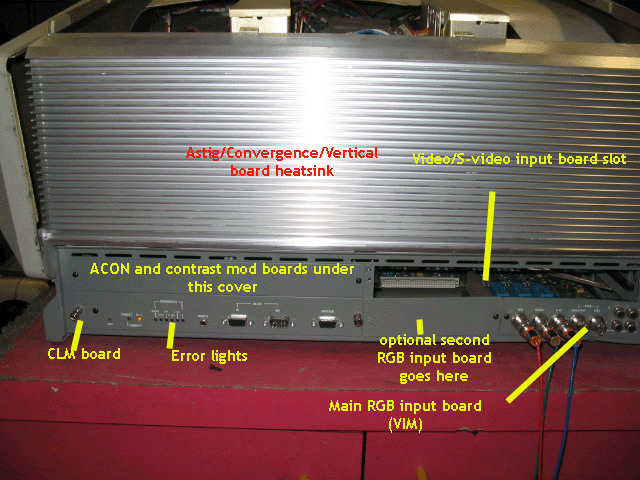
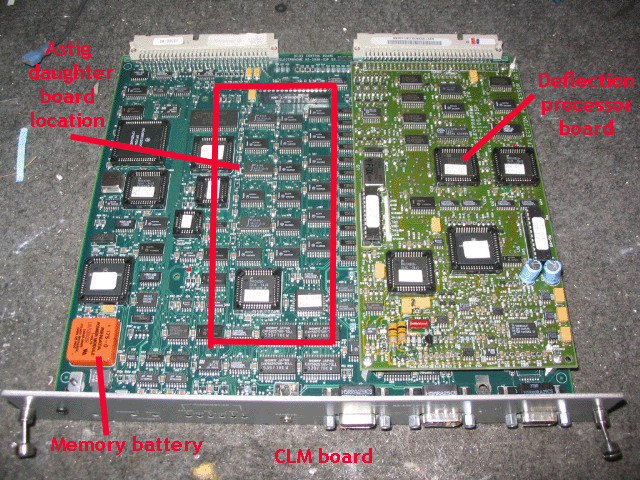
I think you might have a similar issue but maybe in a different section of the board? there's dozens of these little yellow caps all over the VIM board and they also cause a similar problem on the CLM. 
Last edited by draganm on Wed Jul 22, 2009 12:26 am; edited 1 time in total
|
|
| Back to top |
|
 |
jcoles
Joined: 17 Jul 2008
Posts: 40
|
| Posted: Tue Jul 21, 2009 3:23 pm Post subject: |
|
|
Very strange circumstances, but the Fury now works. What I did, for grins, was to attach an HDMI cable from my HD satellite receiver to the Fury then to the projector via RGB...and I got a good picture. When I hooked up the Bluray player thru the Fury, I got a good picture. Don't know why. Didn't make any other changes. Perhaps something got reset in the Fury when I ran the satellite feed thru it..
Now my problem is that when I hook the Fury into the Crescendo RTC 2000, my picture out is a bit out of synch. It's as if you needed to adjust the vertical and horizontal controls on the old B/W TV's. Any suggestions?
|
|
| Back to top |
|
|
draganm
Joined: 08 Mar 2006
Posts: 8990
Location: Colorado
|
| Posted: Wed Jul 22, 2009 12:28 am Post subject: |
|
|
| jcoles wrote: | | Now my problem is that when I hook the Fury into the Crescendo RTC 2000, my picture out is a bit out of synch. It's as if you needed to adjust the vertical and horizontal controls on the old B/W TV's. Any suggestions? |
How long was the machine running before it synched, enough to warm up? Try it again from a cold start and see if the original problem returns.
|
|
| Back to top |
|
|
jcoles
Joined: 17 Jul 2008
Posts: 40
|
| Posted: Wed Jul 22, 2009 1:46 am Post subject: |
|
|
This is just too bizarre!!
When I left, everything was running through the Crescendo and out of synch. I came back an hour or so later, having let it run, and I had a picture while connected thru the Crescendo. Thought I was home free...
Now my problem is that after 15 mins or so. the picture starts to get shaky. If I turn off the projector, wait a few mins and turn it back on, I have a stable picture, only to repeat the problem again after 10 - 15 mins. HELP!
|
|
| Back to top |
|
|
Nashou66

Joined: 12 Jan 2007
Posts: 16171
Location: West Seneca NY
|
|
| Back to top |
|
|
jcoles
Joined: 17 Jul 2008
Posts: 40
|
| Posted: Wed Jul 22, 2009 11:20 am Post subject: |
|
|
Athanasios,
Can you explain what you mean please. I'm not that technically oriented.
Thanks
|
|
| Back to top |
|
|
Nashou66
Joined: 12 Jan 2007
Posts: 16171
Location: West Seneca NY
|
|
| Back to top |
|
|
jcoles
Joined: 17 Jul 2008
Posts: 40
|
| Posted: Wed Jul 22, 2009 12:29 pm Post subject: |
|
|
|
Sorry, where is U7? Do I just unscrew the CLM board to remove it?
|
|
| Back to top |
|
|
Nashou66
Joined: 12 Jan 2007
Posts: 16171
Location: West Seneca NY
|
| Posted: Wed Jul 22, 2009 1:01 pm Post subject: |
|
|
| jcoles wrote: | | Sorry, where is U7? Do I just unscrew the CLM board to remove it? |
Yes it slides right out. then the DPB is the one that has U7, this chip usually causes a bunch of sync and stability issues. but i would remove the whole board from the CLM and also clean the contacts for that connector to the CLM. also those pins can have cracked solder joints, look with a magnifying glass at both the DPB and the Underside of the CLM.
Athanasios
_________________
Don't blame your underwear for your crooked ass~ unknown Greek philosopher
"Republicans believe every day is the Fourth of July, but the Democrats believe every day is April 15." --- President Reagan
One Smart Dog!!!
Marquee High Performance Bellows now shipping!!
Marquee Modifications and Performance Enhancement
Marquee C-element and Bellow removal
|
|
| Back to top |
|
|
jcoles
Joined: 17 Jul 2008
Posts: 40
|
| Posted: Wed Jul 22, 2009 1:06 pm Post subject: |
|
|
|
Again, I'm sorry, but where is U7 on the board?
|
|
| Back to top |
|
|
Nashou66
Joined: 12 Jan 2007
Posts: 16171
Location: West Seneca NY
|
|
| Back to top |
|
|
draganm
Joined: 08 Mar 2006
Posts: 8990
Location: Colorado
|
| Posted: Wed Jul 22, 2009 7:13 pm Post subject: |
|
|
|
More Importanty do NOT pry on them with a screwdriver, get the right tool for $10.
|
|
| Back to top |
|
|
jcoles
Joined: 17 Jul 2008
Posts: 40
|
| Posted: Thu Jul 23, 2009 11:36 am Post subject: |
|
|
|
I did the maintenance, as suggested. When I turned the projector back on I had a good picture for a while. Then the screen would go black for a second, then return to a good picture. This would start occurring with increasing frequency, then I would get horizontal lines with static. I turned off the projector and came back to it later and it appeared to be running OK. I got the brief, black screen a few times, then a good picture. This is where I left it. Who knows what tomorrow will bring? Very strange!!
|
|
| Back to top |
|
|
draganm
Joined: 08 Mar 2006
Posts: 8990
Location: Colorado
|
| Posted: Thu Jul 23, 2009 11:43 am Post subject: |
|
|
|
you need to send your video input and control modules to someone for testing.
|
|
| Back to top |
|
|
Nashou66
Joined: 12 Jan 2007
Posts: 16171
Location: West Seneca NY
|
|
| Back to top |
|
|
jcoles
Joined: 17 Jul 2008
Posts: 40
|
| Posted: Thu Jul 23, 2009 12:34 pm Post subject: |
|
|
|
Just added a Bluray player and an HDFury (HDMI/RGB converter)
|
|
| Back to top |
|
|
Nashou66
Joined: 12 Jan 2007
Posts: 16171
Location: West Seneca NY
|
| Posted: Thu Jul 23, 2009 12:37 pm Post subject: |
|
|
is the BD player connected to the same outlet as the rest of the system?
Aslo what is your retrace set to on the marquee long or short? try both one will cut some of the image off on the sides usualy and running 1080p you need to have special timings. the marquee does not like sync timings less than 1us, and for that you'd need a VP.
Athanasios
_________________
Don't blame your underwear for your crooked ass~ unknown Greek philosopher
"Republicans believe every day is the Fourth of July, but the Democrats believe every day is April 15." --- President Reagan
One Smart Dog!!!
Marquee High Performance Bellows now shipping!!
Marquee Modifications and Performance Enhancement
Marquee C-element and Bellow removal
|
|
| Back to top |
|
|
jcoles
Joined: 17 Jul 2008
Posts: 40
|
| Posted: Thu Jul 23, 2009 6:37 pm Post subject: |
|
|
Yes, the BD player is connected with the other components.
I have tried both the short and long retrace settings, but that doesn't seem to be the problem. Get better centering on the screen with the short rertace setting.
|
|
| Back to top |
|
|
Nashou66
Joined: 12 Jan 2007
Posts: 16171
Location: West Seneca NY
|
| Posted: Thu Jul 23, 2009 6:44 pm Post subject: |
|
|
| jcoles wrote: | Yes, the BD player is connected with the other components.
I have tried both the short and long retrace settings, but that doesn't seem to be the problem. Get better centering on the screen with the short rertace setting. |
Yes the short will give you more of the Picture but some times it introduces jailbar Ringing on the left side of the screen.
Have you removed the small daughter board on the HDM and cleaned those connectors also?
And if you have another CLM to try in your set do that, if it still occurs its most likely not the CLM.
One other thing , some sets have a COntrast Modual, this is located in the right side panel above the CLM. pull ti out and run the set without it, its ok too. See if that solves the issue.
Athanasios
_________________
Don't blame your underwear for your crooked ass~ unknown Greek philosopher
"Republicans believe every day is the Fourth of July, but the Democrats believe every day is April 15." --- President Reagan
One Smart Dog!!!
Marquee High Performance Bellows now shipping!!
Marquee Modifications and Performance Enhancement
Marquee C-element and Bellow removal
|
|
| Back to top |
|
|
jcoles
Joined: 17 Jul 2008
Posts: 40
|
| Posted: Mon Jul 27, 2009 12:57 pm Post subject: |
|
|
It seems when I turn the PJ off and let it sit a
> while and turn it
> back on, I get a picture, but the synch then deteriorates
> over time.
|
|
| Back to top |
|
|
|
|