| Author |
Message |
MilesAhead
Joined: 17 Jul 2010
Posts: 8
|
| Posted: Sat Jul 17, 2010 1:33 am Post subject: |
|
|
|
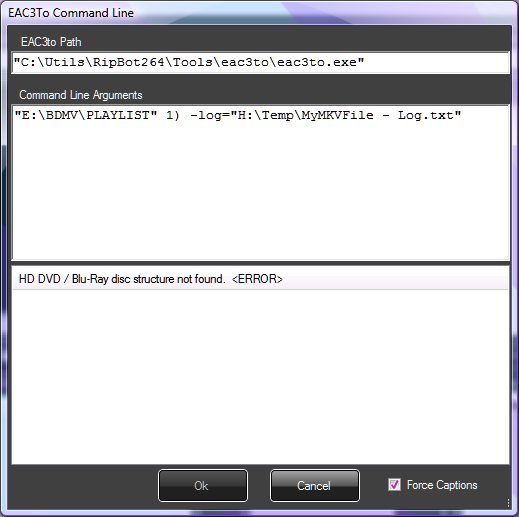
When I hit the Command Line button it gives me no such list of tracks. I get the same error dialog again. It says it was not able to detect the audio track for default language, please select in manually. It's circular.
|
|
| Back to top |
|
 |
jasonwc
Joined: 20 Jun 2010
Posts: 25
|
| Posted: Sat Jul 17, 2010 1:37 am Post subject: |
|
|
| MikeEby wrote: | | MilesAhead wrote: | I don't see any means to just search this thread, and general search did not pick it up so.. the problem I am running into as I have with several other video tools, is that when you select a "default language" it assumes you are watching a film native to your country. IOW if I put English I'm probably watching an English language movie and I want forced subtitles in English. Trouble is, I watch mostly foreign films therefore I want the audio in one language, which varies, and the subs in English. When I try to run the program, it tells me it cannot detect the audio in the default language(because there is no English track) and to set it manually.
I have no clue how to do so and no guides I'm using take this into account. Let's say I have a movie with Swedish audio and I want full English subs. How do I proceed? |
Check the audio track of the native language of the movie. Here is an example of what you do on a movie that does not have an English audio track, this was Letters From Iwo Jimo. Leave the force caption checked, the movie will include full English Subs. Make sure you select only one audio track if you include more then one, it won't work.

If your having problems with "The Girl with the Dragon Tatoo", a great swedish film BTW. This movie has a very odd playlist. The first two small files in the playlist have no audio track, Eac3to can't handle playlists such as this. What I did was manually demux the main movie file then manually create the subs with bdsup2sub and finally merge it all together with mkv merge. I'm considering ways of handling this in the GUI but haven't had the time to implement them yet.
Mike |
Mike,
Was this an issue with the US BD of "The Girl with the Dragon Tattoo"? I remuxed the French BD and had no issues. It had a playlist representing the entire film. It also has much better video quality than the US release.
|
|
| Back to top |
|
|
jasonwc
Joined: 20 Jun 2010
Posts: 25
|
| Posted: Sat Jul 17, 2010 1:39 am Post subject: |
|
|
| MilesAhead wrote: | | When I hit the Command Line button it gives me no such list of tracks. I get the same error dialog again. It says it was not able to detect the audio track for default language, please select in manually. It's circular. |
What film are you trying to remux?
|
|
| Back to top |
|
|
MikeEby

Joined: 24 Jun 2007
Posts: 5237
Location: Osceola, Indiana
|
| Posted: Sat Jul 17, 2010 1:41 am Post subject: |
|
|
| jasonwc wrote: |
Was this an issue with the US BD of "The Girl with the Dragon Tattoo"? I remuxed the French BD and had no issues. It had a playlist representing the entire film. It also has much better video quality than the US release. |
Yes, it is the US version, and the video quality wasn't very good. Does the French version have English Subtitles?
Mike
_________________
Doing HD since the last century!
Last edited by MikeEby on Sat Jul 17, 2010 1:42 am; edited 1 time in total
|
|
| Back to top |
|
|
MilesAhead
Joined: 17 Jul 2010
Posts: 8
|
| Posted: Sat Jul 17, 2010 1:42 am Post subject: |
|
|
Here's a screen shot of what I get.
| Description: |
|
| Filesize: |
31.16 KB |
| Viewed: |
10215 Time(s) |
|
|
|
| Back to top |
|
|
MikeEby
Joined: 24 Jun 2007
Posts: 5237
Location: Osceola, Indiana
|
| Posted: Sat Jul 17, 2010 1:44 am Post subject: |
|
|
That's wierd....Are you drilling down to the streams folder? I don't know why the playlist folder is selected.
Mike
_________________
Doing HD since the last century!
|
|
| Back to top |
|
|
MilesAhead
Joined: 17 Jul 2010
Posts: 8
|
| Posted: Sat Jul 17, 2010 1:45 am Post subject: |
|
|
|
btw I've already used BD Rebuilder on the disc structure backed up by MakeMKV. Somebody on the MakeMKV forum told me this was an interesting tool. So I'm just trying it out. I still think it falls into the trap of having one preferred language as I already mentioned. Handbrake wants to do the same thing. I need audio language different from subtitle language.
|
|
| Back to top |
|
|
jasonwc
Joined: 20 Jun 2010
Posts: 25
|
| Posted: Sat Jul 17, 2010 1:47 am Post subject: |
|
|
| MikeEby wrote: | | jasonwc wrote: |
Was this an issue with the US BD of "The Girl with the Dragon Tattoo"? I remuxed the French BD and had no issues. It had a playlist representing the entire film. It also has much better video quality than the US release. |
Yes, it is the US version, and the video quality wasn't very good. Does the French version have English Subtitles?
Mike |
It doesn't have English subs but someone manually synced subs from a prior release. The video quality is fantastic. Lots of very fine detail and grain. By far the best version available.
Here's the scan:
Disc Size: 44,193,198,859 bytes
Protection: AACS
BD-Java: No
BDInfo: 0.5.3
PLAYLIST REPORT:
Name: 00051.MPLS
Length: 2:32:43 (h:m:s)
Size: 40,387,037,184 bytes
Total Bitrate: 35.26 Mbps
VIDEO:
Codec Bitrate Description
----- ------- -----------
MPEG-4 AVC Video 28050 kbps 1080p / 24.000 fps / 16:9 / High Profile 4.1
AUDIO:
Codec Language Bitrate Description
----- -------- ------- -----------
DTS-HD Master Audio French 1684 kbps 5.1 / 48 kHz / 1684 kbps / 16-bit (DTS Core: 5.1 / 48 kHz / 768 kbps / 16-bit)
DTS-HD Master Audio Swedish 1505 kbps 5.1 / 48 kHz / 1505 kbps / 16-bit (DTS Core: 5.1 / 48 kHz / 768 kbps / 16-bit)
DTS-HD Master Audio French 997 kbps 2.0 / 48 kHz / 997 kbps / 16-bit (DTS Core: 2.0 / 48 kHz / 768 kbps / 16-bit)
DTS-HD Master Audio Swedish 890 kbps 2.0 / 48 kHz / 890 kbps / 16-bit (DTS Core: 2.0 / 48 kHz / 768 kbps / 16-bit)
SUBTITLES:
Codec Language Bitrate Description
----- -------- ------- -----------
Presentation Graphics French 25.389 kbps
Presentation Graphics French 0.158 kbps
|
|
| Back to top |
|
|
MilesAhead
Joined: 17 Jul 2010
Posts: 8
|
| Posted: Sat Jul 17, 2010 1:47 am Post subject: |
|
|
| MikeEby wrote: | That's wierd....Are you drilling down to the streams folder? I don't know why the playlist folder is selected.
Mike |
I tried it both ways. They both give the exact same result as you see in the screen shot. I get the "can't select audio" error dialog again when I click Command Prompt... then it shows me this thing.
|
|
| Back to top |
|
|
jasonwc
Joined: 20 Jun 2010
Posts: 25
|
| Posted: Sat Jul 17, 2010 1:49 am Post subject: |
|
|
| MilesAhead wrote: | | btw I've already used BD Rebuilder on the disc structure backed up by MakeMKV. Somebody on the MakeMKV forum told me this was an interesting tool. So I'm just trying it out. I still think it falls into the trap of having one preferred language as I already mentioned. Handbrake wants to do the same thing. I need audio language different from subtitle language. |
It thinks there is no proper BD structure. When you selected a folder, you should choose the topmost folder - not a subfolder.
For example,
EVERLASTING_MOMENTS
Perhaps it's the disk. Some disks have issues with eac3to. What's the movie?
If it works you should see something like this -

|
|
| Back to top |
|
|
MikeEby
Joined: 24 Jun 2007
Posts: 5237
Location: Osceola, Indiana
|
| Posted: Sat Jul 17, 2010 1:56 am Post subject: |
|
|
| MilesAhead wrote: | | MikeEby wrote: | That's wierd....Are you drilling down to the streams folder? I don't know why the playlist folder is selected.
Mike |
I tried it both ways. They both give the exact same result as you see in the screen shot. I get the "can't select audio" error dialog again when I click Command Prompt... then it shows me this thing. |
Click on Tool>Eac3toInfo. Paste the results here.
Do you have the "Run as Admin" checked on the shortcut?
UAC friendly is high on my list of fixes. It might force me to bundle eac3to, bdsup2sub and MKVMerge with the install to fix it. From what I can tell any .exe launched outside the application folder will not pass UAC.
Mike
_________________
Doing HD since the last century!
Last edited by MikeEby on Sat Jul 17, 2010 1:57 am; edited 1 time in total
|
|
| Back to top |
|
|
MilesAhead
Joined: 17 Jul 2010
Posts: 8
|
| Posted: Sat Jul 17, 2010 1:56 am Post subject: |
|
|
|
It won't make any difference. I tried just going to the E: optical drive. It gives the playist entries, but when I hit Run All I get the can't select audio crap. I'm copying to HD now just out of curiosity. Are you using a 32 bit system by chance? I wonder if it's all just because I'm on 64 bit?
|
|
| Back to top |
|
|
jasonwc
Joined: 20 Jun 2010
Posts: 25
|
| Posted: Sat Jul 17, 2010 2:01 am Post subject: |
|
|
| MilesAhead wrote: | | It won't make any difference. I tried just going to the E: optical drive. It gives the playist entries, but when I hit Run All I get the can't select audio crap. I'm copying to HD now just out of curiosity. Are you using a 32 bit system by chance? I wonder if it's all just because I'm on 64 bit? |
Have you tried disabling UAC temporarily? Type "UAC" in the start menu, select "Change User Account Control Settings" and set to Never Notify. Then restart the program. Admin privileges might be the issue, and I think the 64 bit version of windows react more harshly than the 32 bit ones.
|
|
| Back to top |
|
|
MilesAhead
Joined: 17 Jul 2010
Posts: 8
|
| Posted: Sat Jul 17, 2010 2:05 am Post subject: |
|
|
|
This won't work no matter what I do. I have UAC totally disabled on all machines. It's just returning this decimated dialog to waste my time. It's a cul de sac afaic.
|
|
| Back to top |
|
|
MikeEby
Joined: 24 Jun 2007
Posts: 5237
Location: Osceola, Indiana
|
| Posted: Sat Jul 17, 2010 2:10 am Post subject: |
|
|
| MilesAhead wrote: | | This won't work no matter what I do. I have UAC totally disabled on all machines. It's just returning this decimated dialog to waste my time. It's a cul de sac afaic. |
Are you saying the Tools>Eac3to Info returns nothing? I noticed your using a ripbot version of eac3to. Try downloading the full eac3to and place it in "c:\eac3to" folder, then point the GUI there in the Tools>Options dialog.
Mike
_________________
Doing HD since the last century!
|
|
| Back to top |
|
|
jasonwc
Joined: 20 Jun 2010
Posts: 25
|
| Posted: Sat Jul 17, 2010 2:15 am Post subject: |
|
|
| MilesAhead wrote: | | This won't work no matter what I do. I have UAC totally disabled on all machines. It's just returning this decimated dialog to waste my time. It's a cul de sac afaic. |
Get the latest version of eac3to from http://madshi.net/eac3to.zip
There have been a number of fixes in recent eac3to builds; using an old build could be causing your problems.
Tools > Eac3to > Info should output something like the following -
eac3to (v3.22) is up to date
Nero Audio Decoder (Nero 7) works fine
ArcSoft DTS Decoder (1.1.0.7) works fine
Sonic Audio Decoder (3.22.0.0) doesn't seem to be installed
Haali Matroska Muxer (2010-05-19) is installed
There's a new version (2010-05-20) available
http://haali.net/mkv
Nero AAC Encoder could not be located
http://www.nero.com/eng/nero-aac-codec.html
Copy NeroAacEnc.exe to the eac3to or to the Windows folder.
Surcode DTS Encoder doesn't seem to be installed
http://www.surcode.com
MkvToolnix (4.1.1.0, release version) is up to date
|
|
| Back to top |
|
|
robinsj
Joined: 23 Jul 2010
Posts: 5
|
| Posted: Fri Jul 23, 2010 4:38 pm Post subject: |
|
|
Just found this software, must say, fine piece of work... Thank you...
Just a few questions...
I noticed a few posts back someone mentioned PGS subtitles being supported soon? As this already happened, and what exactly does that mean, also what does it mean in regards to forced subtitles?
Also, when you select the option Add non-forced captions for default language - Does this give you two tracks? One with just forced subtitles, and one with all subtitles?
Thanks again for a great piece of software...
|
|
| Back to top |
|
|
MikeEby
Joined: 24 Jun 2007
Posts: 5237
Location: Osceola, Indiana
|
| Posted: Fri Jul 23, 2010 5:14 pm Post subject: |
|
|
| robinsj wrote: | I noticed a few posts back someone mentioned PGS subtitles being supported soon? As this already happened, and what exactly does that mean, also what does it mean in regards to forced subtitles?
|
This has been an issue that I'm hung up on, currently I don't have a method to extract only the forced PGS Subtitles to separate PGS subtitle track. If anyone knows a tool with a command line interface that can do this I can move ahead.
| robinsj wrote: | Also, when you select the option Add non-forced captions for default language - Does this give you two tracks? One with just forced subtitles, and one with all subtitles?
|
The current release should create a separate .IDX track that contains forced subtitle if they exist along with the not forced in different track. Keep in mind also there also might be a subtitle track that contains "Noises".
Mike
_________________
Doing HD since the last century!
|
|
| Back to top |
|
|
robinsj
Joined: 23 Jul 2010
Posts: 5
|
| Posted: Fri Jul 23, 2010 7:59 pm Post subject: |
|
|
I just did some tests with makemkv, and it actually keeps the forced subs in PGS format. I tried it out with 2012 and had it keep the subtitles and the forced subs, and when it was done, I had two pgs subtitle tracks inside the mkv file, which then i used eac3to to demux them and check them out, and sure enough the 2nd subtitle track was just the forced subs.
Hopefully that helps, because I have no idea how that software does it, but I much prefer yours to makemkv...
|
|
| Back to top |
|
|
MikeEby
Joined: 24 Jun 2007
Posts: 5237
Location: Osceola, Indiana
|
| Posted: Sat Jul 24, 2010 1:26 am Post subject: |
|
|
| robinsj wrote: | I just did some tests with makemkv, and it actually keeps the forced subs in PGS format. I tried it out with 2012 and had it keep the subtitles and the forced subs, and when it was done, I had two pgs subtitle tracks inside the mkv file, which then i used eac3to to demux them and check them out, and sure enough the 2nd subtitle track was just the forced subs.
Hopefully that helps, because I have no idea how that software does it, but I much prefer yours to makemkv... |
Ok...found out how to export to PGS. It was in the bdsup2sub help.
Mike
_________________
Doing HD since the last century!
|
|
| Back to top |
|
|
|
|




