|
As this forum is rarely used anymore, we've locked it. Feel free to browse and read. Questions? Please reach out to us directly. Cheers! |

|
 |
|
|
| Author |
Message |
Wolf-Strong
Joined: 25 May 2009
Posts: 77
|
| Posted: Sat Jun 27, 2009 5:51 pm Post subject: |
|
|
Well I have an update! I will go through my setup steps which may be helpful to someone out there.
Still no speakers as of yet so I am using the computer speakers for now. I did however set up the projector starting from square one with setting all the electronic settings to the center, and getting as close to possible with the manual adjustments. Once I did that, I then tightened it up and went into adjusting the alignment and convergence settings. I also found it was easiest to do the manual adjustments with someone standing next to the screen while I tinkered with the adjustments. I did this by turning the lenses left or right while saying 'left' and 'right' while the person next to the screen would tell me which way to go. This made things very easy and got it very close.
Now something I learned is that alignment is used to align the picture as a whole, while convergence is for aligning the Red and Blue to the Green. Now when I did this, I got right up next to the screen myself. First making sure with just using the green that the alignment from side to side and top to bottom was as center as possible. From there I then using convergence shut off the blue completely and only focused on the red aligning to the green, and then blue to green. From there, I then went ahead and put them all on, and then tried to fine to them (using convergence) to make the test patterns turn all white.
I have to admit, now that I became familiar with how the alignment and convergence are used, I was done doing all the adjustments in under a couple hours, and it turned out GREAT! It is completely watchable with an amazing picture quality. I could think of a few things it could use like a gray scale and color balance with Eye-One, a good upscaler to smooth out that poor dvd quality lol. That was one thing I wasn't expecting though is to see loss and compression on a DVD! Honestly to know that this projector can project so clearly that THAT shows just blew me away! My brother and I seriously can not get over just how poor of quality DVDs actually are when viewed on something that is able to produce good quality; the CGI in Iron Man looked cheesy and fake compared to theaters! Blueray is definatly on my list now! Believe it or not the integraded/onboard graphics and sound on this computer didn't lag at all either.
Unfortunately I didn't get any pictures last night of Iron Man, though I will be watching a movie tonight and I will take a picture with that. Here is a setup of still unsorted and messy, but functional! (Cell phone pics)


|
|
| Back to top |
|
 |
akajester

Joined: 09 Jul 2008
Posts: 934
Location: Wisconsin
|
| Posted: Sat Jun 27, 2009 6:15 pm Post subject: |
|
|
| Kiev Savoie wrote: | This HTPC discussion is pretty interesting stuff. Jester just what kind of tweaking can you do with an HTPC? Is there anything you specifically can't do with an HTPC? Can you do a blend or other fancy stuff like that?
When i got my first Projector i was using an old AMD K6-2 desktop with an ATI all-in-wonder 32 meg video card running 1024x768. Even with that old stuff it ran pretty well except for an occasional hickup. |
You can pretty much do anything with an htpc! My first setup was years ago, and it was all doing SD stuff, like dvd's. Now, with HD video and more choices of formats, it's more difficult and processor intensive.
I built my latest htpc from newegg parts. gigabyte mobo, amd quad core processor and 4gb of ram, total was $200! then I just added the components I already had, like ati 4350, dvd burner, etc. I'm not interested in playing bd's or hd-dvd's right now. It's very difficult to get both formats to play well on the same htpc. You have to use all sorts of older versions of powerdvd, and the pdvd install doesn't play well with other players. So, getting Media Portal to run with pdvd installed is near impossible.
If you don't need dxva, then you can use ffdshow yet and tweak the heck out of the picture. I myself use MPC-HC to handle all the video decoding with dxva running, therefore no post-processing. with my last htpc I was running this same setup and had 9% cpu load playing 1080p video on a pentium4 3ghz!  I'm still doing dxva with my new htpc and I'm down to 5% cpu with 1080p playback. turning off dxva puts my cpu at about 50%, still works fine. I'm still doing dxva with my new htpc and I'm down to 5% cpu with 1080p playback. turning off dxva puts my cpu at about 50%, still works fine.
I'm still working on gamma correction, but I have some other picture issues to work through before I do that.
-akajester
|
|
| Back to top |
|
|
akajester
Joined: 09 Jul 2008
Posts: 934
Location: Wisconsin
|
| Posted: Sat Jun 27, 2009 6:22 pm Post subject: |
|
|
Wolf-Strong, if you play dvd's off your computer, and you use ffdshow, you can do all sorts of cool things, like edge smoothing, etc. The options are incredible. years ago we setup a 480p NEC projector and were able to get it looking pretty amazing with SD source material.
here's a little tutorial that shows some basics with ffdshow and media player classic home cinema (MPC-HC).
http://www.stormfront.org/forum/showthread.php?t=448354
-akajester
|
|
| Back to top |
|
|
Kiev Savoie

Joined: 25 Oct 2007
Posts: 432
|
| Posted: Sat Jun 27, 2009 7:05 pm Post subject: |
|
|
So would it be fair to say that the HTPC Route is cheaper than a video chain full of scalers, switchers, source devices, etc. but more time intensive to get up and running correctly?
OH and great work Wolf-Strong! You seem like a natural for this hobby!
|
|
| Back to top |
|
|
garyfritz

Joined: 08 Apr 2006
Posts: 12088
Location: Fort Collins, CO
|
| Posted: Sat Jun 27, 2009 7:09 pm Post subject: |
|
|
|
Not necessarily. You really don't need all the scalers/etc that you used to need. E.g. you could just buy a PS3. In addition to a great gaming console, you'd also have an excellent Blu-Ray and SD DVD player that does a fine job with 720p, 1080i, and 1080p. No, it doesn't have as many bells & whistles and features as a top-end scaler, but it costs a whole lot less too.
|
|
| Back to top |
|
|
Kiev Savoie
Joined: 25 Oct 2007
Posts: 432
|
| Posted: Sat Jun 27, 2009 8:14 pm Post subject: |
|
|
|
Yeah, the PS3 is the route i am trying to go, but then i am going to want a gamma boost device, an HD tuner, and an Hdfury2 and I still would not be able to do custom resolutions for active area scanning or be able to install dual outputs for a blend or stack someday and I don't think the PS3 will stream Netflix either. Don't get me wrong it's a great game machine and Blueray player and I want one regardless. But the idea of having a central upgradeable machine with only one cable going out to RGBHV on the projector with no buttons and switches and turnpots in odd places is starting to sound more and more appealing. It seems like you basically can save a lot of cash in trade for your time and effort. It's hard for me to say if that would be a worthwhile trade, but it seems promising...
|
|
| Back to top |
|
|
akajester
Joined: 09 Jul 2008
Posts: 934
Location: Wisconsin
|
| Posted: Sat Jun 27, 2009 9:07 pm Post subject: |
|
|
Those are alot of the same reasons I went with an htpc Kiev. I put in a hauppauge 2250 card, it has two dual tuners in it. It works really well with OTA HDTV and all the processing is handled onboard. I can watch and record ota hdtv at the same time, with under 10% cpu utilization.
I've listed all the pros/cons of upgrading to hdmi, it's just not worth it right now. When bluray players are $50, and the bd's are $15 for new releases, and the hdfuryX is $49, then I'll upgrade. Until then, I'm sticking with vga from the htpc to the pj, it's simple and cheap.
To be honest, I've always felt that most of your "adjusting" should happen at the projector, not on the source device. So, I haven't made any adjustments or post processing on the htpc... yet.
|
|
| Back to top |
|
|
akajester
Joined: 09 Jul 2008
Posts: 934
Location: Wisconsin
|
| Posted: Sat Jun 27, 2009 9:10 pm Post subject: |
|
|
|
regarding time, I can setup an htpc now in under 2 hours, from installing windows to the end of installing Media Portal and configuring it all with the right codecs, etc. Not sure if it rivals seperate expensive components, but it sure is more affordable.
|
|
| Back to top |
|
|
Kiev Savoie
Joined: 25 Oct 2007
Posts: 432
|
| Posted: Sat Jun 27, 2009 11:32 pm Post subject: |
|
|
[quote="akajester"]I've listed all the pros/cons of upgrading to hdmi, it's just not worth it right now. When bluray players are $50, and the bd's are $15 for new releases, and the hdfuryX is $49, then I'll upgrade. Until then, I'm sticking with vga from the htpc to the pj[/quote]
Did you list those pros and cons in this thread, Jester? What i'm thinking is that you can start out with VGA output and upgrade later when the money comes available for an HDMI out videocard and an HDMI in Moome card for the projector. I don't know if it would really make any difference in picture quality, but it certainly is possible. I know HDMI is supposed to be so much better because it is a "pure digital pathway" straight to the PJ, But those 5 channels in an RGBHV cable have worked great for 30 years. So long as you have a good output device and cable how much difference are we really talking about?
|
|
| Back to top |
|
|
akajester
Joined: 09 Jul 2008
Posts: 934
Location: Wisconsin
|
| Posted: Sun Jun 28, 2009 11:54 am Post subject: |
|
|
|
Sorry, didn't list the pros/cons here, did it when I was setting things up initially. the ati 4350 I have has hdmi out. I'd need to add a hdfury2, then a hdmi switcher (receiver doesn't do hdmi) or a new receiver, cables, etc. The next step would be BD, so add in the drive or standalone player and buying the BD's. I believe the improvement to the picture quality would be minimal. Now if I had a 9" set? maybe the difference would be more noticeable? Right now I'm running 720p or 1080i on my BG808, both look fantastic.
|
|
| Back to top |
|
|
Kiev Savoie
Joined: 25 Oct 2007
Posts: 432
|
| Posted: Sun Jun 28, 2009 2:30 pm Post subject: |
|
|
that's what i was thinking. A Bluray drive in the PC with RGBHV out would probably look pretty good and be the absolute cheapest option.
Sorry for hijacking your thread wolf-strong 
|
|
| Back to top |
|
|
Wolf-Strong
Joined: 25 May 2009
Posts: 77
|
| Posted: Mon Jun 29, 2009 4:12 pm Post subject: |
|
|
Lol it's ok Kiev; any insight is welcome
So last night we watched the new Friday the 13th and though it was pretty entertaining. The speaker system is a little ghetto rigged with about 4 different types of speakers being used out of the 5 speakers hooked up, but given my limitation on volume it was pretty cool! Here is a quick Cell phone snap of Wall-E while we watched the ending of it.

|
|
| Back to top |
|
|
AnalogRocks
Forum Moderator

Joined: 08 Mar 2006
Posts: 26706
Location: Toronto, Ontario, Canada
TV/Projector: Sony 1252Q, AMPRO 4000G
|
| Posted: Mon Jun 29, 2009 5:11 pm Post subject: |
|
|
Gehto systems are some of the most fun! Tell me it mattered once the lights went down and the film started playing.
_________________
Tech support for nothing
CRT.
HD done right!
|
|
| Back to top |
|
|
Wolf-Strong
Joined: 25 May 2009
Posts: 77
|
| Posted: Mon Jun 29, 2009 6:21 pm Post subject: |
|
|
| AnalogRocks wrote: | | Gehto systems are some of the most fun! Tell me it mattered once the lights went down and the film started playing. |
Didn't matter in the least bit! Everyone was blown away, especially with the addition of some rear speakers with the receiver (it adds a bit of background echo which is SUPER cool when watching a horror movie! Subtle enough to enjoy Wall-E too!). The speakers I am running right now are basically two speakers from this type of boom box for the front right and left channels:
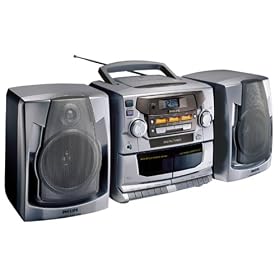
A random speaker from a cheap Coby surround sound that I found for the center channel:

And for the rear, a 6x9 car speaker for the left rear, and 4" car speaker for the right rear that were from my old Maxima's stock Bose system that I no longer have with all 5 wired to the Yamaha receiver I got on craigslist for $40 earlier....now THAT is ghetto rigged! 
Next objective though is to find a 5.1 system that will be a little less messy in the room so it can at least look somewhat clean lol....
|
|
| Back to top |
|
|
Kiev Savoie
Joined: 25 Oct 2007
Posts: 432
|
|
| Back to top |
|
|
RobertMfromLI

Joined: 29 Jun 2009
Posts: 114
Location: West Islip, NY
|
| Posted: Mon Jun 29, 2009 8:07 pm Post subject: |
|
|
| Wolf-Strong wrote: |
Ya I am sold on the CRT technology though. When I eventually move out to a place of my own, I will out getting a 9" CRT and do it all right. I am just glad I have had a chance to be sold on CRTs. Plus, the beast is such an awesome conversation starter   |
That they are...
"Why do you have such a massive projector? You know, they make really small new ones that are even better!"
"Really?" (flips switch and loads DVD or other good quality video to display on massive screen)
"Ummm... wow! OK... I understand now..."
Of course, the 13' screen and 13/11 speaker audio system did help create "the experience" - and pointing out, that at that size, there were no big blocks on the screen for the pixels and the text was still clear and readable.

Last edited by RobertMfromLI on Mon Jun 29, 2009 8:13 pm; edited 1 time in total
|
|
| Back to top |
|
|
RobertMfromLI
Joined: 29 Jun 2009
Posts: 114
Location: West Islip, NY
|
| Posted: Mon Jun 29, 2009 8:12 pm Post subject: |
|
|
| Wolf-Strong wrote: | | Next objective though is to find a 5.1 system that will be a little less messy in the room so it can at least look somewhat clean lol.... |
I got a decent JVC relatively cheap a while back. Has TOS-Link connections, and 5.1 speaker outs (dedicated sub out to amplified sub(s)). My room back then was pretty massive (20'x25') so what I did was use some ancient 6 way Altec-Lansing speakers for the front, a pair of 4 way Yamaha's for the back surround, a Yahama center channel, and then 4 more Yamaha's for mid-surround through a speaker "multiplexer" - with two custom built subs running off two amps. Briefly hooked up two more front speakers off the receiver's B channel, but went back down to the original 11 shortly after.
A bit overkill for most setups - but was nice in a room that size as it simulated the "full surround" of many movie theaters.
|
|
| Back to top |
|
|
Wolf-Strong
Joined: 25 May 2009
Posts: 77
|
| Posted: Tue Jun 30, 2009 3:49 am Post subject: |
|
|
Well good news!!! $60 got me a complete 5.1 surround sound with receiver and it sounds awesome! The speakers are nice and small too so your hardly know they are there.
-$20 projector
-$60 receiver/speakers/sub
-$50 stuff to mount screen and projector
-$40 wiring
-$100 computer
All built off craigslist!!!
Thanks everyone for your help!
|
|
| Back to top |
|
|
RobertMfromLI
Joined: 29 Jun 2009
Posts: 114
Location: West Islip, NY
|
| Posted: Tue Jun 30, 2009 3:51 am Post subject: |
|
|
|
Congrats! Dont forget pics of teh final setup!!!
|
|
| Back to top |
|
|
Wolf-Strong
Joined: 25 May 2009
Posts: 77
|
| Posted: Tue Jun 30, 2009 5:15 am Post subject: |
|
|
|
Ill take some pics and post em tomorrow
|
|
| Back to top |
|
|
|
|
|
|
|
You cannot post new topics in this forum
You cannot reply to topics in this forum
You cannot edit your posts in this forum
You cannot delete your posts in this forum
You cannot vote in polls in this forum
You cannot attach files in this forum
You can download files in this forum
|
Forum powered by phpBB © phpBB Group
|
|




 I'm sure It doesn't give the best sound but the way i look at it, if it was high end ten years ago it can't be TOO bad today. As soon as you get it set up pop in a DVD with the THX logo intro and crank it up. It's was an awesome feeling for me the first time i did that on my own system!
