| Author |
Message |
TbX
Joined: 06 May 2006
Posts: 94
Location: Sweden
|
| Posted: Thu May 06, 2010 8:28 pm Post subject: |
|
|
|
Hi BG1209s 4k chassis with LUGs and HFQ900 on a 2.8 meters wide homemade screen
|
|
| Back to top |
|
 |
studio
Joined: 24 Mar 2006
Posts: 191
|
| Posted: Fri May 07, 2010 12:53 pm Post subject: |
|
|
I have access to this very card. I'm going to try it this weekend.
Thanks
Studio
|
|
| Back to top |
|
|
studio
Joined: 24 Mar 2006
Posts: 191
|
| Posted: Fri May 07, 2010 12:54 pm Post subject: |
|
|
|
Anyone care to post images from it? I posted a few earlier in the week.
|
|
| Back to top |
|
|
studio
Joined: 24 Mar 2006
Posts: 191
|
| Posted: Sat May 08, 2010 9:05 pm Post subject: |
|
|
New to Pstrip. Can't seem to get the numbers to match the sample.
Thanks
Studio
|
|
| Back to top |
|
|
dvh99

Joined: 25 Dec 2009
Posts: 2158
Location: nederland
|
| Posted: Sat May 08, 2010 9:13 pm Post subject: |
|
|
doesnt have to be exact just play around a bit, make sure you set the backporch (horizontal) high enough to prevent ringing on the left side of the image.
dennis
_________________
1 answer always poses multiple questions.
marquee 9500ultra HD10L moome hdmi1.3 v3+ some mods.
|
|
| Back to top |
|
|
studio
Joined: 24 Mar 2006
Posts: 191
|
| Posted: Sat May 08, 2010 9:31 pm Post subject: |
|
|
|
Can you have a primary monitor and the pj as a secondary?
|
|
| Back to top |
|
|
dvh99
Joined: 25 Dec 2009
Posts: 2158
Location: nederland
|
| Posted: Sat May 08, 2010 10:44 pm Post subject: |
|
|
yes that is what i have, both are setup via powerstrip.
the monitor can be set to 1280*960 and the pj needs to be setup with all the porch settings.
use the a or 1 on the graphics card for the monitor and the 2nd dvi out for the pj.
btw have you looked at the newsgroups yet.
_________________
1 answer always poses multiple questions.
marquee 9500ultra HD10L moome hdmi1.3 v3+ some mods.
|
|
| Back to top |
|
|
studio
Joined: 24 Mar 2006
Posts: 191
|
| Posted: Sun May 09, 2010 12:01 am Post subject: |
|
|
|
I can't seem to get it to go that high. Do I have to turn something on or off?
|
|
| Back to top |
|
|
dvh99
Joined: 25 Dec 2009
Posts: 2158
Location: nederland
|
| Posted: Sun May 09, 2010 12:43 am Post subject: |
|
|
what do you mean cannot get it that high?
you have to set powerstrip to custom timing not on windows default or discrete timings.
this will allow powerstrip to handle the resolution.
the custom timing has to be locked so that windows doesnt take over.
this is done by the lock icon on the right where you can choose for custom timings.
dennis
_________________
1 answer always poses multiple questions.
marquee 9500ultra HD10L moome hdmi1.3 v3+ some mods.
|
|
| Back to top |
|
|
studio
Joined: 24 Mar 2006
Posts: 191
|
| Posted: Sun May 09, 2010 1:28 am Post subject: |
|
|
|
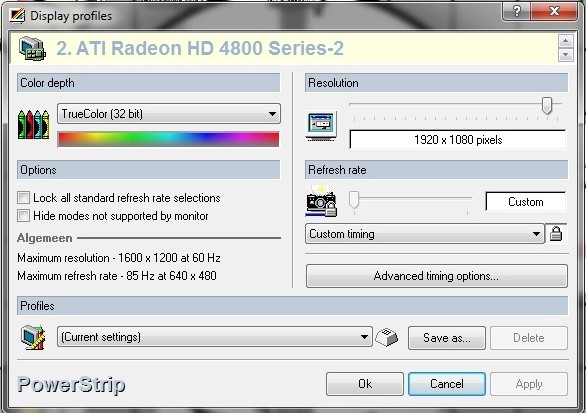
On this page you described on the left it states 1600x1200 max resolution. On the right at the top if I slide the slider it will only go to 1440 x 1050. It has 1920x1080 but when I slide it there and hit apply it changes back to the lower setting.
|
|
| Back to top |
|
|
studio
Joined: 24 Mar 2006
Posts: 191
|
| Posted: Sun May 09, 2010 1:40 am Post subject: |
|
|
|
I have the CCC program of ATI installed it seems like this is fighting the pwstrip.
|
|
| Back to top |
|
|
dvh99
Joined: 25 Dec 2009
Posts: 2158
Location: nederland
|
| Posted: Sun May 09, 2010 1:51 am Post subject: |
|
|
i have that too but powerstrip overrides it.
you see the same with me 1600*1200
when you click on advanced timing options you will be allowed to set the desired resoltion and porch settings.
hope this helps.
dennis
| Description: |
|
| Filesize: |
69.58 KB |
| Viewed: |
5442 Time(s) |
|
|
|
| Back to top |
|
|
studio
Joined: 24 Mar 2006
Posts: 191
|
| Posted: Sun May 09, 2010 2:17 am Post subject: |
|
|
|
Picture is not showing.
|
|
| Back to top |
|
|
dvh99
Joined: 25 Dec 2009
Posts: 2158
Location: nederland
|
| Posted: Sun May 09, 2010 2:30 am Post subject: |
|
|
and the previous picture i posted in this thread if that is not showing than your ie is blocking it.
_________________
1 answer always poses multiple questions.
marquee 9500ultra HD10L moome hdmi1.3 v3+ some mods.
|
|
| Back to top |
|
|
AnalogRocks
Forum Moderator

Joined: 08 Mar 2006
Posts: 26706
Location: Toronto, Ontario, Canada
TV/Projector: Sony 1252Q, AMPRO 4000G
|
| Posted: Sun May 09, 2010 2:31 am Post subject: |
|
|
How about now? Can you see the picture?
_________________
Tech support for nothing
CRT.
HD done right!
|
|
| Back to top |
|
|
studio
Joined: 24 Mar 2006
Posts: 191
|
| Posted: Sun May 09, 2010 2:39 am Post subject: |
|
|
|
I switched to my other computer. The other computer I was using I restarted it today with win7.
|
|
| Back to top |
|
|
studio
Joined: 24 Mar 2006
Posts: 191
|
| Posted: Sun May 09, 2010 2:41 am Post subject: |
|
|
|
In the advanced timing page can you set all of the numbers with out interaction? If I change one number it changes others.
|
|
| Back to top |
|
|
dvh99
Joined: 25 Dec 2009
Posts: 2158
Location: nederland
|
| Posted: Sun May 09, 2010 2:46 am Post subject: |
|
|
yes that is correct it interacts. just hook it up to the pj and change porch settings after you are finished set the vertical refresh rate to 71.976 or something (just 1 click below 72 hz).
_________________
1 answer always poses multiple questions.
marquee 9500ultra HD10L moome hdmi1.3 v3+ some mods.
|
|
| Back to top |
|
|
studio
Joined: 24 Mar 2006
Posts: 191
|
| Posted: Sun May 09, 2010 2:59 am Post subject: |
|
|
|
Thanks will try tomorrow.
|
|
| Back to top |
|
|
dvh99
Joined: 25 Dec 2009
Posts: 2158
Location: nederland
|
| Posted: Thu May 13, 2010 1:16 pm Post subject: |
|
|
studio is powerstrip working fine yet?
_________________
1 answer always poses multiple questions.
marquee 9500ultra HD10L moome hdmi1.3 v3+ some mods.
|
|
| Back to top |
|
|
|
|




