|
As this forum is rarely used anymore, we've locked it. Feel free to browse and read. Questions? Please reach out to us directly. Cheers! |

|
 |
|
|
| Author |
Message |
AnalogRocks
Forum Moderator

Joined: 08 Mar 2006
Posts: 26706
Location: Toronto, Ontario, Canada
TV/Projector: Sony 1252Q, AMPRO 4000G
|
| Posted: Fri Apr 10, 2009 2:05 am Post subject: Dwin 700 oddness with HDFury2 and Moome EXT-FULLHD boxes |
|
|
Hi Dwin guys. I have a gent with a Dwin 700 that has used the HDFury1 and Moome EXT-HD with success but can not set a proper picture with the HDFury2 or Moome EXT-FULLHD box.
Here's a snippet from his email:
| Jorge wrote: |
"HelloI just got the HDFury2 Advanced Kit (Pay Pal transaction ID:xxxxxxxxxxxxxx),
I connected the hdfury2 alone and I got not picture , next I add the Gamax and I got picture , the problem that I have is with the black level , the picture is so dark that my display (Dwin 700) can´t handle that brigtness , I mean that even going all the way up (100), I cant match any black level pattern .
This not happen with the Moome EXT-HD unit that I am using at this moment and never happen with the hdfury1 that I also own . I like to know what black level are you using in the hd fury2 , 0 or 7.5 ire?. Because the Dwin 700 uses 7.5 ire for the black level , if you use 0 ire for the black level in the hdfury2 all that I get is a huge black crush , this is the only reason that I may think that is causing the black level problem.
because as I told you before I´m using wright now the same equipment (Dwin700 with Panasonic bd35 set at black level light and rgb standard) with the Moome ext-hd and the hdfury1 without problems.In this way I can´t use the hd fury2 so please tell what to do , may we fix the hdfury2? or I need return the unit and ask for a refund?I hope that you may found a solution for this problem , I would like to keep the unit (I own two hdfury1)I appreciate and NEED a soon answer.Thank you
Regards
Jorge
ISF certified
|
And the one about the EXT FULL HD:
| Jorge wrote: |
"HelloI just got the Moome EXT-FullHD (Pay Pal Transaction ID: xxxxxxxxxxxxxxx).
I connected the ext-fullhd alone and I got not picture , next I add the Gamax and I got picture , the problem that I have is with the black level , the picture is so dark that my display (Dwin 700) can´t handle that brigtness , I mean that even going all the way up (100), I cant match any black level pattern . This not happen with the Moome EXT-HD (no FULLHD) unit that I am using at this moment and never happen with the hdfury1 that I also own .
I like to know what black level are you using in the hd fury2 , 0 or 7.5 ire?.Because the Dwin 700 uses 7.5 ire for the black level , if you use 0 ire for the black level in the EXT-FULLHD all that I get is a huge black crush , this is the only reason that I may think that is causing the black level problem ,
because as I told you before I´m using wright now the same equipment (Dwin700 with Panasonic bd35 set at black level light and rgb standard) with the Moome ext-hd and the hdfury1 without problems.In this way I can´t use the EXT-FULLHD , so please tell what to do , may we fix the EXT-FULLHD? or I need return the unit and ask for a refund?I hope that you may found a solution for this problem , I would like to keep the unit (I oneEXT-HD , no FULLHD)I appreciate and NEED a soon answer.
Thank you
Regards
Jorge
ISF certified"
|
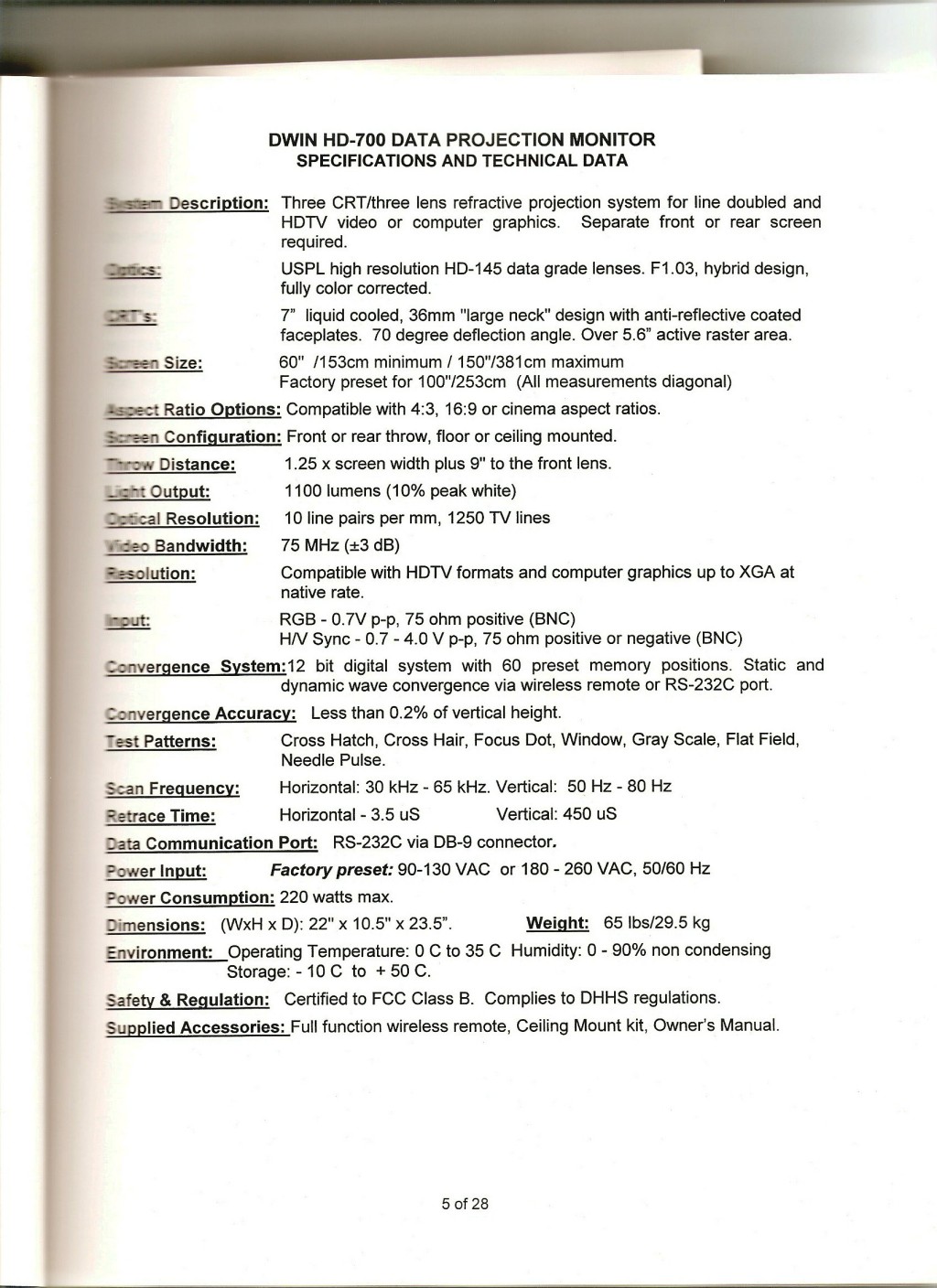
Jorge tells me he is a former Dwin dealer from way back. Also in his Dwin manual is says his Dwin 700 can accept a POSITIVE sync signal ( see pic below of the page in the manual ) while a normal Dwin 700 can only accept negative sync.
I'm at a loss on this one. Both converters not producing a usable signal at the same time.
Any ideas guys?
| Description: |
|
| Filesize: |
277.71 KB |
| Viewed: |
4201 Time(s) |
|
_________________
Tech support for nothing
CRT.
HD done right!
Last edited by AnalogRocks on Sat Apr 11, 2009 9:02 pm; edited 1 time in total
|
|
| Back to top |
|
 |
kal
Forum Administrator

Joined: 06 Mar 2006
Posts: 18114
Location: Ottawa, Canada
TV/Projector: JVC DLA-NZ7
|
| Posted: Fri Apr 10, 2009 2:54 am Post subject: |
|
|
Any help anyone can provide is appreciated!
Jeremy and I have been back and forth a few times on this one and we don't have a logical explanation to explain why the HDfury1/EXT-HD work well but the HDfury2/EXT-FULLHD do not. To make it more confusing, the HDfury2/EXT-FULLHD work well in terms of black levels for everyone else we talk to (including ourselves) so we're a bit confused. Hence the reason the thread was started for this user.
Kal
www.curtpalme.com Home Theater
_________________

Support our site by using our affiliate links. We thank you!
My basement/HT/bar/brewery build 2.0
|
|
| Back to top |
|
|
AnalogRocks
Forum Moderator
Joined: 08 Mar 2006
Posts: 26706
Location: Toronto, Ontario, Canada
TV/Projector: Sony 1252Q, AMPRO 4000G
|
| Posted: Sat Apr 11, 2009 9:02 pm Post subject: |
|
|
Bump.
_________________
Tech support for nothing
CRT.
HD done right!
|
|
| Back to top |
|
|
Gannon

Joined: 08 Dec 2006
Posts: 164
Location: Detroit or the Interstates
|
| Posted: Wed Apr 15, 2009 7:24 am Post subject: |
|
|
Using my Sencore/Quantum Data 802b generator, I've had trouble especially with 720p synching on all 700s...I know forcing it to reverse sync always works...I would trust reality over Edward's documentation every time. Love the guy, but dare I say things could be lost in translation. I can almost hear him now, 'eh, positive or negative, as long as one works, meh'; just before taking a drag on his ever-present filter-free cigarette. He could never suffer the time I spent tweaking his invention, and never wanted to see mine fully tweaked in the studio.
I remember also having to occasionally use the digital sync option instead of analog on the generator, but need to check it that button doesn't also toggle from tri-level to bi-level sync also...I cannot remember at three twenty in the morn. That might explain the black level issues better than a mere 7.5 percent voltage difference not gaining in the entire range of the control.
At least I hope...
_________________
gadfly and rogue philosopher
|
|
| Back to top |
|
|
AnalogRocks
Forum Moderator
Joined: 08 Mar 2006
Posts: 26706
Location: Toronto, Ontario, Canada
TV/Projector: Sony 1252Q, AMPRO 4000G
|
| Posted: Wed Apr 15, 2009 1:23 pm Post subject: |
|
|
| Gannon wrote: | Using my Sencore/Quantum Data 802b generator, I've had trouble especially with 720p synching on all 700s...I know forcing it to reverse sync always works...I would trust reality over Edward's documentation every time. Love the guy, but dare I say things could be lost in translation. I can almost hear him now, 'eh, positive or negative, as long as one works, meh'; just before taking a drag on his ever-present filter-free cigarette. He could never suffer the time I spent tweaking his invention, and never wanted to see mine fully tweaked in the studio.
I remember also having to occasionally use the digital sync option instead of analog on the generator, but need to check it that button doesn't also toggle from tri-level to bi-level sync also...I cannot remember at three twenty in the morn. That might explain the black level issues better than a mere 7.5 percent voltage difference not gaining in the entire range of the control.
At least I hope... |
Thanks Gannon!
Sounds like you have intimate knowledge of the Dwin. So what setting needs to be adjusted in the Dwin's menu exactly?
_________________
Tech support for nothing
CRT.
HD done right!
|
|
| Back to top |
|
|
Gannon
Joined: 08 Dec 2006
Posts: 164
Location: Detroit or the Interstates
|
| Posted: Thu Apr 16, 2009 12:57 am Post subject: |
|
|
Nothing within the Dwin I can find to fix the synch issues...rather 'fix' or alter the source itself, and if it cannot be switched in the unit (even with a firmware toggle) I don't see any reason why the synch leads cannot simply be reversed-wired. I would setup a test jig to quickly switch it, wouldn't be too hard to do...doesn't have to be pretty unless you plan on leaving it IN the circuit, then we're into another discussion.
_________________
gadfly and rogue philosopher
|
|
| Back to top |
|
|
|
|
|
|
|
You cannot post new topics in this forum
You cannot reply to topics in this forum
You cannot edit your posts in this forum
You cannot delete your posts in this forum
You cannot vote in polls in this forum
You cannot attach files in this forum
You can download files in this forum
|
Forum powered by phpBB © phpBB Group
|
|




