| Author |
Message |
the_avguy
Joined: 16 Mar 2007
Posts: 91
Location: Edmonton, Alberta
|
| Posted: Fri Apr 10, 2009 4:26 pm Post subject: |
|
|
| DocNyr wrote: | | Curt Palme wrote: | | Do make sure that both H and V syncs are in auto mode. You should be able to see the menu flash up in sync. Also make sure the RGB card isn't a passthrough, in which case the second set of RGB 'inputs' are actually outputs to go to another card.. and need 75 ohm termination resistors on them. If the card says 'input 1 and 2', then the termination resistors are already there. |
Hi Curt,
Thanks for your reply. I am getting very frustrated with this machine. In any case, no menu flashes up to indicate sync function. Nothing (no words or anything legible) appears on the tubes when I turn it on. I have no clue how to make the H and V sync go to auto mode. There is nothing displaying - no words or anything. I press * and it does not even tell me the software version like the manual says it should.
My input card says input 1 and 2. So, I know I have a good input card. As I said earlier, when I hook it up to my computer and ask the computer to identify the displays/monitor, I can see a discernible change in the image rolling across the tube, even though it looks like horizontal lines rolling up the tubes.
Any clues what is happening here? Thanks |
I think to you just push the h-sysnc button twice fairly quickly to switch sync modes.
Do the same for V-sync if that fails.
The manual for the 4100 is around somewhere I think.
_________________
working ECP 4100.
marquee still in pieces, just gathering knowledge.
optoma ep729
|
|
| Back to top |
|
 |
DocNyr
Joined: 05 Apr 2009
Posts: 29
|
| Posted: Fri Apr 10, 2009 5:42 pm Post subject: |
|
|
|
Thanks for responding Curt. However, my wired remote does not have a H-sync or V-sync button. There is only a single F-sync.
|
|
| Back to top |
|
|
DocNyr
Joined: 05 Apr 2009
Posts: 29
|
| Posted: Fri Apr 10, 2009 8:13 pm Post subject: |
|
|
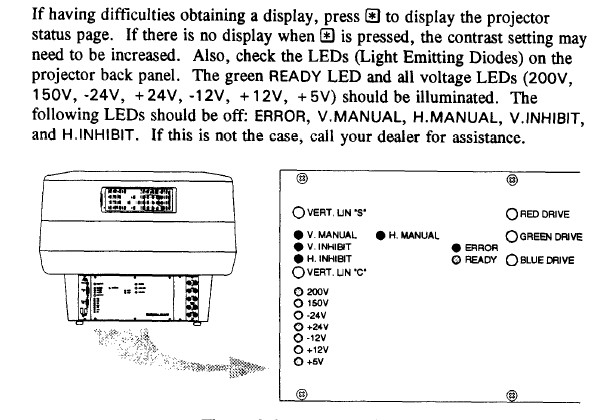
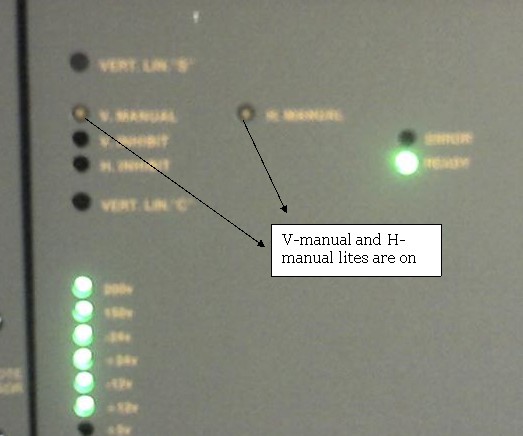
Curt, please help.. the v-manual and h-manual lites are on at the back of the projector. The manual says to contact the company.... but this is a unit from 1994 (15 years ago). I am attaching two photographs of the problem. What can explain this? I cannot seem to get it out of manual sync if that is indeed the problem. I am also wondering if it is the dallas chip that could be causing this problem.
Thanks for your help.
| Description: |
|
| Filesize: |
76.73 KB |
| Viewed: |
5134 Time(s) |
|
| Description: |
|
| Filesize: |
34.2 KB |
| Viewed: |
5134 Time(s) |
|
|
|
| Back to top |
|
|
stefuel

Joined: 07 Mar 2006
Posts: 3353
Location: Green Harbor MA USA
|
| Posted: Fri Apr 10, 2009 9:39 pm Post subject: |
|
|
I have not played with a ECP in a very long time. I gave the last one I had along with the manuals to my brother. I'm not sure but someone else may remember, I think they will sync on green. If so, take a composite video cable and plug it into the yellow video out jack of a DVD player. Get a RCA to BNC adapter from Radio Shack and connect the DVD player to the green on the projector and try it. Once the projector is sync'd to something, you'll be able to read the menus.
Where are you located? Perhaps someone close could help.
Before you go completely nutzo, try connecting a PC monitor to the output of the laptop to confirm that a signal is being sent.
_________________
Chip
A Barco is only a AmPro with training wheels
Card carrying member of the AVS chain gang.
|
|
| Back to top |
|
|
scir16v
Joined: 02 Jan 2009
Posts: 113
Location: St. Louis
|
| Posted: Fri Apr 10, 2009 10:42 pm Post subject: |
|
|
Those lights need to be off in order to be in the auto mode.
The buttons you need to press are the h-hold and v-hold on the remote.
|
|
| Back to top |
|
|
DocNyr
Joined: 05 Apr 2009
Posts: 29
|
| Posted: Sat Apr 11, 2009 7:26 pm Post subject: |
|
|
| scir16v wrote: | Those lights need to be off in order to be in the auto mode.
The buttons you need to press are the h-hold and v-hold on the remote. |
Yes, I tried pressing the H-Hold and V-Hold once
and also twice, and even three times but no luck.
Do you think that changing the Dallas chip in this projector may help?
|
|
| Back to top |
|
|
stefuel
Joined: 07 Mar 2006
Posts: 3353
Location: Green Harbor MA USA
|
| Posted: Sun Apr 12, 2009 12:05 am Post subject: |
|
|
You also have no +5V LED on. I don't have a manual in front of me so I can't help you with it.
_________________
Chip
A Barco is only a AmPro with training wheels
Card carrying member of the AVS chain gang.
|
|
| Back to top |
|
|
WarLord
Joined: 08 Feb 2007
Posts: 14
Location: Toronto, Ontario, Canada
|
| Posted: Mon Apr 13, 2009 6:34 am Post subject: |
|
|
+5 volt led should be ON. Synchronization circuitry besides the other things in these projectors depends on +5v line. Just take a voltmeter and check if +5v present, if it’s not then a low voltage power supply probably bad and needs repair or replacement.
Michael
|
|
| Back to top |
|
|
DocNyr
Joined: 05 Apr 2009
Posts: 29
|
| Posted: Mon Apr 13, 2009 2:18 pm Post subject: |
|
|
|
Thanks for your posts Tim and Warlord. So, I need to check why the 5V LED is not on. I will take the voltmeter and check out the LVPS and the LED itself. If that checks out, what else do you suggest that might cause the 5V LED to be off? Thanks for your expertise on this.
|
|
| Back to top |
|
|
Curt Palme
CRT Tech
Joined: 08 Mar 2006
Posts: 24396
Location: Langley, BC
TV/Projector: All of them!
|
| Posted: Mon Apr 13, 2009 2:27 pm Post subject: |
|
|
|
Check to see if the LED has been pushed back first, or whether the LED is bad. You should have about 1.7 volts across the diode. If you have nothing across the diode, something died in the 5 volt supply. It's most likely cheaper to replace the power supply than to troubleshoot it, as there are no schematics for the power supply, and it's a bit complex. I've got good used ones for cheap.
|
|
| Back to top |
|
|
DocNyr
Joined: 05 Apr 2009
Posts: 29
|
| Posted: Mon Apr 13, 2009 2:34 pm Post subject: |
|
|
|
Curt, Thanks. I will check out the LED and the LVPS, and if the LVPS is bad, I will definitely hit you up for one of those. Many thanks once again for your help. I am out in washington DC this week and will not be back in Pennsylvania until Friday of this week! So, it will have to wait to the weekend.
|
|
| Back to top |
|
|
DocNyr
Joined: 05 Apr 2009
Posts: 29
|
| Posted: Mon May 04, 2009 4:25 pm Post subject: |
|
|
| Curt Palme wrote: | | Check to see if the LED has been pushed back first, or whether the LED is bad. You should have about 1.7 volts across the diode. If you have nothing across the diode, something died in the 5 volt supply. It's most likely cheaper to replace the power supply than to troubleshoot it, as there are no schematics for the power supply, and it's a bit complex. I've got good used ones for cheap. |
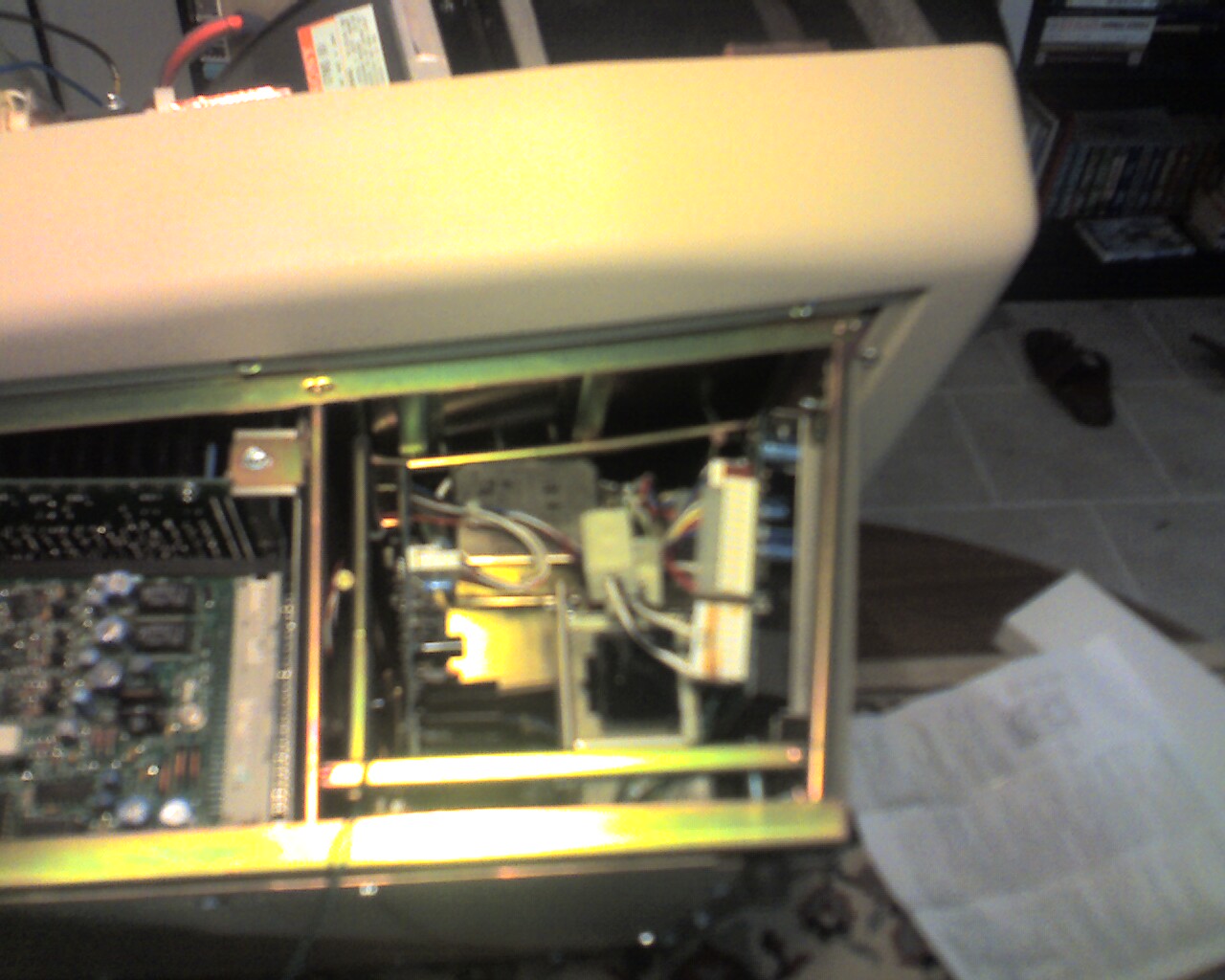
OK.. got back in town last nite... trying to troubleshoot the problem. How do I check the voltage across the led?
Also, how do I access the LVPS? I am attaching a photo of the side of the projector. Where is the LVPS?
Thanks for your help in advance.
| Description: |
|
| Filesize: |
210.3 KB |
| Viewed: |
3869 Time(s) |
|
|
|
| Back to top |
|
|
DocNyr
Joined: 05 Apr 2009
Posts: 29
|
| Posted: Tue May 05, 2009 1:40 am Post subject: |
|
|
|
BUMP BUMP...
|
|
| Back to top |
|
|
DocNyr
Joined: 05 Apr 2009
Posts: 29
|
| Posted: Tue May 05, 2009 12:43 pm Post subject: DESPERATE!!!! |
|
|
The ecp4100 I'm having trouble with was never installed in the building (university) where I teach. The projector was kept in storage since 1995 and it has never been used. I brought it home last year, switched it on and it worked fine. Then I forgot about it since I was travelling a lot and had no time to play with it. In any case, I have been having all this trouble with the machine since I tried to get it set up recently. If you have been following this thread from the beginning, I was having sync issues, and then when I posted pics, someone with a sharp eye noticed the 5V LED at the back of the projector did not lite up. In any case, I received some advice from Curt, and based on that advice, I measurfed the voltage across the LED and it is very very low - not the 1.7V that Curt said it should have. At this point, I don't know what to do. Do I need to replace the whole LVPS? Or is there a possibility that some cable has worked loose? What should I do?
Thanks for any help.... I am desperate.
|
|
| Back to top |
|
|
DocNyr
Joined: 05 Apr 2009
Posts: 29
|
| Posted: Tue May 05, 2009 12:45 pm Post subject: |
|
|
| WarLord wrote: | +5 volt led should be ON. Synchronization circuitry besides the other things in these projectors depends on +5v line. Just take a voltmeter and check if +5v present, if it’s not then a low voltage power supply probably bad and needs repair or replacement.
Michael |
Michael, Which terminals do I check with the voltmeter to see where the 5V line is on? Do you have a pic? Thanks
|
|
| Back to top |
|
|
|
|




