| Author |
Message |
drewman21
Joined: 07 Jun 2008
Posts: 24
Location: Fargo ND
|
| Posted: Thu Apr 02, 2009 8:11 pm Post subject: sony 1252q throw distance and height help |
|
|
Kinda new to the CRT projector scene so I need some help making head way in planning for my basement install. Not looking to get this into the construction thread but just need help to get measurements so i can get over to the home theater thread.
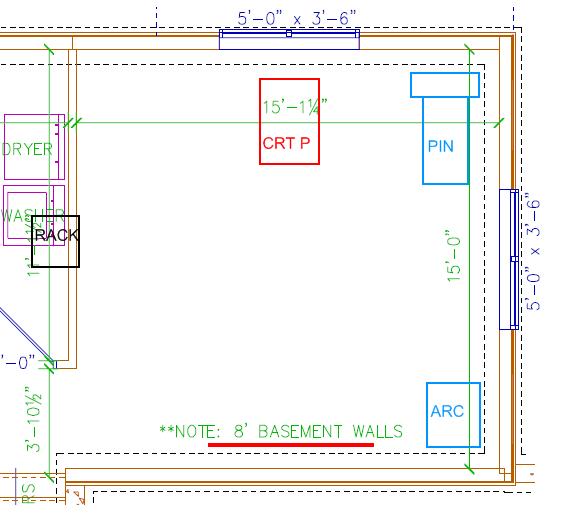
Ok so I have a Sony 1252q on my hands that does work so i need to find what would be the best throw distance to screen size that I can work in the space that i have. Here is a shot of the building diagram of our basement with some rough details put in.
The basement is half type basement that goes 4 feet town and creates a ledge that is noted by the black dotted line. I am planning on building a soffit to add rope lighting and hide a electric screen that will drop down in front of the ledge that is formed by the wall. The ceiling is 8 feet high and i plan to drop the soffit 10 inches from and 1 foot around from the wall. So the height of the screen will be no more than 7'2" and the distance from the front of the Sony to the screen would be some where around 11 to 12 feet give or take my rough measurements.
Ok all that being all said, any ideas on how big of a screen can I safely order to fill the screen with the throw of the projector and how high do I need to build the table/lift/ shelf off the ground to set the projector on to hit the top of the screen? Any ideas?
Thanks for any help you can give.
| Description: |
|
| Filesize: |
41.35 KB |
| Viewed: |
3558 Time(s) |
|
|
|
| Back to top |
|
 |
ecrabb
Forum Moderator

Joined: 13 Mar 2006
Posts: 15909
Location: Utah
TV/Projector: JVC RS40, Epson 5010
|
| Posted: Thu Apr 02, 2009 10:02 pm Post subject: |
|
|
The screen size and throw are a fixed relationship, so in essence, the projector can really only go one place for a give screen size (or there is really on one screen size for a given throw).
Since you really shouldn't go over about 8' wide with a 12xx, and throw is approximately 1.2x screen widths, that means your max throw can only be around 10' or so. If you go to 11 or 12 feet as you mentioned, then you'll end up with a screen size of around 9-10 feet wide, which is going to give you a picture on the dim side, and you'll have to crank contrast to compensate, which will decrease sharpness.
The easiest thing to do is to use the "cart" method: Setup the projector with a source and maximize the raster, put the projector on cart or furniture dolly, and move it around until you find the right spot.
If you have a Windows computer, you can use PJCalc to find the right spot... However the software is conservative with the throw and in reality you'll be able to move the projector 5-10% closer than recommended. It will help give you your offset, too (throw angle).
http://www.curtpalme.com/Sony125x_Downloads.shtm
I just looked - I think that version of PJcalc might be too new. If it is, let me know and I'll scrounge up the older version.
SC
|
|
| Back to top |
|
|
drewman21
Joined: 07 Jun 2008
Posts: 24
Location: Fargo ND
|
| Posted: Fri Apr 03, 2009 1:19 pm Post subject: |
|
|
Hey thanks for the reply!
The software doesn't list the 1252q in the CRT projector list. If you do have a older copy that would be great. How do i get the projector on the ground in the model? The software is a bit clunky but i'll keep banging on it till i get it or need to ask again. Thanks!
|
|
| Back to top |
|
|
jkruger

Joined: 24 Oct 2007
Posts: 2435
Location: Carlsbad, CA
|
| Posted: Fri Apr 03, 2009 2:27 pm Post subject: |
|
|
|
Like ecrabb said, if you maximize the raster you will end up with a different throw distance. Use the cart method if you can, you will get a better picture if your tubes are in good shape. If you have some noticeable wear, you may want to stay within the wear pattern. Do you have pictures of the tube faces?
|
|
| Back to top |
|
|
ecrabb
Forum Moderator
Joined: 13 Mar 2006
Posts: 15909
Location: Utah
TV/Projector: JVC RS40, Epson 5010
|
| Posted: Fri Apr 03, 2009 3:50 pm Post subject: |
|
|
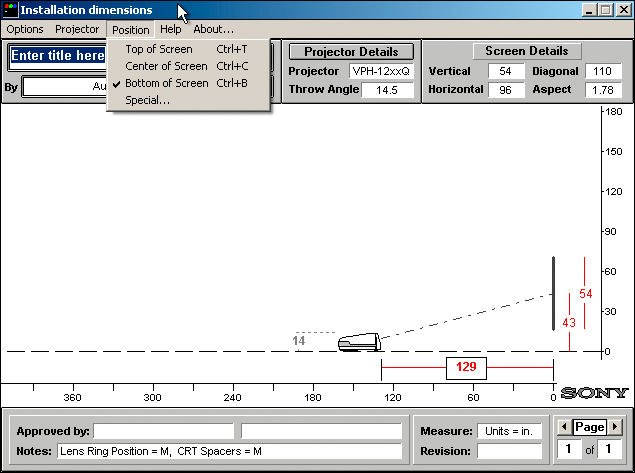
| drewman21 wrote: | | How do i get the projector on the ground in the model? The software is a bit clunky but i'll keep banging on it till i get it or need to ask again. Thanks! |
Select "Bottom of Screen" from the "Position" menu.
Yes, the software is definitely clunky - it's over 15 years old, now!
I'm attaching PJcalc 1.8. It has the 12xx models in it, so you can go to town.
SC
| Description: |
|
| Filesize: |
35.09 KB |
| Viewed: |
3504 Time(s) |
|
| Description: |
| PJ Calc 1.8 - includes 12xx projectors |
|

Download |
| Filename: |
pjcalc_18.zip |
| Filesize: |
448.8 KB |
| Downloaded: |
281 Time(s) |
|
|
| Back to top |
|
|
kal
Forum Administrator

Joined: 06 Mar 2006
Posts: 18114
Location: Ottawa, Canada
TV/Projector: JVC DLA-NZ7
|
|
| Back to top |
|
|
drewman21
Joined: 07 Jun 2008
Posts: 24
Location: Fargo ND
|
| Posted: Fri Apr 03, 2009 4:34 pm Post subject: |
|
|
Wow! Thanks guys for all the help so far. I haven't had time to take off the lenses yet to see what the burn in is like on the tubes. I do know where the projector came from as it was used on our campus at a remote building. It didn't get much use so I'm hoping that I can get some decent use out of it. Well at least the $5 I paid for it at the campus auction. I just need to get it up and running so i can find a screen for it that will fit and then i can start on my basement to get it installed.
Is there any crazy problems or common part failures that i need to watch out for with this model? Any mods that can be done to it to improve it at all such as noise, power or controls?
Thanks again for the help. Next stop picture of the tubes!
|
|
| Back to top |
|
|
jkruger
Joined: 24 Oct 2007
Posts: 2435
Location: Carlsbad, CA
|
| Posted: Fri Apr 03, 2009 4:44 pm Post subject: |
|
|
|
There are fan mods to make it quieter, raster and spring mods to get the most out of the phosphor and more. Just do a search for what you are interested in.
|
|
| Back to top |
|
|
|
|




