| Author |
Message |
boingo
Joined: 01 Mar 2009
Posts: 60
|
| Posted: Sun Jun 13, 2010 1:58 pm Post subject: |
|
|
Case
Yep..will pop down to Jaycar tomorrow
Cheers
|
|
| Back to top |
|
 |
macgyver655
Joined: 22 Aug 2007
Posts: 8508
|
| Posted: Sun Jun 13, 2010 2:08 pm Post subject: |
|
|
Huh, just found this thread. You guys should let me know when your having these problems. I dont check every thread here.
You didn't get those IFB12A manual images from me, did you? LOL Mine look much clearer.
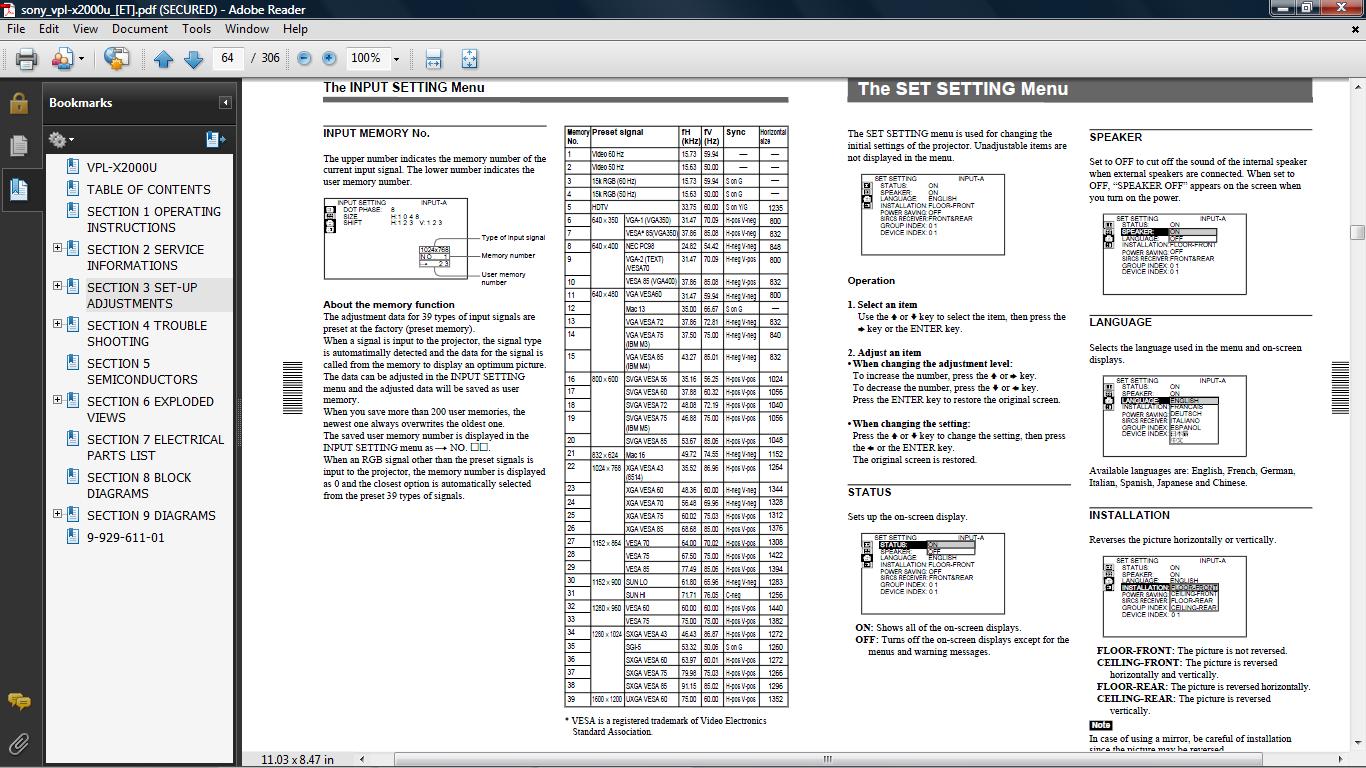
Anyways, I grabbed the service manual (this is an X2000, right) and it does appear to take a 480P signal. When you select your input B or C, are you then selecting component or YPbPr? you need YPbPr for a HD signal.
|
|
| Back to top |
|
|
boingo
Joined: 01 Mar 2009
Posts: 60
|
| Posted: Sun Jun 13, 2010 2:32 pm Post subject: |
|
|
Hi macgyver655
 you could be right...will fire it up tomorrow night (much past everyones bedtime at the moment.) you could be right...will fire it up tomorrow night (much past everyones bedtime at the moment.)
As usual I have 6 projects running at once...well least thats my excuse if its just in the wrong card 
I did have trouble getting a picture from the beginning as you can see from the start of this thread...however anything is possible.
It is indeed the X2000 and indeed does have IF12A.
I will still buy the VGA to RGBVH cable be nice to have more options...and compare...and if it still dont work
Cheers
Will post back tomorrow.
| macgyver655 wrote: | Huh, just found this thread. You guys should let me know when your having these problems. I dont check every thread here.
You didn't get those IFB12A manual images from me, did you? LOL Mine look much clearer.
Anyways, I grabbed the service manual (this is an X2000, right) and it does appear to take a 480P signal. When you select your input B or C, are you then selecting component or YPbPr? you need YPbPr for a HD signal. |
|
|
| Back to top |
|
|
CIR Engineering

Joined: 25 Aug 2008
Posts: 4269
Location: Chicago USA & Berlin Germany
|
| Posted: Sun Jun 13, 2010 2:48 pm Post subject: |
|
|
I was going to say that I think your best option will be a PC or (HTPC) with a decent video card that will scale everything to the native resolution of your projector. Scaling has come a long long long long.... way in the last ten years. Almost any PC will scale better than what is integrated inside the projector. So any time you can send the projector native resolution to it you will get a cleaner picture.
It's a shame you have to use analog for the input though. You would get the best image without a D/A/D conversion, but that was the state of the technology in 2000. Is there any direct digital video input on the projector at all? SDI maybe?
craigr
_________________
JETI 1501-HiRes 2nm Spectroradiometer
JETI 1211 Spectroradiometer
Photo Research PR-650 Spectroradiometer
Klein K10-A Colorimeter
Murideo Fresco SIX-G HDMI 2.x Multimedia Generator
Murideo Fresco SIX-A HDMI 2.x Analyzer
Light Illusion ColourSpace XPT Color Calibration Software
Light Illusion LightSpace XPT Pro Version 10.x Color Calibration Software
OMARDRIS JVC Software Patch to use K10-A and Jeti with JVC OEM AutoCal Software!
Sencore CR7000 CRT Tube Analyzer / Rejuvenater
Authorized Dealer for Lumagen & just about everything worth buying 
www.CIR-Engineering.com - craigr@cir-engineering.com
Phone: 865-405-6892
|
|
| Back to top |
|
|
boingo
Joined: 01 Mar 2009
Posts: 60
|
| Posted: Sun Jun 13, 2010 3:28 pm Post subject: |
|
|
Craigr
No Other inputs unfortunately...
Just tried once more...but 'no show' using YPbPr input option..on both Imputs A & B 
Would watching a DVD thru PC/Laptop VGA --> RGBHV Projector..(at native res ) look noticiably better than DVD Component/interlaced do you think ?
IM going to get a VGA --> RGBHV cable tomorrow and try it anyway...pity I had to do this..as it means I gotta start from scratch with sound.
I guess there is no Add on card for the G70/G90's that would give some kind of Digital input ?
Either that or Im back to that scaler from ebay...at least I could still then use my existing Sound Setup and DVD Player.
|
|
| Back to top |
|
|
macgyver655
Joined: 22 Aug 2007
Posts: 8508
|
| Posted: Sun Jun 13, 2010 4:17 pm Post subject: |
|
|
have you checked these settings?
How to enable progressive scan component on an IFB12 optional input card:
On the dip switches located on the input plate turn on switch 2 and 3 and
leave all others off. Jumpers 3 and 4 are labeled Sync on one side and
Video on the other. The default is Sync but you want to move these to Video.
Jumper 5 is labeled HD on one side and GS on the other. HD is the default
and you want to move this to GS. Then just install the board and hook up
the cables according to the labels on the rear of the IFB12 (Y, Pr, Pb).
You don't need to adjust anything in the on screen menus. This will allow
your older Sony 125x/127x set to accept 1080i and 720p over component.
|
|
| Back to top |
|
|
CIR Engineering
Joined: 25 Aug 2008
Posts: 4269
Location: Chicago USA & Berlin Germany
|
| Posted: Mon Jun 14, 2010 12:25 am Post subject: |
|
|
| boingo wrote: | Craigr
No Other inputs unfortunately...
Just tried once more...but 'no show' using YPbPr input option..on both Imputs A & B
Would watching a DVD thru PC/Laptop VGA --> RGBHV Projector..(at native res ) look noticiably better than DVD Component/interlaced do you think ?
IM going to get a VGA --> RGBHV cable tomorrow and try it anyway...pity I had to do this..as it means I gotta start from scratch with sound.
I guess there is no Add on card for the G70/G90's that would give some kind of Digital input ?
Either that or Im back to that scaler from ebay...at least I could still then use my existing Sound Setup and DVD Player. |
There is an SD-SDI IFB for the Sony projectors. However, this won't get you anywhere better because the SDI card just decodes the SDI to analog RGBHV. So it would be a digital IFB, but the output from the IFB to the projector would still be converted to analog.
Those cards are RARE and hard to find anyway.
craigr
_________________
JETI 1501-HiRes 2nm Spectroradiometer
JETI 1211 Spectroradiometer
Photo Research PR-650 Spectroradiometer
Klein K10-A Colorimeter
Murideo Fresco SIX-G HDMI 2.x Multimedia Generator
Murideo Fresco SIX-A HDMI 2.x Analyzer
Light Illusion ColourSpace XPT Color Calibration Software
Light Illusion LightSpace XPT Pro Version 10.x Color Calibration Software
OMARDRIS JVC Software Patch to use K10-A and Jeti with JVC OEM AutoCal Software!
Sencore CR7000 CRT Tube Analyzer / Rejuvenater
Authorized Dealer for Lumagen & just about everything worth buying
www.CIR-Engineering.com - craigr@cir-engineering.com
Phone: 865-405-6892
|
|
| Back to top |
|
|
CasetheCorvetteman

Joined: 09 Nov 2008
Posts: 6326
Location: Australia
|
|
| Back to top |
|
|
boingo
Joined: 01 Mar 2009
Posts: 60
|
| Posted: Mon Jun 14, 2010 6:19 am Post subject: |
|
|
Thanks to all for the suggestions.
Got me a HD 15-->RGBHV cable from Jaycar (Im in Australia case)... (glad I didnt watch the cup match with Germany last night though arrghhh !)
Will have a play with the projector tonight..with some of the ideas and will see what results we end up getting.
So in about 3-4 hours should know whats possible with IF12 input card or not (thanks for the options to try macgyver) ..and will compare output results from a laptop at 1024 X 768 thru the new Cable.
Cheers
|
|
| Back to top |
|
|
CasetheCorvetteman
Joined: 09 Nov 2008
Posts: 6326
Location: Australia
|
| Posted: Mon Jun 14, 2010 10:48 am Post subject: |
|
|
When you said Jaycar mate i figured you must be in Australia, im in QLD, about 1 hour north of brissy.
Did your cable have "Low smoke, zero halogen" written on the packet too?
|
|
| Back to top |
|
|
boingo
Joined: 01 Mar 2009
Posts: 60
|
| Posted: Mon Jun 14, 2010 1:09 pm Post subject: |
|
|
Case
Yep same cable light/mid grey.
Ive just tested the cable and laptop ...looks OK..but noise lines on movement/fast scene transitions...Im thinking its probably the laptop..not the greatest graphics card.
Im now just about to test macgyvers IF12 config option...Ive set the jumpers and DIP switches..just giving the projector a quick rest and then will try again the DVD Player with Progressive Scan.
| CasetheCorvetteman wrote: | When you said Jaycar mate i figured you must be in Australia, im in QLD, about 1 hour north of brissy.
Did your cable have "Low smoke, zero halogen" written on the packet too? |
|
|
| Back to top |
|
|
boingo
Joined: 01 Mar 2009
Posts: 60
|
| Posted: Mon Jun 14, 2010 1:24 pm Post subject: |
|
|
I tried but no go...
Thanks for trying to help though...its appreciated
Looks like a scan converter or a good PC graphics card.
Cheers
| macgyver655 wrote: | have you checked these settings?
How to enable progressive scan component on an IFB12 optional input card:
On the dip switches located on the input plate turn on switch 2 and 3 and
leave all others off. Jumpers 3 and 4 are labeled Sync on one side and
Video on the other. The default is Sync but you want to move these to Video.
Jumper 5 is labeled HD on one side and GS on the other. HD is the default
and you want to move this to GS. Then just install the board and hook up
the cables according to the labels on the rear of the IFB12 (Y, Pr, Pb).
You don't need to adjust anything in the on screen menus. This will allow
your older Sony 125x/127x set to accept 1080i and 720p over component. |
|
|
| Back to top |
|
|
CIR Engineering
Joined: 25 Aug 2008
Posts: 4269
Location: Chicago USA & Berlin Germany
|
| Posted: Mon Jun 14, 2010 2:54 pm Post subject: |
|
|
| Quote: |
Ive just tested the cable and laptop ...looks OK..but noise lines on movement/fast scene transitions...Im thinking its probably the laptop..not the greatest graphics card. |
You may be disappointed to find that is a limitation of an ancient LCD projector... Even new ones have a little bit of this still. But hopefully not.
criagr
_________________
JETI 1501-HiRes 2nm Spectroradiometer
JETI 1211 Spectroradiometer
Photo Research PR-650 Spectroradiometer
Klein K10-A Colorimeter
Murideo Fresco SIX-G HDMI 2.x Multimedia Generator
Murideo Fresco SIX-A HDMI 2.x Analyzer
Light Illusion ColourSpace XPT Color Calibration Software
Light Illusion LightSpace XPT Pro Version 10.x Color Calibration Software
OMARDRIS JVC Software Patch to use K10-A and Jeti with JVC OEM AutoCal Software!
Sencore CR7000 CRT Tube Analyzer / Rejuvenater
Authorized Dealer for Lumagen & just about everything worth buying
www.CIR-Engineering.com - craigr@cir-engineering.com
Phone: 865-405-6892
|
|
| Back to top |
|
|
macgyver655
Joined: 22 Aug 2007
Posts: 8508
|
| Posted: Mon Jun 14, 2010 6:05 pm Post subject: |
|
|
Something is just not right. It should be able to easily lock onto a 480p signal. But if your not worried about it then I wont either, lol. 
| Description: |
|
| Filesize: |
218.52 KB |
| Viewed: |
4961 Time(s) |
|
|
|
| Back to top |
|
|
boingo
Joined: 01 Mar 2009
Posts: 60
|
| Posted: Mon Jun 14, 2010 10:53 pm Post subject: |
|
|
Macgyver
Im extremely worried is there anything else I could try ?
Which bit in the Sony manual (attachment) makes you believe it should work with PSCAN
Playing around ..with PSCAN set ..when you select S-Video on the projector you get two versions of the DVD being played sided by side on the screen but quite sharp (in black and white)
Also when RGB is selected you get a picture but its green.
Everytime you go from S-Video to YPrPb it seems to try and lock on for a sec then fails(check input message)
| macgyver655 wrote: | | Something is just not right. It should be able to easily lock onto a 480p signal. But if your not worried about it then I wont either, lol. |
|
|
| Back to top |
|
|
CIR Engineering
Joined: 25 Aug 2008
Posts: 4269
Location: Chicago USA & Berlin Germany
|
| Posted: Mon Jun 14, 2010 11:04 pm Post subject: |
|
|
| boingo wrote: |
Also when RGB is selected you get a picture but its green. |
That means you are feeding component to an RGB input. Perhaps RGB will work fine. Maybe it just isn't doing 480p with component?
craigr
_________________
JETI 1501-HiRes 2nm Spectroradiometer
JETI 1211 Spectroradiometer
Photo Research PR-650 Spectroradiometer
Klein K10-A Colorimeter
Murideo Fresco SIX-G HDMI 2.x Multimedia Generator
Murideo Fresco SIX-A HDMI 2.x Analyzer
Light Illusion ColourSpace XPT Color Calibration Software
Light Illusion LightSpace XPT Pro Version 10.x Color Calibration Software
OMARDRIS JVC Software Patch to use K10-A and Jeti with JVC OEM AutoCal Software!
Sencore CR7000 CRT Tube Analyzer / Rejuvenater
Authorized Dealer for Lumagen & just about everything worth buying
www.CIR-Engineering.com - craigr@cir-engineering.com
Phone: 865-405-6892
|
|
| Back to top |
|
|
macgyver655
Joined: 22 Aug 2007
Posts: 8508
|
| Posted: Mon Jun 14, 2010 11:06 pm Post subject: |
|
|
Its not something I would worry about. I just find it hard to believe the timings are causing it not to lock on. It should still lock but would be shifted. But this display is capable of 1600X1200. 640X480 should be nothing. I'm thinking its a setting either on the IFB card or the projector. To bad you couldn't test that IFB in another device to make sure its not that.
If I have some time later I'm going to check something here and if it provides me with something I'll post it here.
|
|
| Back to top |
|
|
boingo
Joined: 01 Mar 2009
Posts: 60
|
| Posted: Tue Jun 15, 2010 12:36 am Post subject: |
|
|
Thanks for your time macgyver
My Default settings (as came with the box) IFB 12 setting is DIP switch1 ON rest OFF
I get the feeling perhaps that the projector is overriding the settings from the IFB12...but thats just a hunch.
| macgyver655 wrote: | Its not something I would worry about. I just find it hard to believe the timings are causing it not to lock on. It should still lock but would be shifted. But this display is capable of 1600X1200. 640X480 should be nothing. I'm thinking its a setting either on the IFB card or the projector. To bad you couldn't test that IFB in another device to make sure its not that.
If I have some time later I'm going to check something here and if it provides me with something I'll post it here. |
|
|
| Back to top |
|
|
CIR Engineering
Joined: 25 Aug 2008
Posts: 4269
Location: Chicago USA & Berlin Germany
|
| Posted: Tue Jun 15, 2010 1:29 pm Post subject: |
|
|
If you think the IFB card is bad, I have a pile of them here and could send you one if you pay the shipping.
craigr
_________________
JETI 1501-HiRes 2nm Spectroradiometer
JETI 1211 Spectroradiometer
Photo Research PR-650 Spectroradiometer
Klein K10-A Colorimeter
Murideo Fresco SIX-G HDMI 2.x Multimedia Generator
Murideo Fresco SIX-A HDMI 2.x Analyzer
Light Illusion ColourSpace XPT Color Calibration Software
Light Illusion LightSpace XPT Pro Version 10.x Color Calibration Software
OMARDRIS JVC Software Patch to use K10-A and Jeti with JVC OEM AutoCal Software!
Sencore CR7000 CRT Tube Analyzer / Rejuvenater
Authorized Dealer for Lumagen & just about everything worth buying
www.CIR-Engineering.com - craigr@cir-engineering.com
Phone: 865-405-6892
|
|
| Back to top |
|
|
boingo
Joined: 01 Mar 2009
Posts: 60
|
| Posted: Wed Jun 16, 2010 11:51 am Post subject: |
|
|
Hi Craigr
Thankyou for that generous offer
Im going to do a bit more playing around...but Im thinking its not the card...but I cant be sure  lol lol
Id gladly pay the postage though..let me go back to another projector I have..same DOM(1999) a Sanyo PLC9000..another old heavywieght and see if it behaves the same way with the same DVD Player and Progessive Scan.
If it works with the Sanyo..then it could be the Sony IF12A input card.
Cheers
|
|
| Back to top |
|
|
|
|




